
1. Ọja Ipariview
The YUHANUS K03-P9-DSK is a comprehensive door access control system designed to enhance security and manage entry to your premises. This system integrates multiple access methods including password input, RFID card swiping, and remote control. It features an electric strike lock for secure door locking, an exit button for convenient indoor egress, and a doorbell chime for visitor notification.
Awọn ẹya pataki pẹlu:
- Awọn aṣayan Iwọle pupọ: Supports password, RFID card, and remote control for entry.
- Imudara Aabo: The 2200LBS Electric Strike Lock provides robust door security.
- Visitor Management: Integrated doorbell and remote unlock feature for convenient visitor access.
- Fifi sori Ọrẹ-olumulo: A ṣe apẹrẹ fun iṣeto ti o rọrun.
- Ojutu ti o ni iye owo: An efficient system for managing access and preventing unauthorized entry.
2. Package Awọn akoonu
Daju pe gbogbo awọn paati ti a ṣe akojọ rẹ si isalẹ wa ninu package rẹ:
- Bọtini foonu RFID
- Electric Kọlu Titii
- Iṣakoso Ipese Agbara
- Bọtini Jade
- Ilẹkun Chime
- Àwọn Ìṣàkóso Láàrin Gbùngbùn (ẹ̀yà méjì)
- RFID Cards/Key Fobs (5 units)
- Ohun èlò àti àwọn okùn ìfìsípò

Figure 2.1: Complete system kit components.
3. Awọn pato
| Ẹya ara ẹrọ | Sipesifikesonu |
|---|---|
| Brand | YUHANUS |
| Nọmba awoṣe | K03-P9-DSK |
| Orisun agbara | Corded Electric (AC110V-240V input, DC12V output) |
| Asopọmọra Technology | Ti firanṣẹ |
| Ọna Iṣakoso | Touch (Keypad), RFID, Remote Control |
| Iru Itaniji | Ohùn àti Ìṣípo |
| Awọn Iwọn Nkan (L x W x H) | 11.81 x 7.09 x 3.15 inches |
| Iwọn Nkan | 2.61 iwon |
| Awọn batiri | 1 CR2032 battery required (included for remote) |
| UPC | 769894490518 |
4. Alaye Aabo
Please read and understand all safety instructions before installation and operation. Failure to follow these instructions may result in electric shock, fire, or other hazards.
- Aabo Itanna: Ensure power is disconnected before performing any wiring or maintenance. All electrical connections should be made by a qualified professional if you are unsure.
- Ewu ewu Voltage: The power supply unit contains hazardous voltage. Do not open the power supply cover.
- Ayika fifi sori ẹrọ: Install the system in a dry, protected area, away from direct sunlight, rain, or extreme temperatures.
- Iṣakoso USB: Route all cables securely to prevent tripping hazards or damage.
5. Fifi sori ẹrọ ati Wiring
5.1. irinše Loriview

Figure 5.1: RFID Keypad

Figure 5.2: Power Supply Control

Figure 5.3: Electric Strike Lock

Figure 5.4: Push to Exit Button

Figure 5.5: Doorbell Chime

olusin 5.6: Latọna jijin Iṣakoso
5.2. Aworan aworan
Follow the wiring diagram carefully to connect all components of the access control system. Ensure all connections are secure and correctly matched to avoid damage or malfunction.
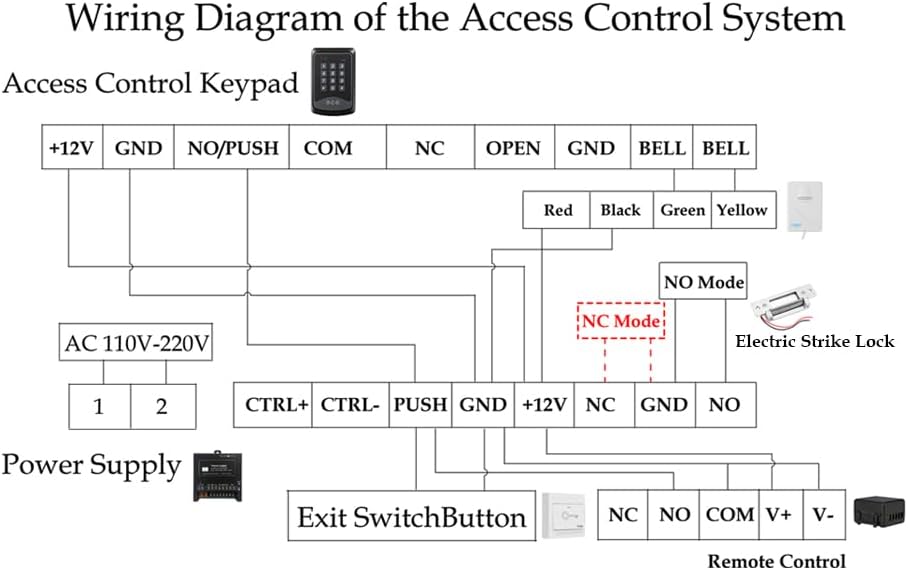
Figure 5.7: Wiring Diagram of the Access Control System
Awọn akọsilẹ Wiring:
- Sopọ awọn Bọtini Iṣakoso Wiwọle si awọn Ibi ti ina elekitiriki ti nwa using the +12V and GND terminals.
- Awọn Electric Kọlu Titii can be wired in either NO (Normally Open) or NC (Normally Closed) mode. Refer to section 5.3 for mode adjustment. Connect the lock to the appropriate NO/NC and GND terminals on the Power Supply.
- Awọn Exit Switch Button connects to the PUSH and GND terminals on the Power Supply.
- Awọn Ilẹkun Chime connects to the BELL terminals on the Keypad.
- Awọn Olugba Iṣakoso latọna jijin connects to the +12V, GND, NO, and COM terminals on the Power Supply.
- Ensure the AC 110V-220V input is correctly connected to the Power Supply.
5.3. Electric Strike Lock Mode Adjustment (NO/NC)
The electric strike lock supports two operating modes: NO (Normally Open) and NC (Normally Closed). The default mode is typically NO (Fail-Secure), meaning the door is closed when power is off. If you require NC (Fail-Safe) mode, where the door is open when power is off, you can adjust it as follows:

Figure 5.8: Electric Strike Lock NO/NC Mode Adjustment
- Igbesẹ 1: Unscrew Screw 2.
- Igbesẹ 2: Loosen Screw 1, then slide it to the other side.
- Igbesẹ 3: Tighten Screw 1 and Screw 2.
Mode Definitions:
- NO Mode (Normally Open / Fail-Secure): When power is off, the door remains locked. Power is required to unlock.
- NC Mode (Normally Closed / Fail-Safe): When power is off, the door is unlocked. Power is required to lock.
6. Awọn ilana Iṣiṣẹ
6.1. Ni ibẹrẹ Oṣo
The default Master Code for the RFID Keypad is 9999. It is highly recommended to change this code immediately after installation for security purposes.
6.2. Setting a New PIN
To set a new PIN for unlocking the door:
- Tẹ * 9999 # (where 9999 is the default Master Code or your current Master Code).
- Tẹ 5.
- Tẹ rẹ PIN titun (fun apẹẹrẹ, 123456).
- Tẹ #.
- Re-enter your PIN titun.
- Tẹ * lati jẹrisi.
6.3. Enrolling RFID Cards
To enroll new RFID cards for access:
- Tẹ * 9999 # (where 9999 is the Master Code).
- Tẹ 1.
- Swipe each RFID card you wish to enroll across the keypad's card reader. The keypad will beep to confirm enrollment.
- Tẹ * to exit enrollment mode.
6.4. Awọn ọna ṣiṣi silẹ
- Using PIN: Enter your programmed PIN on the keypad.
- Lilo Kaadi RFID: Swipe an enrolled RFID card across the keypad's card reader.
- Lilo Iṣakoso Latọna jijin: Tẹ bọtini ṣiṣi silẹ lori iṣakoso latọna jijin.
- Using Exit Button: Press the 'Push to Exit' button from inside the premises.
6.5. Locking Method
- Lilo Iṣakoso Latọna jijin: Press the lock button on the remote control.
6.6. Operational Demonstration Video
Video 6.1: This video demonstrates the various functions of the YUHANUS Door Access Control System, including how to unlock the door using the exit button, setting a new PIN, enrolling RFID cards, and using both RFID cards and the remote control for unlocking and locking. It also shows how to change the electric strike lock between NO (Normally Open) and NC (Normally Closed) modes and the operational difference between these modes.
7. Itọju
Regular maintenance ensures the longevity and optimal performance of your access control system.
- Ninu: Wipe the keypad and other components with a soft, dry cloth. Avoid abrasive cleaners or solvents.
- Rirọpo Batiri: The remote controls use CR2032 batteries. Replace them when the signal weakens or the remote stops responding.
- Ayẹwo USB: Periodically check all wiring for signs of wear, damage, or loose connections.
- Titiipa Mechanism: Ensure the electric strike lock mechanism is free of obstructions and operates smoothly.
8. Laasigbotitusita
If you encounter issues with your access control system, refer to the following common problems and solutions:
| Isoro | Ojutu |
|---|---|
| System is unresponsive / No power | Check the power supply connection and ensure it is plugged into a working outlet. Verify all wiring to the power supply is correct and secure. |
| Door does not unlock with PIN/Card | Ensure the PIN is entered correctly. For RFID cards, verify the card has been properly enrolled. Check the wiring between the keypad and the electric strike lock. |
| Isakoṣo latọna jijin ko ṣiṣẹ | Replace the CR2032 battery in the remote control. Ensure the remote control receiver is correctly wired and powered. |
| Electric strike lock makes a continuous buzzing noise | This can indicate an issue with the power supply or the lock itself. Ensure the power supply is providing stable 12V DC. Check the lock's wiring for any shorts or incorrect connections. If the buzzing persists, the lock or power supply may be faulty. |
| Door remains unlocked even when power is off | This indicates the electric strike lock is in NC (Fail-Safe) mode. If you require the door to be locked when power is off, adjust the lock to NO (Fail-Secure) mode as described in Section 5.3. |
9. Atilẹyin ọja ati Support
For warranty information or technical support, please refer to the contact details provided with your purchase or visit the YUHANUS official webojula. Tọju iwe-ẹri rira rẹ bi ẹri rira fun awọn iṣeduro atilẹyin ọja.