
1. Ifihan ati Loriview
The Epson PowerLite 97H is a versatile XGA conference room projector designed for clear and vibrant presentations. Utilizing 3LCD technology, it delivers bright, true-to-life images with excellent color brightness and a wide color gamut. This projector offers a native resolution of 1024x768 (XGA) and a brightness of 2,700 ANSI Lumens, making it suitable for various environments.
Awọn ẹya pataki pẹlu:
- Imọlẹ: 2,700 ANSI Lumens
- Ipinnu: 1024x768 (XGA)
- Ipin Ipin: 4:3
- Iyatọ: 10,000:1
- Imọ-ẹrọ Ifihan: 3LCD for vibrant colors
- Asopọmọra: Multiple options including HDMI, USB, LAN, VGA, S-Video, Composite, and Audio inputs/outputs.
2. Alaye Aabo
Please read all safety instructions before using the projector to ensure safe operation and to prevent damage to the unit. Keep this manual for future reference.
- Ikilọ Ooru: Pirojekito lamp and surrounding areas can become extremely hot during operation and immediately after shutdown. Avoid touching these areas.
- Afẹfẹ: Ensure adequate ventilation around the projector. Do not block ventilation openings, as this can lead to overheating and potential damage.
- Lamp Rọpo: Always turn off the projector and allow the lamp to cool completely before attempting to replace it. Refer to the lamp replacement instructions in the Maintenance section.
- Orisun Agbara: Use only the specified power supply and cable. Do not overload power outlets.
- Omi ati Ọrinrin: Do not expose the projector to rain, moisture, or excessive humidity. Do not place objects filled with liquids on or near the projector.
- Ninu: Yọ okùn agbára náà kúrò kí o tó fọ ọ́. Lo aṣọ rírọrùn tí ó gbẹ. Má ṣe lo ohun ìfọmọ́ omi tàbí aerosol.
3. Package Awọn akoonu
Daju pe gbogbo awọn nkan wa ninu apo rẹ:
- Epson PowerLite 97H Projector
- Isakoṣo latọna jijin
- Okun agbara
- Okun HDMI
4. Eto
4.1 Ibi ti ara
Place the projector on a stable, flat surface. Ensure there is sufficient space around the projector for proper ventilation. Avoid placing it in direct sunlight or near heat sources. The projector is designed to be portable and can be used for tabletop projection.
4.2 Awọn ẹrọ Nsopọ
The PowerLite 97H offers a wide range of connectivity options. Refer to the image below for port identification.

Figure 1: Rear panel of the Epson PowerLite 97H Projector showing various input and output ports.
- USB-A: Connect USB storage devices or a document camera.
- USB-B: Connect to a computer for USB display or control.
- LAN (RJ-45): Connect to a network for control and monitoring.
- HDMI 1 & HDMI 2/MHL: Connect to devices with HDMI output (e.g., laptops, Blu-ray players, gaming consoles). HDMI 2 also supports MHL for compatible mobile devices.
- Computer1 (VGA) & Computer2 (VGA): Connect to computers using a VGA cable.
- Audio1 (Mini Jack) & Audio2 (Mini Jack): Connect audio from computers or other devices.
- S-Fidio: Connect to devices with S-Video output.
- Fidio (RCA): Connect to devices with composite video output.
- Audio In (RCA R/L): Connect stereo audio from devices with RCA audio output.
- Mi: So gbohungbohun kan pọ.
- RS-232C: For serial control of the projector.
- Monitor Out (VGA): Connect an external monitor to display the projector's input signal.
- Ohun Jade (Mini Jack): Connect external speakers or an audio system.
4.3 Agbara Lori
- So okùn agbara pọ mọ ẹnu AC ti projector naa lẹhinna si ibudo ina.
- Tẹ awọn Agbara button on the projector's control panel or the remote control. The power light will illuminate, and the projector will begin its startup sequence.
5. Ṣiṣẹ
5.1 Ipilẹ idari
The projector can be operated using the control panel on the top of the unit or the included remote control. The top panel provides essential functions.

Figure 2: Top control panel of the Epson PowerLite 97H Projector.
- Bọtini agbara: Yi pirojekito tan tabi pa.
- Iwadi orisun: Yiyipo nipasẹ awọn orisun igbewọle to wa.
- Akojọ: Opens the on-screen display (OSD) menu.
- H/V (Okuta-bọtini Petele/Iroro): Adjusts image shape to correct trapezoidal distortion.
- Esc: Jade ni ti isiyi akojọ aṣayan tabi iṣẹ.
- Wọle: Ó fi ìdí àṣàyàn kan múlẹ̀ nínú àtòjọ náà.
- Awọn bọtini itọka: Lilọ kiri nipasẹ awọn aṣayan akojọ aṣayan ati ṣatunṣe awọn eto.
- Awọn bọtini iwọn didun: Ṣatunṣe ipele iṣelọpọ ohun.
- Egba Mi O: Provides on-screen assistance.
- Imọlẹ ipo: Indicates projector status (e.g., power on, standby, error).
- Lamp Temp Light: Indicates lamp temperature status.
5.2 Siṣàtúnṣe Aworan
To achieve a clear and properly sized image:
- Idojukọ Oruka: Rotate the focus ring located near the lens to sharpen the image.
- Lever Sisun: Use the zoom lever (if present, typically near the lens) to adjust the image size without moving the projector.
- Atunse okuta bọtini: If the image appears trapezoidal, use the H/V keystone buttons on the control panel or remote to correct the shape.

Figure 3: Front/side view showing the projector lens and ventilation.
5.3 Aṣayan titẹ sii
Tẹ awọn Iwadi Orisun button on the control panel or remote control to cycle through the connected input sources (e.g., HDMI 1, Computer1, USB-A). The projector will automatically detect and display the active input.
6. Itọju
Itọju deede ṣe idaniloju iṣẹ ṣiṣe to dara julọ ati fa igbesi aye pirojekito rẹ pọ si.
6.1 Lamp Rirọpo
Pirojekito lamp ni opin igbesi aye. Nigbati lamp de opin igbesi aye rẹ, Lamp Temp indicator may light up, or the image brightness may decrease significantly. Always use genuine Epson replacement lamps.

olusin 4: Apa view of the projector, showing a caution label regarding hot surfaces.
WARNING: Turn off the projector and wait until the lamp has cooled down completely before attempting replacement. Failure to do so can result in severe burns or damage to the projector. Refer to the specific lamp replacement instructions provided in the full Epson service manual for your model.
6.2 Air Filter Cleaning / Rirọpo
The air filter prevents dust from entering the projector and affecting performance. Clean the air filter regularly (e.g., every 100 hours of use) or when prompted by the projector. If the filter is damaged or excessively dirty, replace it.
- Turn off the projector and disconnect the power cable.
- Locate the air filter cover (refer to your full service manual for exact location).
- Remove the cover and carefully extract the filter.
- Use a small vacuum cleaner or soft brush to remove dust from the filter. If replacing, insert a new filter.
- Reattach the filter cover securely.
6.3 Itọju Gbogbogbo
- Fifọ lẹnsi: Gently wipe the lens with a soft, non-abrasive lens cleaning cloth. Do not use harsh chemicals.
- Ode Ninu: Mu ese pirojekito nu pẹlu asọ ti o gbẹ. Fun idoti alagidi, lo die-die damp asọ ati ohun elo tutu, lẹhinna mu ese gbẹ.
- Ibi ipamọ: Nigbati o ko ba wa ni lilo fun awọn akoko ti o gbooro sii, tọju ẹrọ pirojekito ni itura, aye gbigbẹ, ni pipe ninu apoti atilẹba rẹ tabi ọran aabo.
7. Laasigbotitusita
If you encounter issues with your projector, try the following solutions:
- Ko si Aworan:
- Ensure the projector is powered on and the power indicator is solid.
- Check all cable connections (HDMI, VGA, etc.) are secure at both the projector and the source device.
- Tẹ awọn Iwadi Orisun button to cycle through inputs.
- Verify the source device is powered on and outputting a signal.
- Adjust the focus and zoom.
- Ko si Ohun:
- Increase the projector's volume using the volume buttons.
- Check audio cable connections (if using separate audio cables).
- Ensure the audio output on your source device is enabled and turned up.
- Iṣakoso latọna jijin Ko Ṣiṣẹ:
- Rii daju pe ko si awọn idena laarin isakoṣo latọna jijin ati sensọ latọna jijin pirojekito.
- Rọpo awọn batiri ni isakoṣo latọna jijin.
- Ikilọ gbigbona:
- Ensure all ventilation openings are clear and not blocked.
- Clean the air filter as described in the Maintenance section.
- Ṣiṣẹ́ ẹ̀rọ ìṣiṣẹ́ náà ní agbègbè tí afẹ́fẹ́ kò lè yọ́.
8. Awọn pato
| Ẹya ara ẹrọ | Sipesifikesonu |
|---|---|
| Olupese | Epson |
| Awoṣe | PowerLite 97H |
| Ifihan Iru | 3LCD |
| Ipinnu abinibi | 1024 x 768 (XGA) |
| Imọlẹ | 2700 ANSI Lumens |
| Ipin Itansan | 10000:1 |
| Apakan Ipin | 4:3 |
| Asopọmọra Technology | HDMI, USB, LAN, VGA, S-Video, Composite |
| Awọn igbewọle Audio | Mini Jack x 2, RCA (L/R), Mic |
| Ijade ohun | Jack kekere |
| Ibudo Iṣakoso | RS-232C |
| Niyanju Lilo | Iṣowo |
| Pataki Ẹya | Gbigbe |
| Iwọn Nkan | 6 iwon |
9. atilẹyin ọja Information
For specific warranty details regarding your Epson PowerLite 97H projector, please refer to the warranty card included with your product or contact the seller/manufacturer directly. Warranty terms typically cover manufacturing defects for a specified period from the date of purchase.
10. Atilẹyin
For technical support, service, or additional assistance with your Epson PowerLite 97H projector, please use the contact information below:
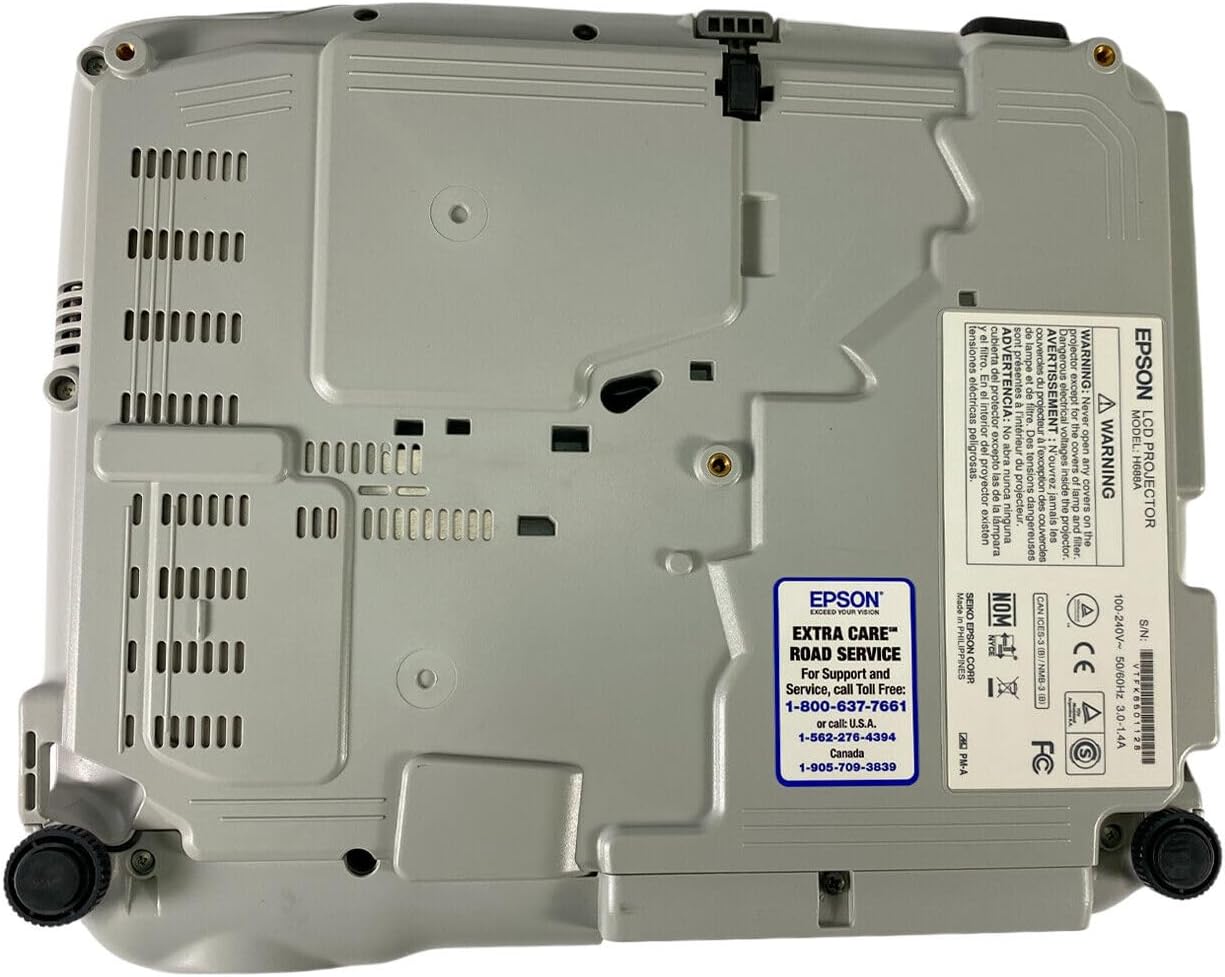
Figure 5: Bottom panel of the projector showing support contact details.
Epson Extra Care Road Service
- For support and service, call:
- USA: 1-800-637-7661
- USA: 1-866-276-4394
- Canada: 1-905-709-3839