
SUNOL K8
GM20 True Wireless Earbuds User Manual
Awoṣe: K8
Ọrọ Iṣaaju
Thank you for choosing the SUNOL GM20 True Wireless Earbuds. This manual provides detailed instructions on how to set up, operate, and maintain your earbuds to ensure optimal performance and longevity. Please read this manual thoroughly before using the product.
Ọja Pariview

Image: The GM20 True Wireless Earbuds in orange, shown with their matching charging case. The charging case features an LED display indicating battery percentage.
The GM20 True Wireless Earbuds are designed for a superior audio experience with advanced features:
- Bluetooth 5.3 Imọ-ẹrọ: Ensures faster pairing, more stable connection, and lower power consumption with an effective range of up to 10 meters.
- Gbohungbohun ti a ṣepọ: High-quality microphone with environmental noise reduction for clear hands-free calls.
- Sisisẹsẹhin ti o gbooro sii: Up to 48 hours of total playback time with the 600mAh charging case, which can recharge the earbuds four times.
- Ifihan LED: The charging case features an LED display to show the power levels of both the earbuds and the charging case.
- Apẹrẹ ti ko ni omi: IPX8 waterproof nano-coating makes the earbuds suitable for various activities, including sports.
- Imudara Itunu: Ergonomic in-ear design with multiple ear tip sizes for prolonged comfortable wear.
Ohun ti o wa ninu Apoti
Upon opening your GM20 True Wireless Earbuds package, you should find the following items:
- GM20 True Wireless Earbuds (Left and Right)
- Ngba agbara Case
- Ngba agbara USB
- Ọpọlọpọ awọn titobi eti
- Afowoyi Olumulo (iwe-ipamọ yii)
Ṣeto
1. Ngba agbara si Earbuds ati Ọran
Ṣaaju lilo akọkọ, rii daju pe awọn agbekọri mejeeji ati ọran gbigba agbara ti gba agbara ni kikun.
- Place the earbuds into the charging case. Ensure they are correctly seated; the LED display on the case will show charging status.
- Connect the charging cable to the charging port on the case and to a USB power source. The LED display will indicate the charging progress of the case.
- A full charge for the case typically takes a few hours. The earbuds will charge automatically when placed inside the powered case.

Image: The GM20 charging case displaying "100" on its LED screen, indicating a full charge. An earbud is shown next to it, ready for use.
2. Pipọpọ pẹlu Ẹrọ Rẹ (Igbese Kanṣoṣo)
The GM20 earbuds feature automatic pairing for convenience.
- Pipọpọ akọkọ:
- Ṣii apoti gbigba agbara ki o mu awọn agbekọri mejeeji jade. Wọn yoo tan-an laifọwọyi ati tẹ ipo sisopọ pọ sii.
- Lori ẹrọ rẹ (foonuiyara, tabulẹti, ati be be lo), jeki Bluetooth.
- Wa fun Bluetooth devices and select "GM20 TWS" from the list.
- Ni kete ti o ba ti sopọ, iwọ yoo gbọ ohun orin idaniloju, ati awọn agbekọri yoo ṣetan fun lilo.
- Tun so pọ: The earbuds will automatically connect to the last paired device when taken out of the charging case.
- If the earbuds do not connect automatically, ensure Bluetooth is enabled on your device and select "GM20 TWS" from your Bluetooth settings.
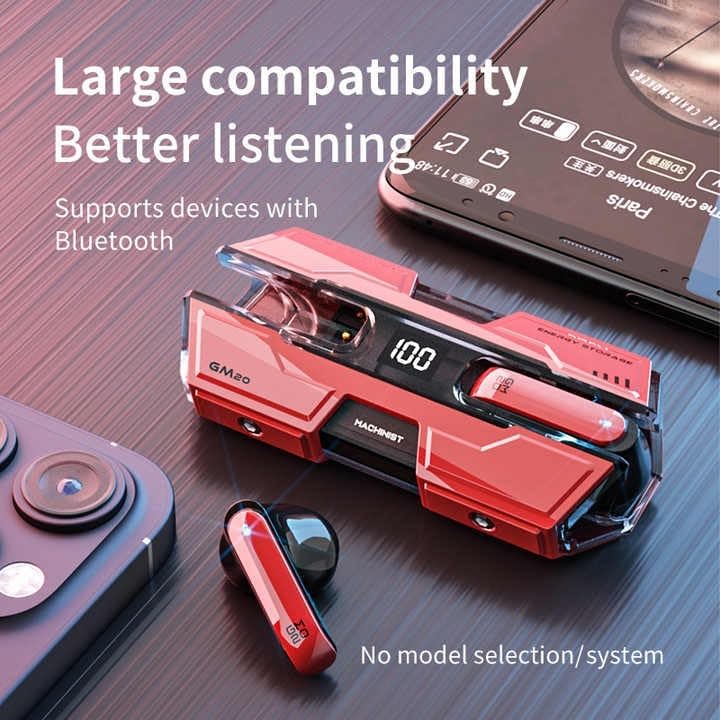
Image: The GM20 earbuds and charging case positioned near a smartphone, emphasizing their broad compatibility with Bluetooth-enabled devices.
Awọn ilana Iṣiṣẹ
Awọn iṣakoso Earbud
The GM20 earbuds feature a multifunction button on each earbud for easy control of audio playback and calls.
| Iṣe | Išẹ |
|---|---|
| Single Press (Left/Right Earbud) | Mu orin ṣiṣẹ/Danuduro, Dahun/Pari ipe |
| Tẹ lẹmeji (Agbohun Akọkọ osi) | Orin ti tẹlẹ |
| Tẹ lẹmeji (Ẹkọ Agbekọri Ọtun) | Orin t'okan |
| Gun Tẹ (awọn aaya 2) | Kọ ipe, Mu Oluranlọwọ Ohun ṣiṣẹ |
| Gun Tẹ (awọn aaya 5) | Titan / Paa |
Wọ awọn Earbuds
For optimal sound quality and comfort, ensure the earbuds are properly seated in your ears. Experiment with the different sizes of ear tips provided to find the best fit for your ears.

Aworan: Ohun exploded view diagram of an earbud, illustrating its internal components such as the 13mm moving coil and composite diaphragm, which contribute to high-resolution sound.
Itoju
Proper maintenance will extend the life of your GM20 earbuds.
- Ninu: Mọ awọn afikọti nigbagbogbo ati apoti gbigba agbara pẹlu asọ ti o gbẹ, asọ ti ko ni lint. Ma ṣe lo abrasive ose tabi epo.
- Omi Resistance: The earbuds are IPX8 waterproof, meaning they are protected against prolonged immersion in water. However, the charging case is not waterproof. Avoid exposing the charging case to liquids. Always ensure earbuds are dry before placing them back in the charging case.
- Ibi ipamọ: Nigbati o ko ba si ni lilo, tọju awọn afikọti sinu apoti gbigba agbara wọn lati daabobo wọn ki o jẹ ki wọn gba agbara. Tọju ni itura, ibi gbigbẹ kuro lati awọn iwọn otutu to gaju.
- Itọju Batiri: Lati tọju igbesi aye batiri, yago fun gbigba agbara ni kikun awọn agbekọri ati ọran gbigba agbara nigbagbogbo. Gba agbara si wọn nigbagbogbo, paapaa ti kii ṣe ni lilo igbagbogbo.
Laasigbotitusita
If you encounter issues with your GM20 earbuds, try the following solutions:
- Awọn agbekọri ti ko so pọ:
- Rii daju pe awọn agbekọri mejeeji ti gba agbara ni kikun.
- Pa Bluetooth lori ẹrọ rẹ, lẹhinna tan-an pada.
- Forget "GM20 TWS" from your device's Bluetooth settings and attempt to re-pair.
- Fi àwọn ètí ìgbọ́rọ̀ sí inú àpótí náà, pa ìbòrí náà, dúró fún ìṣẹ́jú díẹ̀, lẹ́yìn náà ṣí i kí o sì tún gbìyànjú lẹ́ẹ̀kan sí i.
- Ko si ohun tabi iwọn kekere:
- Ṣayẹwo ipele iwọn didun lori ẹrọ rẹ mejeeji ati awọn agbekọri.
- Rii daju pe awọn agbekọri ti sopọ daradara si ẹrọ rẹ.
- Nu eyikeyi idoti kuro lati apapo agbọrọsọ agbekọri.
- Sound distortion or crackling:
- Rí i dájú pé àwọn agbekọri náà wà láàárín ìwọ̀n Bluetooth mítà 10 tí ó wà nínú ẹ̀rọ rẹ.
- Reduce interference by moving away from other wireless devices or strong electromagnetic fields.
- Gbiyanju lati tun awọn agbekọri pọ si.
- Ekọti ko gba agbara:
- Rii daju pe okun gbigba agbara ti sopọ ni aabo si ọran mejeeji ati orisun agbara.
- Ṣàyẹ̀wò bóyá ibudo gbigba agbara lori apoti naa mọ́ tónítóní tí kò sì ní ìdọ̀tí kankan.
- Gbiyanju okun gbigba agbara ti o yatọ tabi ohun ti nmu badọgba agbara.
Awọn pato
| Ẹya ara ẹrọ | Ẹ̀kúnrẹ́rẹ́ |
|---|---|
| Orukọ awoṣe | K8 |
| Ẹya Bluetooth | 5.3 |
| Bluetooth Ibiti | 10 Mita |
| Igbesi aye batiri (Earbuds) | Approx. 8-10 hours (single charge) |
| Igbesi aye batiri (pẹlu apoti gbigba agbara) | Titi di awọn wakati 48 |
| Ngba agbara Batiri Case | 600mAh |
| Omi Resistance Ipele | IPX8 (Earbuds nikan) |
| Idahun Igbohunsafẹfẹ | 20 Hz - 20 kHz |
| Ipalara | 32 ohm |
| Ọna Iṣakoso | Fọwọkan / Bọtini |
| Ohun elo | Acrylonitrile Butadiene Styrene (ABS) |
| Iwọn Nkan | 14.4 iwon (apapọ lapapọ) |
Atilẹyin ọja ati Support
For warranty information and customer support, please refer to the documentation included with your purchase or visit the official SUNOL website. If you experience any issues not covered in this manual, please contact SUNOL customer service for assistance.
Jọwọ ṣe idaduro ẹri rira rẹ fun awọn iṣeduro atilẹyin ọja.
Awọn iwe aṣẹ ti o jọmọ - K8
 |
TREBLAB X3-Pro Afọwọkọ Olumulo Earbuds Alailowaya Iwe afọwọkọ olumulo pipe fun awọn agbekọri alailowaya TREBLAB X3-Pro, iṣeto ibora, sisopọ, ṣiṣiṣẹsẹhin ohun, iṣakoso ipe, ipo ere, laasigbotitusita, mimọ, ailewu, ati awọn pato. |
 |
Àwọn Agbọ́tí Aláìlókùn Kurdene S8 Pro: Ìtọ́sọ́nà Olùlò àti Ìṣètò Ìtọ́sọ́nà tó péye lórí sí ṣíṣètò, sísopọ̀, àti lílo àwọn agbekọri Bluetooth alailowaya Kurdene S8 Pro. Kọ́ nípa àwọn ìṣàkóso, ìṣàkóso agbára, àti ṣíṣe àtúnṣe ìṣòro. |
 |
K8 Wireless Earbuds User Manual and Specifications Official user manual for the K8 Wireless Earbuds. Find detailed specifications, charging instructions, pairing guides, function controls, troubleshooting tips, and safety precautions for your K8 earbuds. |
 |
EAVAN D19 True Wireless Earbuds User Manual and Specifications User manual for EAVAN D19 True Wireless Earbuds, covering warm tips, packing list, charging, power operations, Bluetooth connection, earbud functions, product specifications, and troubleshooting questions. |
 |
ONIKUMA K8 Gaming Headset User Manual - Features, Specs, and Troubleshooting Comprehensive user manual for the ONIKUMA K8 gaming headset. Includes product description, detailed specifications, setup guide, troubleshooting tips, warranty information, and disposal instructions. |
 |
S23 True Wireless Earbuds Instruction Manual Instruction manual for S23 True Wireless Earbuds, covering connection, operation, problem handling, and safety instructions. Learn how to pair, use controls, and troubleshoot common issues. |
Ask a question about this manual
Ask about setup, troubleshooting, compatibility, parts, safety, or missing instructions. Manuals+ will review the question and use this page’s manual context to help answer it.