
WONDOM ADAU1701
WONDOM ADAU1701 DSP Preamp: 2-In 4-Out Digital Signal Processor Instruction Manual
Model: ADAU1701
Ọrọ Iṣaaju
This manual provides detailed instructions for the installation, operation, and maintenance of your WONDOM ADAU1701 DSP Preamp. This unit is designed for advanced audio signal processing, offering a 2-input, 4-output configuration with digital crossover capabilities and support for SigmaStudio programming.
Awọn ẹya pataki pẹlu:
- Powered by ADAU1701 DSP, a 28/56bit Digital Signal Processor Engine.
- 24bit ADC/DAC Resolution Ratio with a 48kHz Sampling Oṣuwọn.
- Unbalanced 2-Input, 4-Output Preamp Ẹyọ.
- USB Type-C Port for DC 5V Power.
- Four Potentiometers for High-Pass Filter (HPF), Low-Pass Filter (LPF), and Volume Control.
- Integrated Mute & Phase Switches.
- Supports SigmaStudio Programming when connected with an ICP5 programmer.
- Open-sourced Demo Program & HEX Files are provided for restoring factory settings.
Package Awọn akoonu
Jọwọ rii daju pe gbogbo awọn nkan wa ninu package:
- WONDOM ADAU1701 DSP Preamp Ẹyọ
- USB Type-C Cable (for power)
- Afowoyi Olumulo (iwe-ipamọ yii)
- (Optional: ICP5 Programmer, sold separately for advanced programming)
Alaye Aabo
- Ensure the power supply matches the device's requirements (DC 5V, 1A via USB Type-C).
- Ma ṣe fi ẹrọ naa han si ọrinrin tabi awọn iwọn otutu to gaju.
- Avoid opening the enclosure unless you are a qualified technician.
- Jeki kuro ni arọwọto awọn ọmọde.
Ṣeto
1. Ti ara Awọn isopọ
Refer to the diagrams below for proper connection of audio inputs, outputs, and power.

Àwòrán 1: Àwọn ìsopọ̀ ẹ̀gbẹ́ pánẹ́lì. This image shows the rear panel of the ADAU1701 DSP Preamp, highlighting the DC Input (5V, 1A), ICP Port, Line In (ADC0 Left, ADC1 Right), and Line Out (DAC0 Right, DAC1 Left, DAC2 Right, DAC3 Left) RCA jacks.
- Asopọ agbara: Connect a DC 5V, 1A power supply to the USB Type-C port labeled "DC INPUT 5V, 1A" on the rear panel.
- Iṣawọle Olohun: Connect your audio source (e.g., media player, pre-amplifier) to the "LINE IN" RCA jacks (ADC0 Left, ADC1 Right).
- Ijade ohun: So rẹ pọ amplifiers or powered speakers to the "LINE OUT" RCA jacks. The default configuration provides 2-channel mid-range output (DAC2 Right, DAC3 Left) and 2-channel bass output (DAC0 Right, DAC1 Left) for a 2-way digital crossover setup.
- ICP Port: This port is used for connecting an ICP5 programmer (sold separately) for advanced SigmaStudio programming.
2. Agbara akọkọ Lori
Once all connections are secure, apply power to the unit. The "POWER" LED on the front panel should illuminate, indicating the device is operational.
Awọn ilana Iṣiṣẹ
The WONDOM ADAU1701 DSP Preamp features several controls on its front panel for direct adjustment, as well as advanced programming capabilities via SigmaStudio.

Àwòrán 2: Àwọn Ìṣàkóso Pánẹ́lì Iwájú. This image displays the front panel, showing the Power LED, Busy LED, SW1 (Mute) and SW2 (Phase) switches, and four potentiometers (POT1, POT2, POT3, POT4) for various audio adjustments.
Awọn iṣakoso Igbimọ iwaju:
- AGBARA LED: Ó túmọ̀ sí wípé ẹ̀rọ náà ti ṣiṣẹ́.
- BUSY LED: Indicates DSP activity.
- SW1 (Mute Switch): Toggles audio output mute on/off.
- SW2 (Phase Switch): Adjusts the phase of the audio output.
- POT1 (MP3 / ADC2): Controls the High-Pass Filter (HPF) for Bank B (3kHz-20kHz).
- POT2 (MP8 / ADC3): Controls the Low-Pass Filter (LPF) for Bank A (210Hz-3kHz).
- POT3 (MP9 / ADC0): Controls the High-Pass Filter (HPF) for Bank A (10Hz-310Hz).
- POT4 (VOL): Ṣe iṣakoso iwọn didun gbogbogbo.
Digital Crossover Configuration:
The unit's default output is configured as a 2-way digital crossover, providing dedicated outputs for bass and mid-range frequencies.
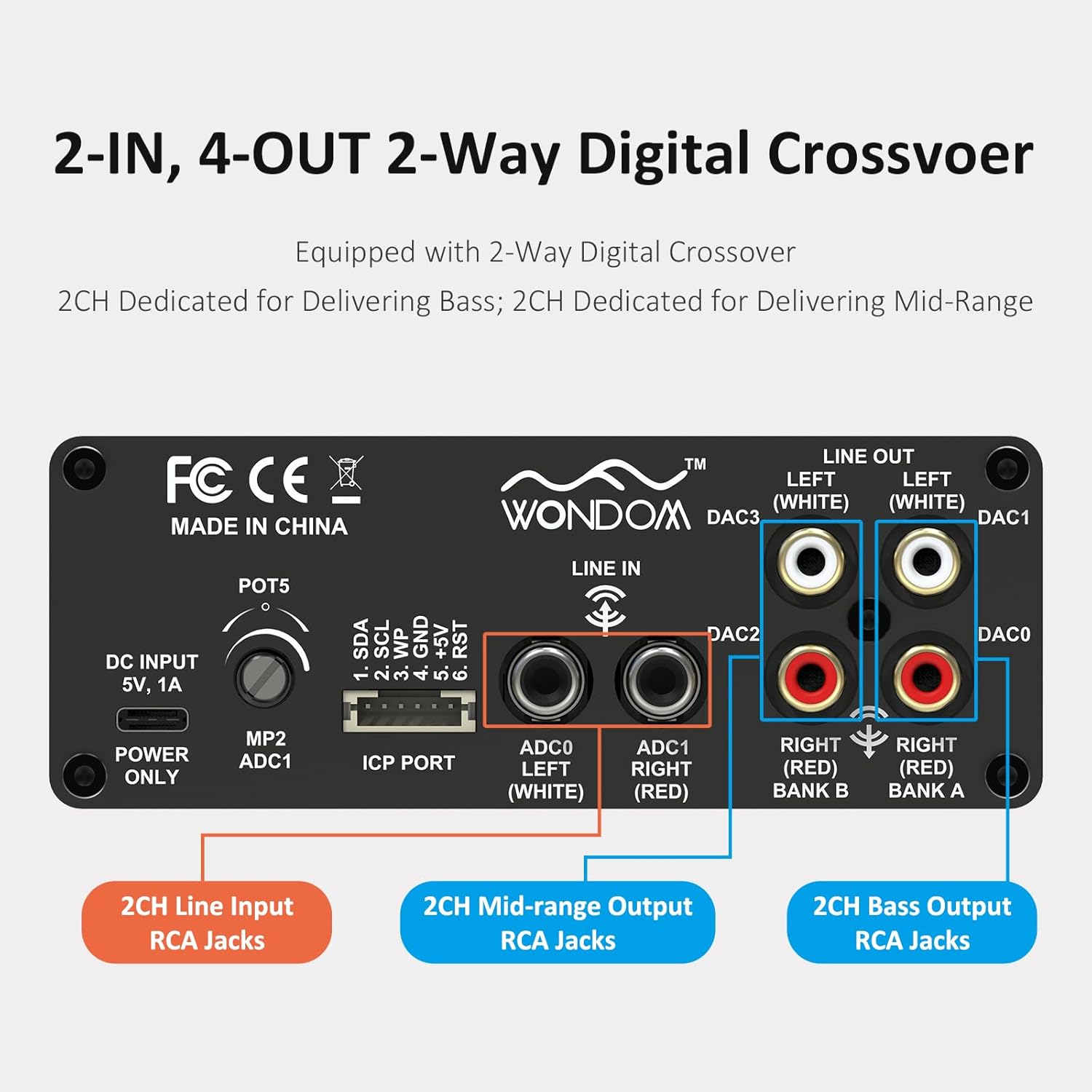
Figure 3: 2-In, 4-Out Digital Crossover. This diagram shows the RCA jack assignments for 2-channel Line Input, 2-channel Mid-range Output, and 2-channel Bass Output, facilitating a 2-way digital crossover setup.
- 2CH Line Input: ADC0 Left (White), ADC1 Right (Red).
- 2CH Mid-range Output: DAC2 Right (Red), DAC3 Left (White).
- 2CH Bass Output: DAC0 Right (Red), DAC1 Left (White).
SigmaStudio Programming:
For advanced customization and fine-tuning of the DSP functions, the unit supports programming via Analog Devices' SigmaStudio software. An ICP5 programmer (sold separately) is required to connect the DSP unit to your computer.

Figure 4: SigmaStudio Programming Setup. This image illustrates the connection between the DSP unit and an ICP5 programmer, along with a visual representation of the SigmaStudio graphical programming interface.
- Software: Download and install SigmaStudio from the Analog Devices webojula.
- Hardware: Connect the ICP5 programmer to the ICP Port on the DSP unit and to your computer via USB.
- Eto: Utilize the open-sourced demo program and HEX files provided by WONDOM to get started or to restore factory settings. All terminal functions can be tailored to specific needs using SigmaStudio.
Itoju
- Jeki ẹyọ naa di mimọ nipa fifẹ rẹ pẹlu asọ ti o gbẹ.
- Yẹra fun lilo awọn kẹmika lile tabi awọn afọmọ abrasive.
- Rii daju pe fentilesonu to peye ni ayika ẹyọ lati ṣe idiwọ igbona.
- Regularly check all cable connections for secure fit.
Laasigbotitusita
| Isoro | Owun to le Fa | Ojutu |
|---|---|---|
| Ko si agbara / LED agbara pa | Incorrect power supply, loose connection, faulty cable. | Verify DC 5V, 1A power supply. Check USB Type-C cable connection. Try a different power source or cable. |
| Ko si idajade ohun | Incorrect input/output connections, Mute switch engaged, volume too low, faulty audio cables. | Check all RCA connections. Ensure SW1 (Mute) is disengaged. Increase POT4 (Volume). Test with different audio cables. |
| Audible hiss or noise | Ground loop, interference, power supply noise, high gain settings. | Ensure all components are properly grounded. Use a high-quality, stable 5V power supply (a separate USB power bank/battery can help reduce noise from PC USB). Reduce gain settings if applicable. |
| Ko le sopọ mọ SigmaStudio | ICP5 programmer not connected or faulty, DSP not powered, incorrect software drivers. | Ensure ICP5 programmer is correctly connected to the DSP and computer. Verify DSP unit is powered on. Install SigmaStudio drivers in administrator mode (as suggested by user reviews). |
Awọn pato
| Ẹya ara ẹrọ | Ẹ̀kúnrẹ́rẹ́ |
|---|---|
| DSP Chip | ADAU1701 (28/56bit Digital Signal Processor) |
| ADC/DAC Resolution | 24-bit |
| SampOṣuwọn ling | 48 kHz |
| Iṣeto ti igbewọle | 2-Input (Unbalanced RCA) |
| O wu iṣeto ni | 4-Output (Unbalanced RCA, default 2-way digital crossover) |
| Ibi ti ina elekitiriki ti nwa | DC 5V, 1A (via USB Type-C) |
| Awọn iṣakoso | 4 Potentiometers (HPF/LPF/Volume), Mute Switch, Phase Switch |
| Programming Support | SigmaStudio (requires ICP5 programmer, sold separately) |
| Awọn iwọn (L x W x H) | 4.72 x 4.72 x 1.77 inches |
| Iwọn | 1.23 iwon |
| Ibugbe | Sleek Aluminum Enclosure |
Atilẹyin ọja ati Support
WONDOM products are manufactured by Sure Electronics. For warranty information, technical support, and further assistance, please refer to the official Sure Electronics webojula tabi kan si wọn onibara iṣẹ taara. Tọju iwe-ẹri rira rẹ bi ẹri rira fun awọn iṣeduro atilẹyin ọja.
Manufacturer: Sure Electronics
For additional resources and community support regarding SigmaStudio programming, online forums and tutorials can be a valuable resource.