Ọja Pariview
This manual provides comprehensive instructions for the DHG Portable Bluetooth Speaker.
Model: DHG1
ASIN: B0CJC2YLF7
The DHG Portable Bluetooth Speaker is designed for wireless music streaming from various devices. It features a compact and portable design with a convenient handle, making it easy to transport. Key functionalities include Bluetooth connectivity, a USB/SD card reader, FM radio, and a karaoke function. It is equipped with a built-in 1200 mAh rechargeable battery and delivers 20W of power.

Image: DHG Portable Bluetooth Speaker, showcasing its portable design with a top handle and front speaker grille.
Ohun ti o wa ninu Apoti
- DHG Portable Bluetooth Speaker
- Isakoṣo latọna jijin
- Ngba agbara USB
Key Awọn ẹya ara ẹrọ
- Asopọmọra Bluetooth Alailowaya
- Integrated USB and SD Card Reader
- Built-in FM Radio Function
- Karaoke Function with Microphone Input
- Batiri Alekun Atunlo (1200 mAh)
- Apẹrẹ gbigbe pẹlu ọwọ gbigbe
- 20W o wu Power
Eto Itọsọna
1. Gbigba agbara Agbọrọsọ
Before first use, fully charge the speaker. Connect the included charging cable to the DC-5V port on the speaker and to a suitable USB power adapter (not included). The charging indicator will illuminate. A full charge ensures optimal battery performance.
2. Agbara lori / Paa
Locate the power switch on the control panel. Slide it to the 'ON' position to power on the speaker. Slide to 'OFF' lati fi agbara pa.
3. Sisopọ Bluetooth
- Turn on the speaker. It will automatically enter Bluetooth pairing mode, indicated by a flashing LED (if applicable).
- On your smartphone, tablet, or other Bluetooth-enabled device, enable Bluetooth.
- Wa fun awọn ẹrọ to wa ko si yan 'DHG1' or a similar name to connect.
- Ohun ìmúdájú yoo tọkasi sisopọ aṣeyọri.
4. Connecting a Microphone (for Karaoke)
Insert a 6.35mm jack microphone (not included) into the 'MIC.' input port on the speaker's control panel.
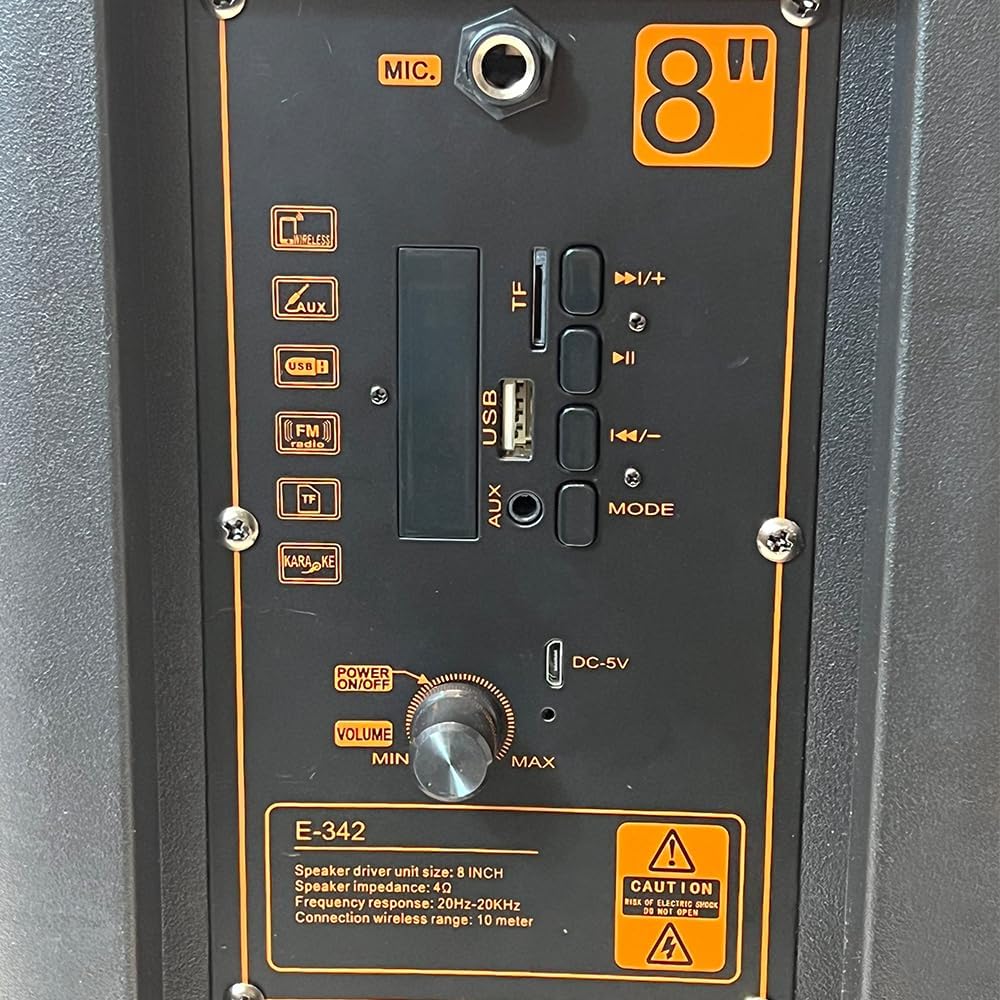
Aworan: Isunmọ view of the speaker's control panel, showing the microphone input, USB and TF card slots, AUX input, mode button, volume knob, and DC-5V charging port.
Awọn ilana Iṣiṣẹ
1. Gbogbogbo Iṣakoso
- Bọtini Iwọn didun: Yiyi lọna aago lati mu iwọn didun pọ si, ni idakeji aago lati dinku.
- Bọtini MODE: Press to cycle through available modes: Bluetooth, FM Radio, USB, SD, and AUX.
- Bọ́tìnì Play/Dúró (►/−): Press to play or pause audio playback. In FM mode, press and hold to auto-scan for radio stations.
- Previous Track/Volume Down (◀◀/−): Press briefly to go to the previous track. Press and hold to decrease volume.
- Next Track/Volume Up (►►/+): Press briefly to go to the next track. Press and hold to increase volume.
2. Ipo Bluetooth
Once paired, ensure your device's volume is up. Play audio from your connected device, and it will stream wirelessly through the speaker.
3. USB / SD Kaadi Sisisẹsẹhin
Insert a USB flash drive or an SD card (containing MP3 audio files) into the corresponding slot. The speaker will automatically switch to USB or SD mode and begin playing the first track. Use the Previous/Next track buttons to navigate through your music.
4. FM Radio isẹ
- Tẹ awọn MODE bọtini lati yan ipo redio FM.
- Tẹ mọlẹ Ṣiṣẹ / Sinmi button to initiate an automatic scan for available radio stations. The speaker will save all found stations.
- Lo awọn Ti tẹlẹ/Orin atẹle buttons to switch between the saved radio stations.
5. Apọju AX
So ẹ̀rọ ohùn ìta pọ̀ mọ́ ẹ̀rọ orin (fún àpẹẹrẹ, ẹ̀rọ orin MP3, kọ̀ǹpútà alágbèéká) mọ́ 'AUX' ibudo nipa lilo okun ohun afetigbọ 3.5mm (ko si ninu rẹ). MODE button to select AUX mode. Audio from your external device will now play through the speaker.
6. Iṣẹ́ Karaoke
With a microphone connected to the 'MIC.' input, ensure the speaker is in any audio playback mode (Bluetooth, USB, SD, or AUX). Your voice from the microphone will be mixed with the ongoing audio playback, allowing for karaoke.
Itoju
Ninu:
Wipe the speaker's exterior with a soft, dry cloth. Do not use liquid cleaners, abrasive materials, or solvents, as these can damage the finish or internal components.
Itọju Batiri:
To maximize battery lifespan, fully charge the speaker before its first use. Recharge the battery regularly, even if the speaker is not used for extended periods. Avoid exposing the speaker to extreme temperatures (hot or cold), as this can degrade battery performance.
Ibi ipamọ:
When not in use, store the speaker in a cool, dry place, away from direct sunlight, excessive humidity, and dust.
Laasigbotitusita
- Ko si Agbara: Ensure the speaker is fully charged. Verify that the power switch is in the 'ON' position.
- Ko si Ohun: Check the volume level on both the speaker and your connected device. Confirm that the correct input mode (Bluetooth, USB, FM, AUX) is selected.
- Bluetooth Ko Sopọ: Ensure Bluetooth is enabled on your device and the speaker is in pairing mode. Move your device closer to the speaker to reduce interference. Try unpairing the speaker from your device's Bluetooth list and then re-pairing.
- Idaduro Redio FM: Adjust the speaker's position to improve signal reception. Ensure you are in an area with good FM signal. Try performing an auto-scan for stations again.
- Gbohungbohun Ko Ṣiṣẹ: Ensure the microphone is securely plugged into the 'MIC.' input port. If the microphone requires power, ensure it is powered on or has fresh batteries.
Awọn pato
| Ẹya ara ẹrọ | Sipesifikesonu |
|---|---|
| Orukọ awoṣe | DHG1 |
| Awọn iwọn (L x W x H) | 18.5 x 25 x 38 cm |
| Iwọn | 1.5 kg |
| Brand | DHG |
| Max Agbọrọsọ o wu Power | 20W |
| Idahun Igbohunsafẹfẹ | 100 Hz |
| Asopọmọra Technology | Bluetooth |
| Ipo Ijade Ohun | Mono |
| Iṣagbesori Iru | Pakà |
| Agbọrọsọ Iru | Iwe ipamọ |
| Pataki Awọn ẹya ara ẹrọ | Bluetooth, To ṣee gbe |
| Niyanju Lilo | For smartphones or tablets |
| Agbara Batiri | 1200 mAh |
Alaye Aabo
- Do not expose the speaker to water, rain, or excessive moisture.
- Má ṣe tú agbọ̀rọ̀sọ náà ká tàbí gbìyànjú láti tún un ṣe fúnra rẹ. Tọ́ka gbogbo iṣẹ́ ìtọ́jú náà sí àwọn òṣìṣẹ́ tó péye.
- Keep the speaker away from heat sources, direct sunlight, and open flames.
- Rí i dájú pé afẹ́fẹ́ ń fẹ́ sí afẹ́fẹ́ tó yẹ ní àyíká agbọ́hùnsọ̀ nígbà tí a bá ń lò ó.
- Dispose of the battery responsibly according to local regulations. Do not dispose of batteries in fire.
Atilẹyin ọja ati Support
This DHG product comes with a standard manufacturer's warranty. For specific warranty terms, claims, or technical support, please contact DHG customer service directly.
You can also visit the official DHG brand store for more information and support resources: