
Ọrọ Iṣaaju
Thank you for choosing the HyperGear Stealth2 ANC Wireless Headphones. This manual provides detailed instructions for setting up, operating, and maintaining your headphones to ensure optimal performance and longevity. Please read this manual thoroughly before use.

Image: HyperGear Stealth2 ANC Wireless Headphones, Bone color, showcasing key features like Active Noise Cancelling, 40mm Neodymium Drivers, Deep HD Stereo Sound, up to 24-hour playing time, rapid charge, and lightweight foldable design.
Package Awọn akoonu
Jẹrisi pe gbogbo awọn ohun kan wa ninu package:
- Awọn agbekọri Alailowaya HyperGear Stealth2 ANC
- USB-C Ngba agbara Cable
- Afowoyi Olumulo (iwe-ipamọ yii)
Ọja Pariview
Familiarize yourself with the various components and controls of your headphones.

Image: Detailed diagram of the HyperGear Stealth2 ANC Wireless Headphones, highlighting the on-ear controls. Labels include Power On/Off, Enter Pairing Mode, Volume Up/Next Track, Play/Pause/Answer/End Call, Reject Call, Activate Voice Assistant, Gaming Mode On/Off, Volume Down/Previous Track, and Active Noise Cancellation On/Off. Also shows Quick Pairing and Auto Reconnection features.
Awọn iṣakoso Lori-Eti:
- Bọtini agbara: Press and hold to power on/off. Press and hold to enter pairing mode.
- Iwọn didun Up / Bọtini orin atẹle: Tẹ lati mu iwọn didun pọ si. Tẹ mọlẹ lati fo si orin atẹle.
- Bọtini iṣẹ-ọpọlọpọ (Ṣiṣere/Daduro): Press to play/pause audio. Press to answer/end calls. Press and hold to reject calls. Double-press to activate voice assistant. Triple-press to toggle Gaming Mode.
- Iwọn didun isalẹ / Bọtini orin ti iṣaaju: Tẹ lati dinku iwọn didun. Tẹ mọlẹ lati lọ si orin ti tẹlẹ.
- Bọtini ANC: Press to toggle Active Noise Cancellation on/off.
Ṣeto
1. Ngba agbara si awọn Agbekọri
Ṣaaju lilo akọkọ, gba agbara si awọn agbekọri rẹ ni kikun.
- So okun gbigba agbara USB-C ti a pese si ibudo gbigba agbara lori awọn agbekọri.
- So opin okun miiran pọ si orisun agbara USB (fun apẹẹrẹ, ohun ti nmu badọgba ogiri, ibudo USB kọnputa).
- The LED indicator will show charging status. It typically takes about 2 hours for a full charge.
- A 10-minute rapid charge can provide approximately 3 hours of playback.

Image: A person wearing HyperGear Stealth2 ANC Wireless Headphones on an airplane, illustrating battery life: 18 hours with ANC on, 24 hours with ANC off. Also highlights rapid charge: 10 minutes of charging provides 3 hours of playback.
2. Sisopọ Bluetooth
Pa awọn agbekọri rẹ pọ pẹlu ẹrọ rẹ fun ohun afetigbọ alailowaya.
- Rii daju pe awọn agbekọri ti gba agbara ati agbara si pipa.
- Tẹ mọlẹ Bọtini Agbara titi ti Atọka LED yoo tan bulu ati pupa, nfihan ipo sisopọ.
- Lori ẹrọ rẹ (foonuiyara, tabulẹti, kọmputa), mu Bluetooth ṣiṣẹ ki o wa awọn ẹrọ to wa.
- Select "HyperGear Stealth2" from the list of found devices.
- Nígbà tí a bá ti so pọ̀, àmì LED náà yóò fi ìmọ́lẹ̀ aláwọ̀ búlúù tàbí ìmọ́lẹ̀ díẹ̀díẹ̀ hàn.
Pipọpọ ni iyara: The headphones are designed for instant connection with your device in seconds after initial pairing.
Asopọ Aifọwọyi: The headphones will remember and automatically reconnect to the last paired device when powered on and within range.
Awọn ilana Iṣiṣẹ
Titan / Paa
- Láti tan agbára, tẹ bọtini Agbára náà kí o sì di í mú títí tí àmì LED yóò fi tan ìmọ́lẹ̀.
- Láti pa iná, tẹ bọtini agbara ki o si di mu titi ti ifihan LED yoo fi pa.
Fagilee Ariwo Ti nṣiṣe lọwọ (ANC)
- Press the dedicated ANC button to toggle Active Noise Cancellation on or off.
- When ANC is active, ambient noise is significantly reduced, providing a quieter listening experience.
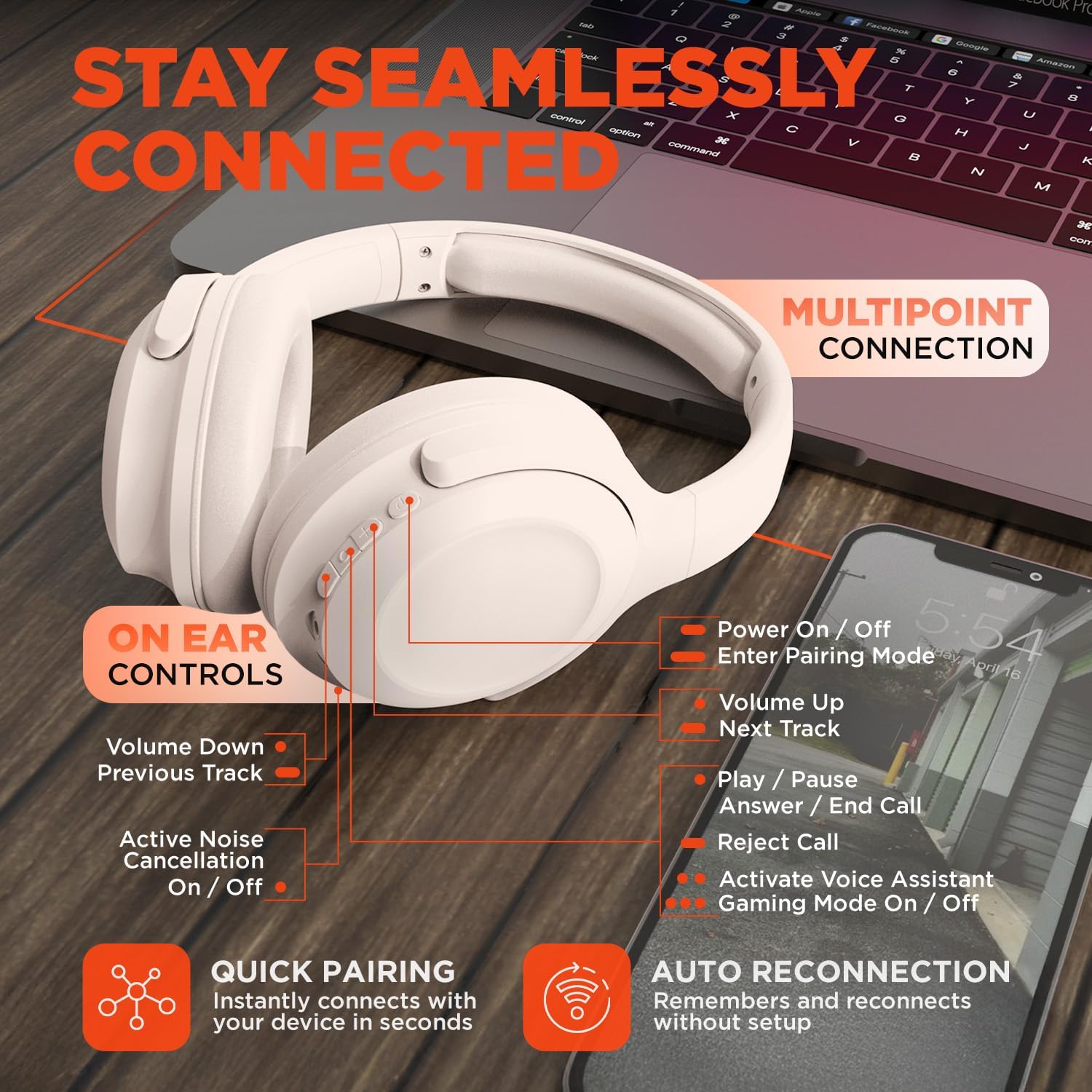
Image: HyperGear Stealth2 ANC Wireless Headphones highlighting "Pure Sound Anywhere" with Dual ANC Microphones for blocking unwanted noise and Adaptive Sound Control for real-time environment adjustment. Also shows compatibility with Siri and Google Assistant, and use cases for exercise, gaming, and travel.
Sisisẹsẹhin ohun ati awọn ipe
- Ṣiṣẹ/Daduro: Tẹ bọtini Olona-iṣẹ lẹẹkan.
- Orin t’okan: Tẹ mọlẹ bọtini Iwọn didun Up.
- Tẹlẹ Orin: Tẹ mọlẹ bọtini Iwọn didun isalẹ.
- Iṣakoso iwọn didun: Tẹ awọn bọtini iwọn didun tabi Iwọn didun isalẹ.
- Idahun/Ipe Ipari: Tẹ bọtini Olona-iṣẹ lẹẹkan.
- Kọ Ipe: Tẹ mọlẹ bọtini iṣẹ-ọpọlọpọ.
Oluranlọwọ ohun
- Double-press the Multi-function button to activate your device's voice assistant (Siri, Google Assistant, etc.).
Ipo ere
- Triple-press the Multi-function button to toggle the no-lag Gaming Mode. This mode optimizes audio synchronization for enhanced gameplay.
Multipoint Asopọ
The headphones support multipoint connection, allowing them to be connected to two Bluetooth devices simultaneously.
- Pair the headphones with the first device as described in the "Bluetooth Pairing" section.
- Mu Bluetooth ṣiṣẹ lori ẹrọ akọkọ.
- Fi awọn agbekọri pada si ipo sisọpọ ki o so wọn pọ pẹlu ẹrọ keji.
- Re-enable Bluetooth on the first device. The headphones should now be connected to both devices.
- Audio will play from the device that is actively playing content.

Image: HyperGear Stealth2 ANC Wireless Headphones positioned between a laptop and a smartphone, demonstrating the multipoint connection feature. This allows the headphones to stay seamlessly connected to multiple devices.
Itoju
Itọju to peye ṣe idaniloju gigun ati iṣẹ ti awọn agbekọri rẹ.
- Keep the headphones dry. Do not expose them to water or excessive moisture. They are not water resistant.
- Clean the earcups and headband with a soft, dry cloth. Avoid using harsh chemicals or abrasive materials.
- Tọju awọn agbekọri naa ni itura, aye gbigbẹ nigbati ko si ni lilo. Apẹrẹ ti a ṣe pọ gba laaye fun ibi ipamọ iwapọ.
- Yago fun awọn iwọn otutu to gaju.
- Má ṣe gbìyànjú láti tú tàbí yí àwọn agbekọri náà padà, nítorí èyí yóò sọ àtìlẹ́yìn náà di òfo.
Laasigbotitusita
Tí o bá ní ìṣòro, wo àwọn ìdáhùn tó wọ́pọ̀ wọ̀nyí.
| Isoro | Ojutu |
|---|---|
| Àwọn agbekọri kì yóò tan. | Rii daju pe awọn agbekọri ti gba agbara ni kikun. Sopọ si orisun agbara nipa lilo okun USB-C. |
| Ko le so pọ pẹlu ẹrọ kan. |
|
| Ko si ohun tabi iwọn kekere. |
|
| ANC is not effective. |
|
Awọn pato
| Ẹya ara ẹrọ | Ẹ̀kúnrẹ́rẹ́ |
|---|---|
| Orukọ awoṣe | Awọn agbekọri HyperGear Stealth2 ANC |
| Nọmba awoṣe | 15860 |
| Asopọmọra Technology | Ailokun (Bluetooth) |
| Ẹya Bluetooth | 5.2 |
| Bluetooth Ibiti | 10 Mita |
| Audio Driver Iwon | 40mm |
| Iwọn Igbohunsafẹfẹ | 20 Hz - 20,000 Hz |
| Ariwo Iṣakoso | Ti nṣiṣe lọwọ Noise Ifagile |
| Igbesi aye batiri | Títí dé wákàtí 24 (ANC ti dínkù) |
| Akoko gbigba agbara | Awọn wakati 2 |
| Gbigba agbara Port | USB-C |
| Ohun elo | Ṣiṣu |
| Iwọn Nkan | 0.38 kilogram (13.3 iwon) |
| Ọja Mefa | 7.88 x 2.25 x 10.51 inches |
| Omi Resistance Ipele | Ko Omi Resistant |
| UPC | 633755158605 |
Atilẹyin ọja ati Support
HyperGear products are designed for reliability and performance. For warranty information and customer support, please refer to the warranty card included with your purchase or visit the official HyperGear webojula.
Ilana Pada: This product typically includes a 30-day return policy for refunds or replacements. Please check your purchase details for specific terms.
Olupese: HYPERGEAR