
1. Ifihan
Thank you for choosing the RadioShack TWS Bluetooth Wireless Earbuds, Model 100128651 (Snow). These earbuds are designed to provide a high-quality, wireless audio experience with convenience and comfort. This manual will guide you through the setup, operation, and maintenance of your new earbuds.
2. Package Awọn akoonu
Jọwọ rii daju pe gbogbo awọn nkan wa ninu package rẹ:
- RadioShack TWS Bluetooth Wireless Earbuds (Left and Right)
- Ngba agbara Case
- USB Iru-C Ngba agbara USB
- Ọpọ titobi ti Eti Italolobo

3. Ọja Ipariview
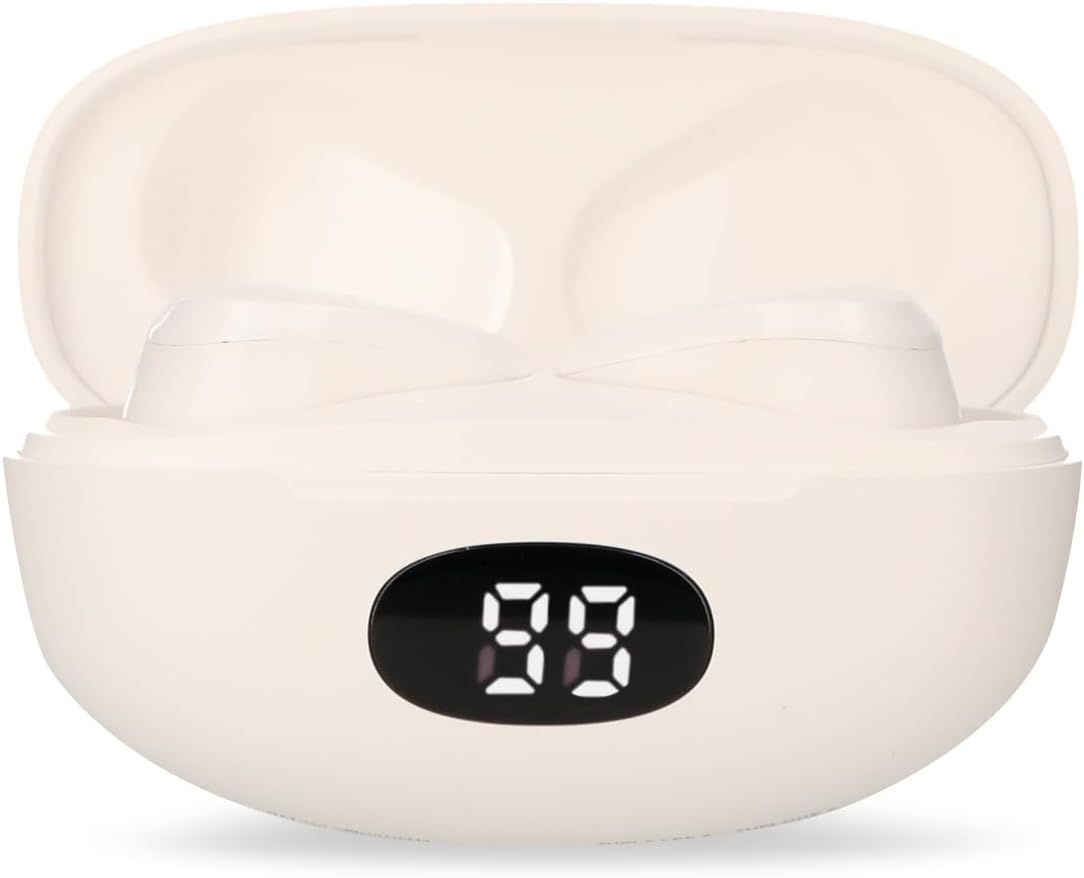
Familiarize yourself with the components of your RadioShack TWS Bluetooth Wireless Earbuds.


4. Eto
4.1 Ngba agbara si Earbuds ati Ọran
- Idiyele Ibẹrẹ: Ṣaaju lilo akọkọ, gba agbara ni kikun awọn agbekọri ati apoti gbigba agbara.
- Gbigba agbara si ọran naa: Connect the provided USB Type-C cable to the charging port on the case and the other end to a USB power source (e.g., computer, wall adapter). The LED display on the case will indicate charging status.
- Ngba agbara si Earbuds: Place the earbuds into the charging case. Ensure they are correctly seated; the earbuds will automatically begin charging. The LED display on the case will show the earbuds' charging status.
- Akoko gbigba agbara: A full charge for both the earbuds and case typically takes up to 1.5 hours.
4.2 Sisopọ Bluetooth
- Agbara Tan: Ṣí àpótí ìgbara. Àwọn agbekọri náà yóò tan-an láìfọwọ́sí, wọn yóò sì wọ inú ipò ìsopọ̀. O lè gbọ́ ìkéde tí a lè gbọ́.
- Mu Bluetooth ṣiṣẹ: On your mobile device (smartphone, tablet, etc.), go to the Bluetooth settings and ensure Bluetooth is enabled.
- Yan Ẹrọ: Wa fun available Bluetooth devices. Select "RadioShack Snow" or a similar name from the list.
- Sopọ: Once selected, your device should connect to the earbuds. A confirmation sound or message may indicate successful pairing.
- Tun sopọ: After initial pairing, the earbuds will automatically connect to the last paired device when removed from the charging case and Bluetooth is active on your device.
5. Awọn ilana Iṣiṣẹ
The RadioShack TWS Earbuds feature a multifunction touch button for easy control.
5.1 Agbara Tan / Pa
- Agbara Tan: Open the charging case, and the earbuds will power on automatically. Alternatively, press and hold the touch area on both earbuds for approximately 3 seconds.
- Agbara Pa: Place the earbuds back into the charging case and close the lid. They will power off automatically. Alternatively, press and hold the touch area on both earbuds for approximately 5 seconds.
5.2 Sisisẹsẹhin Orin
- Ṣiṣẹ/Daduro: Fọwọ ba agbegbe ifọwọkan lori boya agbekọri lẹẹkan.
- Orin t’okan: Tẹ agbegbe ifọwọkan lẹẹmeji lori agbekọri ọtun.
- Tẹlẹ Orin: Tẹ agbegbe ifọwọkan lẹẹmeji ni agbekọri osi.
5.3 ipe Management
- Idahun/Ipe Ipari: Fọwọ ba agbegbe ifọwọkan lori boya agbekọri lẹẹkan.
- Kọ Ipe: Press and hold the touch area on either earbud for approximately 2 seconds.
5.4 Iṣakoso iwọn didun
- Mu iwọn didun pọ si: Tẹ agbegbe ifọwọkan ni ẹẹmẹta ni agbekọri ọtun.
- Din iwọn didun silẹ: Tẹ agbegbe ifọwọkan ni ẹẹmẹta ni agbekọri osi.
5.5 Iranlọwọ ohun
- Mu Oluranlọwọ Ohun ṣiṣẹ: Press and hold the touch area on either earbud for approximately 2 seconds (when not on a call).
6. Itọju
Láti rí i dájú pé àwọn agbekọri rẹ pẹ́ títí àti pé wọ́n ń ṣiṣẹ́ dáadáa, tẹ̀lé àwọn ìlànà ìtọ́jú wọ̀nyí:
- Ninu: Lo asọ ti o gbẹ, asọ ti ko ni lint lati nu afikọti ati apoti gbigba agbara. Maṣe lo awọn afọmọ abrasive, ọti-lile, tabi awọn nkan ti kemikali.
- Italolobo Eti: Regularly remove and clean the ear tips with a damp Aṣọ. Rí i dájú pé wọ́n gbẹ pátápátá kí o tó tún so wọ́n pọ̀ mọ́ ara wọn.
- Awọn olubasọrọ gbigba agbara: Ti awọn ọran gbigba agbara ba waye, rọra nu awọn olubasọrọ gbigba agbara lori mejeeji agbekọri ati inu ọran pẹlu swab owu gbigbẹ.
- Ibi ipamọ: Nigbati ko ba si ni lilo, tọju awọn afikọti sinu apoti gbigba agbara wọn lati daabobo wọn lọwọ eruku ati ibajẹ. Tọju ni itura kan, ibi gbigbẹ.
- Yago fun Omi: Àwọn ètí ìgbọ́rọ̀ yìí kì í ṣe omi tí ó lè gbà. Yẹra fún fífi ara hàn sí omi, ọrinrin, tàbí ooru tó le koko.
7. Laasigbotitusita
If you encounter any issues with your earbuds, refer to the following common problems and solutions:
| Isoro | Owun to le Fa | Ojutu |
|---|---|---|
| Earbuds ko so pọ | Earbuds are not in pairing mode or Bluetooth is off on device. | Ensure earbuds are out of the case and Bluetooth is enabled on your device. Forget previous pairings and try again. |
| Ko si ohun lati agbekọri | Volume too low, earbuds not connected, or media paused. | Increase volume on both earbuds and device. Check Bluetooth connection. Ensure media is playing. |
| Agbohungbohun kan ko ṣiṣẹ | Low battery, connection issue, or earbud not properly seated in case. | Place both earbuds back in the case, close, then reopen. Ensure both are charged. Re-pair if necessary. |
| Ngba agbara ko gba agbara | Faulty cable, power source, or dirty charging port. | Try a different USB-C cable and power adapter. Clean the charging port. |
| Didara ohun afetigbọ | Distance from device, interference, or low battery. | Move closer to your device. Avoid environments with strong Wi-Fi or other Bluetooth signals. Charge earbuds. |
8. Awọn pato
Detailed technical specifications for the RadioShack TWS Bluetooth Wireless Earbuds, Model 100128651 (Snow):
- Orukọ awoṣe: Òjò dídì
- Nọmba awoṣe: 100128651
- Asopọmọra: Alailowaya, Bluetooth
- Ẹya Bluetooth: 5.1
- Iwọn Alailowaya: Titi de awọn mita 10 (33 ẹsẹ)
- Batiri Agboti: 3.7V DC, 30 mAh (each)
- Batiri Apo Ngba agbara: 3.7V DC, 250 mAh
- Charging Input (Earbuds): 5V DC, 30 MA
- Charging Input (Case): 5V DC, 220 MA
- Ibudo gbigba agbara: USB Iru-C
- Akoko gbigba agbara ni kikun: O fẹrẹ to awọn wakati 1.5
- Akoko Sisisẹsẹhin Earbud: Títí dé wákàtí ogún (nígbà gbogbo)
- Total Playback Time (with case): Titi di wakati 12
- Ọna Iṣakoso: Fọwọkan
- Gbohungbohun: Included (for hands-free calls)
- Awọn ẹya pataki: Voice Assistant support, Ergonomic Design, Passive Noise Cancellation
- Ibamu: iOS ati Android awọn ẹrọ
- UPC: 7503038212252
- Awọn iwọn idii: 17.7 x 8.5 x 4.7 cm
- Ìwúwo Apo: 150 g
9. Atilẹyin ọja ati Support
RadioShack products are manufactured with quality and reliability in mind. For warranty information, please refer to the documentation provided at the time of purchase or visit the official RadioShack webaaye fun agbegbe rẹ.
For technical support or customer service, please contact:
- Webojula: www.radioshack.com.mx
- Foonu: 55 2582 0999
Jọwọ ni nọmba awoṣe rẹ (100128651) ati ẹri rira ṣetan nigbati o ba kan si atilẹyin.