
1. Ifihan
This manual provides essential information for setting up, operating, and maintaining your SOUYIE Smart Watch T19Pro. Please read it thoroughly to ensure proper use and to maximize the device's capabilities.
Aworan: Iwaju view of the SOUYIE Smart Watch T19Pro.

Image: SOUYIE Smart Watch T19Pro in multiple colors, highlighting its role as a personal health assistant.
2. Package Awọn akoonu
The SOUYIE Smart Watch T19Pro package includes the following items:
- 1 x SOUYIE Smart Watch T19Pro
- 1 x Itọsọna olumulo
- Okùn Silikoni TPU 1 x
- 1 x Okun Ngba agbara Oofa USB
3. Bibẹrẹ
3.1. Ngba agbara ẹrọ
Before initial use, fully charge your SOUYIE Smart Watch T19Pro. The watch features a 280mAh battery. A full charge takes approximately 2 hours, providing about 7 days of daily use and up to 30 days of standby time.
- Connect the USB magnetic charging cable to a compatible USB power source.
- Attach the magnetic end of the cable to the charging points on the back of the smartwatch. Ensure proper alignment for a secure connection.
- Ifihan aago naa yoo fihan ipo gbigba agbara.

Image: The SOUYIE Smart Watch T19Pro connected to its magnetic charging cable, illustrating charging duration and battery longevity.
3.2. Fifi sori ẹrọ ati isopọmọ Bluetooth
To unlock the full potential of your SOUYIE Smart Watch T19Pro, download and install the companion application on your smartphone. The watch is compatible with Android (5.0 and above) and iOS (9.0 and above).
- Scan the QR code provided in the included user manual or search for the "Da Fit" app in your smartphone's app store (Google Play Store for Android, Apple App Store for iOS).
- Install the "Da Fit" application.
- Rii daju pe Bluetooth ti ṣiṣẹ lori foonuiyara rẹ.
- Open the "Da Fit" app and follow the on-screen instructions to add your device. Select "T19Pro" from the list of available devices to pair.
- Jẹrisi ibeere sisopọ lori mejeeji foonuiyara rẹ ati smartwatch naa.
Video: Demonstrates the process of connecting the SOUYIE Smart Watch T19Pro to a smartphone via Bluetooth using the companion app.
3.3. Setting Up Notifications
Once paired, you can configure your smartwatch to receive notifications from your smartphone.
- Ṣii ohun elo "Da Fit" lori foonuiyara rẹ.
- Navigate to the "Notifications" section within the app.
- Enable notifications for desired applications (e.g., Phone, Messages, WhatsApp, Facebook, Twitter, Instagram, Skype, etc.).
- The smartwatch will vibrate and display incoming calls or messages on its screen.
Video: Illustrates how to enable and manage message notifications for the SOUYIE Smart Watch T19Pro through the companion app.
4. Key Awọn ẹya ara ẹrọ ati awọn iṣẹ
4.1. Ifihan ati isọdi
The SOUYIE Smart Watch T19Pro features a 1.96-inch high-definition large screen for clear visual display. It includes a rotary button on the side for navigation and switching watch faces.
- Lilọ kiri iboju: Swipe across the touchscreen to access different functions and menus.
- Bọtini Rotari: Use the rotary button to scroll through pages or switch watch faces.
- Awọn oju iṣọ: The "Da Fit" app offers over 100 different watch faces. You can also customize the watch face with your own photos.

Image: Close-up of the SOUYIE Smart Watch T19Pro's 1.96-inch HD screen and its functional rotary button.
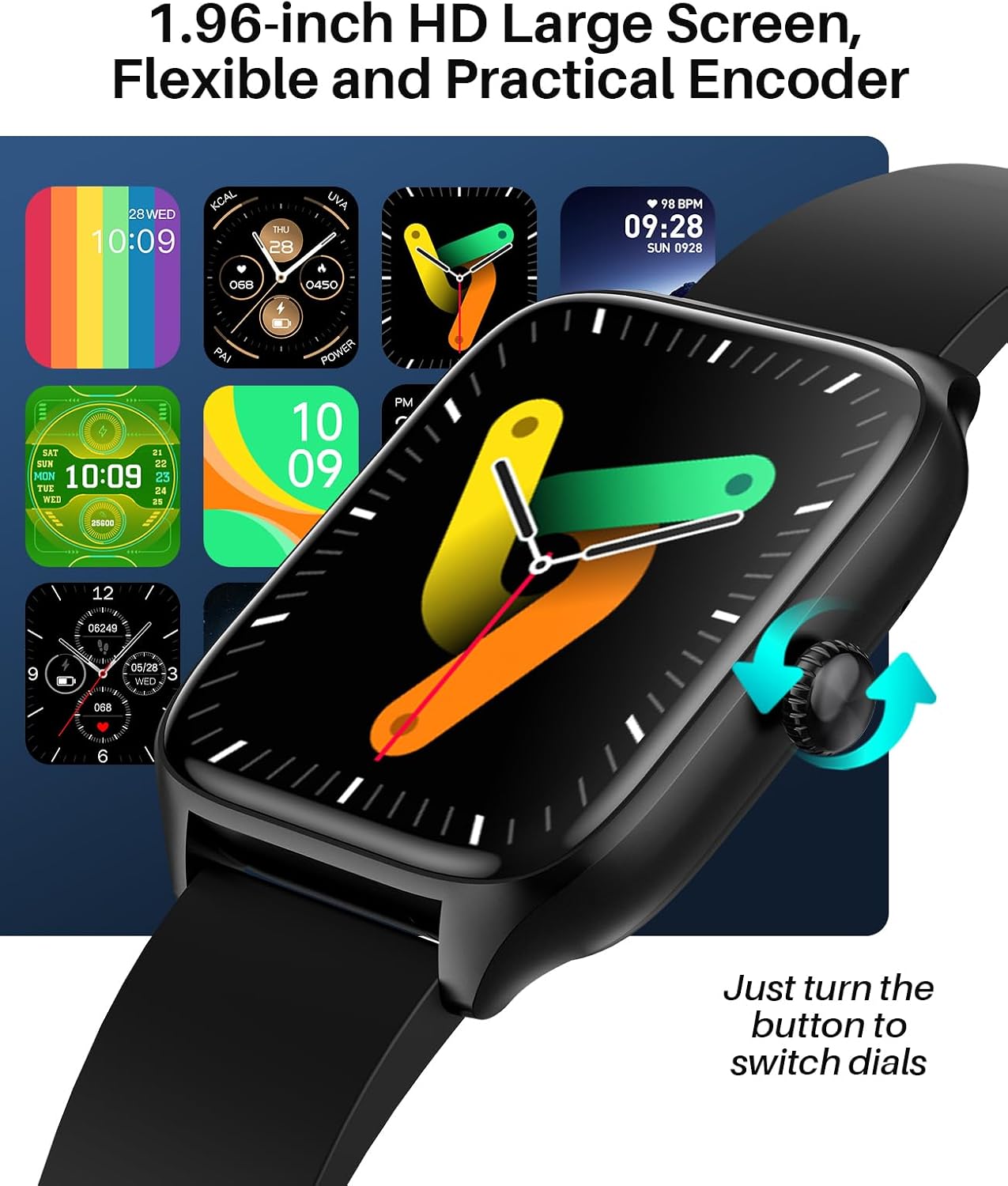
Image: A variety of digital and analog watch faces available for the SOUYIE Smart Watch T19Pro.
4.2. Abojuto Ilera
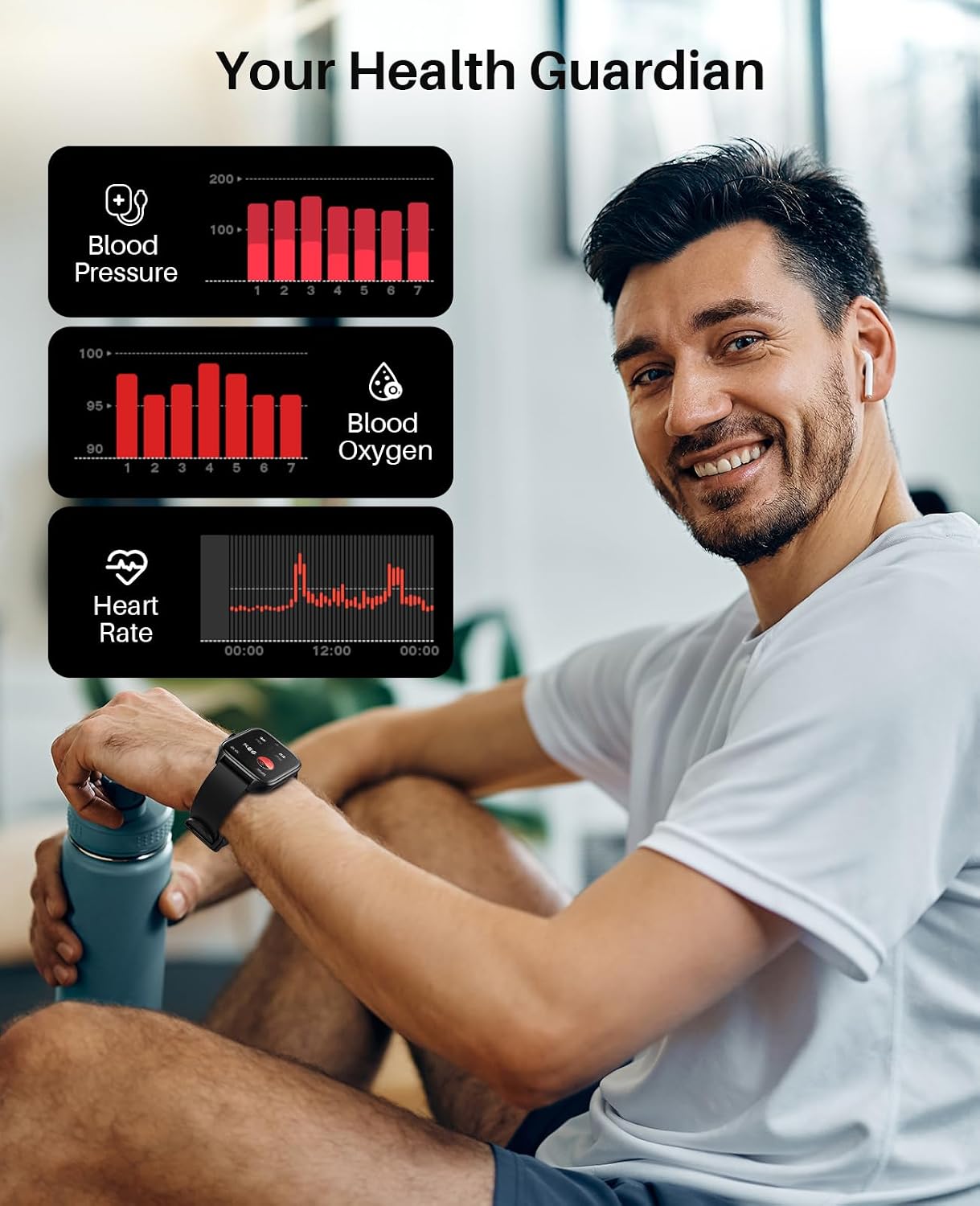
The SOUYIE Smart Watch T19Pro utilizes optical sensors to monitor various health metrics.
- Atẹle Oṣuwọn ọkan: Ó ń tọ́pasẹ̀ ìlù ọkàn rẹ nígbà gbogbo.
- Atẹgun Atẹgun Ẹjẹ (SpO2): Ṣe iwọn awọn ipele atẹgun ẹjẹ.
- Atẹle titẹ ẹjẹ: Pese awọn kika titẹ ẹjẹ.
- Olutọpa oorun: Monitors your sleep quality, including awake, light, REM, and restful sleep stages.

Image: A user wearing the SOUYIE Smart Watch T19Pro, with graphical representations of blood pressure, blood oxygen, and heart rate data.

Image: A woman sleeping while wearing the SOUYIE Smart Watch T19Pro, displaying sleep duration, heart rate, stress levels, and blood oxygen saturation.
4.3. Amọdaju Titele
The smartwatch is equipped with features to track your physical activity.
- Olutọpa iṣẹ ṣiṣe: Records your daily activity.
- Pedometer: Counts your steps.
- Olutọpa kalori: Estimates calories burned during activities.
- Awọn ọna Idaraya: Over 100 built-in exercise modes to record workout time and calories burned.

Image: A man playing tennis while wearing the SOUYIE Smart Watch T19Pro, with icons representing over 100 sports modes.
4.4. Awọn ẹya ara ẹrọ ibaraẹnisọrọ
Stay connected with your SOUYIE Smart Watch T19Pro.
- Awọn ipe Bluetooth: Make and answer calls directly from your watch when connected via Bluetooth.
- Awọn iwifunni Ifiranṣẹ: Receive alerts for text messages and app notifications (e.g., WhatsApp, Facebook, Twitter).
- Oluranlọwọ ohun AI: Use voice commands for various functions.

Image: The SOUYIE Smart Watch T19Pro showing a Bluetooth call interface, with various messaging and social media app icons indicating notification capabilities.
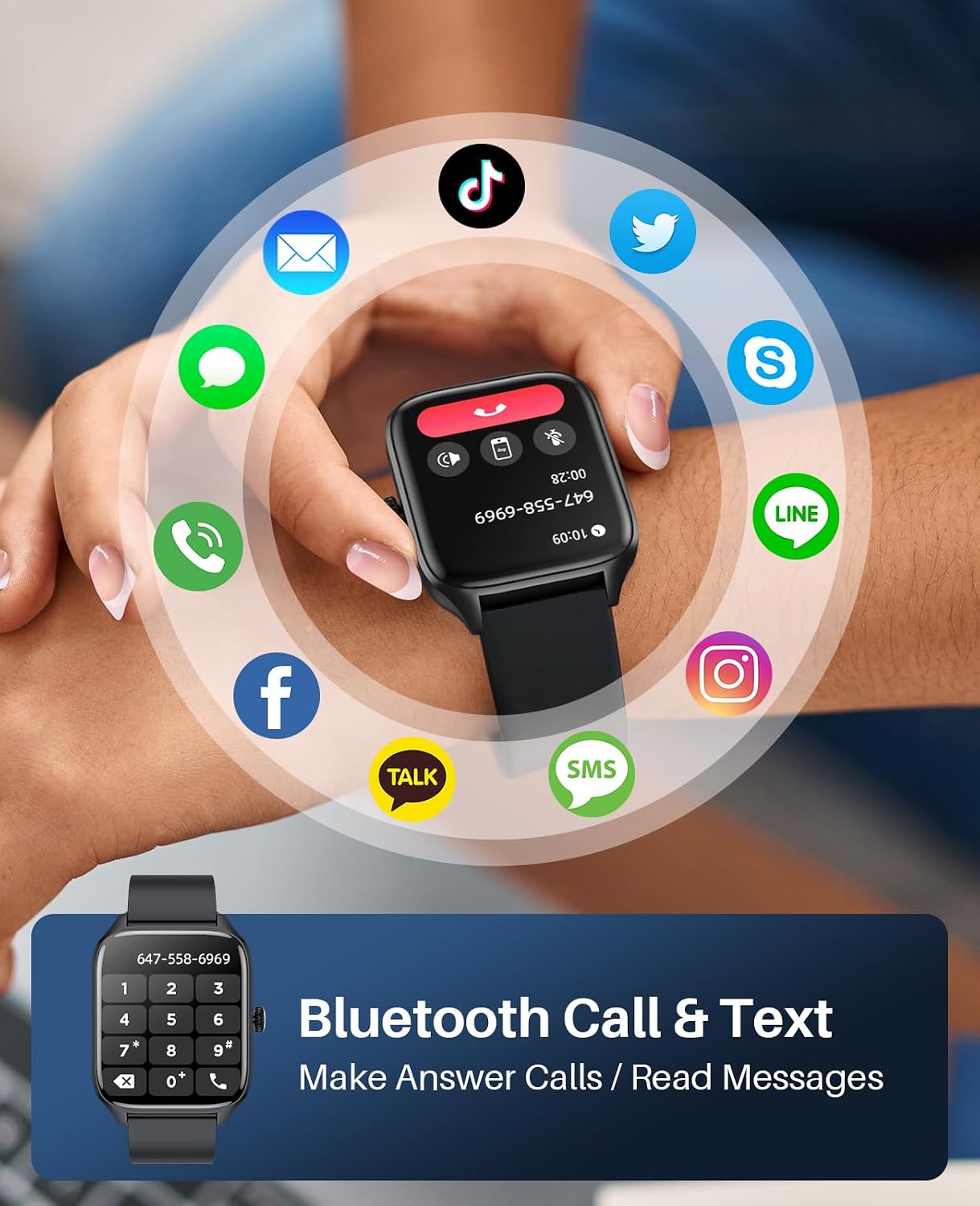
Image: The SOUYIE Smart Watch T19Pro displaying options for dialing, answering, rejecting calls, viewing contacts, and message reminders.

Image: The SOUYIE Smart Watch T19Pro showing the voice assistant interface with example commands like "Please turn off the alarm" and "How's the weather today?".
4.5. Additional Smart Functions
The T19Pro offers a range of practical tools for daily convenience.
- Iṣakoso Orin
- Ẹrọ iṣiro
- Olurannileti Sedentary
- àjọsọpọ Games
- Aago itaniji
- Aago iṣẹju-aaya
- Iwọn otutu
- Latọna kamẹra Iṣakoso
- Live Weather Updates

Image: A man wearing the SOUYIE Smart Watch T19Pro, showcasing its multifunctional smart assistant features including alarm, calculator, music player, timer, and flashlight.
5. Omi Resistance
The SOUYIE Smart Watch T19Pro has an IP67 waterproof rating. This means it is resistant to splashes, rain, and brief immersion in water. It can be used for daily activities such as cold showers or washing hands. It is not recommended for swimming, diving, or exposure to hot water or steam.

Image: A man by a pool wearing the SOUYIE Smart Watch T19Pro, illustrating its IP67 waterproof capability for daily use.
6. Awọn pato
| Ẹya ara ẹrọ | Sipesifikesonu |
|---|---|
| Nọmba awoṣe | T19Pro |
| Ọja Mefa | 5.51 x 3.86 x 1.1 inches |
| Iwọn Nkan | 1.87 iwon (53 Giramu) |
| Iwon iboju | 1.96 inches |
| Eto isesise | Android (5.0 ati loke) ati iOS (9.0 ati loke) |
| Asopọmọra Technology | Bluetooth |
| Agbara Batiri | 280 Milionuamp Hours (280mAh) |
| Akoko gbigba agbara | O fẹrẹ to awọn wakati 2 |
| Lilo deede aye batiri | O fẹrẹ to awọn ọjọ 7 |
| Akoko Iduro | O fẹrẹ to awọn ọjọ 30 |
| Omi Resistance | IP67 |
| Pataki Awọn ẹya ara ẹrọ | Activity tracker, alarm clock, blood pressure monitor, calorie tracker, camera, heart rate monitor, notifications, oximeter (SpO2), pedometer, phone, sleep monitor, text messaging, heart rate display, thermometer, AI voice assistant, music control, multi-dial switching, calculator, sedentary reminder, casual games, remote camera control, live weather, custom wallpapers. |
7. Itọju ati Itọju
- Ninu: Máa fọ aago agogo rẹ déédéé, kí o sì fi aṣọ gbígbẹ tó rọra mú dì í. Tí ó bá pọndandan, lo aṣọ díẹ̀.amp aṣọ àti ọṣẹ díẹ̀, lẹ́yìn náà, fi omi wẹ̀ kí o sì gbẹ ẹ́ dáadáa.
- Yago fun Kemikali: Do not use harsh chemicals, cleaning solvents, or strong detergents, as they may damage the watch's finish or components.
- Iwọn otutu: Yago fun ṣiṣafihan aago si awọn iwọn otutu to gaju (gbona tabi otutu) tabi oorun taara fun awọn akoko gigun.
- Ibi ipamọ: When not in use, store the watch in a cool, dry place.
8. Laasigbotitusita
- Wo Ko Tii: Rii daju pe aago naa ti gba agbara ni kikun. Sopọ mọ ṣaja ki o duro fun iṣẹju diẹ ṣaaju ki o to gbiyanju lati tan-an.
- Awọn oran Asopọmọra: Verify that Bluetooth is enabled on your smartphone and the "Da Fit" app is open. Try restarting both your phone and the smartwatch.
- Awọn iwifunni Ko Gba: Check the "Notifications" settings in the "Da Fit" app to ensure that notifications are enabled for the desired applications. Also, check your phone's system notification settings for the app.
- Awọn kika ti ko pe: Rii daju pe aago naa ti wọ snugly lori ọwọ ọwọ rẹ, kii ṣe ju tabi alaimuṣinṣin pupọ. Nu awọn sensọ lori ẹhin aago naa.
- Iboju Ko dahun: Gbiyanju tun aago naa bẹrẹ. Ti ọrọ naa ba wa, rii daju pe iboju jẹ mimọ ati gbẹ.
9. Atilẹyin ọja ati Support
SOUYIE smartwatches are supported by a commitment to service quality.
- Ilana Pada: A 30-day free return policy is offered.
- Atilẹyin ọja: The product includes a 1-year warranty.
- Atilẹyin Onibara: 24/7 customer support is available. For assistance, please contact SOUYIE customer service through your purchase platform (e.g., "Find order --- Contact seller" on Amazon).