
1. Ifihan
This manual provides essential instructions for the assembly, operation, and maintenance of your Devoko 140x60cm Electric Height Adjustable Standing Desk, Model 0463. Designed to promote a healthier work environment, this desk allows you to seamlessly switch between sitting and standing positions, enhancing productivity and reducing physical strain.
2. Alaye Aabo
- Iṣọra: Operate the electric height adjustment mechanism with care.
- Maa ko koja awọn ti o pọju fifuye agbara ti 70 kg on the desktop to prevent damage or injury.
- Pa awọn ọmọde ati awọn ohun ọsin kuro ni tabili lakoko iṣẹ.
- Ensure all cables are properly managed to avoid entanglement during height adjustments.
- Do not place hands or objects near moving parts of the desk frame.
- Always ensure the desk is on a level surface before operation.
3. Ọja Ipariview
The Devoko Electric Height Adjustable Standing Desk features a robust design for stability and durability. Key components include:
- Electric height-adjustable frame with T-shaped legs.
- 140x60cm desktop made of engineered wood.
- Integrated control panel with LED display and memory presets.
- Monitor support for ergonomic screen placement.
- Cable management grommets and rounded corners for safety.
- Accessory hook for headphones or bags.

Image 3.1: Fully assembled Devoko Electric Standing Desk with monitor support, laptop, and accessories.
4. Eto ati Apejọ
Detailed installation instructions are included in the product packaging. Please refer to these instructions for step-by-step guidance. General assembly involves:
- Ṣíṣí gbogbo àwọn ohun èlò pa mọ́ àti ṣíṣe àyẹ̀wò ní ìbámu pẹ̀lú àkójọ àwọn ohun èlò.
- Assembling the desk frame, ensuring all screws are securely tightened.
- Attaching the desktop sections and monitor support.
- Connecting the control panel and power supply.

Image 4.1: Diagram illustrating the dimensions of the desk components, including the 140cm x 60cm desktop and the height-adjustable frame.
5. Awọn ilana Iṣiṣẹ
5.1. Giga tolesese
The desk's height can be adjusted electrically between 73 cm and 118 cm. Use the control panel located on the front edge of the desk.
- Tẹ awọn OKE (▲) bọtini lati gbe tabili soke.
- Tẹ awọn Si isalẹ (▼) bọtini lati kekere ti awọn Iduro.
- Release the button when the desired height is reached. The LED display will show the current height.
5.2. Awọn tito iranti
The control panel allows you to save two frequently used heights for quick adjustment.
- Ṣe àtúnṣe tábìlì náà sí gíga tí o fẹ́ nípa lílo àwọn bọ́tìnì UP/SOWN.
- Tẹ awọn "M" button (Memory) once, then press either "1" or "2" to save the current height to that preset.
- To recall a saved height, simply press the corresponding "1" or "2" button. The desk will automatically move to the saved position.
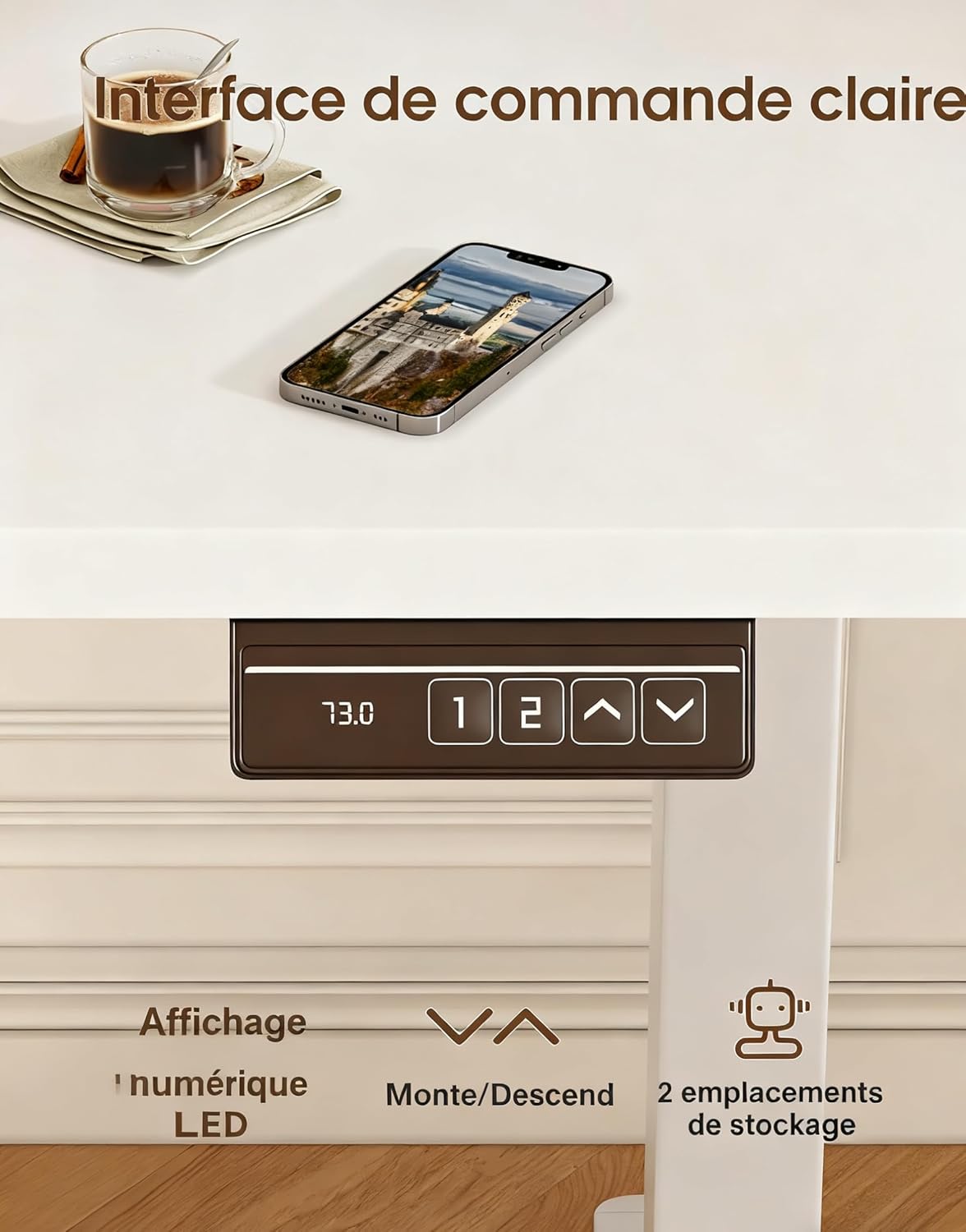
Image 5.1: Close-up of the desk's control panel, showing the LED height display, up/down arrows, and two memory preset buttons.
5.3. Ergonomics and Usage Tips
Alternating between sitting and standing throughout your workday can improve posture, circulation, and overall well-being. Utilize the monitor support to ensure your screen is at eye level, whether sitting or standing, to reduce neck and eye strain.

Image 5.2: Illustrations demonstrating correct ergonomic postures for sitting and standing at the desk, highlighting the importance of monitor height.

Image 5.3: Visual representation of the desk's special features, including cable management grommets, rounded corners for safety, and an integrated hook for accessories.
6. Itọju
- Ninu: Nu tabili ati fireemu nu pẹlu asọ, damp asọ. Yago fun abrasive ose tabi simi kemikali.
- Awọn ayewo: Lokọọkan ṣayẹwo gbogbo awọn skru ati awọn asopọ lati rii daju pe wọn wa ni wiwọ.
- Iṣakoso USB: Ensure power cords and other cables are not pinched or tangled, especially during height adjustments.
7. Laasigbotitusita
If your desk is not functioning as expected, please check the following:
- Ko si gbigbe: Rii daju pe okun agbara ti wa ni edidi ni aabo sinu tabili mejeeji ati iṣan ogiri ti n ṣiṣẹ.
- Iyipo ti ko ni deede: Check that the desk is not overloaded and that all components are assembled correctly and securely.
- Awọn koodu aṣiṣe: If the LED display shows an error code, refer to the detailed troubleshooting section in your included assembly manual.
8. Awọn pato
| Ẹya ara ẹrọ | Sipesifikesonu |
|---|---|
| Brand | Devoko |
| Nọmba awoṣe | 0463 |
| Desktop Dimensions (L x W) | 140 cm x 60 cm |
| Giga tolesese Range | 73 cm - 118 cm |
| O pọju fifuye Agbara | 70 kg |
| Ohun elo | Engineered Wood (Desktop), Metal (Frame) |
| Iwọn Nkan | 21.8 kg |
| Ariwo Ipele | Kere ju 60 dB |
| Awọn tito iranti | 2 |
9. Atilẹyin ọja ati Support
For specific warranty information and after-sales support, please refer to the documentation included with your product or contact Devoko customer service. Detailed installation instructions and further assistance are available through official support channels.