
TEYES CC3 2K
TEYES CC3 2K Car Radio Multimedia Video Player Navigation Stereo GPS Headunit User Manual
Model: CC3 2K
1. Ifihan
This manual provides comprehensive instructions for the installation, operation, and maintenance of your TEYES CC3 2K Car Radio Multimedia Video Player Navigation Stereo GPS Headunit. Please read this manual thoroughly before using the product to ensure proper functionality and safety.

Aworan: Iwaju view of the TEYES CC3 2K Headunit displaying its user interface.
2. Alaye Aabo
Nigbagbogbo ṣe akiyesi awọn iṣọra ailewu atẹle lati yago fun ipalara tabi ibajẹ si ẹrọ naa:
- Má ṣe gbìyànjú láti tú tàbí ṣe àtúnṣe ẹ̀rọ náà. Èyí lè fa ìbàjẹ́ kí ó sì sọ àtìlẹ́yìn náà di òfo.
- Rí i dájú pé gbogbo àwọn ìsopọ̀ wáyà wà ní ààbò àti pé wọ́n ní ààbò tó tọ́ láti dènà àwọn ìyípo kúkúrú.
- Avoid operating the device in extreme temperatures or high humidity.
- Ma ṣe dina awọn ṣiṣi afẹfẹ lori ẹyọ naa.
- Kan si alamọja kan fun fifi sori ẹrọ ti o ko ba ni idaniloju nipa awọn igbesẹ eyikeyi.
3. Package Awọn akoonu
Daju pe gbogbo awọn nkan ti a ṣe akojọ si isalẹ wa ninu package:
- 1x Head unit (TEYES CC3 2K)
- 1x okun agbara
- 1x okun USB
- 1x eriali GPS
- 1x AUX okun
- 1x 4G WiFi antenna
- 1x E-book (digital manual)
- 1x Frame (for BMW X5 E39 E53 1999-2006)
- 1x AHD 1080p rear camera
- 1x Mimọ asọ
- 1x Wiring diagram

Image: Visual representation of the TEYES CC3 2K Headunit and its included accessories.
4. Itọsọna fifi sori ẹrọ
This section outlines the general steps for installing the TEYES CC3 2K head unit in compatible BMW X5 E39/E53 models (1999-2006). Professional installation is recommended.
4.1 Pre-Fifi sọwedowo
- Ensure the vehicle's ignition is off and the battery is disconnected before starting.
- Verify compatibility with your specific BMW X5 model and year.
- Familiarize yourself with the vehicle's existing dashboard layout and wiring.

Image: Comparison of a BMW X5 dashboard before and after installation of the TEYES CC3 2K head unit.
4.2 Removal of Existing Unit
- Carefully remove the trim pieces surrounding the factory radio.
- Unscrew and pull out the existing head unit.
- Disconnect all wiring harnesses and antenna cables from the old unit.
4.3 Fifi sori ẹrọ Ẹyọ Ori
- Attach the provided frame to the TEYES CC3 2K head unit.
- Connect the power cable, USB cables, GPS antenna, 4G WiFi antenna, and AUX cable to the corresponding ports on the new head unit. Refer to the included wiring diagram for detailed connections.
- Route the GPS and 4G WiFi antennas to an optimal location for signal reception, typically on the dashboard or under the windshield.
- If installing the rear camera, route its cable from the rear of the vehicle to the head unit and connect it to the designated input.
- Carefully slide the TEYES CC3 2K head unit with the frame into the dashboard opening.
- Secure the unit using the appropriate screws.
- Reattach the dashboard trim pieces.

Image: The OEM panel designed for integrating the TEYES CC3 2K head unit into the vehicle's dashboard.
4.4 Fi sori ẹrọ lẹhin
- Tun batiri ọkọ pọ.
- Turn on the ignition and power on the head unit.
- Perform initial setup, including language, time, and network settings.
- Test all functions: radio, navigation, Bluetooth, USB, and rear camera.
5. Awọn ilana Iṣiṣẹ
The TEYES CC3 2K operates on an Android system, offering a user-friendly interface. Navigate using the touchscreen and physical buttons (if applicable).
5.1 Ipilẹ isẹ
- Titan/Apapa: Tẹ mọlẹ bọtini agbara.
- Iṣakoso iwọn didun: Adjust using the on-screen controls or steering wheel buttons.
- Iboju ile: Tap the home icon to return to the main interface.
- Drawer App: Swipe up or tap the app icon to access all installed applications.

Image: Illustration of the head unit's compatibility with vehicle steering wheel controls for convenient operation.
5.2 Lilọ kiri
- Access the pre-installed navigation application from the home screen or app drawer.
- Enter your destination using the on-screen keyboard or voice command.
- The system supports various map types, including North America.
5.3 Multimedia Sisisẹsẹhin
- Redio: Select the "Radio" application to tune into FM/AM stations. Supports RDS.
- Sisisẹsẹhin USB: Connect USB devices to the available USB ports for audio and video playback. The unit features 3 USB outputs for data transfer.
- Ohun afetigbọ Bluetooth: Pair your smartphone via Bluetooth to stream music.
- Sisisẹsẹhin fidio: Atilẹyin orisirisi fidio ọna kika.

Image: Screenshot of the premium local radio interface on the TEYES CC3 2K head unit.
5.4 Asopọmọra
- Wi-Fi/Hotspot: Connect to a Wi-Fi network or use your phone's hotspot for internet access.
- 4G Internet: The unit supports 4G internet connectivity.
- Bluetooth: For hands-free calling and audio streaming, featuring an upgraded QCC3031QFN Qualcomm module.
- Alailowaya CarPlay & Android Auto: Built-in support for seamless smartphone integration.

Image: Close-up of the three USB output ports provided for data transfer and device connectivity.
5.5 To ti ni ilọsiwaju Awọn ẹya ara ẹrọ
- Pipin Ipo iboju: Utilize the "Freestyle Combination Split Screen Mode" to run two applications simultaneously.
- DSP Audio Processing: Features 2*DSP ADAU1701 + ROHM32107 for enhanced audio quality, including a 27-segment EQ, sound filtering, and optical/coaxial digital audio output.
- Ẹyìn View Kamẹra: Akoko gidi viewing of the vehicle's rear view and support for video recording with the included AHD 1080p rear camera.
- TEYES Vision & TEYES Yahu: Explore creative 3D software applications.

Image: The head unit displaying two applications simultaneously in split-screen mode.

Image: User interface for the DSP audio processing, highlighting the dual DSP chips.

Image: Display showing real-time rear view camera feed with video recording functionality.
6. Itọju
Proper maintenance ensures the longevity and optimal performance of your TEYES CC3 2K head unit.
- Ninu: Use the provided cleaning cloth or a soft, dry cloth to wipe the screen and unit exterior. Avoid abrasive cleaners or solvents.
- Awọn imudojuiwọn sọfitiwia: Periodically check for and install software updates to ensure the latest features and bug fixes.
- Iwọn otutu: Avoid exposing the unit to direct sunlight for prolonged periods or extreme temperatures.
7. Laasigbotitusita
Wo abala yii fun awọn ọran ti o wọpọ ati awọn ojutu wọn. Ti iṣoro naa ba tẹsiwaju, kan si atilẹyin alabara.
| Isoro | Owun to le Fa | Ojutu |
|---|---|---|
| Ẹka ko ni agbara lori. | Asopọ agbara ti ko ni agbara, fiusi ti o fẹ, ati batiri ọkọ ti ge asopọ. | Check power cable connections. Inspect vehicle fuses. Ensure battery is connected. |
| Ko si ohun jade. | Volume too low, audio cables disconnected, incorrect audio source selected. | Increase volume. Verify speaker wire connections. Select correct audio source (e.g., Radio, USB, Bluetooth). |
| Àmì GPS náà kò lágbára tàbí ó sọnù. | A ti fi eriali GPS si tabi ge asopọ kuro ni ọna ti ko tọ. | Ensure GPS antenna is securely connected and placed in an unobstructed location. |
| Awọn oran asopọ Bluetooth. | Device not paired, Bluetooth off on phone/unit, interference. | Rí i dájú pé Bluetooth ti ṣiṣẹ́ lórí àwọn ẹ̀rọ méjèèjì. Tún so ẹ̀rọ náà pọ̀. Sún mọ́ ẹ̀rọ náà. |

Image: An icon representing the Frequently Asked Questions (FAQ) section, indicating support resources.
8. Awọn pato
| Ẹya ara ẹrọ | Ẹ̀kúnrẹ́rẹ́ |
|---|---|
| Nọmba awoṣe | CC3 2K |
| Iwọn Ifihan | 9.5 inches |
| Ifihan ọna ẹrọ | 2K In-cell Display, Gamut Coverage 157% |
| Eto isesise | Android 10 |
| isise | 8 cores 2.0GHz |
| Àgbo | 6GB |
| ROM | 128GB |
| Asopọmọra | Bluetooth (QCC3031QFN Qualcomm), USB, Wi-Fi, Hotspot, 4G Internet |
| Ipo Ijade Ohun | Sitẹrio |
| DSP | 2*DSP ADAU1701 + ROHM32107 |
| Ijade ohun | Optical and coaxial digital audio output |
| Pataki Awọn ẹya ara ẹrọ | Touchscreen, Built-in wireless CARPLAY and ANDROID AUTO, RDS support, TEYES Vision & TEYES Yahu software, Real-time rear view with recording. |
| Included Rear Camera | AHD 1080p |
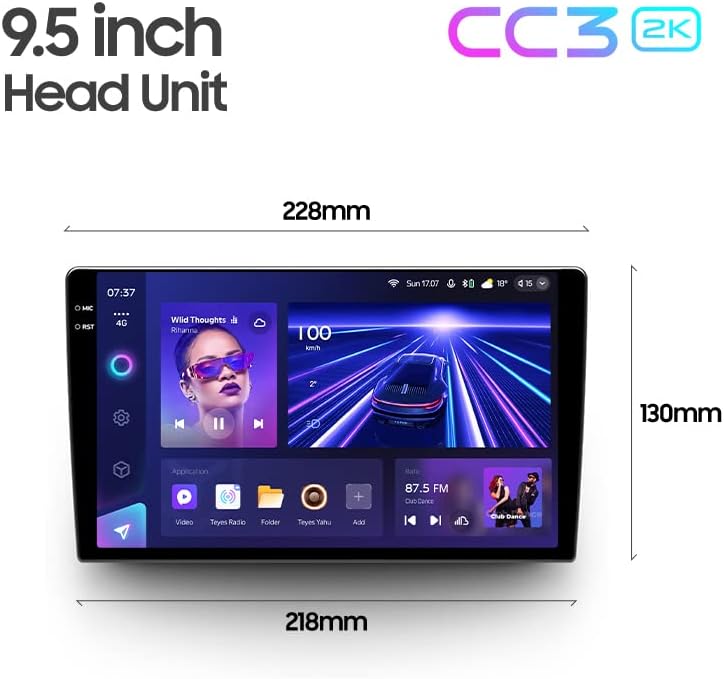
Image: Diagram showing the dimensions of the TEYES CC3 2K Headunit.
9. Atilẹyin ọja ati Support
The TEYES CC3 2K Headunit comes with a 1-odun atilẹyin ọja lati ọjọ ti o ra.
For technical support, warranty claims, or further assistance, please contact TEYES customer service through their official webaaye tabi alagbata ti o ti ra ọja naa. Jeki ẹri rira rẹ fun ijẹrisi atilẹyin ọja.
Manufacturer: Shenzhen TEYES High tech Co., Ltd.
Ask a question about this manual
Ask about setup, troubleshooting, compatibility, parts, safety, or missing instructions. Manuals+ will review the question and use this page’s manual context to help answer it.