
Ọrọ Iṣaaju
This manual provides instructions for the VINABTY SYJ-TM-3000-SYJ replacement remote control, designed for use with various TECHNOMATE receiver models including TM-3000, TM-3150, TM-3200, TM-3300, TM-3400, and TM-3500 series. Please read this manual carefully to ensure proper setup and operation of your new remote control.

Aworan 1: Iwaju view of the VINABTY replacement remote control. This image displays the full layout of buttons, including the power button, number pad, navigation controls, and various function keys.
Ṣeto
1. Fifi sori batiri
- Wa ideri iyẹwu batiri ni ẹhin isakoṣo latọna jijin.
- Gbe ideri si isalẹ tabi tẹ latch lati ṣii.
- Insert two AAA batteries (not included) into the compartment, ensuring the positive (+) and negative (-) terminals match the diagrams inside the compartment.
- Rọpo ideri iyẹwu batiri nipa gbigbe pada si aaye titi yoo fi tẹ ni aabo.

Aworan 2: View of the battery compartment on the back of the remote control, showing the correct orientation for AAA battery insertion.
2. Lilo akọkọ
This VINABTY replacement remote control is pre-programmed for direct use with compatible TECHNOMATE receivers. No additional programming or pairing is typically required. Simply point the remote control towards your receiver and begin operation.
Awọn ilana Iṣiṣẹ
The remote control features 18 buttons designed for intuitive control of your TECHNOMATE receiver. Below is a general overview ti awọn iṣẹ bọtini ti o wọpọ.
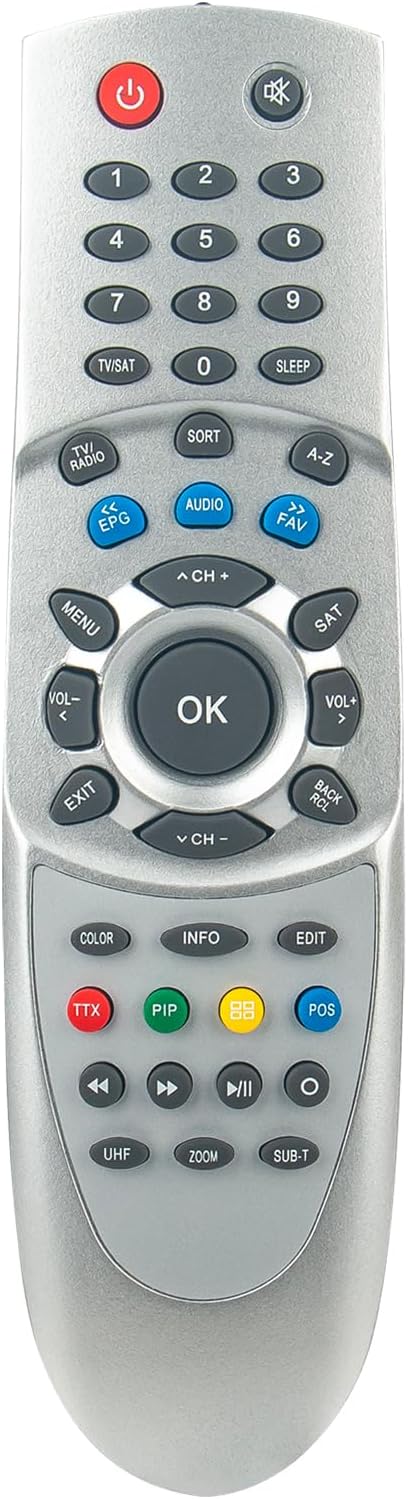
Aworan 3: Oke-isalẹ view of the remote control, providing a clear perspective of all buttons and their labels for easy identification.
- Bọtini agbara (⏻): Turns the receiver on or off.
- Paadi Nọmba (0-9): Directly input channel numbers or menu selections.
- TV/SAT Button: Switches between TV and Satellite modes.
- Iwọn didun Soke/Isalẹ (VOL+/-): Ó ń ṣe àtúnṣe ohùn.
- Channel Up/Down (CH+/-): Changes the channel.
- Bọtini Parẹ✖): Mu ohun naa mu tabi mu ohun naa kuro.
- Bọtini Akojọ aṣyn: Accesses the receiver's main menu.
- Bọtini O dara: Jẹrisi awọn aṣayan ninu awọn akojọ aṣayan.
- Awọn bọtini lilọ kiri (Soke, Isalẹ, Osi, ọtun): Lilọ kiri nipasẹ awọn akojọ aṣayan ati awọn aṣayan.
- Bọtini Jade: Exits the current menu or screen.
- Bọtini EPG: Displays the Electronic Program Guide.
- Bọtini Ohun: Ó yan àwọn orin tàbí àwọn ìpele ohùn.
- Bọtini FAV: Wọle si atokọ awọn ikanni ayanfẹ.
- Awọn bọtini Awọ (pupa, Alawọ ewe, Yellow, Blue): These buttons typically correspond to specific functions displayed on-screen within menus or interactive services.
- Awọn iṣakoso ṣiṣiṣẹsẹhin (Ṣiṣere, Daduro, Duro, Dapada sẹhin, Sare siwaju): Controls media playback if your receiver supports it.
For detailed functions of specific buttons, refer to your TECHNOMATE receiver's original user manual, as button functionalities can vary slightly between receiver models.
Itoju
Batiri Rirọpo
When the remote control's range decreases or it becomes unresponsive, it is likely time to replace the batteries. Follow the battery installation steps outlined in the "Setup" section. Always replace both batteries at the same time with new AAA batteries.
Ninu
Lati nu isakoṣo latọna jijin, rọra nu dada rẹ pẹlu asọ ti o gbẹ. Fun idoti alagidi, die-die dampen the cloth with water or a mild, non-abrasive cleaner. Avoid using harsh chemicals or excessive moisture, as these can damage the remote's electronics.
Laasigbotitusita
| Isoro | Owun to le Fa | Ojutu |
|---|---|---|
| Isakoṣo latọna jijin ko ṣiṣẹ. |
|
|
| Ìwọ̀n tó lopin tàbí ìdáhùn tó ń lọ lẹ́ẹ̀kọ̀ọ̀kan. |
|
|
Awọn pato
- Brand: VINABTY
- Nọmba awoṣe: SYJ-TM-3000-SYJ
- Àwọn Àwòṣe Olùgbà Tó Báramu: TECHNOMATE TM-3000, TM-3150, TM-3200, TM-3300, TM-3400, TM-3500 series
- Asopọmọra Technology: Infurarẹẹdi (IR)
- Nọmba ti Awọn bọtini: 18
- Ibiti o pọju: Awọn mita 10
- Awọn ẹrọ atilẹyin: Home cinema (up to 10 devices, though this remote is specific to TECHNOMATE receivers)
- Orisun agbara: Batiri AAA 2 x (ko si ninu rẹ)
Atilẹyin ọja ati Support
Specific warranty information for this VINABTY replacement remote control is not provided in the product details. For any warranty claims, technical support, or further assistance, please contact the seller or the manufacturer directly through your purchase platform.