
HICON HICON
HICON Mondo Gaming Chair User Manual
Model: HICON
1. Alaye Aabo
Ikilọ: Read this instruction manual carefully for safe assembly and use. Always pay attention to the user's weight and the stability of the chair. For more detailed information, please refer to the product packaging or the full instruction manual.
2. Ọja Ipariview
The HICON Mondo Gaming Chair is engineered to provide superior comfort and support for extended periods of use, whether for gaming, working, or relaxing. Its design integrates ergonomic principles with robust construction to ensure a healthy posture and long-lasting durability.
This gaming chair features a unique ergonomic design with a winged back that provides multi-point body contact, effectively distributing pressure and protecting your spine and lumbar region. It includes specialized head and lumbar pillows for comprehensive support, adapting to various body shapes.
The chair is highly versatile, offering a 360-degree swivel, smooth-rolling wheels for easy mobility, and a wide recline range from 90 to 170 degrees, suitable for working, playing, reading, or even napping. An adjustable, retractable footrest allows for comfortable relaxation. The seat and armrest heights are also adjustable to accommodate different desk heights and sitting preferences.
Constructed with a high-quality, hand-stitched PU leather covering an alloy frame and 12.5 cm high-density foam, the chair ensures both comfort and resilience. It is equipped with a state-of-the-art Class 4 gas lift and a solid mechanism, guaranteeing safety and stability. The chair has a robust maximum load capacity of 200 kg.

Figure 2.1: HICON Mondo Gaming Chair in pink and white.
3. Ergonomic Awọn ẹya ara ẹrọ
The HICON Mondo Gaming Chair is designed with your comfort and health in mind, incorporating several ergonomic features:
- Winged Backrest: Provides multi-point body contact to distribute pressure evenly and protect your spine and lumbar region.
- Atilẹyin Lumbar Atunṣe: Position the lumbar support to fit the natural curve of your lower back, ensuring optimal support and a relaxed, neutral posture.
- Memory Foam Headrest: The combination of memory foam and the headrest design adapts to your individual contours, providing comprehensive support and can help relieve pain.
- Awọn ihamọra ti o le ṣatunṣe: Ensure your arms are at approximately a 90-degree angle, aligning with your desk height to support your elbows comfortably. The width can also be adjusted to keep your elbows close to your body.
- Ẹsẹ ti o le fa pada: Allows you to recline and relax in a comfortable position, taking pressure off your legs and feet.

Figure 3.1: Ergonomic Design highlighting neck, shoulder, back, and lumbar support.

Figure 3.2: Memory Foam Headrest and Lumbar Pillow, adapting to contours and providing comfort.
4. Eto ati Apejọ
While specific assembly instructions are typically provided with the product packaging, here is a general guide for setting up your HICON Mondo Gaming Chair:
- Yọ awọn ohun elo kuro: Carefully remove all parts from the packaging and lay them out. Verify that all components listed in the product's assembly guide are present.
- Ṣepọ ipilẹ: Insert the five caster wheels into the holes at the end of each leg of the chair's star base. Ensure they click securely into place.
- Install the Gas Lift: Gbe silinda gbe gaasi sinu iho aarin ti ipilẹ irawọ ti a pejọ.
- Attach the Mechanism: Ṣe aabo ẹrọ ijoko si abẹlẹ ti timutimu ijoko nipa lilo awọn skru ti a pese. Rii daju pe iwaju ẹrọ naa dojukọ iwaju ijoko naa.
- So ijoko pọ si Ipilẹ: Carefully place the assembled seat cushion (with mechanism) onto the gas lift cylinder.
- So Backrest: Align the backrest with the mounting brackets on the seat mechanism. Secure it using the provided screws.
- Fi Armrests sori ẹrọ: Attach the armrests to the sides of the seat and backrest, following the specific instructions for your model.
- Fi awọn irọri kun: Attach the headrest and lumbar support pillows using their straps.
- Ṣayẹwo Ipari: Once assembled, sit on the chair to test its stability and functionality. Ensure all screws are tightened and adjustments work smoothly.
5. Ṣiṣẹ ati Awọn atunṣe
To maximize comfort and ergonomic benefits, adjust your HICON Mondo Gaming Chair according to your body and preferences:
- Atunse Giga Ijoko: Locate the lever under the seat (usually on the right side). To raise the seat, lift the lever while taking your weight off the chair. To lower, lift the lever while seated. Adjust until your feet are flat on the floor and your knees are bent at a 90-110 degree angle. If your feet don't reach, consider using a footrest.
- Atunse Ijinle ijoko: Sit upright and adjust the seat depth so that there is approximately a 'fist distance' (four fingers) between the back of your knees and the front edge of the seat. This prevents pressure on blood vessels and nerves in your legs.
- Isunmọ Afẹyinti: Use the recline lever (typically on the left side) to adjust the backrest angle from 90 to 170 degrees. You can lock the backrest at your desired angle or set it to 'free float' for dynamic movement. When leaning back, ensure the chair moves smoothly. When sitting still, you should be able to sit upright without leaning on the backrest.
- Atunṣe Armrest: Adjust the height of the armrests so that your forearms rest comfortably on them, ideally at the same height as your desk, forming a 90-degree angle at your elbows. Some models also allow for width adjustment to keep your elbows close to your body.
- Isẹ ẹsẹ: Pull out the retractable footrest from under the seat. You can adjust its angle by 15 degrees for optimal relaxation. Push it back in when not in use.

Figure 5.1: Recline angles for various activities: Working, Film Watching, and Rest.
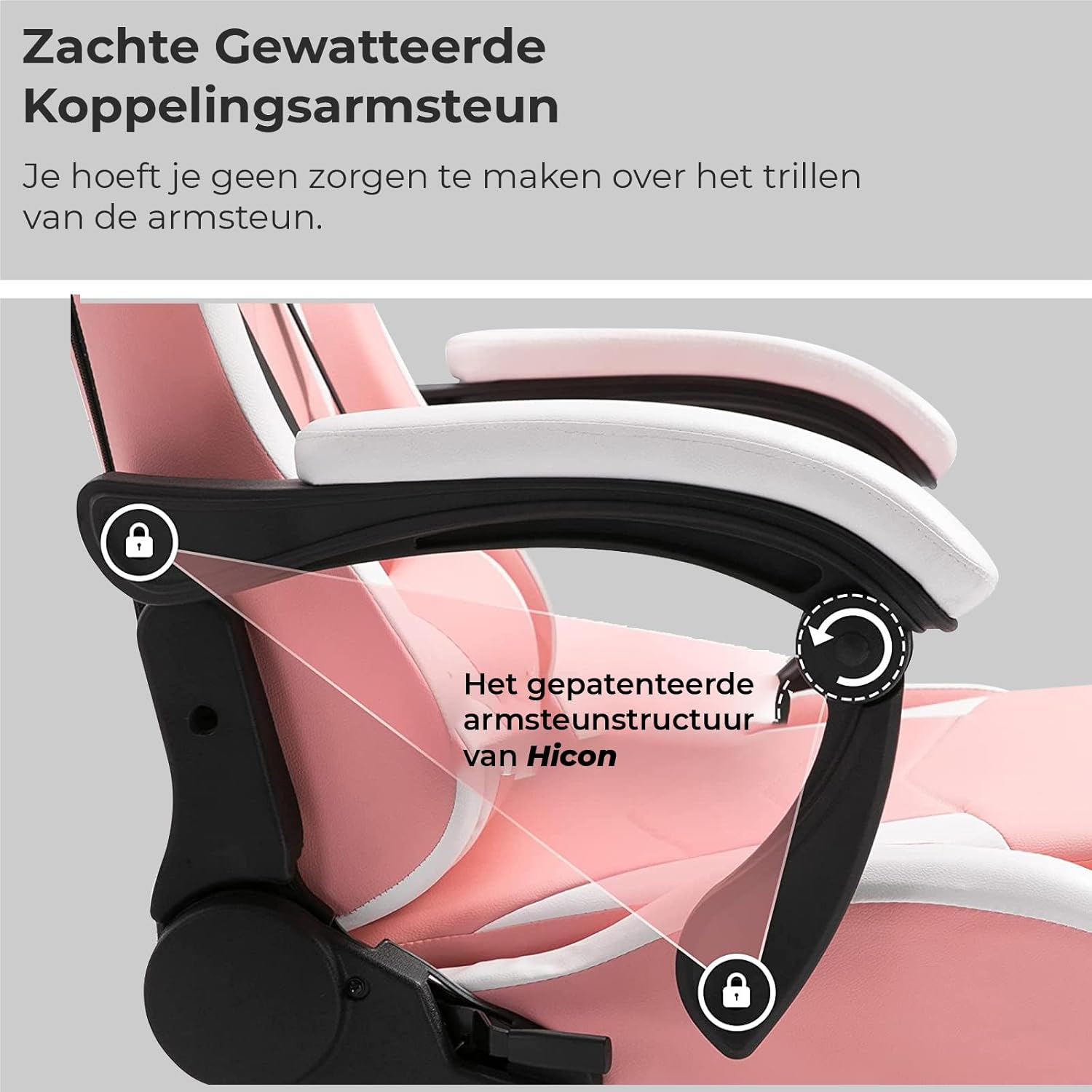
Figure 5.2: Detail of the soft padded linkage armrest, designed for stability and comfort.
6. Itọju
Regular maintenance will extend the life and appearance of your HICON Mondo Gaming Chair:
- Ninu Alawọ PU: Nu dada nu pẹlu asọ, damp cloth. For tougher stains, use a mild soap solution and wipe dry immediately. Avoid harsh chemicals, abrasive cleaners, or solvents, as they can damage the material.
- Fireemu ati Ipilẹ: Periodically check and tighten all screws and bolts to ensure stability. Wipe metal parts with a dry cloth to prevent dust buildup.
- Awọn kẹkẹ Caster: Clean the wheels regularly to remove hair, dust, and debris that can impede smooth movement. You can use a small brush or vacuum cleaner.
- Awọn ẹya gbigbe: If any moving parts (like the gas lift or recline mechanism) become stiff or squeaky, a small amount of silicone-based lubricant can be applied, but consult the manufacturer's guidelines if unsure.
- Yago fun Imọlẹ Oorun Taara: Prolonged exposure to direct sunlight can cause the PU leather to fade or crack. Position your chair away from direct sunlight if possible.
7. Laasigbotitusita
Eyi ni diẹ ninu awọn ọran ti o wọpọ ati awọn ọna abayọ wọn:
| Isoro | Owun to le Fa | Ojutu |
|---|---|---|
| Chair Squeaks | Loose bolts, friction between parts | Tighten all assembly bolts. Apply silicone lubricant to moving parts or joints. |
| Chair Sinks/Doesn't Stay Up | Gas lift malfunction | The gas lift may need replacement. Contact customer support. |
| Caster Wheels Don't Roll Smoothly | Debris in wheels, damaged casters | Clean wheels thoroughly. If damaged, replace casters. |
| Backrest Doesn't Recline/Lock | Mechanism issue, lever stuck | Check if the recline lever is fully engaged or disengaged. Ensure no obstructions. |
8. Awọn pato
Detailed specifications for the HICON Mondo Gaming Chair:
| Iwa | Iye |
|---|---|
| Brand | IN.HOMEXL / HICON |
| Nọmba awoṣe | HICON |
| Awọn iwọn Ọja (L x W x H) | 10D x 10W x 10H millimeters (approx. 1 x 1 x 1 cm) |
| Iwọn Nkan | 23 kilo |
| Pada Style | Wing Back |
| Ijoko elo Iru | Polyurethane (PU) |
| Iṣeduro iwuwo iwuwo | 200 kilo |
| Ara | Igbalode |
| Yara Iru | Office, Game and Recreation Room |
| Ibiti ọjọ ori (Apejuwe) | Agbalagba |
| Igbẹhin (A) | 59.5 cm |
| Backrest Height (B) | 82.5 cm |
| Seat Width (C) | 41 cm |
| Armrest Width (D) | 46 cm |
| Adjustable Height (E) | 33-46 cm |
| Seat Depth (F) | 58 cm |

Figure 8.1: Detailed dimensions of the HICON Mondo Gaming Chair.

Figure 8.2: Comparison illustrating the enlarged backrest and seat of the HICON chair.

Figure 8.3: Illustration of the robust metal frame and updated PU wheels for enhanced safety and durability.
9. Atilẹyin ọja ati Support
Specific warranty details for the HICON Mondo Gaming Chair are not provided in this manual. Please refer to the product packaging, purchase documentation, or the manufacturer's official website for information regarding warranty coverage and terms.
For technical support, spare parts, or any inquiries not covered in this manual, please contact HICON customer service through the contact information provided with your purchase or on the official HICON webojula.