
HICON HICON
HICON Incanto Gaming Chair User Manual
Model: HICON
Brand: HICON
1. Ifihan
Welcome to the user manual for your HICON Incanto Gaming Chair. This manual provides essential information on the assembly, operation, maintenance, and troubleshooting of your new chair. Designed for optimal comfort and ergonomic support, the HICON Incanto chair is suitable for extended periods of gaming or office work. Please read this manual carefully to ensure proper use and to maximize the lifespan of your product.

Figure 1: HICON Incanto Gaming Chair, a black chair with red stitching, featuring a headrest, lumbar pillow, and footrest.
2. Eto ati Apejọ
While specific step-by-step assembly instructions are not provided in detail, the general assembly process for the HICON Incanto Gaming Chair involves connecting the main components. It is recommended to lay out all parts before beginning assembly.
- So awọn backrest si awọn ipilẹ ijoko.
- Insert the gas lift cylinder into the five-star base.
- Connect the assembled seat and backrest to the gas lift and base.
- Attach the armrests and any additional cushions (headrest, lumbar support).
- Ensure all screws and bolts are securely tightened before using the chair.
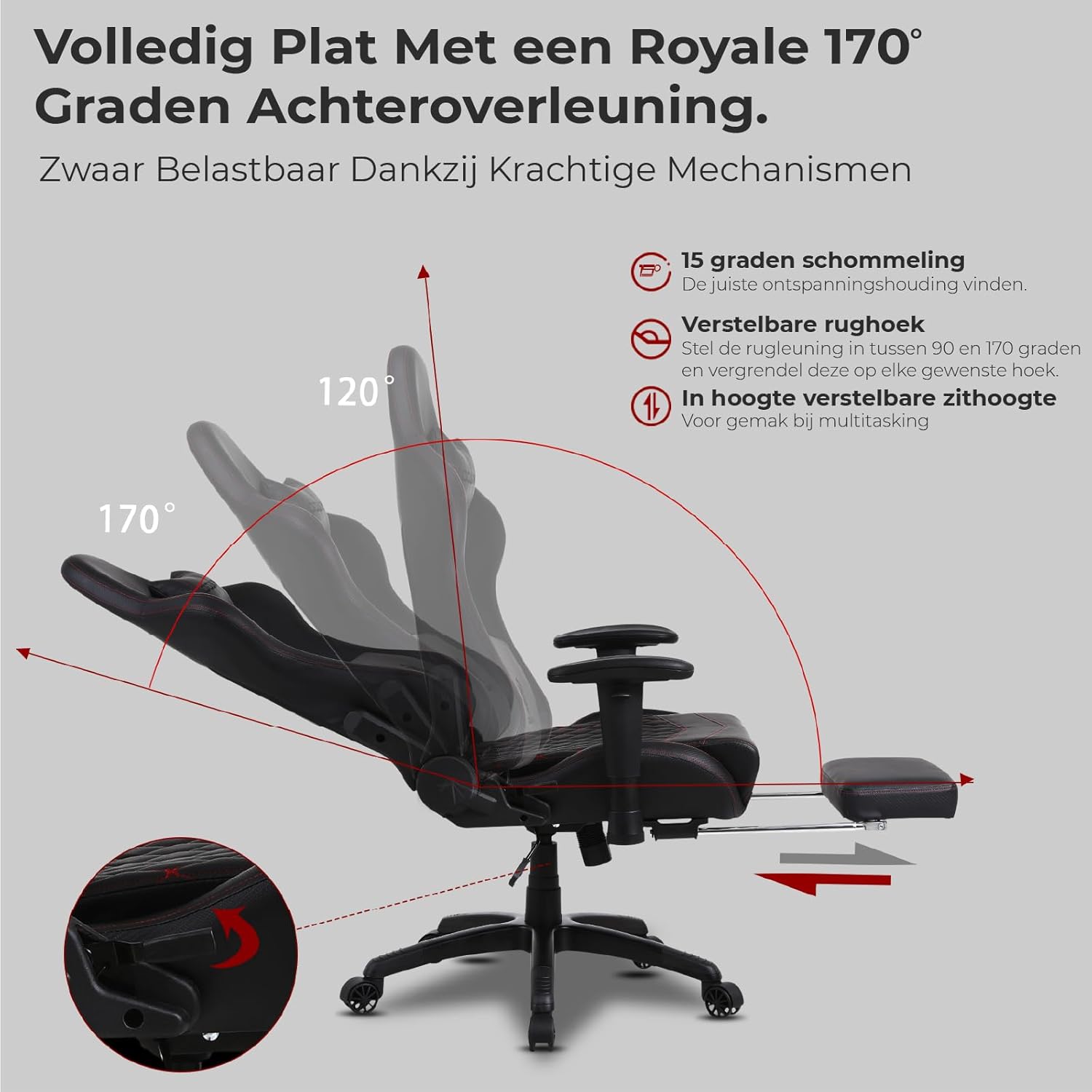
Figure 2: Illustration of the robust metal frame integrated within the chair's structure, ensuring durability and safety.

Figure 3: Components for adjustable seat height, including a heavy-duty Class 4 gas lift, and the USB connection for the massage function.
3. Awọn ilana Iṣiṣẹ
The HICON Incanto Gaming Chair offers multiple adjustment features to customize your seating experience for maximum comfort and ergonomic support.
3.1. Ijoko Giga tolesese
The chair features a Class 4 heavy-duty gas lift for smooth and precise seat height adjustment. To adjust, locate the lever under the seat (typically on the right side). Pull the lever upwards while applying or releasing your weight to move the seat up or down. Release the lever to lock the height. The correct height allows your feet to be flat on the floor with your knees bent at a 90-110 degree angle.
3.2. Backrest Recline and Rocking Function
The backrest can be reclined from 90° (upright) to a full 170° (nearly flat) for various relaxation postures. Use the recline lever on the side of the chair to adjust and lock the backrest at your desired angle. The chair also offers a 15-degree rocking motion for dynamic sitting. It is recommended not to fix the backrest in a rigid position but to allow some flexibility for movement.

Figure 4: Illustration of the chair's recline capabilities, showing angles from 90° to 170°, and the 15-degree rocking function.
3.3. Lumbar Support and Massage Function
The adjustable lumbar support cushion is designed to provide crucial support to your lower back. Position it to fit the natural curve of your lower back. This cushion also includes a USB-powered massage function to alleviate fatigue during long sessions. Connect the USB cable to a compatible power source (e.g., power bank, USB adapter) to activate the massage feature.
3.4. Armrest Atunṣe
Adjust the height and width of the armrests to ensure your arms are at approximately a 90-degree angle, allowing your forearms to rest comfortably on your desk. Ensure the armrests are at the same height as your desk and provide adequate elbow support. Adjust the width to keep your elbows close to your body for optimal comfort.
3.5. Extendable Footrest
For ultimate relaxation, the chair is equipped with an extendable footrest. Pull it out from under the seat when reclining to support your legs and feet, allowing you to fully stretch out and relax.

Figure 5: The extendable footrest, shown in its extended position for leg support.
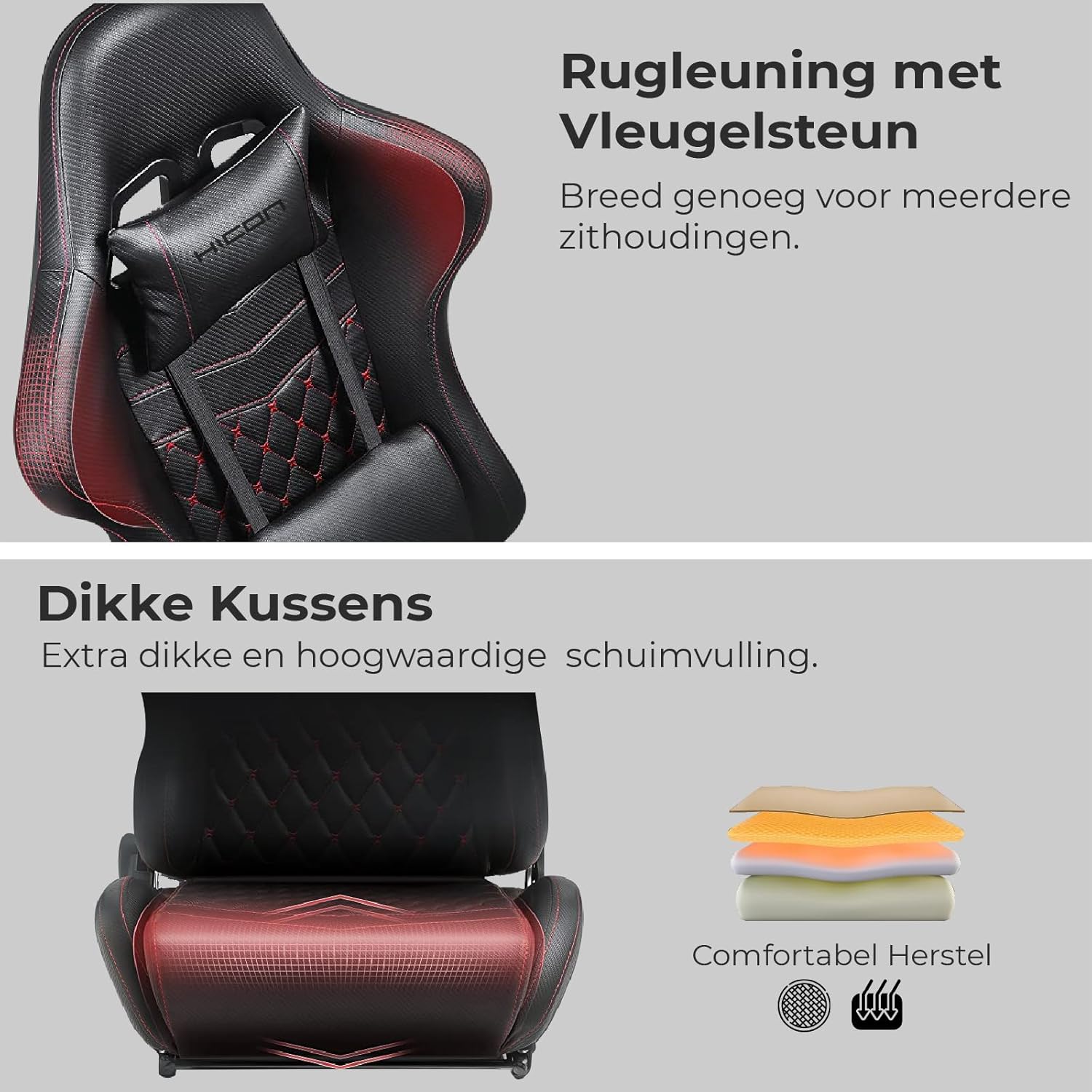
Figure 6: Detail of the backrest with wing support, designed for broad seating postures.

olusin 7: Cross-apakan view of the thick, high-density foam cushioning for enhanced comfort and durability.
4. Itọju
Proper maintenance will extend the life and appearance of your HICON Incanto Gaming Chair.
- Ninu: Regularly wipe the PU leather surfaces with a soft, damp cloth. For stubborn stains, use a mild soap solution and wipe dry immediately. Avoid using harsh chemicals, abrasive cleaners, or solvents, as these can damage the material.
- Ṣiṣayẹwo ohun elo: Periodically check all screws, bolts, and connections to ensure they are tight. Re-tighten any loose hardware to maintain stability and prevent squeaking.
- Itọju Kẹkẹ: Keep the chair's wheels clean from dust, hair, and debris to ensure smooth movement and prevent scratching your floor.
- Abojuto timutimu: The headrest and lumbar cushions can be removed for cleaning. Follow the same cleaning instructions as for the chair's main upholstery.
5. Laasigbotitusita
If you encounter any issues with your HICON Incanto Gaming Chair, refer to the following common problems and solutions:
- Awọn Ariwo Npa:
Owun to le fa: Loose connections or friction between moving parts.
Ojutu: Check all bolted connections and tighten them securely. If squeaking persists, apply a small amount of silicone-based lubricant to the moving parts of the mechanism or where components rub together. - Difficulty Adjusting Seat Height:
Owun to le fa: Lẹ́fà gbígbé gaasi kò ṣiṣẹ́ dáadáa tàbí àṣìṣe sílíńdà gbígbé gaasi.
Ojutu: Ensure the height adjustment lever is fully pulled or pushed. If the issue persists, the gas lift cylinder may need replacement. Contact customer support for assistance. - Chair Feels Wobbly:
Owun to le fa: Loose connections in the base or seat.
Ojutu: Verify that all screws connecting the seat to the mechanism, and the mechanism to the gas lift, as well as the casters to the base, are securely fastened. - Backrest Does Not Recline/Lock:
Owun to le fa: Recline mechanism jammed or lever not fully engaged.
Ojutu: Ensure the recline lever is fully engaged or disengaged. Check for any obstructions around the mechanism.
6. Awọn pato
| Ẹya ara ẹrọ | Sipesifikesonu |
|---|---|
| Brand | IN.HOMEXL |
| Nọmba awoṣe | HICON |
| Ọja Mefa | 1 x 1 x 1 cm; 23 kg (approx. 10D x 10B x 10H millimeters) |
| Olupese | HICON |
| Iwọn Nkan | 23 kilo |
| Iṣeduro iwuwo iwuwo | 150 kilo |
| Ara | Igbalode |
| Àpẹẹrẹ | ri to |
| Yara Iru | Ọfiisi |
| Awọn irinše to wa | Cushion (Headrest and Lumbar) |
| Akọkọ Wa Ọjọ | Oṣu Kẹwa Ọjọ 18, Ọdun 2023 |
7. Atilẹyin ọja ati Support
For warranty information, product support, or to inquire about replacement parts, please contact HICON customer service through your original point of purchase. It is advisable to retain your purchase receipt as proof of purchase for any warranty claims.