
1. Ifihan
Thank you for choosing the MAIRDI M890DBTC Wireless Headset. This manual provides detailed instructions for setting up, operating, and maintaining your headset to ensure optimal performance and longevity. Please read this manual thoroughly before use.

A alaye iwaju view of the MAIRDI M890DBTC Wireless Headset, showcasing its over-ear design, adjustable headband, and microphone boom.
2. Package Awọn akoonu
Daju pe gbogbo awọn nkan wa ninu apo rẹ:
- MAIRDI M890DBTC Bluetooth Headset x1
- Okun Gbigba agbara USB x1
- Ilana olumulo x1
3. Ọja Ipariview
3.1 Agbekọri irinše
- Adijositabulu Headband
- Padded Earmuffs
- Rotatable Microphone Boom (330-degree)
- Bọtini agbara
- Iwọn didun Up/isalẹ Awọn bọtini
- Bọtini iṣẹ-ọpọlọpọ (MFB)
- Bọtini dakẹjẹẹ
- Imọlẹ Atọka LED
- Charging Port (Mini USB)
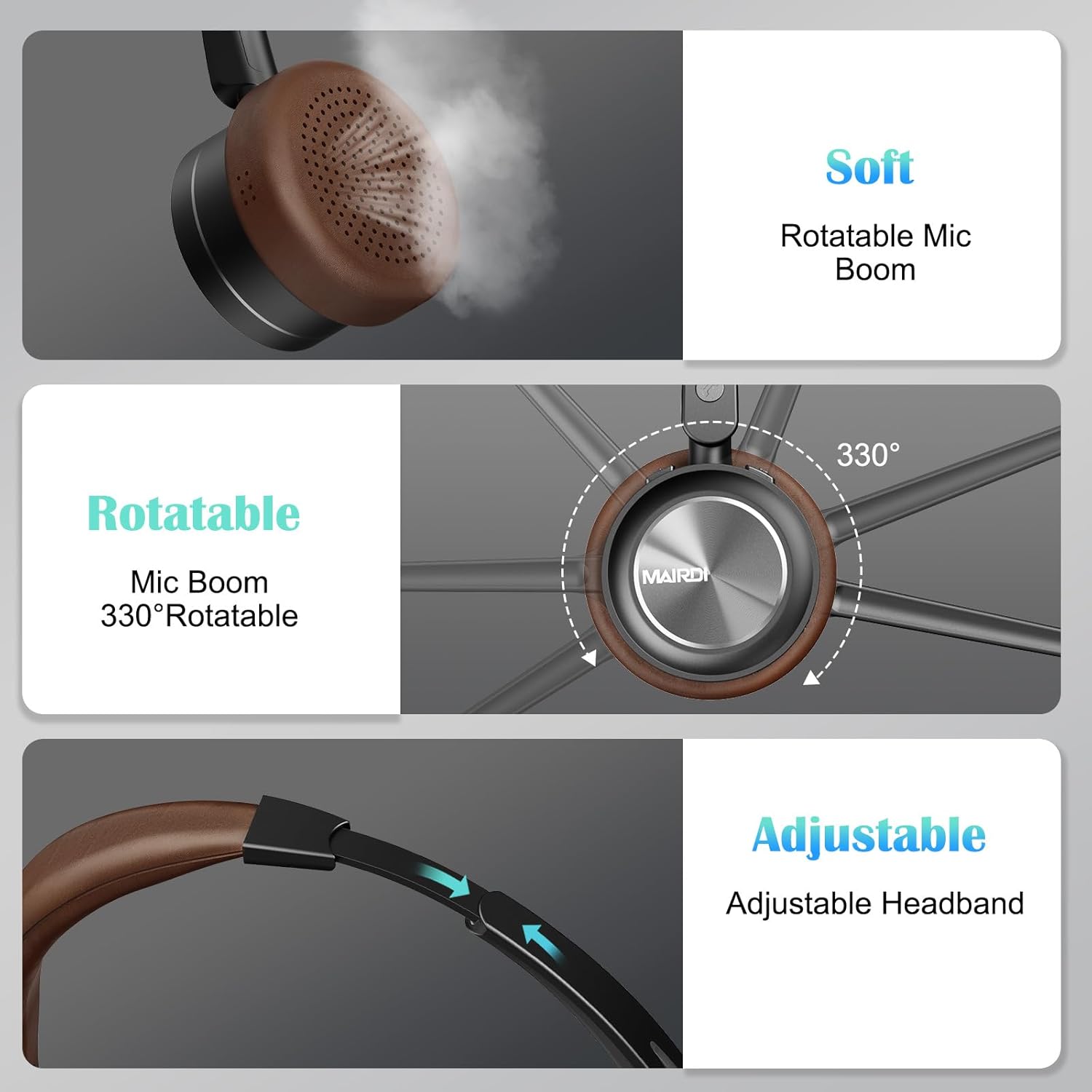
A visual breakdown of the MAIRDI M890DBTC headset's comfort features, including soft earpads, a 330-degree rotatable microphone boom, and an adjustable stainless steel headband.
4. Eto ati gbigba agbara
4.1 Ni ibẹrẹ idiyele
Before first use, fully charge the headset. Connect the provided USB charging cable to the headset's Mini USB port and a power source (e.g., computer USB port or USB wall adapter). The LED indicator will show charging status and turn off or change color when fully charged (approximately 2 hours).
4.2 Agbara Tan / Pa
- Agbara Tan: Tẹ bọtini agbara ki o si dimu fun awọn aaya mẹta titi ti ifihan LED yoo fi tan imọlẹ buluu.
- Agbara Pa: Press and hold the Power Button for 3 seconds until the LED indicator flashes red and then turns off.
5. Awọn ilana Iṣiṣẹ
5.1 Sisopọ Bluetooth
- Rii daju pe agbekari ti ni agbara ni pipa.
- Press and hold the Power Button for approximately 5-7 seconds until the LED indicator flashes red and blue alternately. This indicates pairing mode.
- On your device (smartphone, PC, laptop), enable Bluetooth and search for available devices.
- Select "MAIRDI M890DBTC" from the list of found devices.
- Ni kete ti o sopọ, Atọka LED yoo tan buluu laiyara.
5.2 Multipoint Connectivity
The MAIRDI M890DBTC supports connecting to two Bluetooth devices simultaneously.
- Pair the headset with the first device (e.g., smartphone) as described in Section 5.1.
- Disable Bluetooth on the first device. The headset will re-enter pairing mode.
- Pair the headset with the second device (e.g., laptop).
- Re-enable Bluetooth on the first device. The headset should automatically connect to both devices.

The MAIRDI M890DBTC headset connected simultaneously to a smartphone and a laptop, illustrating its multipoint pairing capability for stable connection with two devices.
5.3 ipe Management
- Idahun/Ipe Ipari: Tẹ Bọtini iṣẹ-ọpọlọpọ (MFB) lẹẹkan.
- Kọ Ipe: Tẹ mọlẹ MFB fun iṣẹju-aaya 2.
- Nọmba Ikẹhin Tun Tun: Tẹ MFB lẹẹmeji.
- Pa ẹ / Mu Gbohungbohun dakẹ: Press the Mute Button once during a call. The LED indicator on the microphone will illuminate when muted.

An image depicting a person wearing the MAIRDI M890DBTC headset, highlighting the noise-canceling microphone feature and the mute button functionality. Visual representation of sound waves before and after noise cancellation is included.
5.4 Iṣakoso iwọn didun
- Iwọn didun Up: Tẹ bọtini Iwọn didun Up (+).
- Iwọn didun isalẹ: Tẹ bọtini Iwọn didun isalẹ (-).
6. Itọju
- Nu agbekari nigbagbogbo pẹlu asọ ti o gbẹ.
- Avoid exposing the headset to extreme temperatures, humidity, or corrosive substances.
- Tọju agbekari ni itura, aye gbigbẹ nigbati ko si ni lilo.
- Ma ṣe gbiyanju lati tu tabi tun agbekari naa funrararẹ, nitori eyi yoo sọ atilẹyin ọja di ofo.
7. Laasigbotitusita
7.1 Headset Does Not Power On
- Ensure the headset is fully charged. Connect it to a power source and allow it to charge for at least 30 minutes before attempting to power on again.
7.2 Ko le So pọ pẹlu Device
- Rí i dájú pé agbekọri naa wa ni ipo isopopo (LED n tan imọlẹ pupa ati bulu ni ọna miiran).
- Make sure Bluetooth is enabled on your device and it is within 10 meters (33 feet) of the headset.
- Gbiyanju tun bẹrẹ mejeeji agbekari ati ẹrọ rẹ.
- Clear the Bluetooth pairing list on your device and attempt to pair again.
7.3 No Audio or Poor Audio Quality
- Ṣayẹwo awọn ipele iwọn didun lori mejeeji agbekari ati ẹrọ ti o sopọ.
- Ensure the headset is properly connected to your device. Re-pair if necessary.
- Move closer to your device to avoid interference or range issues.
- If using with a PC, ensure the MAIRDI M890DBTC is selected as the default audio input/output device in your sound settings.
7.4 Gbohungbohun Ko Ṣiṣẹ
- Ensure the microphone is not muted (check the LED indicator on the microphone boom).
- Verify that the microphone boom is positioned correctly towards your mouth.
- Check your device's audio settings to ensure the headset microphone is selected as the input device.
8. Awọn pato
| Awoṣe | M890DBTC |
| Asopọmọra Technology | Ailokun (Bluetooth 5.1) |
| Bluetooth Ibiti | Titi de awọn mita 20 (60 ẹsẹ) |
| Igbesi aye batiri (Aago Ọrọ) | Titi di wakati 30 |
| Ìgbésí Ayé Bátìrì (Àkókò Ìdúró) | Titi di wakati 200 |
| Akoko gbigba agbara | O fẹrẹ to awọn wakati 2 |
| Gbohungbohun | Advanced Noise-Canceling |
| Iwọn Awakọ Agbọrọsọ | 40mm |
| Iwọn Igbohunsafẹfẹ | 20 Hz - 20,000 Hz |
| Iwọn | 0.21 kilogram (7.4 iwon) |
| Ohun elo | Awọ, Ṣiṣu, Irin Alagbara |

The MAIRDI M890DBTC headset positioned over a circuit board, illustrating its advanced Bluetooth 5.1 technology and 40mm speaker drivers for high-definition audio.
9. Atilẹyin ọja ati Support
MAIRDI products are designed for reliability and performance. For warranty information or technical support, please refer to the contact details provided on the MAIRDI official webAaye ayelujara tabi awọn iwe aṣẹ rira rẹ. Pa ẹri rira rẹ mọ fun awọn ẹtọ atilẹyin ọja.
Fun iranlọwọ siwaju sii, jọwọ ṣabẹwo si MAIRDI Store on Amazon.


