
1. Ifihan
O ṣeun fun riraasing the Aanyhoh LED Wall Lamp. This battery-operated, USB rechargeable wall sconce offers versatile lighting with dimmable brightness, adjustable color temperature, and 360° rotation, controlled conveniently by a remote. This manual provides essential information for safe installation, operation, and maintenance of your new wall lamp.
Awọn akoonu idii:
- 2 x LED Wall Lights
- 2 x Battery Packs (built-in 3600mAh)
- 2 x USB to Type-C Charging Cables
- 2 x Fixing Screws sets
- 1 x Afowoyi fifi sori
2. Alaye Aabo
Important Warning: Do not use a charger with more than 5V/2A to charge the wall lamp. Fast chargers can easily cause damage to the battery.
- Rii daju pe ọja naa lo ninu ile nikan.
- Pa lamp away from high temperatures and flammable objects.
- Maṣe gbiyanju lati ṣajọpọ tabi ṣe atunṣe lamp.
- Always ensure the battery pack is securely inserted before use.
- Jeki kuro ni arọwọto awọn ọmọde.
3. Ọja Ipariview
The Aanyhoh LED Wall Lamp features a sleek, minimalist design with a rotatable light bar and a magnetic, removable battery compartment for easy charging.

Aworan: Pariview of the Aanyhoh LED Wall Lamp, showing its main components and an example of it installed in a bedroom setting.

Image: Detailed dimensions of the wall lamp and a visual representation of the included remote control and USB-C charging cables.
Awọn ẹya pataki:
- USB gbigba agbara: Built-in 3600mAh battery for cordless operation.
- Removable Battery Compartment: Easily detach the battery for charging without removing the entire lamp.
- Imọlẹ Dimmable: Adjust light intensity from 10% to 100%.
- Iwọn otutu Awọ Atunṣe: Switch between 3000K (warm white) and 6000K (cool white).
- 360° Yiyi: The light bar can be rotated to direct light as needed.
- Isakoṣo latọna jijin: Conveniently manage all functions from a distance.
- Imọlẹ Ore-oju: Designed to be flicker-free to reduce eye fatigue.
4. Eto & Fifi sori
Gbigbe Lamp:
- Choose a suitable location on your wall.
- Use the provided fixing screws to securely attach the mounting base to the wall.
- Align the wall lamp with the mounting base and slide it into place. The lamp is held by a rubber ring around the base.
- Adjust the light bar to your desired angle using its 360° rotation feature.

Aworan: Examples of the Aanyhoh LED Wall Lamp installed in different interior spaces, demonstrating its versatile application.
Ngba agbara si Batiri naa:
- Gently pull the magnetic battery compartment from the lamp ara.
- Connect the provided USB to Type-C charging cable to the charging port on the battery pack.
- Connect the other end of the USB cable to a 5V / 1A tabi 5V / 2A USB power adapter (not included).
- Ina ifihan agbara yoo tan imọlẹ. Gbigba agbara maa n gba wakati mẹta si marun.
- Once fully charged, the indicator light may change or turn off. Disconnect the cable and reinsert the battery pack into the lamp ara.

Aworan: Isunmọ view of the removable magnetic battery compartment and the USB-C charging port.
5. Awọn ilana Iṣiṣẹ
The Aanyhoh LED Wall Lamp can be operated using the included remote control or the power button on the battery pack.
Lilo Iṣakoso Latọna jijin:
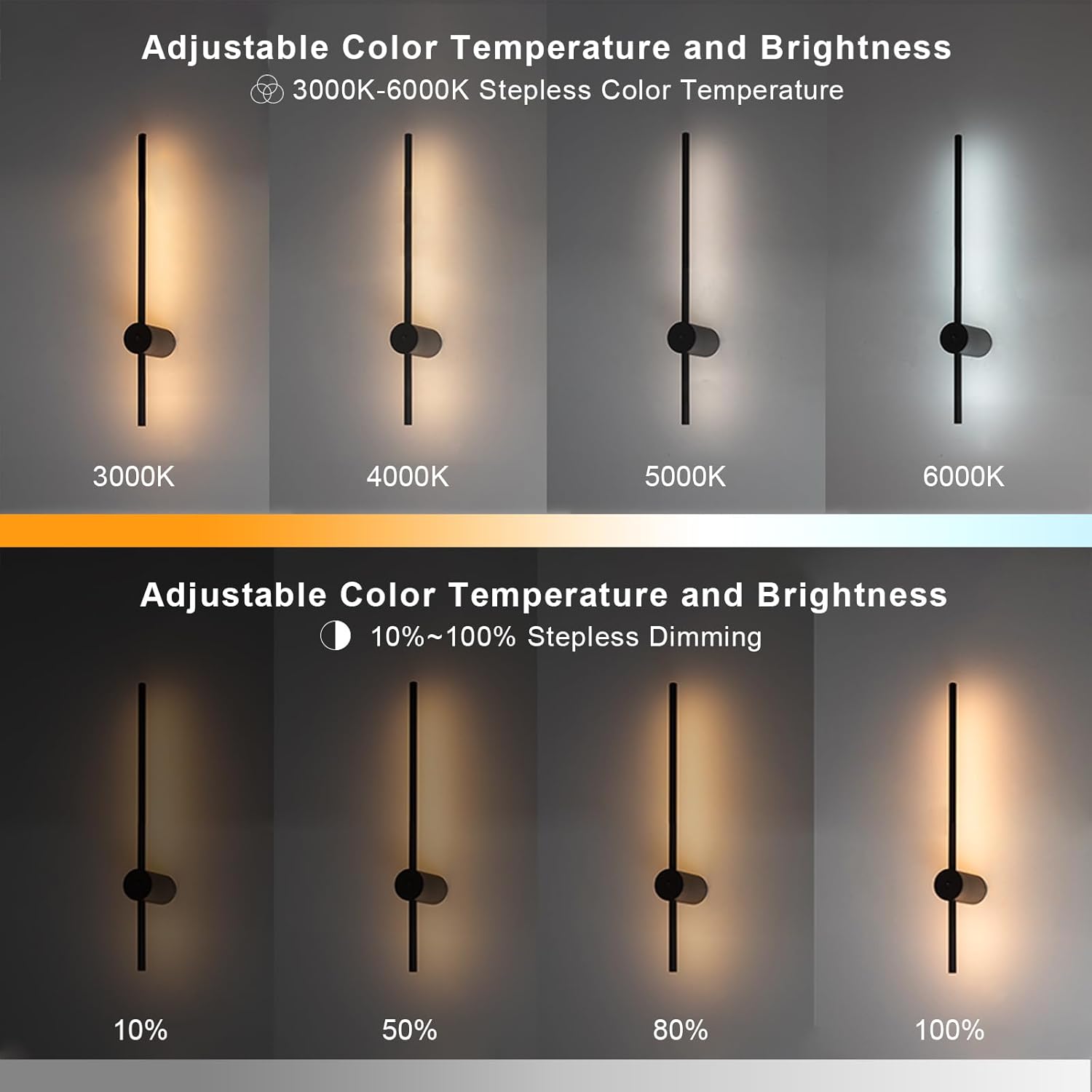
Image: Visual demonstration of the lamp's adjustable color temperature (3000K-6000K) and stepless dimming (10%-100%).
- Bọtini TAN/PA: Tẹ lati tan lamp tan tabi pa.
- Brightness Adjustment (Sun Icon): Press the '+' button to increase brightness, '-' button to decrease brightness (10%-100% stepless dimming).
- Color Temperature Adjustment (WW/M/CW):
- WW (funfun ti o gbona): Sets the light to 3000K.
- M (Mixed): Sets the light to 4000K.
- CW (Cool White): Sets the light to 5000K or 6000K.
- Night Light Mode (Moon Icon): Short press to activate a low-brightness, soft light mode, ideal for night use without harsh glare. Long press to lock the remote control.

Image: Illustration of the Night Light Mode feature and the multi-functional keys on the remote control.
Isẹ afọwọṣe:
A power button is located on the battery pack. Press this button to manually turn the lamp tan tabi pa.
6. Itọju
Ninu:
Lati nu lamp, gently wipe it with a soft, dry cloth. Do not use abrasive cleaners, solvents, or liquids that could damage the finish or electrical components.
Itọju Batiri:
- Gba agbara si batiri ni kikun ṣaaju lilo akọkọ.
- Recharge the battery when the light output becomes noticeably dim.
- Yẹra fún kí batiri náà máa gbẹ pátápátá nígbà gbogbo, nítorí pé èyí lè dín àkókò rẹ̀ kù.
- Ti o ba tọju lamp for an extended period, charge the battery to about 50% and recharge every 3-6 months to maintain battery health.
7. Laasigbotitusita
- Lamp ko tan:
- Ensure the battery pack is fully charged and correctly inserted.
- Ṣàyẹ̀wò bóyá àwọn bátìrì ìṣàkóso latọna jijin nílò àyípadà.
- Ṣe idaniloju lamp's manual power button is in the ON position.
- Light flickers or is unstable:
- This may indicate a low battery. Recharge the battery pack.
- Ensure you are using a charger that does not exceed 5V/2A. Using an incompatible charger can cause damage and erratic behavior.
- Iṣakoso latọna jijin ko dahun:
- Ṣàyẹ̀wò kí o sì pààrọ̀ àwọn bátìrì ìṣàkóso latọna jijin tí ó bá pọndandan.
- Rii daju pe ko si awọn idena laarin isakoṣo latọna jijin ati lamp.
- If the remote was locked (long press of moon icon), long press it again to unlock.
- A ko le ṣatunṣe imọlẹ tabi iwọn otutu awọ:
- Ensure the remote control is functioning correctly (see above).
- Awọn lamp may be in a specific mode that limits adjustment; try turning it off and on again.
8. Awọn pato
| Iwa | Iye |
|---|---|
| Brand | Aanyhoh |
| Nọmba awoṣe | 1099-WG60 |
| Fọọmu Imuduro Imọlẹ | Sconce |
| Ara | Kekere |
| Ohun elo | Aluminum / Acrylic |
| Iṣagbewọle Voltage | USB to Type-C (5V/1A recommended) |
| Orisun Imọlẹ | LED |
| Lilo agbara | 6W |
| Iwọn otutu awọ | 3000K-6000K (A le dínkù) |
| Dimmable | Bẹẹni (10%-100%) |
| Awọ imuduro | Dudu |
| Agbara Batiri | 3600mAh (Lithium Metal) |
| Akoko gbigba agbara | Isunmọ. 4-5 wakati |
| Àkókò Iṣẹ́ Tí Ń Tẹ̀síwájú | More than 10 hours (at highest brightness) |
| Niyanju Yara Iwon | 5-10 m² |
| Ọja Mefa | 10 x 6 x 60 cm |
| Iwọn Ọja | Isunmọ. 950 g |
For detailed energy efficiency information, please refer to the EPREL database: https://eprel.ec.europa.eu/qr/1841766
9. Atilẹyin ọja & Atilẹyin
For information regarding product warranty, please refer to the terms and conditions provided at the time of purchase or contact your seller directly. If you encounter any issues not covered in this manual, please reach out to the manufacturer or seller for assistance.