
1. Ifihan
This manual provides detailed instructions for the installation, operation, maintenance, and troubleshooting of the Fydun ZL-7901A Incubator Controller. This device is designed for precise and automatic control of temperature and humidity in various incubation environments, ensuring optimal conditions for successful hatching.
2. Ọja Ipariview
The Fydun ZL-7901A is a high-precision digital incubator controller capable of managing both temperature and humidity. It features a clear display and intuitive controls for easy programming and monitoring.
Awọn ẹya pataki:
- Iṣakoso pipe: High-accuracy temperature and humidity regulation for stable incubator environments.
- Strong Anti-interference: Designed for reliable operation in various conditions.
- High Stability and Accuracy: Ensures consistent performance for critical incubation processes.
- Ohun elo jakejado: Suitable for a variety of eggs including chicken, duck, goose, pigeon, quail, parrot, and peacock.
- Isẹ aladaaṣe: Fully automatic control reduces manual intervention.
Awọn eroja:

Nọmba 2.1: Iwaju view of the Fydun ZL-7901A Incubator Controller, showing the display and control buttons.

Nọmba 2.2: The ZL-7901A controller packaged with its temperature and humidity sensors and connecting cables.

Nọmba 2.3: The ZL-7901A controller shown in an incubator environment, demonstrating its application for egg incubation.
3. Alaye Aabo
- Ka gbogbo awọn ilana ni pẹkipẹki ṣaaju fifi sori ẹrọ ati ṣiṣẹ.
- Rii daju pe ipese agbara voltage matches the controller's requirements (100V-240V).
- All wiring should be performed by a qualified professional to prevent electrical hazards.
- Má ṣe fi olùdarí náà hàn sí omi tàbí ọ̀rinrin tó pọ̀ jù.
- Jeki ẹrọ naa kuro lati awọn ohun elo ti o jo.
- Disconnect power before performing any maintenance or wiring changes.
- Ẹrọ yii kii ṣe nkan isere. Tọju kuro ni arọwọto awọn ọmọde.
4. Eto ati fifi sori
4.1 Iṣagbesori Adarí
The ZL-7901A controller is designed for panel mounting. Ensure a secure and stable location within your incubator setup.

Nọmba 4.1: Apa view illustrating the mounting bracket for panel installation.
4.2 Awọn isopọ onirin
Carefully connect the power supply, sensors, and output devices (heater, humidifier, fan, egg turner) to the appropriate terminals on the back of the controller. Refer to the wiring diagram provided with your product for specific connections. Ensure all connections are tight and secure.

Nọmba 4.2: Ẹyìn view of the controller, showing the terminal blocks for electrical connections.
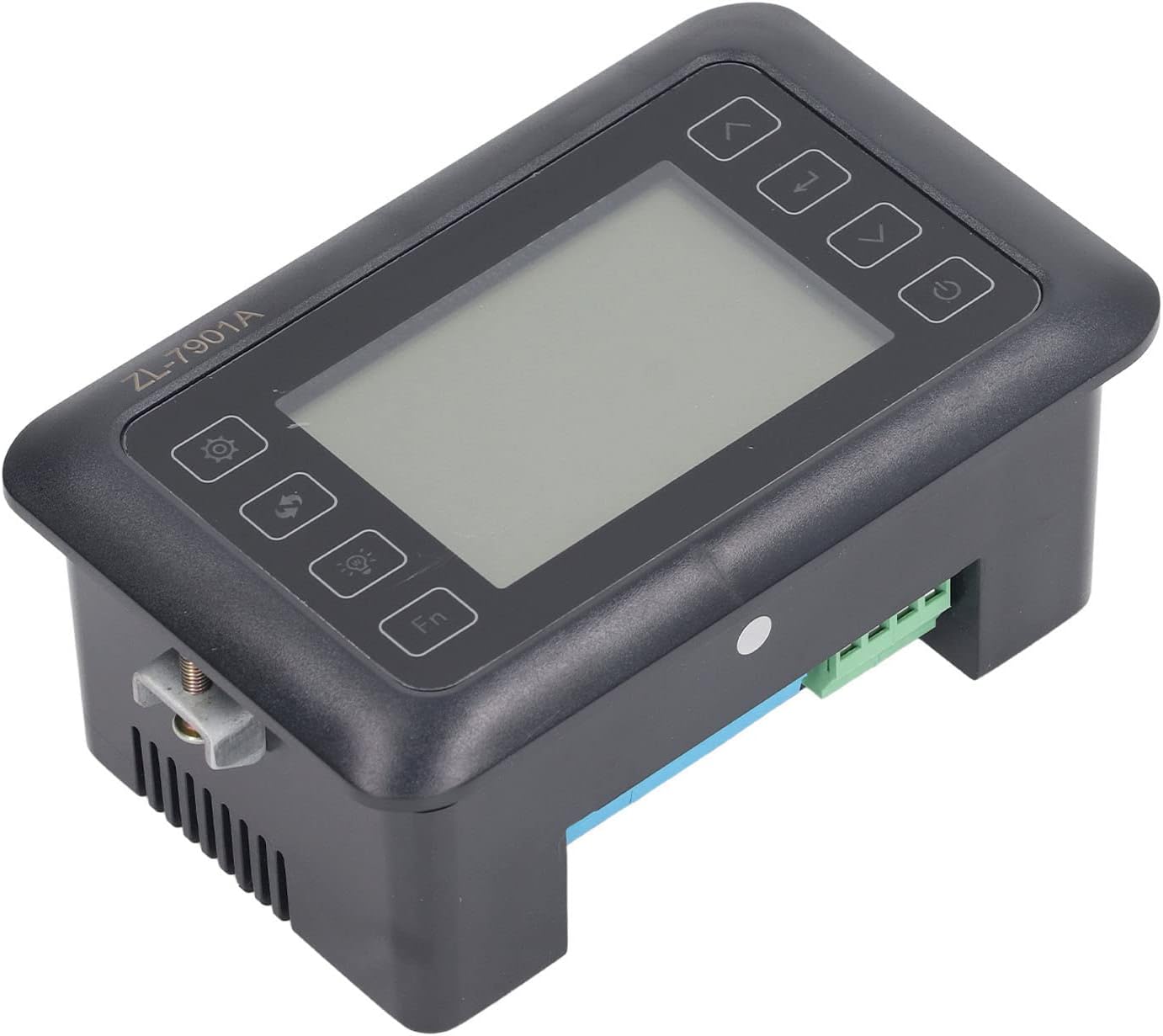
Nọmba 4.3: Igun view highlighting the various connection points on the controller's side.
After all connections are made, double-check them for correctness before applying power.
5. Awọn ilana Iṣiṣẹ
5.1 Agbara Tan / Pa
Tẹ awọn Bọtini agbara to turn the controller on or off. The display will illuminate upon power-on. The power button is located on the right side of the controller's front panel.
5.2 Ifihan Loriview
The main display shows the current temperature and humidity readings. Additional indicators may show the status of heating, humidifying, and turning functions.
5.3 Eto paramita
- Tẹ awọn Bọtini Eto (gear icon) to enter the parameter setting mode. This button is on the left side of the controller's front panel.
- Lo awọn Up (ọfà òkè) àti Isalẹ (down arrow) buttons to navigate through different parameters (e.g., target temperature, target humidity, egg turning interval). These buttons are on the right side of the controller's front panel.
- Tẹ awọn Tẹ bọtini (return arrow icon) to select a parameter for editing. This button is on the right side of the controller's front panel.
- Lo awọn Up ati Isalẹ awọn bọtini lati ṣatunṣe iye.
- Tẹ awọn Tẹ bọtini lẹẹkansi lati jẹrisi awọn titun iye.
- Repeat for all desired parameters.
- Jade ni ipo eto nipa titẹ awọn Bọtini Eto again or waiting for a timeout.
Akiyesi: Consult the full product manual (if provided separately) for a complete list of parameters and their functions.
5.4 Awọn bọtini iṣẹ
- Bọtini Imọlẹ (light bulb icon): Controls the internal light of the incubator (if connected). This button is on the left side of the controller's front panel.
- Fn Bọtini: Activates special functions or enters advanced settings. Refer to the detailed manual for specific Fn button operations. This button is on the left side of the controller's front panel.
6. Itọju
6.1 Ninu
- Ensure the controller is powered off and disconnected from the power source before cleaning.
- Wipe the exterior of the controller with a soft, dry cloth.
- Do not use abrasive cleaners, solvents, or immerse the unit in water.
- Keep the sensor probes clean and free from debris to ensure accurate readings.
6.2 Sensọ Itọju
Handle the temperature and humidity sensors with care. Avoid bending or damaging the cables. If readings appear inaccurate, gently clean the sensor tips. Do not attempt to disassemble the sensors.
7. Laasigbotitusita
| Isoro | Owun to le Fa | Ojutu |
|---|---|---|
| Adarí ko ni agbara lori. | Kò sí ìpèsè agbára; ìsopọ̀ tí ó dẹ̀; okùn agbára tí ó bàjẹ́. | Check power outlet; ensure all connections are secure; test power cable. |
| Awọn kika iwọn otutu / ọriniinitutu ti ko pe. | Sensor dirty or damaged; sensor not properly placed; calibration needed. | Clean sensor; reposition sensor away from direct airflow/heat; refer to advanced settings for calibration (if available). |
| Heater/Humidifier not activating. | Output device not connected; setpoint not reached; faulty output device. | Verify wiring connections; check setpoint values; test heater/humidifier independently. |
| Ifihan fihan koodu aṣiṣe. | Sensor fault; internal error. | Note the error code and consult the full product manual or contact support. |
8. Awọn pato
| Ẹya ara ẹrọ | Ẹ̀kúnrẹ́rẹ́ |
|---|---|
| Awoṣe | ZL-7901A |
| Brand | Fydun |
| Iṣagbewọle Voltage | 100V-240V AC |
| Iṣakoso Iru | Fully Automatic Digital Temperature and Humidity Control |
| Yiye | High precision for both temperature and humidity |
| Ohun elo | Incubators for various poultry and bird eggs |
| Iṣagbesori | Panel Oke |
9. Atilẹyin ọja ati Support
Fydun is committed to providing quality products and excellent customer service. If you encounter any issues or have questions regarding your ZL-7901A Incubator Controller, please contact our customer service team.
For support, please refer to the contact information provided with your purchase or visit the official Fydun store on Amazon: Fydun Amazon Store.
Our professional customer service team is ready to assist you promptly.