
1. Ifihan
O ṣeun fun riraasing the JVC XS-N1123PB Party Bluetooth Speaker. This manual provides essential information for the safe and efficient operation of your speaker. Please read it thoroughly before use and retain it for future reference.
2. Alaye Aabo
- Ma ṣe fi agbọrọsọ si awọn iwọn otutu to gaju, imọlẹ orun taara, tabi ọriniinitutu giga.
- Yago fun sisọ tabi tẹriba agbọrọsọ si awọn ipa to lagbara.
- Má ṣe tú agbọ̀rọ̀sọ náà ká tàbí gbìyànjú láti tún un ṣe fúnra rẹ. Tọ́ka gbogbo iṣẹ́ ìtọ́jú náà sí àwọn òṣìṣẹ́ tó péye.
- Keep the speaker away from water and other liquids to prevent electric shock or damage.
- Lo gbigba agbara pàtó kan voltage (5 Volts) and compatible charger.
3. Package Awọn akoonu
Jẹrisi pe gbogbo awọn ohun kan wa ninu package:
- JVC XS-N1123PB Party Bluetooth Speaker
- Okun Ngba agbara USB
- Itọsọna olumulo
4. Ọja Ipariview
4.1 Iwaju View

The front of the speaker features the main speaker grille with integrated RGB lighting, displaying various color patterns.
4.2 Ẹgbẹ View

Awọn ẹgbẹ view shows the compact and portable design of the speaker, suitable for easy transport.
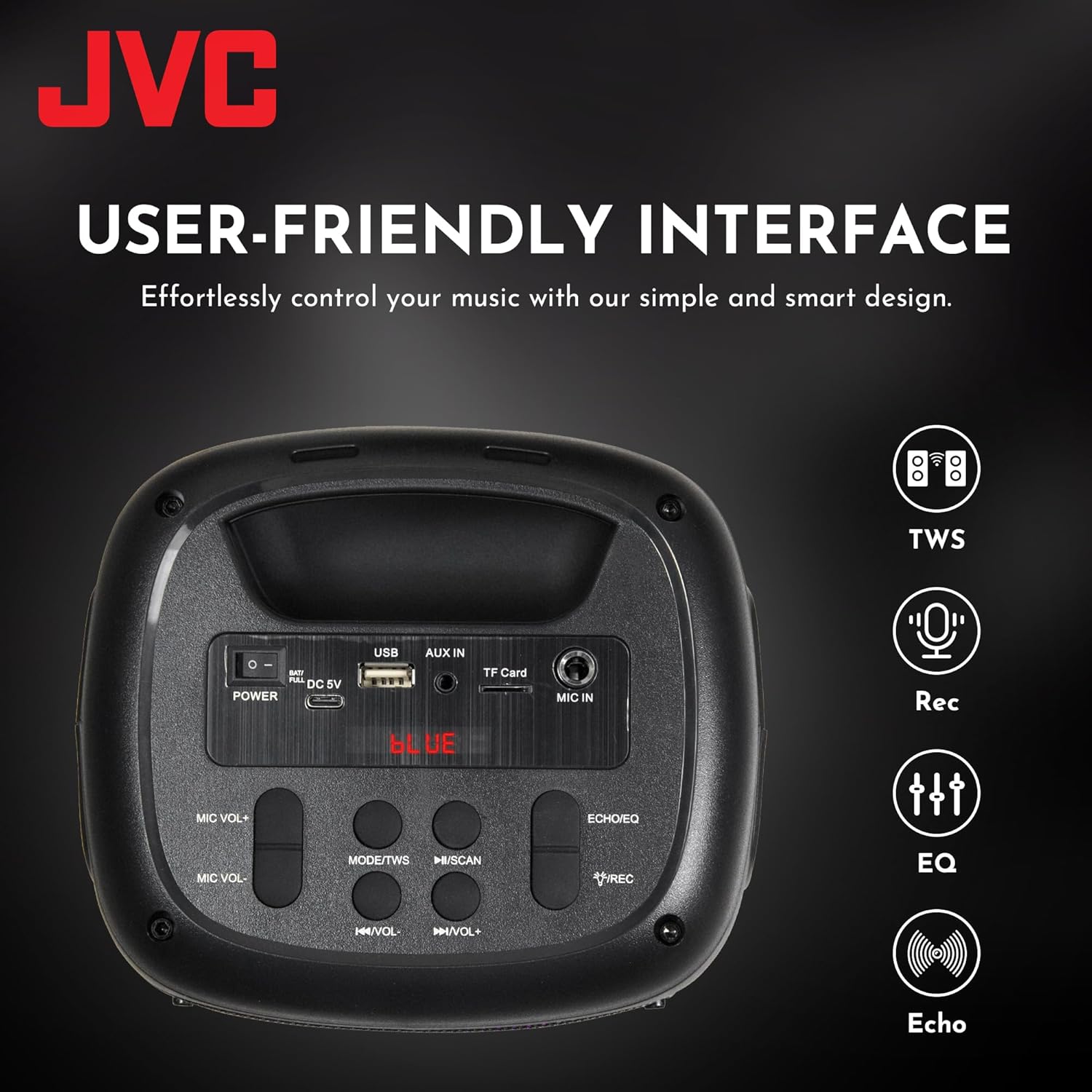
4.3 Top Panel Controls and Ports

This image displays the top control panel, including buttons for power, mode selection, volume, track control, and recording. It also shows the USB, AUX IN, TF Card, and MIC IN ports.
4.4 Ẹyìn View

Awọn ru view of the speaker, highlighting its robust enclosure and design.
5. Eto
5.1 Gbigba agbara si Agbọrọsọ
Kí o tó lo ó fún ìgbà àkọ́kọ́, gba agbára sí agbọ̀rọ̀sọ náà pátápátá. So okùn gbigba agbara USB tí a pèsè mọ́ ibudo DC 5V lórí agbọ̀rọ̀sọ náà, kí o sì so ẹ̀gbẹ́ kejì mọ́ adapta agbara USB (kò sí nínú rẹ̀) tàbí ibudo USB ti kọ̀ǹpútà.
- Ìmọ́lẹ̀ àmì ìgbóná yóò máa tàn nígbà tí a bá ń gba agbára.
- The light will turn off or change color when charging is complete.
The speaker features a 1500 mAh dual battery system for extended playback.
5.2 Titan / Pa a
To power on the speaker, press and hold the Power button located on the top panel. To power off, press and hold the Power button again.
5.3 Sisopọ Bluetooth
- Tan agbohunsoke. Yoo tẹ ipo sisopọ pọ si Bluetooth laifọwọyi, ti a fihan nipasẹ ina LED didan.
- Mu Bluetooth ṣiṣẹ lori ẹrọ alagbeka rẹ (foonuiyara, tabulẹti, ati bẹbẹ lọ).
- Wa fun available Bluetooth devices and select "JVC XS-N1123PB" from the list.
- Ni kete ti a ba so pọ, agbọrọsọ yoo tu ohun ìmúdájú jade, ati ina LED yoo da ìmọlẹ duro.
5.4 Otitọ Sitẹrio Alailowaya (TWS) Sisọpọ
TWS allows you to connect two JVC XS-N1123PB speakers for a stereo sound experience.

Pair two speakers wirelessly for a dynamic stereo sound experience.
- Rii daju pe awọn agbohunsoke mejeeji wa ni titan ati pe wọn ko sopọ si eyikeyi ẹrọ Bluetooth miiran.
- On one speaker (this will be the primary speaker), press and hold the TWS button (if available, or a designated pairing button) until you hear a pairing tone.
- The two speakers will automatically connect to each other. A confirmation tone will sound once TWS pairing is successful.
- Now, connect your mobile device to the primary speaker via Bluetooth as described in section 5.3. Both speakers will play audio in stereo.
6. Awọn ilana Iṣiṣẹ
6.1 Aṣayan ipo
Press the 'MODE' button on the top panel to switch between different input modes: Bluetooth, USB, TF Card, AUX, and FM Radio.
6.2 Audio Sisisẹsẹhin
- Ipo Bluetooth: After successful pairing, play audio from your connected device.
- Ipo Kaadi USB/TF: Insert a USB drive or TF card into the respective port. The speaker will automatically detect and play audio files.
- Ipo AUX: Connect an external audio device using a 3.5mm audio cable to the AUX IN port.
- Ipo Redio FM: In FM mode, press the Play/Pause button to auto-scan and save available radio stations. Use the Previous/Next buttons to navigate between saved stations.
6.3 Iṣakoso iwọn didun
Use the 'VOL-' and 'VOL+' buttons on the top panel to decrease or increase the volume.
6.4 Track Control
- Press the 'Previous Track' button to go to the beginning of the current track or the previous track.
- Press the 'Next Track' button to skip to the next track.
- Press the 'Play/Pause' button to play or pause audio.
6.5 Light Show Iṣakoso
The speaker features built-in RGB lights. Specific controls for the light show (e.g., changing patterns, turning on/off) may be integrated with the 'MODE' button or a dedicated light button if available. Refer to the quick start guide for specific light control functions.
6.6 Microphone and Guitar Input (Karaoke Function)

Connect a microphone or guitar to the respective input ports for karaoke or live performance. Adjust microphone volume using the MIC VOL+/- buttons.
7. Itọju
7.1 Ninu
Wipe the speaker with a soft, dry cloth. Do not use abrasive cleaners, waxes, or solvents as they may damage the finish.
7.2 Ibi ipamọ
When not in use for extended periods, store the speaker in a cool, dry place, away from direct sunlight and extreme temperatures. It is recommended to charge the battery periodically to maintain its lifespan.
8. Laasigbotitusita
| Isoro | Owun to le Fa | Ojutu |
|---|---|---|
| Agbọrọsọ ko ni agbara lori | Batiri kekere; Bọtini agbara ko tẹ ni deede | Charge the speaker; Press and hold the Power button for a few seconds |
| Ko si ohun | Iwọn ti o kere ju; Ipo titẹ sii ti ko tọ; Ẹrọ ko ni asopọ | Increase volume; Select correct input mode; Reconnect Bluetooth device or AUX cable |
| Sisopọ Bluetooth kuna | Agbọrọsọ kii ṣe ni ipo sisopọ; Ẹrọ ti o jinna pupọ; kikọlu | Ensure speaker is in pairing mode; Move device closer; Turn off other Bluetooth devices |
| Sisopọ TWS kuna | Àwọn agbọ́rọ̀sọ jìnnà jù; Agbọ́rọ̀sọ kan ti so mọ́ ẹ̀rọ kan tẹ́lẹ̀ | Ensure speakers are within range; Disconnect any Bluetooth devices from both speakers before TWS pairing |
| Gbigba redio FM ko dara | Àmì tí kò lágbára; Ìdènà | Relocate the speaker; Extend the antenna (if applicable) |
9. Awọn pato
| Ẹya ara ẹrọ | Sipesifikesonu |
|---|---|
| Nọmba awoṣe | XS-N1123PB (AP-W113Y) |
| Agbara Ijade | 15W RMS (40 Watts Peak) |
| Iwọn Agbọrọsọ | 4 inches |
| Asopọmọra | Bluetooth, USB, TF Card, AUX-in, FM Radio |
| Ipo Ijade Ohun | Sitẹrio |
| Iṣagbewọle Voltage | 5 Volts |
| Batiri | 1 batiri litiumu ion (pẹlu) |
| Ohun elo | Ṣiṣu |
| Iwọn (D x W x H) | 15.7D x 13.3W x 21.8H cm |
| Pataki Awọn ẹya ara ẹrọ | Bass Boost, RGB Light Show, TWS Function, Microphone Input |
| Ilu isenbale | China |

Product dimensions for the JVC XS-N1123PB speaker.
10. Atilẹyin ọja ati Support
10.1 atilẹyin ọja Alaye
This JVC XS-N1123PB Party Bluetooth Speaker comes with a 1 Odun atilẹyin ọja from the date of purchase. Please retain your proof of purchase for warranty claims. The warranty covers manufacturing defects but does not cover damage caused by misuse, accidents, unauthorized modifications, or normal wear and tear.
10.2 Onibara Support
For technical assistance, warranty claims, or further information, please contact JVC customer support through their official website or the retailer where the product was purchased. Please have your model number (XS-N1123PB) and proof of purchase ready when contacting support.