
Ọrọ Iṣaaju
The M-Vave Cube Baby Bass is a portable and user-friendly multi-effects processor designed for bass guitarists. It offers a range of classic amplifier emulations and essential effects to enhance your bass sound. This manual provides instructions for setting up, operating, and maintaining your Cube Baby Bass pedal.
Key Awọn ẹya ara ẹrọ
- 8 kilasika amplifier emulations
- 5 essential effects: Chorus, Vibrato, Compressor, Delay, and Reverb
- Support for third-party Impulse Responses (IRs)
- Built-in precise tuner
- Integrated rechargeable battery for portable use
- USB charging via power bank or mobile phone adapter
- Iwapọ ati ki o logan oniru
Package Awọn akoonu
Jọwọ ṣayẹwo pe gbogbo awọn nkan wa ninu package:
- M-Vave Cube Baby Bass Multi-Effects Pedal
- Okun Ngba agbara USB
- Afowoyi Olumulo (iwe-ipamọ yii)

Image: M-Vave Cube Baby Bass pedal, USB cables, and user manual as included in the package.
Awọn iṣakoso ati awọn isopọ
Familiarize yourself with the controls and connection points on your Cube Baby Bass pedal.
Oke igbimo
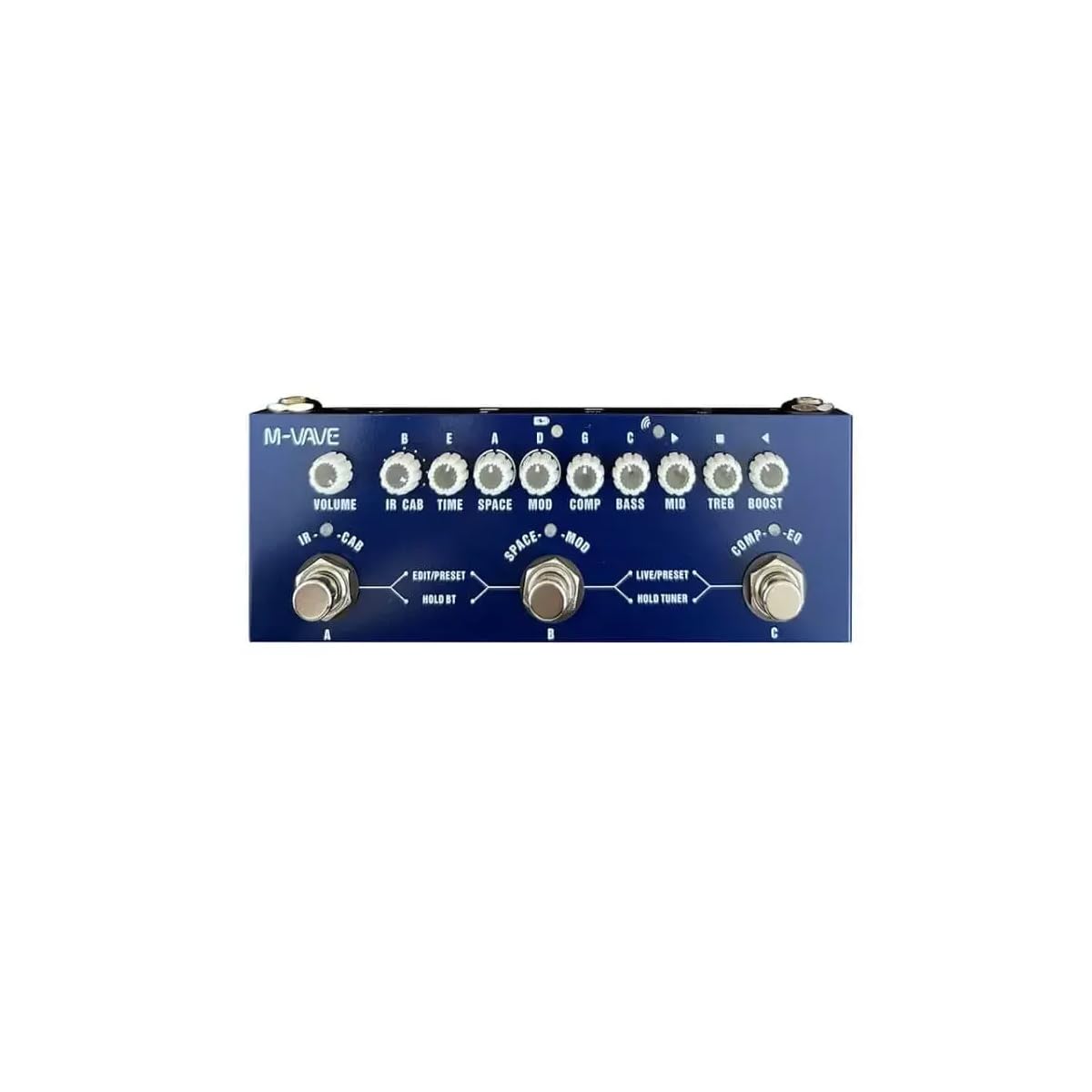
Aworan: Oke view of the M-Vave Cube Baby Bass pedal. It features multiple control knobs for various effects and two footswitches for preset selection and tuner activation.
- KỌRỌ IWỌRỌ: Satunṣe awọn ìwò o wu iwọn didun.
- CAB Knob: Selects and adjusts cabinet simulations.
- KỌRỌ TIME: Controls the delay time or other time-based effect parameters.
- SPACE Knob: Adjusts reverb parameters.
- MOD Knob: Controls modulation effects like Chorus or Vibrato.
- KỌMBA COMP: Adjusts the compressor effect.
- BASS Knob: Adjusts the low-frequency equalization.
- Bọlu agbedemeji: Adjusts the mid-frequency equalization.
- TREB Knob: Adjusts the high-frequency equalization.
- BOOST Bọtini: Ṣe iṣakoso ipele igbelaruge.
- LEFT Footswitch (PRESET): Toggles between presets or modes.
- RIGHT Footswitch (TUNER/BOOST): Activates the tuner or boost function.
Ru Panel

Aworan: Ẹyin view of the M-Vave Cube Baby Bass pedal. From left to right, it shows the IN (input) jack, a power button, a USB-C port for charging and data, a micro-USB port (likely for OTG/external device), a headphone output, and the OUT (output) jack.
- IN Jack (1/4-inch): So gita baasi rẹ pọ nibi.
- Bọtini agbara: Yipada ẹyọ naa tan tabi pa.
- Ibudo USB-C: For charging the internal battery and connecting to a computer for IR loading or software updates.
- Ibudo USB Micro-USB: (Likely for OTG or specific data functions, refer to software manual for details).
- Headphone Jack (1/8-inch): So agbekọri pọ fun adaṣe idakẹjẹ.
- OUT Jack (1/4-inch): Sopọ si rẹ amplifier, audio interface, or mixer.
Ṣeto
- Ngba agbara si Batiri naa: Connect the USB charging cable to the USB-C port on the pedal and to a USB power adapter (not included) or a power bank. The pedal takes approximately 2 hours to fully charge and provides 6-8 hours of operation.
- Connecting Your Instrument: So gita bass rẹ pọ mọ inu IN jack using a standard 1/4-inch instrument cable.
- Nsopọ si ẹya Ampẹ̀rọ ìfọ́mọ́ra/Àdàpọ̀: Sopọ awọn Jade jack to your bass amplifier, audio interface, or mixer using a standard 1/4-inch instrument cable.
- Asopọ agbekọri: For silent practice, plug your headphones into the Jack agbekọri.
- Agbara Tan: Press and hold the Power Button to turn on the Cube Baby Bass.
Awọn ilana Iṣiṣẹ
Isẹ ipilẹ
- Yiyan awọn tito tẹlẹ: Lo awọn LEFT Footswitch (PRESET) to cycle through available presets. The LED indicator will show the currently selected preset.
- Adjusting Effects: Turn the corresponding knobs (VOLUME, CAB, TIME, SPACE, MOD, COMP, BASS, MID, TREB, BOOST) to adjust the parameters of the active effects.
- Lilo Tuner: Tẹ mọlẹ RIGHT Footswitch (TUNER/BOOST) to activate the built-in tuner. Play a single note on your bass, and the display will indicate the note and tuning accuracy. Press the footswitch again to exit tuner mode.
- Activating Boost: A quick press of the RIGHT Footswitch (TUNER/BOOST) will engage or disengage the boost function, controlled by the BOOST knob.
Advanced Features (IR Loading)
The Cube Baby Bass supports loading third-party Impulse Responses (IRs) to expand its cabinet simulation capabilities.
- Sopọ si Kọmputa: Use the USB-C cable to connect the pedal to your computer.
- Software: Download and install the dedicated M-Vave software (available from the M-Vave official webaaye).
- Load IRs: Follow the software instructions to load your desired IR files into the pedal's memory.
Itoju
- Ninu: Wipe the pedal with a soft, dry cloth. Do not use abrasive cleaners or solvents.
- Ibi ipamọ: Tọ́jú pedal náà sí ibi tí ó tutù tí ó sì gbẹ, tí kò sí ibi tí oòrùn lè tàn dé àti ibi tí ó gbóná janjan.
- Itọju Batiri: To prolong battery life, avoid fully discharging the battery frequently. Charge the pedal regularly, even if not in use for extended periods.
- Awọn imudojuiwọn famuwia: Check the M-Vave official webAaye ayelujara nigbagbogbo fun awọn imudojuiwọn famuwia lati rii daju pe iṣẹ ṣiṣe ti o dara julọ ati iwọle si awọn ẹya tuntun.
Laasigbotitusita
- Ko si Ijade ohun:
- Ensure the pedal is powered on and fully charged.
- Check all cable connections (instrument to IN, OUT to amplifier/mixer, headphones).
- Verify that the VOLUME knob is turned up.
- Bypass the pedal to check if the issue is with the instrument or amplifier.
- Ohun Yiyi:
- Reduce the input level from your bass or the gain settings on the pedal.
- Ṣàyẹ̀wò fún àwọn okùn tí kò ní àbùkù.
- Rii daju pe amplifier's input is not overdriven.
- Pedal Not Charging:
- Ensure the USB-C cable is securely connected to both the pedal and the power source.
- Try a different USB power adapter or power bank.
- Ṣayẹwo boya okun USB-C ti bajẹ.
- Awọn ipa Ko ṣiṣẹ:
- Ensure the specific effect is enabled within the selected preset.
- Adjust the effect's corresponding knob to hear its impact.
- If using custom IRs, ensure they are loaded correctly.
Awọn pato
| Ẹya ara ẹrọ | Sipesifikesonu |
|---|---|
| Awoṣe | MVA-CBB |
| Awọn iwọn | 19 x 13.5 x 3.7 cm (7.5 x 5.3 x 1.5 inches) |
| Iwọn | 340 g (0.75 lbs) |
| Awọn ipa | 8 Amp Emulations, Chorus, Vibrato, Compressor, Delay, Reverb |
| Atilẹyin IR | Yes, third-party IR loading |
| Tuner | Built-in precise tuner |
| Orisun agbara | Batiri gbigba agbara ti a ṣe sinu |
| Akoko gbigba agbara | Isunmọ. wakati meji 2 |
| Akoko Iṣiṣẹ | 6-8 wakati |
| Iṣawọle | 1/4-inch Audio Jack |
| Abajade | 1/4-inch Audio Jack |
| Agbekọri Ijade | 1/8-inch Audio Jack |
| USB Interface | USB-C (charging, data), Micro-USB |
Atilẹyin ọja ati Support
Atilẹyin ọja: This product comes with a 2-year manufacturer's warranty from the date of purchase. Please retain your proof of purchase for warranty claims. The warranty covers defects in materials and workmanship under normal use. It does not cover damage caused by misuse, accidents, unauthorized modifications, or normal wear and tear.
Atilẹyin: For technical support, troubleshooting assistance, or warranty inquiries, please contact M-Vave customer service through their official webojula tabi agbegbe rẹ olupin.