
Ọrọ Iṣaaju
This user manual provides comprehensive instructions for the setup, operation, maintenance, and troubleshooting of your Fanvil W610W Portable WiFi Phone. Please read this manual carefully before using the device to ensure proper functionality and to avoid damage.
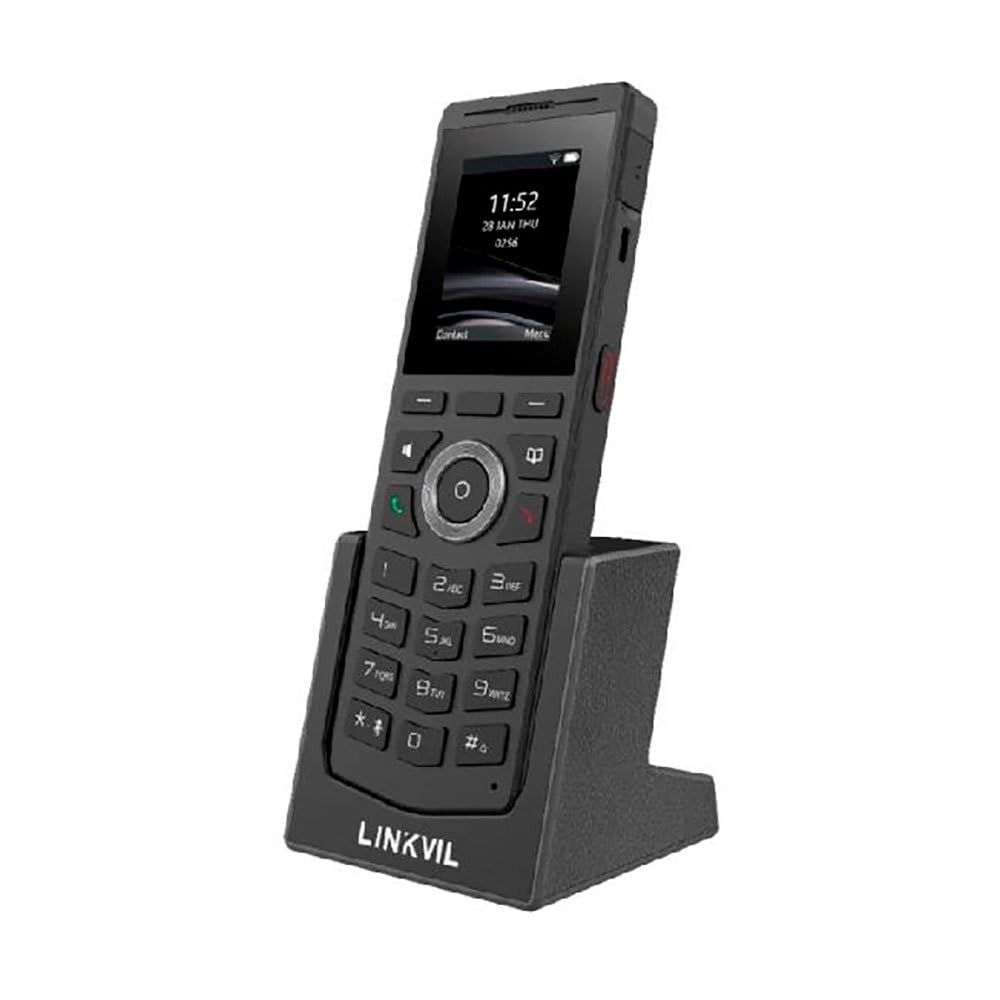
Figure 1: Fanvil W610W Portable WiFi Phone with charging cradle.
The image displays the Fanvil W610W phone, a sleek black device with a color screen showing the time (11:52) and date (23 JAN THU). Below the screen is a standard phone keypad with numerical buttons and navigation keys. The phone is seated in a matching black charging cradle, which has "LINKVIL" embossed on its front base.
The Fanvil W610W is a robust and portable WiFi phone designed for professional environments, offering reliable communication with advanced features such as dual-band Wi-Fi, Bluetooth 5.0, and support for multiple SIP lines.
Package Awọn akoonu
- Fanvil W610W Portable WiFi Phone
- Gbigba agbara Jojolo
- Adapter agbara
- Rechargeable Battery (may be pre-installed)
- Itọsọna Ibẹrẹ kiakia (ti o ba wulo)
Ṣeto
1. Fifi sori batiri ati gbigba agbara
- Wa yara batiri ni ẹhin foonu naa.
- Insert the provided 1900mAh rechargeable battery, ensuring correct polarity.
- Pa ideri batiri naa ni aabo.
- Place the phone into the charging cradle.
- Connect the power adapter to the charging cradle and then to a power outlet.
- Allow the phone to charge fully before first use (approximately 4 hours). The battery indicator on the screen will show charging status.
2. Agbara akọkọ Lori
Press and hold the Power button (usually on the side or top) until the screen illuminates.
3. Network Configuration (Wi-Fi)
- Lilö kiri si Eto > Nẹtiwọọki > Wi-Fi.
- Enable Wi-Fi. The phone will scan for available networks.
- Select your desired 2.4GHz or 5GHz Wi-Fi network from the list.
- Tẹ ọrọ igbaniwọle Wi-Fi sii ti o ba ṣetan.
- Confirm connection. The Wi-Fi icon will appear on the status bar.
4. Iforukọsilẹ Account SIP
The Fanvil W610W supports up to 4 SIP lines. Configuration typically requires details from your VoIP service provider or PBX administrator.
- Lilö kiri si Eto > Awọn iroyin > SIP Account.
- Yan aaye akọọlẹ ti o wa.
- Enter the following information provided by your administrator:
- Orukọ akọọlẹ
- Adirẹsi olupin SIP
- ID olumulo SIP
- Authentication Username
- Ọrọigbaniwọle Ijeri
- Save the settings. The account status icon should indicate successful registration.
Awọn ilana Iṣiṣẹ
Ṣiṣe awọn ipe
- Pipe: Tẹ nọmba foonu sii nipa lilo oriṣi bọtini ko si tẹ awọn Pe bọtini.
- Láti ọ̀dọ̀ àwọn olùbáṣepọ̀: Lilö kiri si Awọn olubasọrọyan olubasọrọ kan, ki o si tẹ Pe bọtini.
- Titun: Tẹ awọn Pe button to access the call history and select a number to redial.
Gbigba Awọn ipe
Tí ìpè kan bá dún, tẹ ìpè náà Pe button to answer. To reject, press the Ipe Ipari bọtini.
Awọn ẹya ipe
- Duro: Lakoko ipe, tẹ awọn Dimu bọtini rirọ.
- Gbe: Lakoko ipe, tẹ awọn Gbigbe bọtini soft, tẹ nọmba tuntun naa, ki o tẹ Gbigbe lẹẹkansi.
- Apejọ: Lakoko ipe, tẹ awọn Conf soft key, dial the second party, and then press Conf lẹẹkansi lati da gbogbo awọn ẹgbẹ.
- Pa ẹnu mọ́: Tẹ awọn Pa ẹnu mọ́ button to mute your microphone during a call.
- Titari-si-Sọrọ (PTT): Utilize the dedicated PTT button for one-key calling in supported environments.
Sisopọ Agbekọri Bluetooth
The W610W supports Bluetooth 5.0 for wireless headsets.
- Lilö kiri si Eto > Bluetooth.
- Mu Bluetooth ṣiṣẹ.
- Put your Bluetooth headset into pairing mode.
- Select your headset from the list of available devices and confirm pairing.
Itoju
Ninu
- Use a soft, dry, lint-free cloth to clean the phone and screen.
- Do not use liquid cleaners, aerosols, or abrasive materials.
Itọju Batiri
- Gba agbara si batiri nigbagbogbo lati ṣetọju iṣẹ to dara julọ.
- Avoid extreme temperatures, which can reduce battery life.
- If the phone will not be used for an extended period, charge it to about 50% and store it in a cool, dry place.
Famuwia Awọn imudojuiwọn
Periodically check for firmware updates to ensure your phone has the latest features and security enhancements. Updates can typically be performed via the phone's web interface or through your system administrator.
Laasigbotitusita
| Isoro | Owun to le Fa | Ojutu |
|---|---|---|
| Foonu ko ṣiṣẹ. | Low or depleted battery; faulty battery; power adapter issue. | Ensure battery is charged. Check power adapter connection. Try a different power outlet. |
| Ko le sopọ si Wi-Fi. | Incorrect password; out of range; Wi-Fi network issues. | Verify Wi-Fi password. Move closer to the access point. Restart router/access point. |
| Ko le ṣe tabi gba awọn ipe wọle. | SIP account not registered; network connectivity issues; incorrect SIP settings. | Check SIP account status (should be registered). Verify network connection. Re-enter SIP account details. Contact your VoIP administrator. |
| Dídára ìpè tí kò dára (ìró ohùn, àìdúró). | Weak Wi-Fi signal; network congestion; headset issues. | Improve Wi-Fi signal strength. Reduce network traffic. Test with a different headset or without one. |
Awọn pato
- Awoṣe: W610W
- Awọn iwọn: 5.91 x 5.91 x 3.15 inches
- Ìwúwo: 15.1 iwon (0.43 kilo)
- Ifihan: Iboju Awọ 2"
- Asopọmọra: Dual-Band Wi-Fi (2.4GHz/5GHz), Bluetooth 5.0
- Awọn Laini SIP: Supports 4 SIP lines
- Batiri: 1900mAh batiri gbigba agbara
- Akoko Ọrọ: Titi di wakati 9
- Akoko Iduro: Titi di wakati 200
- Ju ailewu: From 1.8 meters
- Awọn ẹya: 16 DSS keys, PTT one-key calling, Roaming protocols (802.11k/v/r), HD voice, Multilingual UI, Voicemail, Enhanced call features.
- Orisun Agbara: Agbara Batiri
- Àwọ̀: Dudu
- Olupese: Fanvil
- Akọkọ Wa: Oṣu Kẹwa Ọjọ 26, Ọdun 2023
Alaye atilẹyin ọja
Fanvil products typically come with a standard manufacturer's warranty. For specific warranty terms and conditions, please refer to the warranty card included with your product or visit the official Fanvil webojula. Tọju iwe-ẹri rira rẹ bi ẹri rira fun awọn iṣeduro atilẹyin ọja.
Atilẹyin
For technical assistance, troubleshooting beyond this manual, or warranty inquiries, please contact your product vendor or Fanvil customer support. You may find contact information on the Fanvil official webaaye tabi ninu apoti ọja rẹ.
Awọn orisun Ayelujara:
- Fanvil Official Webojula: www.fanvil.com (Eksample ọna asopọ, ọna asopọ gangan le yatọ)
- Product Support Pages: Refer to the support section on the Fanvil website for firmware, FAQs, and additional documentation.