
1. Ọja Ipariview
The DOOGEE V30 PRO is a robust 5G rugged smartphone designed for durability and high performance. It features a powerful MediaTek Dimensity 7050 Octa Core processor, a large 10800mAh battery, and an advanced 200MP AI triple camera system. Built to withstand harsh environments, it meets IP68/IP69K and MIL-STD-810H standards for water, dust, and drop resistance.
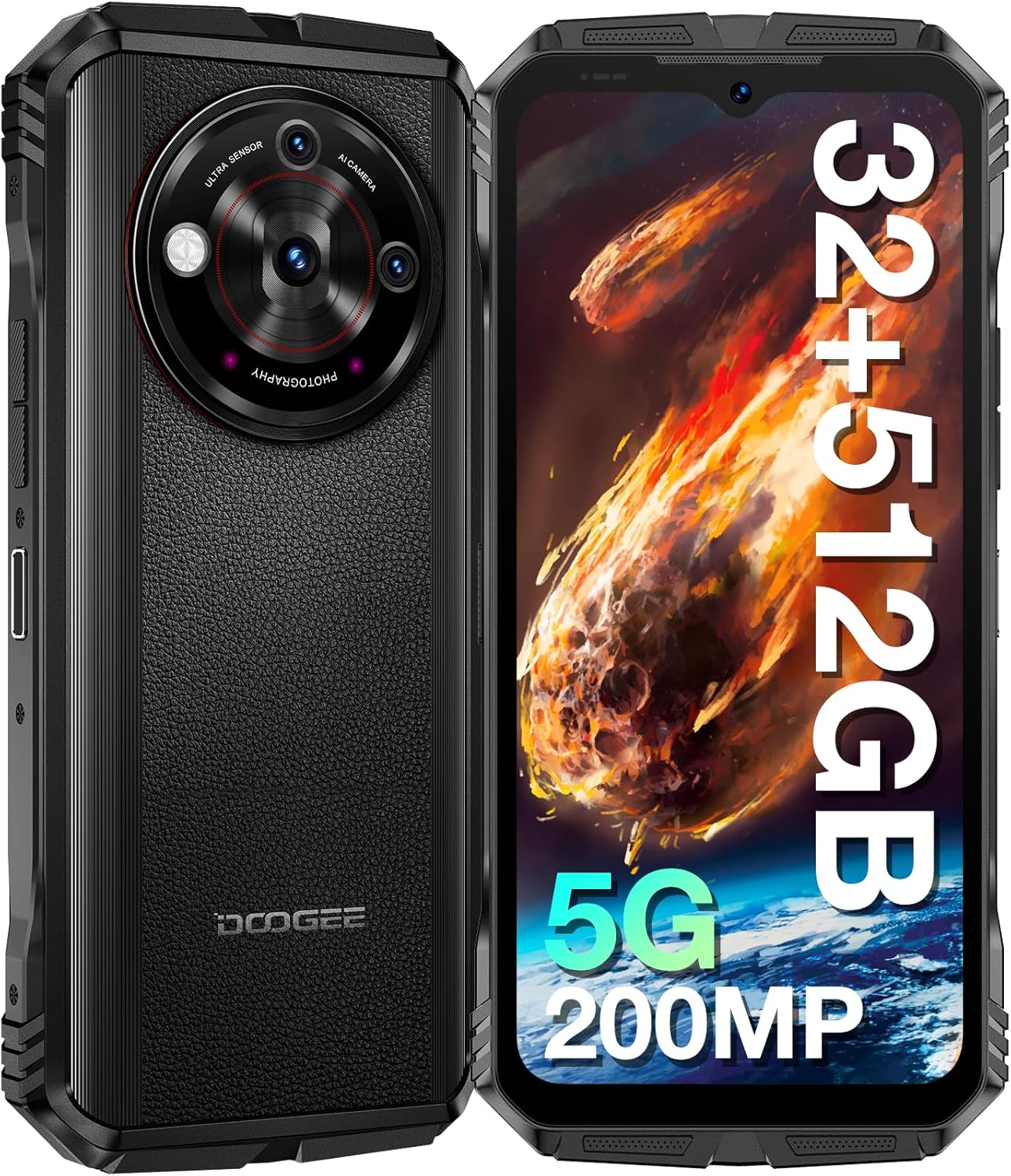
Aworan: Iwaju ati sẹhin view of the DOOGEE V30 PRO 5G Rugged Smartphone, highlighting its robust design and camera module.

Aworan: An loriview of the DOOGEE V30 PRO's key features, including its 200MP camera, 120Hz display, Dimensity 7050 processor, and 10800mAh battery.
2. Eto Itọsọna
2.1 Package Awọn akoonu
Before starting, ensure all items are present in the box:
- DOOGEE V30 PRO Smartphone
- 33W Super Sare Ṣaja
- Okun USB (Iru-C)
- SIM Atẹ ejector Ọpa
2.2 Kaadi SIM ati TF Kaadi fifi sori
The DOOGEE V30 PRO supports dual Nano SIM cards or one Nano SIM card and one TF (microSD) card for expanded storage.
- Wa atẹ kaadi SIM ni ẹgbẹ ti ẹrọ naa.
- Fi SIM atẹ ejector ọpa sinu kekere iho tókàn si awọn atẹ ki o si tẹ rọra titi ti atẹ yoo jade.
- Place your Nano SIM card(s) and/or TF card into the designated slots on the tray, ensuring correct orientation.
- Fi pẹ̀lẹ́pẹ̀lẹ́ tì atẹ́ náà padà sínú ihò náà títí tí yóò fi rí bí ara ẹ̀rọ náà ṣe rí.

Image: Diagram illustrating the Nano SIM1 and Nano-SIM2/TF card slot for proper installation.
2.3 Gbigba agbara ibẹrẹ ati Agbára
- Connect the USB cable to the 33W Super Fast Charger and then to the Type-C port on your phone.
- So charger náà mọ́ ibi tí a lè fi mànàmáná sí. A gbani nímọ̀ràn láti gba agbára rẹ̀ kí ó tó di pé a kọ́kọ́ lò ó.
- To power on, press and hold the Power button (usually on the side) until the DOOGEE logo appears on the screen.
- Follow the on-screen prompts to complete the initial Android 13.0 setup, including language selection, Wi-Fi connection, and Google account setup.
3. Ṣiṣẹ ẹrọ rẹ
3.1 Ifihan ati Ibaṣepọ
The DOOGEE V30 PRO features a 6.58-inch FHD+ IPS display with a 120Hz refresh rate for smooth visuals and responsiveness.
- Lilọ kiri iboju ifọwọkan: Interact with the device by tapping, swiping, pinching, and long-pressing on the screen.
- Awọn bọtini Ti ara: Utilize the Power button for screen lock/unlock and power options, and Volume buttons for audio control.
- Custom Key Button: The device includes a customizable side button that can be programmed for quick access to specific functions or applications.

Image: The 6.58-inch FHD+ IPS display with 120Hz refresh rate, showcasing its vibrant visuals.
3.2 kamẹra Awọn ẹya ara ẹrọ
Ya awọn fọto ati awọn fidio didara giga pẹlu eto kamẹra ti o le lo.
- 200MP AI akọkọ kamẹra: For detailed and high-resolution images.
- Kamera Iran Alẹ́ 24MP: Enables clear photography in low-light or complete darkness.
- 32MP Kamẹra iwaju: Apẹrẹ fun awọn selfie ati awọn ipe fidio.
- 4K Video Capture: Record high-definition videos.

Image: The AI Triple Camera setup on the DOOGEE V30 PRO, featuring the 200MP main sensor.

Image: A comparison demonstrating the clarity of the 24MP Night Vision Camera in dark conditions.
3.3 Asopọmọra
The device offers advanced connectivity options:
- Nẹtiwọọki 5G: Provides fast and stable mobile data connectivity.
- Wi-Fi 6: For high-speed wireless internet access with lower latency.
- Bluetooth 5.2: Fún sísopọ̀ àwọn ohun èlò aláiláìlókùn bíi agbekọri àti àwọn agbọ́hùnsọ.
- NFC (Ibaraẹnisọrọ aaye nitosi): Supports mobile payments and quick pairing with compatible devices.
- Lilọ kiri: Integrated GPS, GLONASS, Galileo, Beidou, and AGPS for accurate positioning.
3.4 Awọn ẹya Aabo
Secure your device and data:
- Ìmọ̀ Ìka Ẹ̀gbẹ́: Unlock your phone quickly and securely using the side-mounted fingerprint sensor.
- Ti idanimọ oju: Lo oju rẹ lati ṣii ẹrọ naa.
3.5 batiri Management
The 10800mAh battery provides extended usage time.
- Akoko Iduro Gigun: Titi di wakati 720.
- Gbigba agbara iyara 33W: Quickly recharge your device using the included charger.
- OTG (On-The-Go) Function: Use your phone to charge other electronic devices in emergencies.

Image: Illustration of the 10800mAh battery capacity and 33W fast charging capability.
3.6 Ibi ipamọ ati Performance
The DOOGEE V30 PRO offers ample storage and smooth performance:
- 32GB Ramu: (12GB physical + 20GB virtual RAM) for seamless multitasking.
- ROM 512GB: Internal storage for apps and data.
- Ìfẹ̀sí Káàdì TF 2TB: Expand storage further using a microSD card.

Image: Visual representation of the Dimensity 7050 Octa Core processor, highlighting its 32GB RAM and 512GB ROM with 2TB expandable storage.
3.7 Rugged Features and Toolbag
Designed for extreme conditions, the V30 PRO is IP68/IP69K and MIL-STD-810H certified, making it resistant to:
- 1.5M Drop-Test: O duro de awọn isalẹ lati to awọn mita 1.5.
- 1.5M Water Deep: Submersible in water up to 1.5 meters for 30 minutes.
- Ko eruku: Ni aabo ni kikun lodi si eruku eruku.
The device also includes a suite of practical tools:
- Protractor
- SoundMeter
- HeightMeasure
- Fọ́kì Dídì
- Agbo nla
- Kompasi
- Gradienter
- Plumb Bob
- Digi

Image: Demonstrates the solid and waterproof structure of the DOOGEE V30 PRO, highlighting its resistance to drops, water, and dust.

Image: Icons representing the various built-in toolbag applications available on the DOOGEE V30 PRO.
3.8 Underwater Mode
The DOOGEE V30 PRO supports an Underwater Mode, allowing you to capture photos and videos while submerged. Ensure the device is properly sealed before entering water.

Image: A person using the DOOGEE V30 PRO in Underwater Mode to capture images beneath the surface.
4. Itọju
4.1 Ninu ẹrọ rẹ
To maintain the ruggedness and appearance of your DOOGEE V30 PRO:
- Nu ẹrọ naa pẹlu asọ, damp asọ.
- Fun idoti alagidi, lo ojutu ọṣẹ kekere kan ki o fi omi ṣan daradara pẹlu omi mimọ.
- Ensure all ports and covers are dry before charging or using in wet conditions.
4.2 batiri Itọju
Lati pẹ igbesi aye batiri:
- Yago fun ṣiṣafihan ẹrọ naa si awọn iwọn otutu to gaju.
- Use only the original charger and cable provided.
- Ma ṣe mu batiri silẹ ni kikun nigbagbogbo.
4.3 Software imudojuiwọn
Regularly check for and install software updates to ensure optimal performance, security, and access to new features. Updates are typically found in the device's settings menu under 'System' or 'About phone'.
5. Laasigbotitusita
This section addresses common issues you might encounter with your DOOGEE V30 PRO.
5.1 Wọpọ Oran ati Solusan
- Ẹrọ ko ṣiṣẹ lori:
- Rí i dájú pé batiri náà ti gba agbára. So mọ́ ẹ̀rọ amúṣẹ́ náà fún o kere ju ìṣẹ́jú mẹ́wàá kí o tó gbìyànjú láti tan agbára náà.
- Tẹ bọtini agbara ki o si mu fun awọn aaya 10-15 lati fi agbara mu lati tun bẹrẹ.
- Poor network connectivity (calls/data):
- Check if the SIM card is correctly inserted. Re-insert if necessary.
- Rí i dájú pé o wà lábẹ́ ààbò nẹ́tíwọ́ọ̀kì.
- Yipada Ipo ofurufu tan ati pa.
- Tun ẹrọ naa bẹrẹ.
- Awọn ohun elo kọlu tabi didi:
- Ko kaṣe ti ohun elo iṣoro kuro (Eto> Awọn ohun elo> [Orukọ Ohun elo]> Ibi ipamọ> Ko kaṣe kuro).
- Rii daju pe ohun elo naa ti ni imudojuiwọn si ẹya tuntun rẹ.
- Tun ẹrọ naa bẹrẹ.
- Batiri mimu yarayara:
- Din imọlẹ iboju din.
- Pa awọn ohun elo abẹlẹ ti ko lo.
- Mu Wi-Fi, Bluetooth, tabi GPS ṣiṣẹ nigbati ko si ni lilo.
- Ṣàyẹ̀wò lílo bátìrì nínú Ètò láti mọ àwọn ohun èlò tí agbára ń fẹ́.
- NFC not working (e.g., with CGMs):
- Ensure NFC is enabled in Settings.
- Verify compatibility with the specific NFC device or system you are trying to use. Not all NFC applications are universally supported.
5.2 Atunto ile-iṣẹ
Ti awọn ọran ba tẹsiwaju, atunto ile-iṣẹ le yanju ọpọlọpọ awọn iṣoro ti o ni ibatan sọfitiwia. Ikilọ: Èyí yóò pa gbogbo ìwífún lórí fóònù rẹ rẹ́. Ṣe àtìlẹ́yìn fún àwọn ìwífún pàtàkì kí o tó tẹ̀síwájú.
- Lọ si Eto> Eto> Tun awọn aṣayan.
- Yan 'Nu gbogbo data rẹ (atunṣe ile-iṣẹ)'.
- Jẹrisi ipinnu rẹ ki o tẹ PIN/apẹẹrẹ rẹ sii ti o ba ṣetan.
6. Awọn pato
| Ẹya ara ẹrọ | Sipesifikesonu |
|---|---|
| Orukọ awoṣe | V30PRO |
| Eto isesise | Android 13.0 |
| isise | MediaTek Dimensity 7050 Octa Core (2.6 GHz) |
| Àgbo | 32 GB (12GB ti ara + 20GB foju) |
| Ibi ipamọ inu (ROM) | 512 GB |
| Expandable Ibi ipamọ | Títí dé 2TB (káàdì TF) |
| Iwọn Ifihan | 6.58 inches |
| Ipinnu Ifihan | 1080 x 2408 (FHD+) |
| Oṣuwọn sọtun | 120 Hz |
| Kamẹra akọkọ | 200 MP AI Main Camera |
| Oju-ọjọ Kamẹra | 24 MP |
| Kamẹra iwaju | 32 MP |
| Agbara Batiri | 10800 mAh |
| Gbigba agbara | 33W Super Fast Charge (Type-C) |
| Asopọmọra | 5G, Wi-Fi 6, Bluetooth 5.2, NFC |
| Lilọ kiri | GPS, GLONASS, Galileo, Beidou, AGPS |
| Awọn Iwọn Agbara Iwaju | IP68 / IP69K / MIL-STD-810H |
| Aabo | Side Fingerprint Recognition, Face Recognition |
| Awọn iwọn | 7.48 x 4.06 x 3.27 inches |
| Iwọn Nkan | 1.46 iwon |
7. Atilẹyin ọja ati Support
The DOOGEE V30 PRO Rugged Smartphone comes with a two-year quality guarantee.
For technical assistance, warranty claims, or general inquiries, please contact DOOGEE customer service. Our personal customer service provides a friendly and fast response within 24 hours.
You can also visit the official DOOGEE store for more information and support resources: Ile itaja DOOGEE lori Amazon