
Candy CW50-BP12307-S
Candy CW50-BP12307-S Front-Load Washing Machine User Manual
Model: CW50-BP12307-S
1. Ifihan ati Alaye Aabo
Thank you for choosing the Candy CW50-BP12307-S Front-Load Washing Machine. This manual provides essential information for the safe and efficient use of your appliance. Please read it thoroughly before installation and operation, and keep it for future reference.
1.1 Gbogbogbo Aabo ikilo
- Nigbagbogbo ge asopọ ohun elo lati ipese agbara ṣaaju ṣiṣe mimọ tabi ṣiṣe itọju.
- Ohun elo yii kii ṣe ipinnu fun lilo nipasẹ awọn eniyan (pẹlu awọn ọmọde) pẹlu idinku ti ara, imọlara tabi awọn agbara ọpọlọ, tabi aini iriri ati imọ, ayafi ti wọn ba ti fun wọn ni abojuto tabi itọnisọna nipa lilo ohun elo nipasẹ eniyan ti o ni iduro fun aabo wọn.
- Awọn ọmọde yẹ ki o wa ni abojuto lati rii daju pe wọn ko ṣere pẹlu ohun elo naa.
- Maṣe fi ohun elo sori ẹrọ ni ipolowoamp place or where it may be exposed to water.
- Rí i dájú pé gbogbo ohun èlò ìdìpọ̀ ni a ti yọ kúrò kí a tó lò ó.
- Ma ṣe lo awọn okun itẹsiwaju tabi awọn oluyipada pupọ.
- Do not open the detergent drawer during the wash cycle.
- Maṣe fi ọwọ kan ohun elo pẹlu ọwọ tutu tabi ẹsẹ.
2. Ọja Ipariview
Mọ ararẹ pẹlu awọn paati akọkọ ti ẹrọ fifọ rẹ.
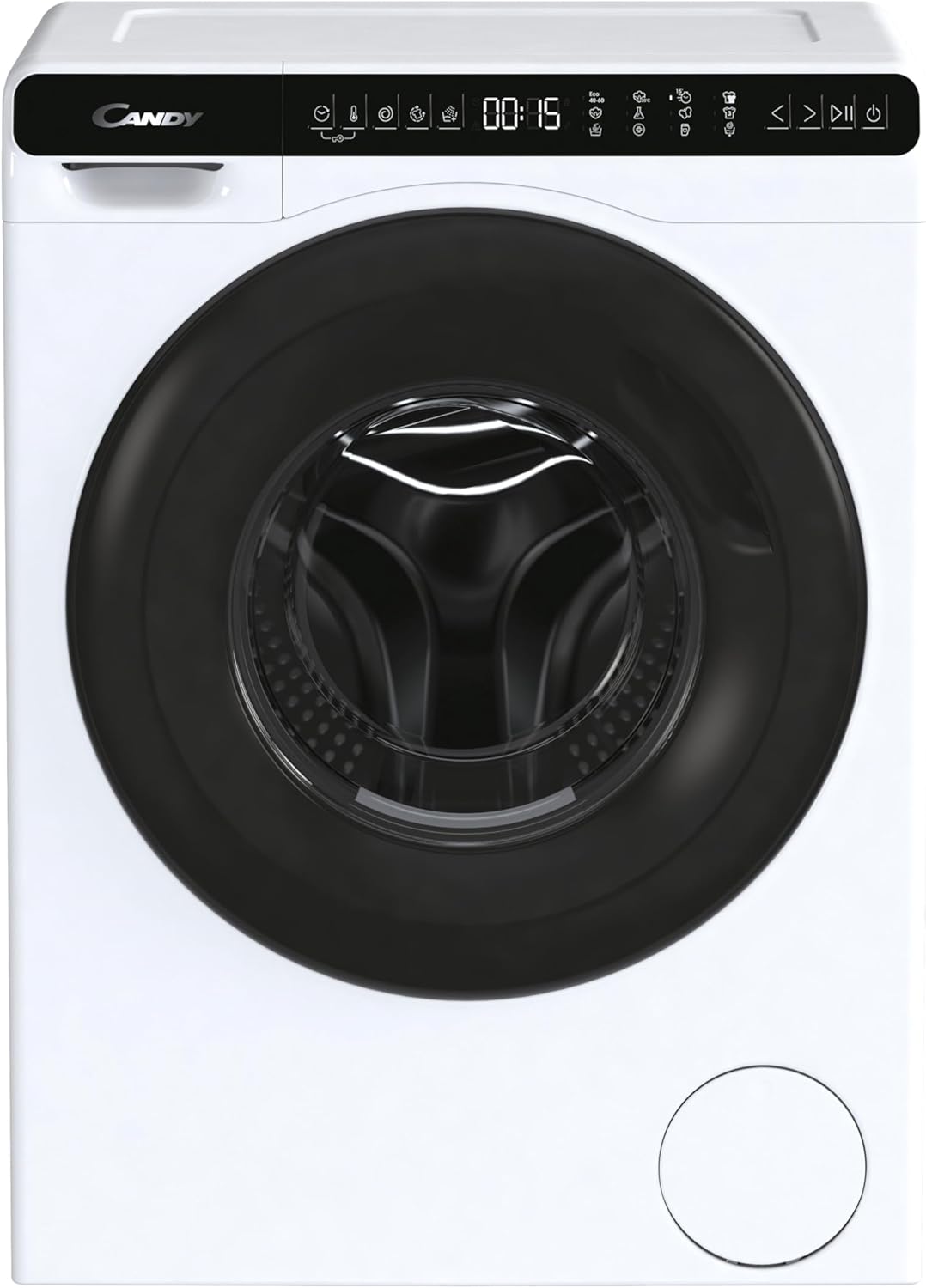
Aworan 2.1: Iwaju view of the Candy CW50-BP12307-S washing machine. This image displays the appliance with its door closed, showcasing the control panel at the top and the main drum access.

Aworan 2.2: Close-up of the control panel and door. This image highlights the digital display, program selection buttons, and the ergonomic handle of the washing machine door.
2.1 Iṣakoso igbimo
The control panel allows you to select wash programs, adjust settings, and monitor the wash cycle. Refer to the detailed diagram below for specific button functions.

Aworan 2.3: Alaye view of the Candy CW50-BP12307-S control panel. This image provides a clear look at the various icons and buttons for program selection, temperature, spin speed, and additional functions.
- Aṣayan Eto: Turn to choose your desired wash program.
- Ifihan: Shows remaining time, selected options, and error codes.
- Bọtini Ibẹrẹ/Daduro: Initiates or pauses the wash cycle.
- Awọn bọtini aṣayan: Modify temperature, spin speed, or add extra rinses.
3. Eto ati fifi sori
Fifi sori ẹrọ to dara jẹ pataki fun iṣẹ ṣiṣe ati gigun ti ẹrọ fifọ rẹ.
3.1 Ṣiṣii silẹ
- Yọ gbogbo awọn ohun elo apoti kuro, pẹlu ipilẹ polystyrene ati eyikeyi awọn ifibọ lati inu ilu naa.
- Remove the transport bolts located at the rear of the machine. These bolts secure the drum during transit and gbọdọ be removed before use. Keep them for future transport.
3.2 Ipò àti Ìwọ̀n
Place the washing machine on a firm, flat surface. Use the adjustable leveling feet to ensure the appliance is perfectly stable and level. An unlevel machine can cause excessive vibration and noise.
- Loosen the lock nut on each foot.
- Rotate the foot to adjust the height.
- Use a spirit level to check for perfect leveling.
- Tighten the lock nuts against the machine base to secure the feet.
3.3 Omi ati Sisan awọn isopọ
- So okun iwọle omi pọ si omi tutu tẹ ni kia kia pẹlu okun 3/4" kan. Rii daju pe asopọ pọ lati yago fun awọn n jo.
- Position the drain hose into a standpipe or over the edge of a sink, ensuring it is securely fixed to prevent displacement during draining. The drain hose should be between 60 cm and 100 cm from the floor.
3.4 Itanna Asopọ
- Connect the power plug to a grounded electrical outlet.
- Rii daju voltage àti ìgbagbogbo bá àwọn ìlànà tó wà lórí àwo ìdíyelé ohun èlò mu.
4. Awọn ilana Iṣiṣẹ
4.1 Preparing the Laundry
- Too ifọṣọ nipasẹ iru aṣọ, awọ, ati iwọn ile.
- Ṣayẹwo awọn aami itọju aṣọ fun awọn ilana fifọ.
- Da awọn apo pamọ ki o si ti awọn sipu ati awọn bọtini pa.
4.2 Loading the Washing Machine

Aworan 4.1: The washing machine with its door open, ready for loading. This view shows the spacious drum and the door hinge mechanism.
- Ṣii ilẹkun ẹrọ fifọ.
- Load the laundry loosely into the drum, ensuring not to overload. The maximum capacity is 5 kg.
- Ti ilẹkun naa ṣinṣin titi ti yoo fi tẹ tiipa.
4.3 Fifi Detergent ati Awọn afikun
Open the detergent drawer and add detergent and fabric softener to the appropriate compartments. Refer to your detergent packaging for recommended dosages.
4.4 Yiyan Eto Wẹ
- Turn the program selector knob to choose the desired wash program (e.g., Cotton, Synthetics, Delicates, Eco 40-60).
- If necessary, adjust the temperature and spin speed using the option buttons.
- Tẹ bọtini Bẹrẹ/Sinmi lati bẹrẹ ọmọ naa.
Akiyesi: The display will show the estimated remaining time for the cycle.
5. Itọju ati Cleaning
Itọju deede ṣe idaniloju iṣẹ ṣiṣe to dara julọ ati fa igbesi aye ohun elo rẹ gbooro.
5.1 Ninu Drawer Detergent
- Pull out the detergent drawer completely.
- Fi omi ṣan labẹ omi ṣiṣan lati yọkuro eyikeyi iyokù ohun elo.
- Clean the drawer housing with a brush.
- Tun atẹwọ sii.
5.2 Ninu Ajọ Imugbẹ
The drain filter should be cleaned periodically to prevent blockages.
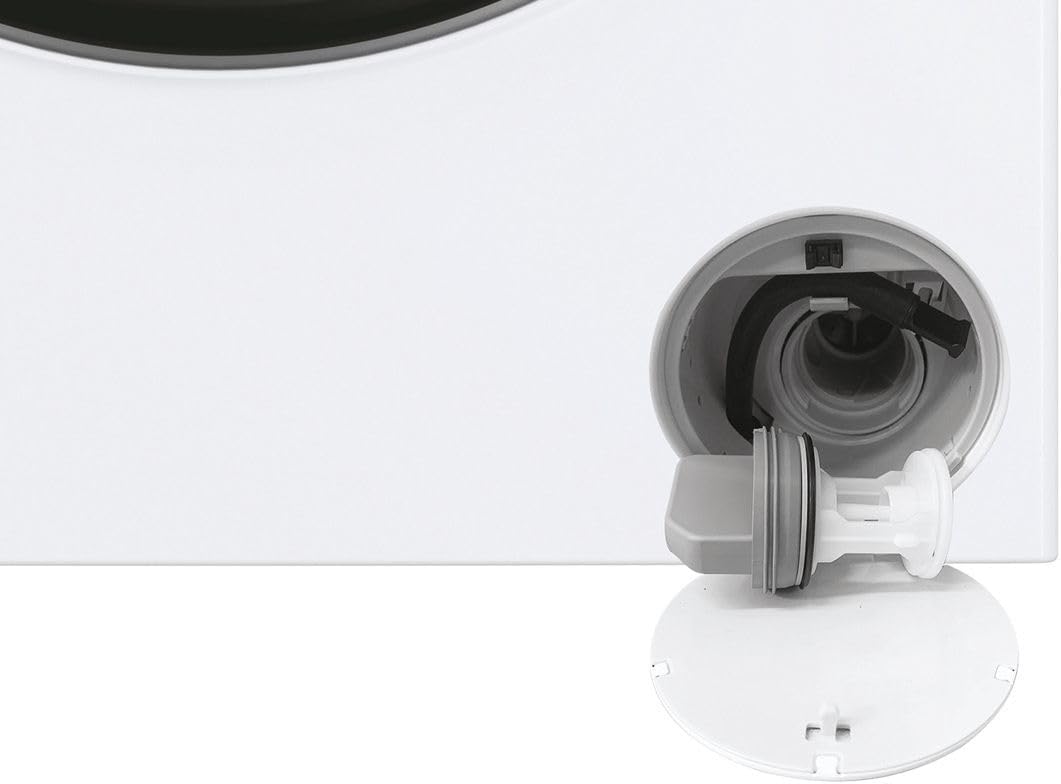
Aworan 5.1: Sun mo tipetipe view of the drain filter compartment, showing the filter removed for cleaning. This component is essential for preventing blockages.
- Ṣí ideri kékeré náà ní ìsàlẹ̀ iwájú ẹ̀rọ náà.
- Place a shallow container underneath to collect any residual water.
- Díẹ̀díẹ̀ tú àlẹ̀mọ́ náà ní ọ̀nà òdìkejì sí ọwọ́ òsì kí o sì yọ ọ́ kúrò.
- Nu àlẹ̀mọ́ náà mọ́ lábẹ́ omi tó ń ṣàn, kí o sì yọ gbogbo ohun tó wà nínú rẹ̀ tàbí àwọn ohun àjèjì kúrò.
- Dí àlẹ̀mọ́ náà padà sí apá ọ̀tún kí o sì ti ìbòrí náà pa.
5.3 Ìmọ́tótó ìlù
Run a maintenance wash (e.g., a hot cycle with no laundry and a descaling agent) periodically to clean the drum and remove detergent residues.
5.4 Ode Ninu
Mu ese ita ti ẹrọ fifọ pẹlu asọ, damp asọ. Ma ṣe lo abrasive ose tabi epo.
6. Laasigbotitusita
Ṣaaju ki o to kan si iṣẹ, jọwọ ṣayẹwo awọn ọran ti o wọpọ ati awọn ojutu wọnyi.
| Isoro | Owun to le Fa | Ojutu |
|---|---|---|
| Ẹrọ ko bẹrẹ | Kò sí agbára; Kò sí ìlẹ̀kùn; Kò sí ètò tí a yàn; A kò tẹ̀ ìbẹ̀rẹ̀/Dákẹ́. | Ṣàyẹ̀wò ìpèsè agbára; Rí i dájú pé ìlẹ̀kùn ti sé dáadáa; Yan ètò kan; Tẹ Bẹ̀rẹ̀/Dákẹ́. |
| Omi ko kun | Omi tẹ ni pipade; Inlet okun kikan; Omi titẹ ju kekere. | Ṣii omi tẹ ni kia kia; Titọ okun; Ṣayẹwo ipese omi. |
| Omi ti ko ṣan | Drain hose kinked or blocked; Drain filter blocked. | Straighten or clear drain hose; Clean drain filter (refer to Section 5.2). |
| Gbigbọn pupọ/ariwo | Ẹ̀rọ náà kò ní ìpele; Àwọn bọ́tìlì ọkọ̀ kò yọ kúrò; Ìlù tí ó kún fún ẹrù púpọ̀. | Ṣàtúnṣe ìwọ̀n ẹsẹ̀; Yọ àwọn bulọ́ọ̀tì ìrìnnà kúrò; Dín ẹrù ìfọṣọ kù. |
| Detergent aloku ni duroa | Insufficient water pressure; Detergent clumping. | Check water pressure; Clean detergent drawer; Use less detergent or liquid detergent. |
Ti iṣoro naa ba wa lẹhin igbiyanju awọn iṣeduro wọnyi, jọwọ kan si atilẹyin alabara.
7. Awọn pato
| Ẹya ara ẹrọ | Ẹ̀kúnrẹ́rẹ́ |
|---|---|
| Awoṣe | CW50-BP12307-S |
| Brand | Suwiti |
| Iru | Front-Load Washing Machine |
| Agbara | 5 kilo |
| O pọju omo ere | 1200 rpm |
| Àwọ̀ | White with Black accents |
| Iwọn Nkan | 52 kilo |
| Pataki Ẹya | Ẹsẹ Ipele Adijositabulu |
| Awọn iwọn (H x W x D) | Please refer to the product label or official Candy webaaye fun awọn iwọn gangan. |
| Ibi ti ina elekitiriki ti nwa | Refer to the rating plate on the appliance. |
8. Atilẹyin ọja ati Onibara Support
8.1 atilẹyin ọja Alaye
Your Candy CW50-BP12307-S washing machine comes with a manufacturer's warranty. Please refer to the warranty card included with your purchase for specific terms, conditions, and duration. Keep your proof of purchase for warranty claims.
8.2 Onibara Support
For technical assistance, spare parts, or warranty service, please contact Candy customer support. Contact details can typically be found on the official Candy webaaye tabi ninu iwe atilẹyin ọja rẹ.
When contacting support, please have your model number (CW50-BP12307-S) and serial number ready. The serial number is usually located on a label inside the door or at the back of the appliance.
Ask a question about this manual
Ask about setup, troubleshooting, compatibility, parts, safety, or missing instructions. Manuals+ will review the question and use this page’s manual context to help answer it.