

1. Ifihan
This manual provides essential information for the safe and efficient operation of your Defy Electronic Convection Microwave Oven, model DMO400. This appliance combines microwave, grill, and convection cooking functions, offering versatility for various culinary tasks. Please read these instructions thoroughly before using the appliance and retain them for future reference.
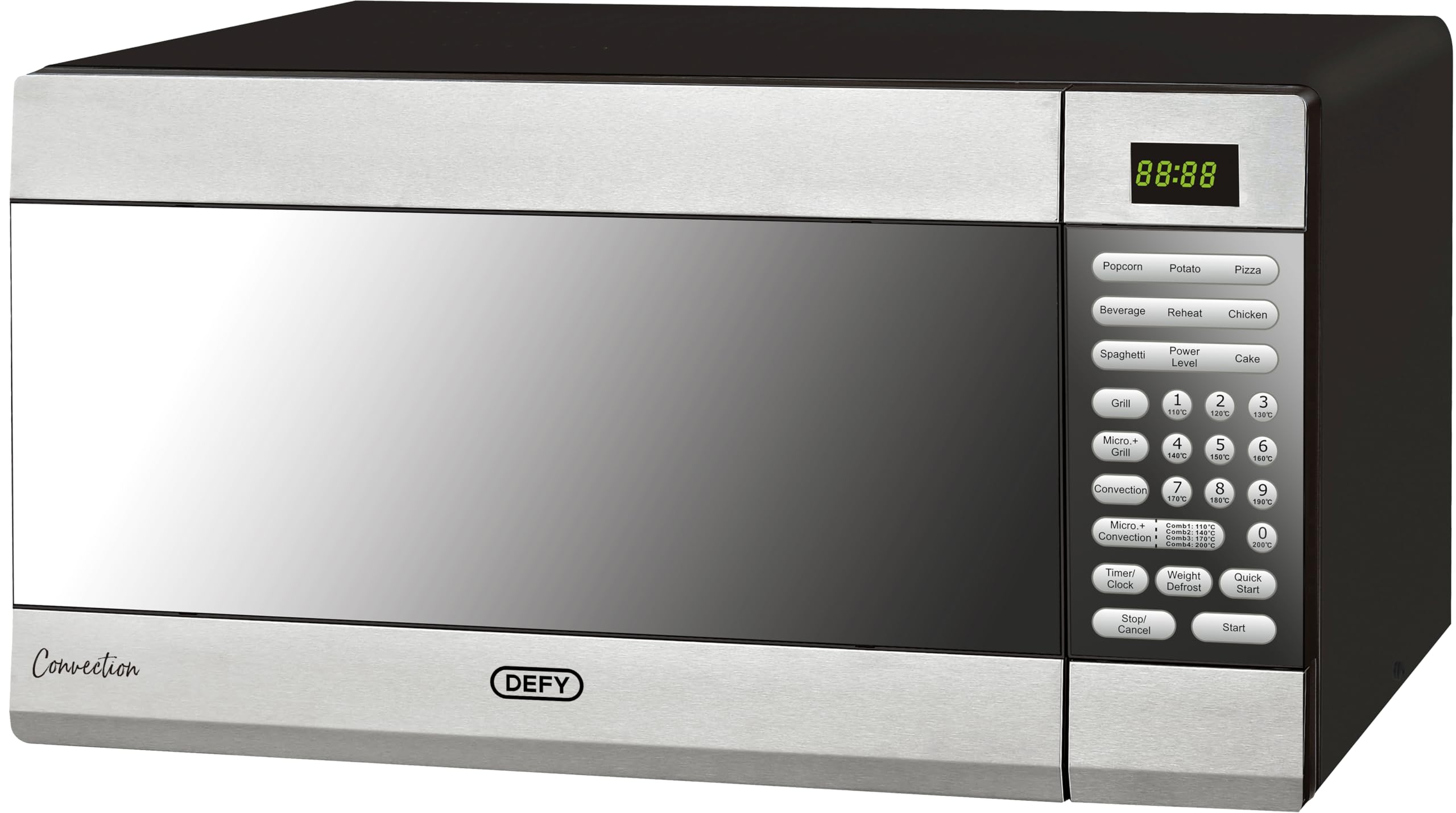
Figure 1: Defy Electronic Convection Microwave Oven DMO400, front view.
2. Awọn Ilana Aabo pataki
Nigbati o ba nlo awọn ohun elo itanna, awọn iṣọra aabo ipilẹ yẹ ki o tẹle nigbagbogbo lati dinku eewu ina, mọnamọna, ati ipalara si awọn eniyan.
- Ka gbogbo awọn ilana ṣaaju lilo ohun elo naa.
- Do not operate the oven if the cord or plug is damaged, if it is not working properly, or if it has been damaged or dropped.
- Ma ṣe gbona awọn olomi tabi awọn ounjẹ miiran ninu awọn apoti ti a fi edidi bi wọn ṣe yẹ lati bu gbamu.
- Nikan gba awọn ọmọde laaye lati lo adiro laisi abojuto nigbati o ba ti fun awọn ilana ti o peye ki ọmọ naa le lo adiro ni ọna ti o ni aabo ati ki o loye awọn ewu ti lilo aibojumu.
- Lo awọn ohun elo nikan ti o dara fun lilo ninu awọn adiro makirowefu.
- Nigbati o ba nmu ounjẹ ni ṣiṣu tabi awọn apoti iwe, tọju oju adiro nitori iṣeeṣe ti ina.
- Ti o ba ti wo ẹfin, pa tabi yọọ ohun elo naa ki o si pa ẹnu-ọna mọ ki o le di eyikeyi ina.
- Maṣe jẹ ounjẹ pupọju.
- Do not use the oven for storage purposes. Do not leave paper products, cooking utensils, or food in the oven when not in use.
- A gbọdọ gbe adiro sori alapin, dada iduroṣinṣin.
- Ma ṣe ṣisẹ ohun elo yii ti o ba ni okun tabi plug ti o bajẹ, ti ko ba ṣiṣẹ daradara, tabi ti o ba ti bajẹ tabi sọ silẹ.
- Ohun elo yii jẹ ipinnu fun lilo ile nikan.
3. Ọja Ipariview ati irinše
The Defy DMO400 is a versatile appliance featuring a digital display and a user-friendly control panel for various cooking functions.

olusin 2: Isunmọ view ti awọn iṣakoso nronu.
Awọn eroja pataki:
- Ifihan Digital: Shows time, power level, and cooking settings.
- Ibi iwaju alabujuto: Buttons for various functions including Popcorn, Potato, Pizza, Beverage, Reheat, Chicken, Spaghetti, Power Level, Cake, Grill, Micro+Grill, Convection, Micro+Convection, Timer/Clock, Weight Defrost, Quick Start, Stop/Cancel, and Start.
- Iho adiro: Interior space for food.
- Gilasi Yiyi: Ṣe idaniloju paapaa sise.
- Ilekun adiro: With mirror glass finish.
4. Fifi sori ẹrọ ati Oṣo
Proper installation ensures optimal performance and safety of your microwave oven.
Ṣii silẹ:
- Yọ gbogbo awọn ohun elo apoti kuro lati inu ati ita adiro.
- Ṣayẹwo adiro fun eyikeyi ibajẹ, gẹgẹbi awọn apọn tabi ẹnu-ọna ti ko tọ. Ma ṣe ṣiṣẹ lọla ti o ba bajẹ.
Ibi:
- Place the oven on a flat, stable countertop surface that can support its weight.
- Ensure adequate ventilation by leaving at least 20 cm of space above the oven, 10 cm at the rear, and 5 cm on both sides.
- Ma ṣe dina awọn atẹgun atẹgun.
- Jeki adiro kuro lati awọn orisun ooru ati awọn aaye oofa ti o lagbara.
Asopọmọra itanna:
- Plug the oven into a properly grounded electrical outlet. Ensure the voltage àti ìgbàgbogbo bá àwọn ìlànà tó wà lórí àmì ìdíyelé mu.
- Ma ṣe lo awọn okun itẹsiwaju tabi awọn oluyipada.

Figure 3: Microwave oven placed on a countertop, demonstrating proper placement.
5. Awọn ilana Iṣiṣẹ
Your Defy DMO400 offers multiple cooking modes. Familiarize yourself with the control panel for optimal use.
5.1. Ṣiṣeto Agogo naa
- Press the 'Timer/Clock' button once.
- Use the number buttons to enter the current time (e.g., 12:30).
- Press 'Timer/Clock' again to confirm.
5.2. Basic Microwave Operation
- Fi ounjẹ sinu awo ti a le fi makirowefu sinu lori tabili ti a fi ntan.
- Pa ilekun adiro.
- Press the 'Power Level' button repeatedly to select the desired power level (e.g., P100 for 100% power).
- Lo awọn bọtini nọmba lati tẹ akoko sise sii.
- Tẹ 'Bẹrẹ'.
5.3. Quick Start Function
For quick cooking at full power (1000W):
- Press the 'Quick Start' button. Each press adds 30 seconds of cooking time.
- Press 'Start' to begin cooking immediately.
5.4. Convection Sise
This mode uses a fan to circulate hot air, ideal for baking and roasting.
- Tẹ bọtini 'Convection'.
- Use the number buttons to set the desired temperature (e.g., 180 for 180°C).
- Press 'Convection' again to confirm temperature.
- Lo awọn bọtini nọmba lati ṣeto akoko sise.
- Tẹ 'Bẹrẹ'.
5.5. Yiyan Išė
Use for browning and crisping food.
- Tẹ bọtini 'Grill'.
- Use the number buttons to set the grilling time.
- Tẹ 'Bẹrẹ'.
5.6. Combination Cooking (Micro+Grill, Micro+Convection)
Combines microwave power with grill or convection heat for faster, more even results.
- Micro+Grill: Press 'Micro+Grill', select power/grill level, set time, then 'Start'.
- Micro+Convection: Press 'Micro+Convection', select power/temperature, set time, then 'Start'.
5.7. Pre-set Cooking Menus
The oven includes pre-programmed settings for common foods:
- Press the desired food button (e.g., 'Popcorn', 'Potato', 'Pizza', 'Beverage', 'Reheat', 'Chicken', 'Spaghetti', 'Cake').
- Select the quantity/weight using number buttons if prompted.
- Tẹ 'Bẹrẹ'.
5.8. Iyọkuro
Use the 'Weight Defrost' function for thawing frozen foods.
- Press the 'Weight Defrost' button.
- Tẹ awọn àdánù ti awọn ounje lilo awọn bọtini nọmba.
- Press 'Start'. The oven will automatically calculate the defrosting time.
6. Itọju ati Itọju
Regular cleaning and proper care will extend the life of your appliance.
Fífọ Ìta Ààrò:
- Pa ode nu pẹlu ipolowoamp asọ ati ìwọnba detergent.
- Yago fun abrasive ose tabi scouring paadi.
Mimọ inu Ado:
- Clean the interior cavity after each use with a damp asọ.
- For stubborn food residue, place a bowl of water with lemon juice inside and microwave for 2-3 minutes to loosen the grime, then wipe clean.
- Remove and wash the glass turntable and roller ring in warm, soapy water. They are also dishwasher safe.
Itọju ilekun:
- Pa awọn edidi ilẹkun ati awọn ẹya ti o wa nitosi rẹ nigbagbogbo pẹlu ipolowoamp cloth to remove spills and splashes.
- Ma ṣe lo awọn afọmọ abrasive ti o lagbara tabi awọn scrapers irin ti o ni didan lati nu gilasi ilẹkun adiro niwọn igba ti wọn le yọ dada, eyiti o le ja si fifọ gilasi naa.
7. Itọsọna Laasigbotitusita
Tí o bá ní ìṣòro pẹ̀lú ààrò máìkrówéfù rẹ, wo àtẹ yìí fún àwọn ìṣòro àti ìdáhùn tó wọ́pọ̀.
| Isoro | Owun to le Fa | Ojutu |
|---|---|---|
| Lọla ko bẹrẹ | Power cord not securely plugged in. Door not closed properly. Fuse blown or circuit breaker tripped. | Rí i dájú pé páálí náà wà ní ìta gbangba dáadáa. Ti ilẹ̀kùn náà dáadáa. Ṣàyẹ̀wò fíùsì/ìfọ́ ẹ̀rọ ilé. |
| Ounjẹ kii ṣe alapapo | Door not closed properly. Incorrect cooking time or power level set. Food not suitable for microwave. | Ensure door is closed. Adjust cooking time/power. Use microwave-safe dishes. |
| Turntable ko yiyi | Turntable not properly placed on roller ring. Roller ring or turntable dirty. | Reposition turntable and roller ring. Clean turntable and roller ring. |
| Sparking inu lọla | Metal or foil in oven. Utensils not microwave-safe. Food splatters on cavity walls. | Remove all metal objects. Use only microwave-safe dishes. Clean oven interior thoroughly. |
| Imọlẹ adiro ko ṣiṣẹ | Boolubu nilo rirọpo. | Kan si oṣiṣẹ iṣẹ ti o peye fun rirọpo boolubu. |
If the problem persists after attempting these solutions, please contact Defy customer support.
8. Imọ ni pato
| Ẹya ara ẹrọ | Sipesifikesonu |
|---|---|
| Brand | Kọja |
| Awoṣe | DMO400 |
| Agbara | 43 liters |
| Wattage (Makirowefu) | 1000 watt |
| Iru fifi sori ẹrọ | Countertop |
| Alapapo Ọna | Convection, Makirowefu, Yiyan |
| Pataki Awọn ẹya ara ẹrọ | Temperature Control, Digital Display |
| Defrost Eto | Manual defrost (Weight Defrost function) |
| Ohun èlò (Òde) | Irin ti ko njepata |
| Irisi Ohun elo inu | Irin ti ko njepata |
| Àwọ̀ | Gilasi digi |
| Awọn iwọn Ọja (D x W x H) | 30D x 90W x 60H centimetres (Note: Package dimensions are 62 x 60.2 x 37.6 cm) |
| Awọn irinše to wa | 1 x Defy Electronic Convection Microwave Oven, 43 Liter Capacity, Mirror Glass |
9. Atilẹyin ọja ati Support
For warranty information, please refer to the warranty card included with your product or visit the official Defy website. Spare part availability information is not provided in this manual.
Atilẹyin Onibara:
If you require assistance, have questions, or need to report a fault, please contact Defy customer service. Contact details can typically be found on the Defy webojula tabi lori rẹ ra iwe.
Awọn orisun Ayelujara: Fun atilẹyin afikun ati alaye ọja, ṣabẹwo si Defy Store on Amazon.


