
1. Ifihan
This manual provides essential information for the safe and efficient operation, installation, and maintenance of your Defy 600 Series 4 Solid Plate Stove with Electric Oven and Warmer Drawer, Model DSS693. Please read these instructions carefully before using the appliance and retain them for future reference. Proper use and care will ensure optimal performance and extend the lifespan of your stove.
2. Awọn ilana aabo
Aabo rẹ ati aabo ti awọn miiran jẹ pataki julọ. Nigbagbogbo tẹle awọn iṣọra ailewu wọnyi:
- Aabo Itanna: Ensure the appliance is correctly installed by a qualified electrician and connected to a properly earthed power supply. Do not use extension cords or adapters.
- Iná Iná: Cooking surfaces and oven interior become hot during use. Always use oven mitts and exercise caution. Keep children away from the appliance.
- Ewu ina: Never leave cooking unattended. Do not store flammable materials in or near the oven or warmer drawer. Clean grease build-up regularly.
- Afẹfẹ: Rí i dájú pé afẹ́fẹ́ tó péye wà ní ibi ìdáná nígbà tí a bá ń ṣiṣẹ́.
- Ninu: Disconnect the appliance from the power supply before cleaning. Allow surfaces to cool completely.
- Bibajẹ: Do not operate the appliance if it is damaged. Contact Defy service for repairs.
3. Ọja Ipariview
The Defy 600 Series 4 Solid Plate Stove DSS693 features four solid electric cooking plates, a spacious electric oven, and a convenient warmer drawer. The control panel is located at the rear of the cooktop for easy access.
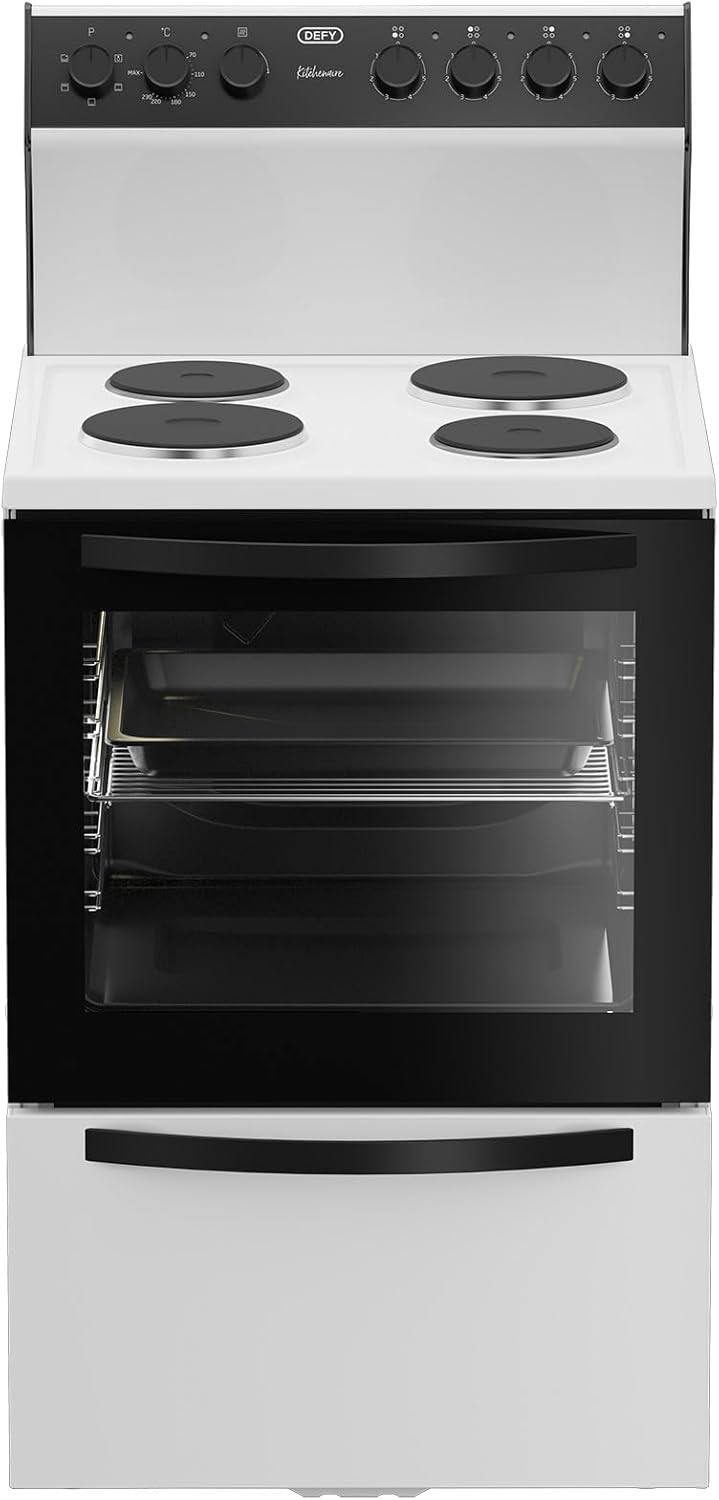
Nọmba 3.1: Iwaju view of the Defy 600 Series 4 Solid Plate Stove, showing the cooktop, oven door, and warmer drawer.

Nọmba 3.2: Igun view of the stove, highlighting its compact design and integrated control panel.
3.1 Iṣakoso igbimo
The control panel consists of heat switches for each solid plate and a function selector for the electric oven, along with plate indicator lights.

Nọmba 3.3: Close-up of the control panel, showing the heat switches for the solid plates and the oven function selector.
3.2 Ile ounjẹ
The cooktop features four solid electric plates, each controlled by a dedicated heat switch. Plate indicator lights illuminate when a plate is active.

Nọmba 3.4: Oke view of the cooktop with four solid electric plates.
3.3 Electric adiro
The electric oven includes multiple rack positions, a roast pan, and a chrome shelf for versatile cooking. The inner glass is removable for easy cleaning.

Nọmba 3.5: Inu ilohunsoke view of the electric oven, showing the roast pan and chrome shelf on adjustable racks.

Nọmba 3.6: The oven with its door open, providing a clear view of the interior and rack supports.
3.4 Warmer Drawer
Located beneath the oven, the warmer drawer is designed to keep cooked food warm before serving.
4. Eto ati fifi sori
For safety and optimal performance, the installation of your Defy stove must be carried out by a qualified and authorized technician in accordance with local electrical codes and regulations.
- Ṣii silẹ: Carefully remove all packaging materials. Inspect the appliance for any damage incurred during transit.
- Ipo: Place the stove on a level, stable surface. Ensure adequate clearance from adjacent cabinets and walls as specified in the installation guide provided with the appliance.
- Asopọmọra itanna: The stove requires a dedicated electrical circuit. The technician will connect the appliance to the mains power supply, ensuring proper earthing.
- Lilo akọkọ: Ṣaaju lilo akọkọ, nu gbogbo awọn oju ilẹ pẹlu ipolowoamp cloth. Run the oven empty at maximum temperature for approximately 30 minutes to burn off any manufacturing residues. This may produce a slight odor. Ensure the kitchen is well-ventilated during this process.
5. Awọn ilana Iṣiṣẹ
5.1 Using the Solid Plates
Each solid plate is controlled by a dedicated heat switch on the control panel. The plate indicator light will illuminate when the plate is active.
- Selecting Heat: Turn the corresponding heat switch clockwise to select the desired heat level (typically from 1 to 6, or a similar scale).
- Akiyesi: Use flat-bottomed pots and pans that match the size of the solid plate for efficient heat transfer.
- Lẹhin Lilo: Turn the heat switch back to the '0' position after cooking. The plate will remain hot for some time.

Nọmba 5.1: Example of appropriate cookware on the solid electric plates.
5.2 Using the Electric Oven
The electric oven offers various cooking functions and temperature control.
- Aṣayan iṣẹ ṣiṣe: Turn the oven function selector to choose the desired cooking mode (e.g., Bake, Grill, Fan Assist).
- Iṣakoso iwọn otutu: Turn the temperature knob to set the desired oven temperature. The oven indicator light will illuminate when the oven is heating and turn off when the set temperature is reached.
- Gbigbona ṣaaju: Fún àbájáde tó dára jùlọ, mú kí ààrò náà gbóná sí iwọ̀n otútù tó yẹ kí o tó fi oúnjẹ sínú rẹ̀.
- Awọn ipo agbeko: Utilize the multiple rack positions to optimize cooking for different dishes.
5.3 Using the Warmer Drawer
The warmer drawer is designed to keep cooked food warm at a serving temperature. It is not intended for cooking or reheating cold food.
- Muu ṣiṣẹ: The warmer drawer typically operates when the oven is in use or has a separate control. Refer to the specific markings on your appliance's control panel.
- Ibi: Place heat-safe dishes with cooked food into the drawer.
- Iṣọra: Do not place plastic containers or flammable items in the warmer drawer.
6. Itọju ati Cleaning
Regular cleaning and maintenance will keep your stove in excellent condition.
- Ṣaaju ki o to sọ di mimọ: Always ensure the appliance is switched off at the mains power supply and has cooled down completely.
- Awọn oju ita: Fi asọ rirọ nu dampened with warm soapy water. Avoid abrasive cleaners or scouring pads.
- Solid Plates: Clean spills immediately after the plate has cooled. Use a damp cloth and mild detergent. For stubborn stains, specialized solid plate cleaners can be used.
- Inu ile adiro: For light soiling, wipe with warm soapy water. For heavier grease, use an oven cleaner suitable for electric ovens, following the product instructions carefully.
- Removable Inner Glass: The oven's inner glass can be removed for thorough cleaning. Consult the detailed instructions in the full product manual for the specific removal procedure. Clean with glass cleaner or soapy water.
- Roast Pan and Chrome Shelf: These can be washed in warm soapy water or in a dishwasher.
7. Laasigbotitusita
Ṣaaju ki o to kan si iṣẹ, tunview Awọn iṣoro ti o wọpọ ati awọn solusan wọnyi:
| Isoro | Owun to le Fa | Ojutu |
|---|---|---|
| Stove not turning on | Ko si ipese agbara; Circuit fifọ tripped | Ṣayẹwo asopọ agbara; atunto Circuit fifọ. |
| Lọla ko alapapo | Incorrect function/temperature setting; faulty element | Verify settings; if problem persists, contact service. |
| Solid plate not heating | Incorrect heat switch setting; faulty element | Ensure switch is turned on; if problem persists, contact service. |
| Excessive smoke during first use | Manufacturing residues burning off | Normal for first use. Ensure good ventilation. |
If you encounter issues not listed here or if solutions do not resolve the problem, please contact Defy customer service or an authorized service agent.
8. Awọn pato
Key specifications for the Defy 600 Series 4 Solid Plate Stove DSS693:
| Ẹya ara ẹrọ | Ẹ̀kúnrẹ́rẹ́ |
|---|---|
| Brand | Kọja |
| Nọmba awoṣe | DSS693 |
| Àwọ̀ | Funfun |
| Iru | 4 Solid Plate Electric Stove with Electric Oven and Warmer Drawer |
| Package Mefa | 92.5 x 67 x 55 cm |
| Iwọn Nkan | 40.1 kg |
| adiro Awọn ẹya ara ẹrọ | Removable inner glass, Roast pan, Chrome shelf |
| Aabo Awọn ẹya ara ẹrọ | Plate indicator lights, 1 Thermal protection plate |
9. Atilẹyin ọja ati Support
Your Defy appliance is covered by a manufacturer's warranty. Please refer to the warranty card included with your purchase for specific terms and conditions, including the warranty period and coverage details. Keep your proof of purchase for warranty claims.
For technical assistance, spare parts, or to schedule a service appointment, please contact Defy customer support. Contact information can typically be found on the Defy webaaye tabi ni iwe ti a pese pẹlu ohun elo rẹ.