
OQIMAX CP212-Vitt
OQIMAX Bluetooth 5.0/5.3 Transmitter Receiver 2-in-1 Audio Adapter
Model: CP212-Vitt
Ọrọ Iṣaaju
The OQIMAX Bluetooth 5.0/5.3 Transmitter Receiver is a versatile 2-in-1 audio adapter designed to enhance your audio experience. It allows you to wirelessly transmit audio from non-Bluetooth devices or receive audio on non-Bluetooth devices, offering flexibility for various home and car audio setups. Featuring Bluetooth 5.3 technology and CVC noise reduction, it ensures stable connections and clear sound quality.
This adapter supports both Transmitter (TX) and Receiver (RX) modes, making it compatible with a wide range of devices such as TVs, PCs, MP3/MP4 players, car audio systems, speakers, and headphones. Its compact design and long battery life provide convenience for both stationary and portable use.
Ọja Pariview
Familiarize yourself with the components and controls of your OQIMAX Bluetooth Audio Adapter.

Aworan: Detailed diagram of the OQIMAX Bluetooth adapter, highlighting its key features: the 3.5mm Audio Port, Type-C Charging Port, RX/TX mode switch, Multi-function Button, and the Connection Indicator Light with its different states (Pairing State - Red/Blue flash, Low Battery Warning - Red flash, Connected - Blue/Red solid).
- Ibudo Olohun 3.5mm: For connecting to audio sources or output devices using the included AUX cable.
- Ibudo Ngba agbara Iru-C: For charging the device using the provided Micro USB cable.
- RX/TX Switch: Toggles between Receiver (RX) and Transmitter (TX) modes.
- Bọtini iṣẹ-pupọ: Used for powering on/off, pairing, answering/ending calls, and playing/pausing music.
- Connection Indicator Light: Displays the device's status:
- Blue Light (fast flashing): Ready for pairing in RX mode.
- Red Light (fast flashing): Ready for pairing in TX mode.
- Blue Light (solid): Connected in RX mode.
- Red Light (solid): Connected in TX mode.
- Red Light (flashing slowly): Ikilọ batiri kekere.

Aworan: The OQIMAX Bluetooth adapter package contents, showing the white adapter unit, a 3.5mm audio cable, and a USB charging cable.
Awọn akoonu idii:
- OQIMAX Bluetooth 5.0/5.3 Transmitter Receiver
- 3.5mm Audio USB
- Micro USB Ngba agbara USB
- Itọsọna olumulo
Eto ati gbigba agbara
Gbigba agbara ni ibẹrẹ
Before first use, please fully charge the device.
- Connect the provided Micro USB charging cable to the Type-C Charging Port on the adapter.
- So opin keji okun USB pọ mọ adapter agbara USB deede (ko si ninu rẹ) tabi ibudo USB kọmputa kan.
- The indicator light will show charging status (specific color/behavior not detailed in source, assume it indicates charging).
- Gbigba agbara ni kikun maa n gba to wakati mẹta.

Aworan: The OQIMAX Bluetooth adapter next to a battery icon, illustrating its battery life: up to 8 hours for music playback and 2 hours for a full charge.
Akiyesi: It is not recommended to use the device while charging, as this may introduce current noise.
Awọn ilana Iṣiṣẹ
Awọn ọna Yipada
The device features a physical switch to select between Receiver (RX) and Transmitter (TX) modes. Always shut down the device before switching modes.

Aworan: An illustration demonstrating the ease of operation, showing the RX/TX switch on the OQIMAX Bluetooth adapter. The top panel shows TX mode used with a TV and headphones, while the bottom panel shows RX mode used with a smartphone and wired headphones.
Ipo olugba (RX)
In RX mode, the adapter receives Bluetooth audio from your smartphone or other Bluetooth-enabled devices and outputs it to non-Bluetooth audio equipment like wired headphones, car audio systems, or home speakers.
- Rii daju pe ẹrọ naa ti gba agbara.
- Connect the OQIMAX adapter (B-10S) to your non-Bluetooth audio device (e.g., headphones, car AUX input, speaker) using the 3.5mm audio cable.
- Gbe ipo yipada si RX ipo.
- Press and hold the Multi-function Button to power on the device. The blue indicator light will flash rapidly, indicating it is in pairing mode.
- On your Bluetooth-enabled device (e.g., smartphone), search for Bluetooth devices and select "B-10S" to pair.
- Once connected, the blue indicator light will become solid. You can now stream audio wirelessly to your connected non-Bluetooth device.
- To answer/end calls or play/pause music, press the Multi-function Button.

Aworan: The OQIMAX Bluetooth adapter in Receiver (RX) mode, wirelessly connected to a smartphone and outputting audio to a speaker, demonstrating its use in a home setting.
Ipo Atagba (TX)
In TX mode, the adapter transmits audio from non-Bluetooth devices (like TVs or PCs) to Bluetooth-enabled headphones or speakers.
- Rii daju pe ẹrọ naa ti gba agbara.
- Connect the OQIMAX adapter (B-10S) to your non-Bluetooth audio source (e.g., TV, PC, CD player) using the 3.5mm audio cable.
- Gbe ipo yipada si TX ipo.
- Press and hold the Multi-function Button to power on the device. The red indicator light will flash rapidly, indicating it is in pairing mode.
- Fi agbekọri Bluetooth tabi agbọrọsọ rẹ sinu ipo sisọpọ.
- The OQIMAX adapter will automatically search for and connect to nearby Bluetooth receiving devices.
- Once connected, the red indicator light will become solid. Audio from your non-Bluetooth source will now be transmitted wirelessly to your Bluetooth headphones/speaker.
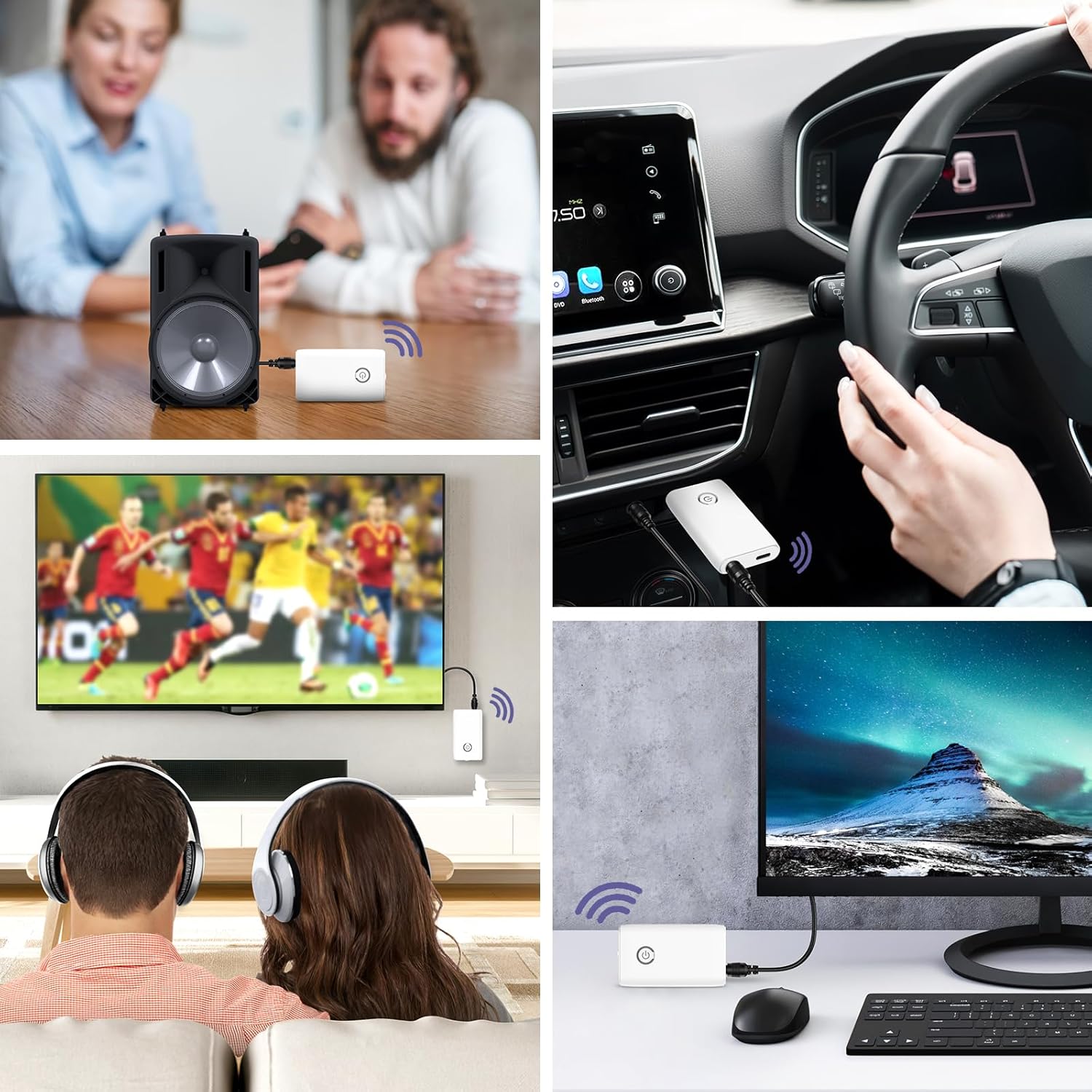
Aworan: A collage of usage scenarios for the OQIMAX Bluetooth adapter. It shows the adapter transmitting audio from a TV to headphones, from a PC to headphones, and receiving audio from a phone to a car audio system or a portable speaker.
Itoju
- Keep the device dry. Moisture can damage electronic circuits.
- Do not expose the device to extreme temperatures. High temperatures can shorten the life of electronic devices, damage batteries, and warp or melt certain plastics.
- Do not use harsh chemicals, cleaning solvents, or strong detergents to clean the device. Wipe it with a soft, slightly damp asọ.
- Avoid dropping, knocking, or shaking the device. Rough handling can break internal circuit boards and fine mechanics.
Laasigbotitusita
| Isoro | Owun to le Fa | Ojutu |
|---|---|---|
| Ẹrọ naa ko ṣiṣẹ. | Batiri kekere. | Gba agbara si ẹrọ ni kikun. |
| Cannot pair with another device. | Ipò tí kò tọ́ tí a yàn (TX/RX). Ẹrọ ko si ni ipo sisopọ. Other device not in pairing mode. Too far from the other device. | Ensure the correct mode is selected and the device is powered off before switching. Press and hold the Multi-function Button until the indicator light flashes rapidly. Ensure the target Bluetooth device is also in pairing mode. Gbé àwọn ẹ̀rọ sún mọ́ ara wọn (láàrín àwọn mítà 10). |
| Ko si ohun afetigbọ tabi didara ohun ti ko dara. | Asopọ okun ti ko tọ. Iwọn didun ju. kikọlu. Using while charging. | Check that the 3.5mm audio cable is securely connected to both the adapter and the audio device. Adjust volume on both the adapter and the connected audio device. Move away from other wireless devices or sources of interference. Avoid using the device while it is charging to prevent current noise. |
| Asopọ silẹ nigbagbogbo. | Ijinna ju nla. Awọn idiwọ. Batiri kekere. | Din aaye laarin ohun ti nmu badọgba ati ẹrọ ti a ti sopọ. Ensure there are no major obstructions (walls, large metal objects) between devices. Gba agbara si ẹrọ naa. |
Awọn pato
| Brand | OQIMAX |
| Nọmba awoṣe | CP212-Vitt |
| Ẹya Bluetooth | 5.3 |
| Asopọmọra Technology | Bluetooth, AUX (3.5mm), USB (for charging) |
| Pataki Awọn ẹya ara ẹrọ | Hands-free calling, CVC Noise Reduction, Low Latency, 2-in-1 Transmitter/Receiver |
| Awọn ẹrọ ibaramu | Headphones, Speakers, Computers, Radios, Car Stereo Systems, Televisions |
| Orisun agbara | Batiri Agbara (Agba agbara) |
| Agbara Batiri | 250mAh |
| Play Time (Receiver Mode) | Titi di wakati 8 |
| Play Time (Transmitter Mode) | Titi di wakati 6 |
| Akoko gbigba agbara | O fẹrẹ to awọn wakati 2 |
| Bluetooth Ibiti | Titi de awọn mita 10 (33 ẹsẹ) |
| Ọja Mefa | 6.4L x 3.7W x 1.2H sẹntimita |
| Iwọn Nkan | 11 giramu |
| Àwọ̀ | Funfun |
Awọn Ikilọ Abo
Please adhere to the following safety guidelines for battery use:
- Do not expose the battery to high heat or open flames.
- Ma ṣe sọ batiri naa sinu ina.
- Recycle or dispose of the battery according to local regulations.
- Jeki kuro ni arọwọto awọn ọmọde.
Atilẹyin ọja ati Support
For warranty information and technical support, please refer to the contact details provided with your purchase or visit the official OQIMAX webojula.
Iṣẹ onibara: Please contact your retailer or OQIMAX customer support for assistance.