
1. Ọja Ipariview
The Veise VE07-H Fingerprint Smart Lock with Handle Set offers advanced security and convenient access for your home. This smart lock provides multiple unlocking options, including fingerprint, app control, keypad codes, eKeys, fobs, and a traditional mechanical key. Designed for easy installation and robust performance, it integrates seamlessly into modern smart homes.

Image: Veise VE07-H Fingerprint Smart Lock with Handle Set components.
Fidio: Pariview of Veise VE07-H Fingerprint Smart Deadbolt Lock Handle Set features.
2. Ohun ti o wa ninu Apoti
Your Veise VE07-H Smart Lock package includes all necessary components for installation and operation:
- Smart Door Lock (Exterior and Interior Assemblies)
- Zinc Alloy Complete Handleset
- Latch and Strike Plates
- Iṣagbesori Awo ati skru
- 2 Awọn bọtini afẹyinti
- 2 Key Cards (Fobs)
- Ilana fifi sori ẹrọ
- Programming Quick Setup Guide
- Ọpa Tunto

Image: Visual representation of the smart lock and its various unlocking methods.
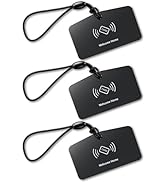
Image: Two Veise VK01 IC Cards (fobs) included with the smart lock.
3. Eto ati fifi sori
The Veise VE07-H smart lock is designed for easy installation, typically taking about 15 minutes with a screwdriver. Ensure your door meets the following specifications before beginning:
- Door Thickness: 1-3/8" to 2" (35mm-50mm)
- Backset: 2-3/8" or 2-3/4" (60mm or 70mm)
- Hole Diameter (Deadbolt): 2-1/8" (54mm)
- Hole Diameter (Handle): 3/8" (10mm)
- Ijinna to kere ju laarin awọn ihò: 4" (101.6mm)

Image: Detailed door dimension requirements for installation.

Image: Visual guide for left-handed and right-handed door configurations.
For a detailed step-by-step installation guide, please refer to the official installation video:
Video: Veise VE07H Smart Front Door Lock Set Installation Guide.

Image: Quick setup directions for the app, indicating compatibility with right and left-handed doors.
4. Awọn ilana Iṣiṣẹ
The Veise VE07-H offers 8 flexible unlocking options for convenient access:
- Ikawe kikọ: Unlock in 0.3 seconds with advanced biometric technology. Supports up to 50 fingerprints.
- Keypad Codes: Use the digital electronic touchscreen to enter a personalized PIN. Supports over 250 access codes, including timed, permanent, recurring, custom, and one-time codes.
- eKys: Share digital keys via the app for flexible access management.
- Fobs (Key Cards): Tap the included key fobs to unlock the door.
- Kọ́kọ́rọ́ Ẹ̀rọ: Use the traditional backup key for manual unlocking.
- Apple Watch: Unlock directly from your Apple Watch.
- Web Èbúté: Manage access and settings remotely via a web portal.
- Ohun elo Iṣakoso: Lock and unlock your door directly from the mobile app.

Image: Fingerprint unlocking feature with 0.3s identification and 99.9% recognition rate.

Image: Various access code types including one-time, timed, recurring, permanent, custom, and erase codes.
To lock your door, you have several options:
- Titiipa aifọwọyi: Configurable to automatically lock after 5-900 seconds.
- One-touch locking: Press and hold the lock icon in the app for 2 seconds, or press "#" on the keypad for 2 seconds.
- Kọ́kọ́rọ́ Àfikún: Lo awọn darí bọtini.
- Yipada Atanpako: Manually turn the thumb turn from the inside.
5. App Management
The free mobile app and web portal provide comprehensive management of your smart lock:
- Set and delete passwords.
- Manage access rights for different users.
- View real-time access logs.
- Monitor smart lock status.
- Generate various types of access codes (timed, one-time, permanent, recurring, custom, erase).

Aworan: Pariview of smart app and web management features, including user management, eKey sharing, remote access, and access time logs.

Image: Screenshot of the DD Lock web portal for managing multiple locks and users.

Image: App interface showing access records and user activity.

Aworan: Example of a DD Lock notification for unlocking events.
6. Aabo Awọn ẹya ara ẹrọ
The Veise VE07-H smart lock is built with robust security features to protect your home:
- Ìpele 3 ti ANSI/BHMA ti jẹ́rìí sí: Ensures reliable security for both interior and exterior doors.
- IP54 Mabomire ati eruku: Designed to withstand various weather conditions, including rain, wind, and sun.
- Anti-Peeping Touchscreen Keypad: Prevents others from guessing your code by allowing you to enter random digits before or after your actual code.
- Anti-Hacking Features: Includes mechanisms to deter unauthorized access attempts.
- Ipo Aṣiri: Activates a mode for enhanced privacy.
- Ipo Ilana: Allows the door to remain unlocked for continuous access during specific periods.

Aworan: Pariview of enhanced security features including IP54 waterproof rating, auto-lock, low battery alert, anti-peeping code, privacy mode, and ANSI/BHMA Grade 3 certification.

Image: Demonstrates anti-cracking (lockout after multiple wrong entries) and anti-peeping features.

Image: Highlights ANSI Grade 3 certification, AES encryption, and IP54 waterproof rating.
7. Smart Home Integration
Enhance your smart home experience by connecting your Veise VE07-H smart lock with a Veise G2 gateway (sold separately). This enables:
- Remote access to your digital door lock from anywhere.
- Iṣakoso ohun pẹlu Amazon Alexa ati Google Home.
- Real-time access logs and status monitoring.

Image: Diagram showing smart lock connectivity with a Veise G2 Gateway and a 2.4G router for remote access.

Image: Demonstrates voice control with Alexa and Google Home via the Veise G2 Gateway.

Image: Table summarizing smart lock features and which require the Veise G2 Wi-Fi Gateway.
8. Itọju
To ensure optimal performance and longevity of your Veise VE07-H smart lock:
- Rirọpo Batiri: The lock provides low-battery alerts. Replace the 4 AA alkaline batteries promptly when alerted. Expected battery life is 12 months.
- Ninu: Use a soft, dry cloth to clean the touchscreen and exterior surfaces. Avoid abrasive cleaners or solvents.
- Awọn eroja ẹrọ: Lifetime maintenance is offered for mechanical components.

Image: App notification showing a low battery alert for the smart lock.
9. Laasigbotitusita
If you encounter issues with your smart lock, consider the following:
- Awọn ọran Asopọ App: If the app doesn't find the lock or cannot connect, try resetting the lock.
- Ọrọigbaniwọle Titunto: Do not use the keypad to change the Master Password before pairing the lock in the app.
- Muu ṣiṣẹ: Before pairing, you may need to touch the keypad to activate the lock.
For instructions on how to reset the lock, please refer to the following video:
Video: Veise VE07H Smart Front Door Lock Set Reset Video.
10. Awọn pato
| Ẹya ara ẹrọ | Ẹ̀kúnrẹ́rẹ́ |
|---|---|
| Brand | Veise |
| Nọmba awoṣe | VE07-H |
| Titiipa Iru | Biometric, Combination Lock, Deadbolt, Keypad |
| Ohun elo | Aluminiomu, Sinkii |
| Àwọ̀ | Matte Black |
| Awọn Iwọn Nkan (L x W x H) | 6.1 x 2.7 x 1.4 inches |
| Ilana Asopọmọra | Bluetooth, WiFi (Veise G2 WiFi Gateway Required) |
| Adarí Iru | iOS, Android |
| Pataki Awọn ẹya ara ẹrọ | 8-IN-1 Unlock, 0.3s Fingerprint, Auto-Lock (5-900s), App Control & eKeys, Rental Web Management, Watch Unlock, Touchscreen Keypad, Remote Control with G2 Gateway, Alexa and Google Compatible (Veise G2 WiFi Gateway Required), 12-Month Battery Life, Anti-Drill, Anti-Cracking, Anti-Peeping, Passage Mode |
11. Atilẹyin ọja ati Support
Veise is committed to providing excellent customer service and product reliability:
- Atilẹyin ọja: At least a 2-year warranty.
- Lifetime Maintenance: For mechanical components.
- US-Based Phone Support: Available Monday–Friday 9 AM–5 PM PST, and Saturday 7 AM–3 PM PST.
- 24/7 After-Sales Email Service: For continuous support.

Image: Highlights US-based support, 2-year quality protection, 30-day free return or exchange, lifetime manufacturer service, and lifetime phone support.