
1. Ifihan
This manual provides essential instructions for the safe and efficient operation of your SHARP SMC1169KS Countertop Microwave Oven. Please read all instructions thoroughly before using the appliance and retain this manual for future reference. This microwave oven features a 1.1 cubic feet capacity, 1000 watts of cooking power, and is compatible with Alexa for voice control. It also includes a removable 12.4-inch carousel turntable and a child lock function.
2. Alaye Aabo pataki
Nigbati o ba nlo awọn ohun elo itanna, awọn iṣọra aabo ipilẹ yẹ ki o tẹle, pẹlu atẹle naa:
- Ka gbogbo awọn ilana ṣaaju lilo.
- Ma ṣe ṣiṣẹ adiro ti o ba bajẹ tabi ti ko ṣiṣẹ.
- Rii daju pe fentilesonu to dara ni ayika makirowefu.
- Ma ṣe gbona awọn apoti ti a fi edidi, nitori wọn le bu gbamu.
- Maṣe lo awọn kemikali ibajẹ tabi awọn eefin ninu ohun elo yii.
- Máa tọ́jú àwọn ọmọdé dáadáa nígbà tí wọ́n bá ń lo máìkrówéfù.
- Do not attempt to service or repair the oven yourself. Contact qualified service personnel.
- Lo awọn ohun elo onjẹ-ailewu makirowefu nigbagbogbo.
- Liquids heated in a microwave oven can boil over unexpectedly. Exercise caution when removing containers.
3. Ọja Ipariview
The SHARP SMC1169KS is a stainless steel countertop microwave oven designed for convenient food preparation. Key features include:
- Agbara: 1.1 onigun ẹsẹ
- Ijade agbara: 1000 watt
- Yipada: Removable 12.4-inch glass carousel for even cooking
- Iṣakoso: Digital display with touch controls and Alexa voice compatibility
- Inu inu: Gray interior with LED lighting
- Aabo: Child Safety Lock function
- Awọn iṣẹ sise: 10 power levels, 2-stage cooking, Auto Cook menus, Weight and Time Defrost, Express Cook, +30 seconds key.

Iwaju view of the SHARP SMC1169KS Countertop Microwave Oven, showcasing rẹ alagbara, irin pari ati iṣakoso nronu.
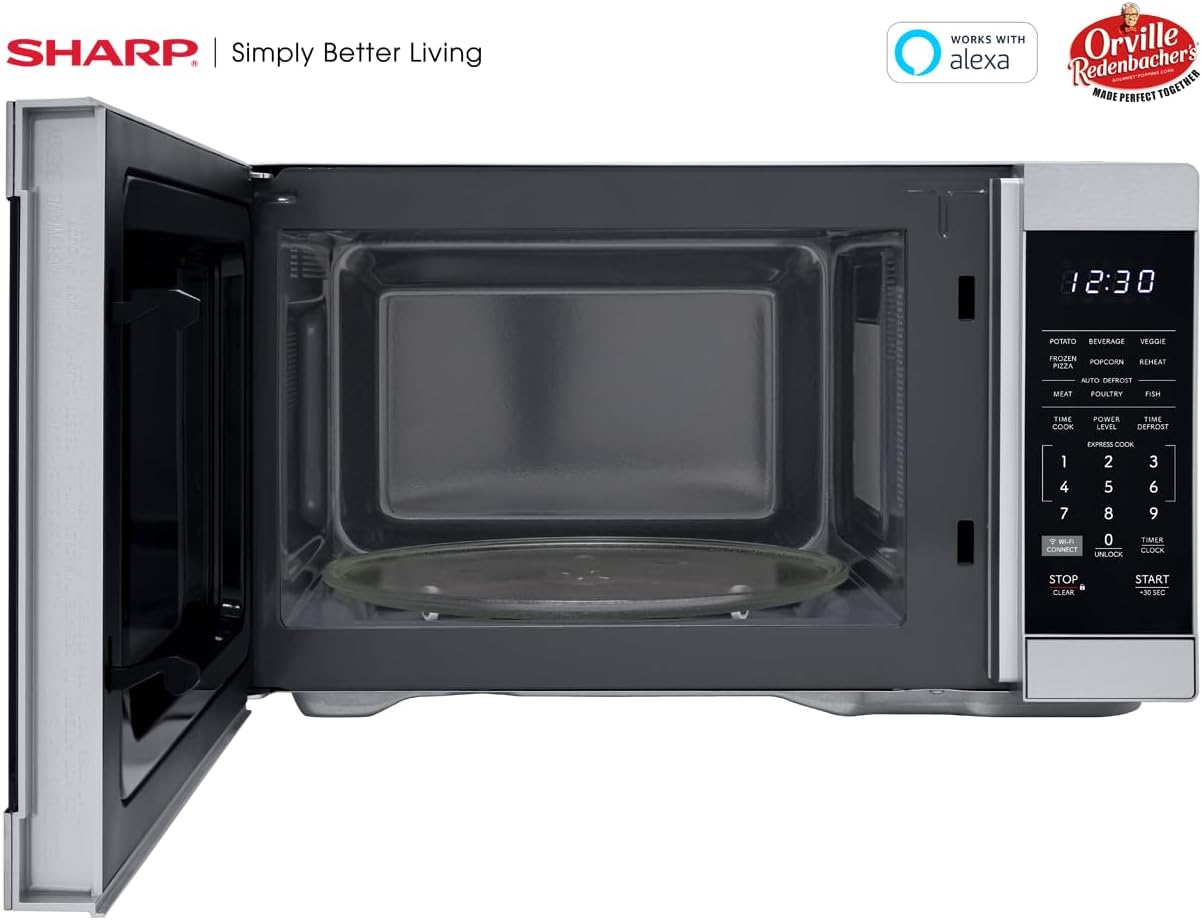
Inu ilohunsoke view of the SHARP SMC1169KS microwave oven, highlighting the removable glass carousel turntable for uniform heating.

Close-up of the SHARP SMC1169KS microwave oven control panel, featuring the digital display, number pad, and dedicated function buttons.
4. Eto
4.1 Ṣiṣii ati Gbe
- Remove all packing materials from inside and outside the microwave oven.
- Place the microwave on a flat, stable surface that is strong enough to hold the oven and the food being cooked.
- Ensure there is at least 4 inches (10 cm) of space on the top, back, and sides for proper ventilation. Do not block any ventilation openings.
- Pa máìkrówéfù náà mọ́ kúrò lọ́wọ́ àwọn orísun ooru àti àwọn pápá mànàmáná tó lágbára.
4.2 Turntable fifi sori
- Place the turntable ring inside the microwave cavity.
- Position the glass turntable plate securely on top of the turntable ring. Ensure it is centered and sits properly on the coupler.
4.3 Asopọ agbara
Plug the power cord into a standard 3-prong, 120V AC, 60Hz grounded electrical outlet. Do not use an extension cord or adapter.
4.4 Initial Setup (Clock & Wi-Fi/Alexa)
- Ṣiṣeto aago: Tẹ awọn Aago/Aago button once. Use the number pad to enter the current time. Press Aago/Aago lẹẹkansi lati jẹrisi.
- Connecting to Wi-Fi/Alexa: Refer to the separate Alexa setup guide or the Sharp Home Appliances app for detailed instructions on connecting your microwave to your home Wi-Fi network and linking it with your Amazon Alexa account. Press the Isopọ WI-FI button to initiate pairing mode.
5. Awọn ilana Iṣiṣẹ
5.1 Basic Microwave Cooking (Time Cook)
- Fi ounjẹ sinu apo eiyan-ailewu kan makirowefu lori tabili titan.
- Ti ilẹkun.
- Tẹ awọn Aago ASIKO bọtini.
- Tẹ akoko sise ti o fẹ sii nipa lilo paadi nọmba.
- Tẹ Bẹrẹ/+30 iṣẹju-aaya.
5.2 Ṣíṣe àtúnṣe Ipele Agbára
- After entering cooking time (Step 3 of Basic Cooking), press IPILE AGBARA.
- Enter the desired power level from 1 to 10 (10 being 100% power).
- Tẹ Bẹrẹ/+30 iṣẹju-aaya.
5.3 kiakia Cook
For quick cooking at 100% power, simply press the number pad (1-6) for 1 to 6 minutes of cooking time. The oven will start immediately.
5.4 Auto Cook Akojọ aṣyn
The microwave includes preset cooking options for common food items:
- POTATO: Fun yan poteto.
- OJÚN: Fun alapapo ohun mimu.
- VEGGIE: For cooking vegetables.
- PIZZA didi: For heating frozen pizza.
- ṢE AGBADO: Optimized for Orville Redenbacher's popcorn (3.3 oz Classic or 1.16 oz Mini Bag).
- TUN: For reheating various foods.
- MEAT, POULTRY, FISH: For specific meat types.
To use an Auto Cook menu: Press the desired menu button, then follow the display prompts (e.g., enter quantity) and press Bẹrẹ/+30 iṣẹju-aaya.
5.5 Defrosting
makirowefu nfunni awọn ọna gbigbẹ meji:
- Defrost iwuwo: Tẹ Akoko DEFROST, tẹ iwuwo ounjẹ naa sii, lẹhinna tẹ Bẹrẹ/+30 iṣẹju-aaya.
- Idaduro akoko: Tẹ Akoko DEFROST twice, enter the desired defrosting time, then press Bẹrẹ/+30 iṣẹju-aaya.
5.6 Išẹ Titiipa Ọmọ
Lati mu Titiipa Ọmọ ṣiṣẹ:
- Tẹ mọlẹ Duro / KO button for 3 seconds. The lock indicator will appear on the display.
Lati mu Titiipa Ọmọde ṣiṣẹ:
- Tẹ mọlẹ Ṣii silẹ button (0) for 3 seconds. The lock indicator will disappear.
5.7 Alexa Iṣakoso ohun
Once connected to Alexa, you can use voice commands for various functions. Example pẹlu:
- "Alexa, microwave for 1 minute."
- "Alexa, defrost 1 pound of chicken."
- "Alexa, microwave Classic Popcorn."
Refer to the Alexa app or Sharp's online resources for a comprehensive list of voice commands.
6. Itọju
6.1 Ninu ilohunsoke
Regularly clean the interior of the oven to prevent food particles from accumulating. Use a mild detergent and a soft cloth. For stubborn stains, place a cup of water with lemon juice in the microwave and heat for 2-3 minutes, then wipe clean.
6.2 Ninu Ode
Mu ese ita gbangba pẹlu asọ, damp asọ. Yago fun abrasive ose tabi scouring paadi ti o le họ awọn alagbara, irin ipari.
6.3 Ìtọ́jú Turntable
A le yọ òrùka gíláàsì àti tábìlì ìyípadà náà kúrò kí a sì fi omi gbígbóná tàbí omi ọṣẹ fọ̀ ọ́. Rí i dájú pé wọ́n gbẹ pátápátá kí a tó tún fi wọ́n sínú ààrò.
7. Laasigbotitusita
Tí o bá ní ìṣòro pẹ̀lú máìkrówéfù rẹ, wo tábìlì tó wà ní ìsàlẹ̀ yìí fún àwọn ìṣòro àti ìdáhùn tó wọ́pọ̀.
| Isoro | Owun to le Fa | Ojutu |
|---|---|---|
| Lọla ko bẹrẹ | Ilekun ko tii daradara; Okun agbara kuro; Ti fẹ fiusi / tripped Circuit fifọ. | Rí i dájú pé ilẹ̀kùn ti sé dáadáa; Ṣàyẹ̀wò ìsopọ̀ okùn agbára; Ṣàyẹ̀wò fíùsì/ìfọ́ ẹ̀rọ ìfọ́ ilé. |
| Ounje ko sise boṣeyẹ | Food not stirred/rotated; Turntable not rotating. | Stir or rearrange food during cooking; Ensure turntable and ring are correctly placed and free of obstructions. |
| Ifihan fihan "LOCK" | Titiipa ọmọ ti mu ṣiṣẹ. | Tẹ mọlẹ Ṣii silẹ button (0) for 3 seconds to deactivate. |
| Alexa commands not working | No Wi-Fi connection; Microwave not linked to Alexa; Incorrect command. | Check Wi-Fi connection; Re-link microwave in Alexa app; Use correct voice commands. |
Ti iṣoro naa ba wa lẹhin igbiyanju awọn iṣeduro wọnyi, jọwọ kan si atilẹyin alabara.
8. Awọn pato
| Ẹya ara ẹrọ | Sipesifikesonu |
|---|---|
| Nọmba awoṣe | SMC1169KS |
| Agbara | 1.1 Onigun Ẹsẹ |
| Wattage | 1000 watt |
| Voltage | 120 Volts |
| Awọn iwọn Ọja (D x W x H) | 14.7" x 20.6" x 11.8" |
| Iwọn Nkan | 34.9 iwon |
| Ohun elo | Irin ti ko njepata |
| Pataki Ẹya | Child Safety Lock, Alexa Compatible |

Dimensional diagram of the SHARP SMC1169KS microwave oven.
9. atilẹyin ọja Information
SHARP products are manufactured to high-quality standards. For specific warranty details, including coverage period and terms, please refer to the warranty card included with your product or visit the official Sharp webojula. Tọju iwe-ẹri rira rẹ bi ẹri rira fun awọn iṣeduro atilẹyin ọja.
10. Onibara Support
For further assistance, technical support, or service inquiries, please visit the official Sharp webojula tabi kan si wọn onibara iṣẹ Eka. Alaye olubasọrọ le ṣee ri ni igbagbogbo lori olupese webaaye tabi ni apoti ọja.