
1. Ifihan
The Antec C8 is a full-tower E-ATX PC case designed for high-performance computing. It features a dual-chamber layout, seamless tempered glass panels, and extensive cooling support to accommodate modern components. This manual provides detailed instructions for setup, installation, operation, and maintenance of your Antec C8 PC case.

Figure 1: Antec C8 Full-Tower PC Case with internal components and RGB lighting.
2. Key Awọn ẹya ara ẹrọ
- Ni kikun-View Apẹrẹ: Seamless tempered glass front and side panels offer a panoramic view ti awọn ẹya inu rẹ.
- Dual Chamber Layout: Separates the main components (CPU, GPU, Motherboard) from the power supply and drives for optimized thermal performance and cable management.
- Atilẹyin Itutu agbaiye: Accommodates up to three 140mm fans or two 160mm fans on both the top and bottom. Supports thick 360mm radiators simultaneously on the top, bottom, and side.
- Tool-less Design: Features 0.8mm and 1.0mm thick steel construction with quick-release panels for easy assembly and maintenance.
- Ibamu Kaadi Awọn aworan: Ample width to support wider RTX 40 series GPUs. Supports vertical GPU riser brackets (after removal of horizontal slots) and includes 8 reusable PCIe slot covers.
- Advanced Cable Management: Equipped with interior and rear Velcro straps, along with rubber grommets for routing cables, providing up to 90mm clearance.
- Awọn aṣayan Ibi ipamọ to rọ: Modular drive trays support up to two 3.5" HDDs and four 2.5" SSDs.
- Igbimọ I/O ode oni: Includes a mainstream Type-C (10Gbps) port, USB 3.0 ports, and a Mic/Audio 2-in-1 port, complete with dust plugs.

Figure 2: Seamless tempered glass panels for a full-view darapupo.

Nọmba 3: Alaye view of cable management features in the rear chamber.
3. Eto & Fifi sori
3.1. Panel Yiyọ
The Antec C8 features tool-less panels for easy access to internal components. To remove the side and top panels, gently pull them away from the chassis. The bottom dust filter is a pull-out design.

Figure 4: Side panel removal for easy access.

Figure 5: Top panel removal revealing the mounting area.

Figure 6: Rear panel removed to access the second chamber.
3.2. Modaboudu fifi sori
The Antec C8 supports E-ATX motherboards. Install your motherboard into the main chamber, securing it with the provided screws. Ensure all standoffs are correctly aligned.
3.3. Graphics Kaadi fifi sori
Ni irú pese ample space for wider RTX 40 series GPUs. You can install your graphics card horizontally into the PCIe slots. For vertical GPU mounting, remove the horizontal PCIe slot covers and install a compatible vertical GPU riser bracket (sold separately).

Figure 7: Graphics card installation options.
3.4. Fifi sori Ipese Agbara
The power supply mounts at the bottom of the rear chamber. The case supports power supplies up to 210mm in length and includes a stylish PSU bracket with a rubber pad to prevent scratches.

Figure 8: Power supply unit installation.
3.5. Fifi sori ẹrọ ẹrọ ipamọ
Utilize the modular drive trays for installing your storage devices. The case supports two 3.5" HDDs and four 2.5" SSDs.

Figure 9: Modular drive trays for storage.
3.6. Iṣakoso USB
The dual-chamber design and included Velcro straps and rubber grommets facilitate excellent cable management. Route cables through the designated channels to maintain a clean interior and optimize airflow.
3.7. Itutu eto sori
The Antec C8 offers versatile cooling options. Fans are not included with this model.
- Top & Bottom: Supports three 140mm fans or two 160mm fans.
- Apa: Supports three 120mm or two 140mm fans.
- Ẹyìn: Supports one 120mm or one 140mm fan.
For liquid cooling, the case supports thick 360mm radiators on the top, bottom, and side simultaneously.

Figure 10: Vertical cooling airflow demonstration.

Figure 11: Bottom fan configuration with full cut-out design.
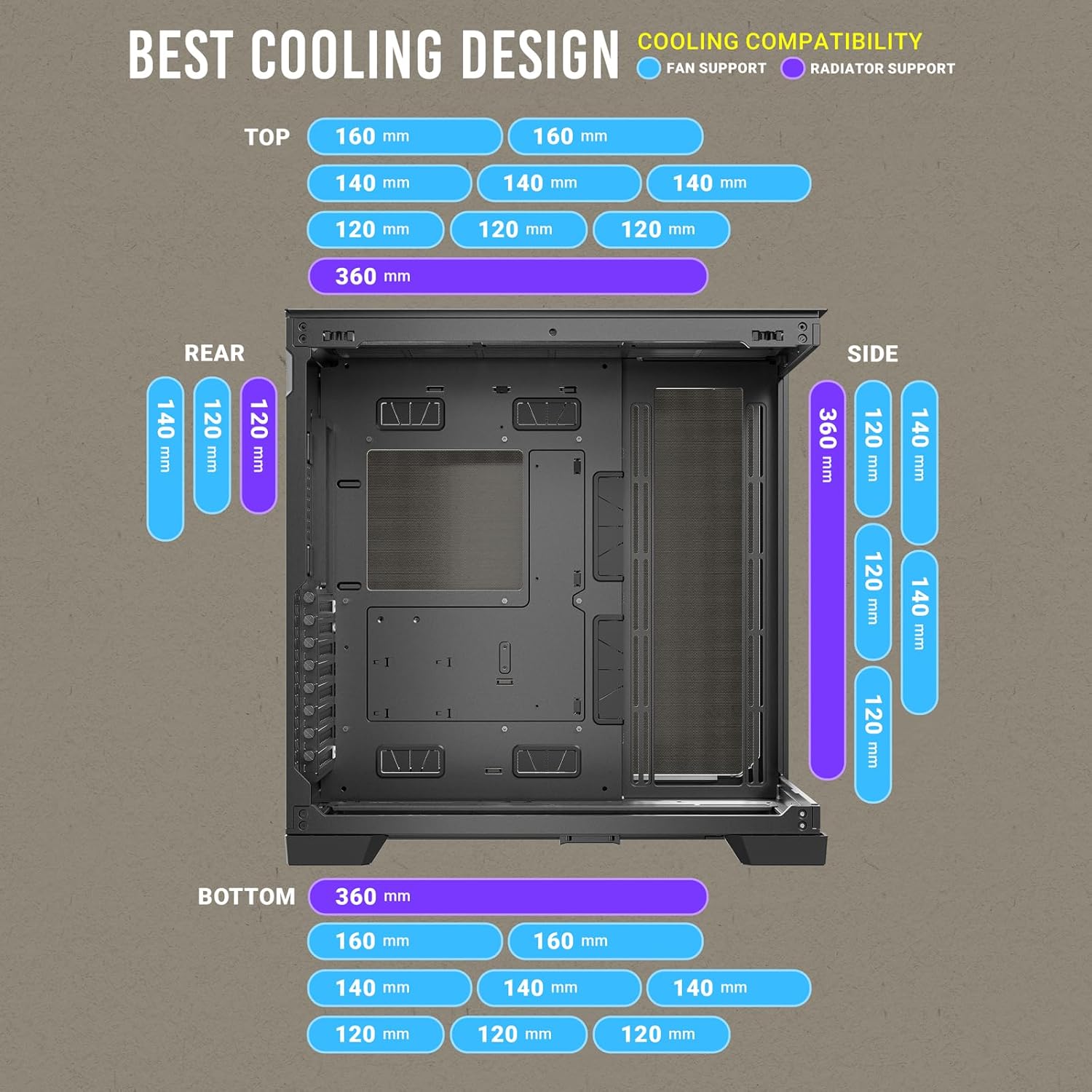
Figure 12: Comprehensive cooling compatibility chart.
4. Awọn ilana Iṣiṣẹ
4.1. Front I/O Panel
Pẹpẹ I/O iwaju pese iwọle ti o rọrun si awọn ibudo pataki:
- Bọtini agbara
- Bọtini atunto
- Awọn ibudo USB 3.0 (x2)
- Type-C (10Gbps) Port (x1)
- Headphone/Mic Combo Jack (x1)

Figure 13: Front I/O Panel layout.
5. Itọju
5.1. eruku Ajọ
The Antec C8 includes a pull-out dust filter at the bottom for easy cleaning. Regularly clean the dust filters to maintain optimal airflow and prevent dust buildup inside the case.

Figure 14: Bottom pull-out dust filter for easy maintenance.
5.2. Fífọ Àpò náà
Lo asọ, damp cloth to clean the exterior surfaces of the case. For tempered glass panels, use a glass cleaner and a microfiber cloth to avoid scratches. Ensure the system is powered off and unplugged before cleaning.
6. Awọn pato
| Ẹya ara ẹrọ | Sipesifikesonu |
|---|---|
| Brand | Antec |
| Orukọ awoṣe | C8 |
| Iru Irú | Ile-iṣọ kikun |
| Modaboudu Ibamu | ATX ti o gbooro sii |
| Ohun elo | Gilasi ibinu |
| Iwọn Nkan | 10.48 iwon |
| Awọn iwọn Ọja (LxWxH) | 18.7 x 8.26 x 11.92 inches |
| Nọmba ti USB 3.0 Ports | 2 |
| Agbara Ipese Iṣagbesori Iru | Isalẹ Oke |
| Ọna Itutu | Omi |
7. Official ọja Video
Video 1: Antec C8 motion. This video provides a dynamic overview of the Antec C8 PC case, highlighting its design and features.
8. Laasigbotitusita
If you encounter any issues during installation or operation, please review the following general troubleshooting steps:
- Awọn oran agbara: Ensure all power cables (PSU, motherboard, GPU, drives) are securely connected. Verify the power supply switch is in the 'ON' position.
- Iṣe Itutu: Check that all fans are spinning correctly and are connected to the motherboard or fan controller. Ensure dust filters are clean and not obstructing airflow.
- Ìbámu Àwọn Ẹ̀yà: Double-check component dimensions against case specifications to ensure compatibility.
- Awọn isopọ alaimuṣinṣin: Re-seat all major components (RAM, GPU, storage drives) and check all data and power cables.
9. Atilẹyin ọja ati Support
Fun alaye atilẹyin ọja ati atilẹyin imọ-ẹrọ, jọwọ tọka si Antec osise webojula tabi kan si wọn onibara iṣẹ. Jeki ẹri rira rẹ fun awọn iṣeduro atilẹyin ọja.