
1. Ifihan
This manual provides essential instructions for the proper assembly, operation, and maintenance of your WUPRO Gallery Fixed Frame Projector Screen Black Crystal CLR 70 Inch. Please read this manual thoroughly before installation and retain it for future reference. This projector screen is designed to enhance your viewing experience with its advanced Ambient Light Rejection (ALR) technology, supporting 4K/8K, HDR, and Active 3D content under normal lighting conditions.

Image 1.1: WUPRO Gallery Fixed Frame Projector Screen Black Crystal CLR 70 Inch.
2. Alaye Aabo
- Always handle the screen material with clean hands or gloves to prevent smudges and damage.
- Ensure the installation surface is sturdy and capable of supporting the screen's weight.
- Pa awọn ẹya kekere ati awọn irinṣẹ mọ kuro ni ọwọ awọn ọmọde.
- Do not attempt to modify the screen or its components, as this may void the warranty and pose safety risks.
- Follow all assembly steps carefully to ensure proper and safe installation.
3. Package Awọn akoonu
Rii daju pe gbogbo awọn paati wa ṣaaju ki o to bẹrẹ apejọ:
- Screen Fabric (Black Crystal CLR)
- Aluminiomu Alloy fireemu Awọn apakan
- Ultrafine Velvet Frame Strips
- Fiberglass Strips
- Spring Hook Tensioning System Components
- Ohun elo iṣagbesori (awọn skru, awọn ìdákọró ogiri)
- Ilana itọnisọna

Aworan 3.1: exploded view of the projector screen components, illustrating the frame, screen fabric, and tensioning system.
4. Eto ati fifi sori
The WUPRO Gallery Fixed Frame Projector Screen features a quick-install trolley system for easy setup. Manual installation is required. It is recommended to have two people for assembly and mounting.
4.1. Apejọ fireemu
- Yọọ gbogbo awọn paati ki o si gbe wọn si ori mimọ, dada alapin.
- Connect the aluminum alloy frame sections according to the included diagrams, ensuring a secure fit.
- Attach the ultrafine velvet frame strips to the assembled frame.
4.2. Screen Fabric Installation
- Carefully unroll the Black Crystal CLR screen fabric. Avoid creasing or touching the viewing surface directly.
- Position the screen fabric onto the assembled frame.
- Utilize the spring hook tensioning system to stretch the screen fabric evenly across the frame. Start from the center and work outwards, ensuring the fabric is taut and wrinkle-free.
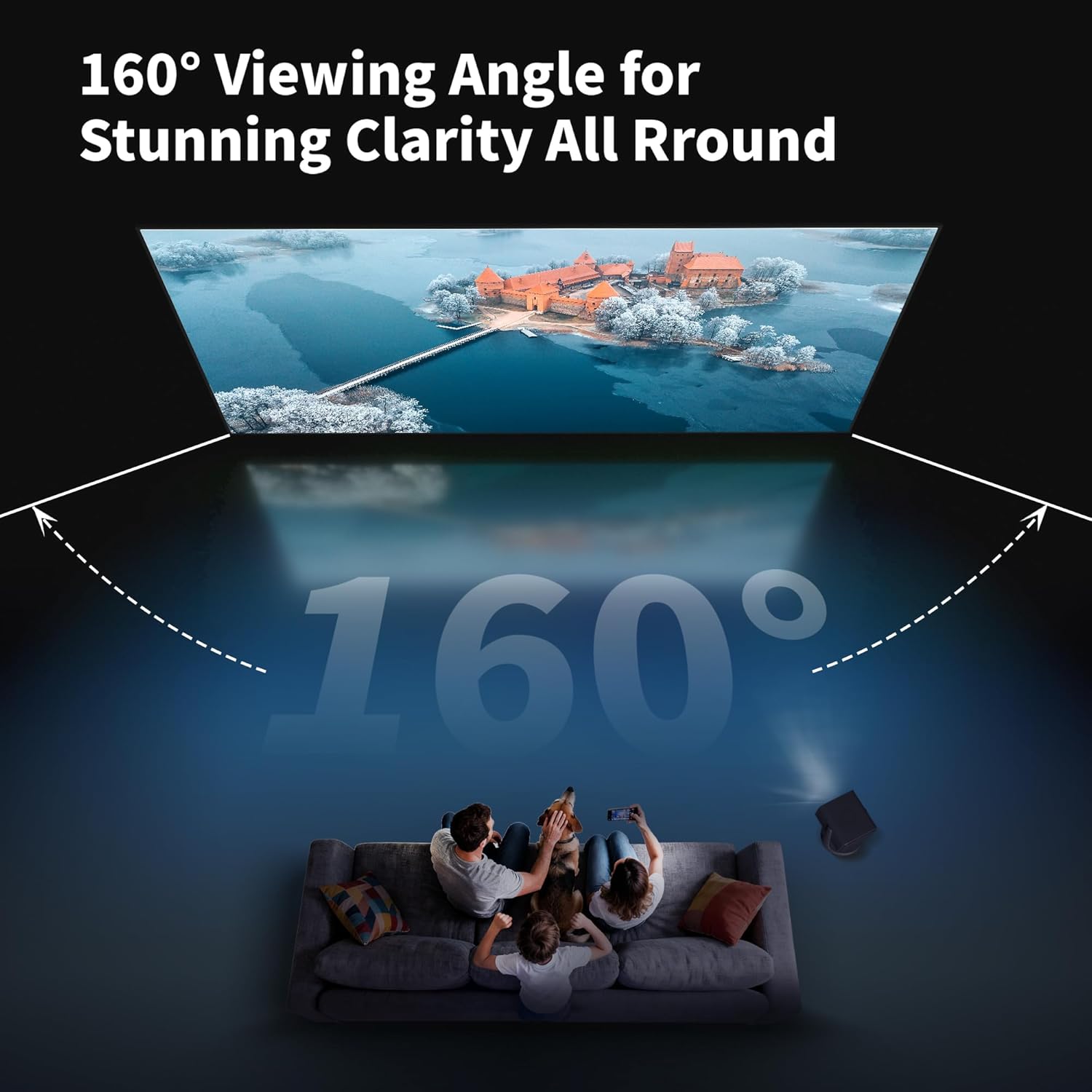
Image 4.1: Detail of the spring hook tensioning system, ensuring a flat screen surface.
4.3. Iṣagbesori Odi
- Determine the desired mounting location and height.
- Mark the drilling points for the wall brackets, ensuring they are level and correctly spaced.
- Lu awọn ihò awaoko ki o si fi awọn ìdákọró odi ti o ba jẹ dandan.
- So awọn brackets ogiri mọ ogiri nipa lilo awọn skru ti a pese.
- Carefully lift the assembled screen and hang it onto the wall brackets. Ensure it is securely seated.

Image 4.2: Visual guide for the easy installation process, including pushing the screen close to the wall and securing it.
4.4. fifi sori Video
For a visual guide on the assembly and installation process, please refer to the following video:
Video 4.1: WUPRO Fixed Frame Screen ALR Home Cinema 16:9 Screen Assembly Guide. This video demonstrates the assembly of the fixed frame screen and highlights its ALR features.
5. Awọn ilana Iṣiṣẹ
The WUPRO Gallery Fixed Frame Projector Screen is designed for optimal performance with specific projector types and viewawọn ipo jijẹ.
5.1. Projector Compatibility
- Recommended Projectors: Standard/Long-throw projectors with 1800 ANSI lumens or higher.
- Incompatible Projectors: Ultra-short-throw projectors.
- Akiyesi: Limited speckle control for tricolor laser projectors.
5.2. Ambient Light Rejection (ALR)
The Black Crystal CLR screen material features Ambient Light Rejection (Ceiling) of ≥70%. This technology blocks overhead light interference, optimizing the viewing experience in normal lighting conditions. It reflects projector light towards the viewer while minimizing the impact of ambient light.

Image 5.1: Illustration of the multi-layered PVC material designed for 70% ambient light rejection.

Image 5.2: The screen maintains vivid image quality even in a room with significant ambient light, thanks to its ALR properties.
5.3. Viewigun igun
Iboju naa nfunni ni 160 ° fife viewing angle, providing broad visibility from various positions within a room. This makes it suitable for diverse environments such as living rooms, bedrooms, schools, and offices.

Image 5.3: The 160° viewing angle ensures clear visibility for multiple viewers across a wide area.
6. Itọju ati Itọju
Proper care will ensure the longevity and optimal performance of your projector screen.
- Ninu Oju Iboju naa: Gently wipe the screen surface with a soft, lint-free cloth. For stubborn marks, lightly dampen the cloth with water. Avoid harsh chemicals, abrasive cleaners, or excessive pressure, as these can damage the screen material.
- Itọju fireemu: The aluminum frame can be cleaned with a soft, dry cloth.
- Ibi ipamọ: If disassembling for storage, carefully roll the screen fabric without creasing and store it in its original protective packaging in a cool, dry place.
- Mimu: Always handle the screen by its frame, not by the screen surface.
7. Laasigbotitusita
Abala yii n ṣalaye awọn ọran ti o wọpọ ti o le ba pade.
7.1. Wrinkles or Creases on the Screen
- Nitori: Improper handling during unpacking or assembly, or insufficient tensioning.
- Ojutu: Ensure the screen fabric is stretched evenly and tautly using the spring hook tensioning system. Over time, minor creases from packaging may diminish as the screen remains under tension. If creases persist, re-check the tensioning and ensure all springs are correctly attached.
7.2. Poor Image Quality / Dim Image
- Nitori: Incompatible projector, excessive ambient light, or incorrect projector placement.
- Ojutu: Verify your projector is a standard/long-throw type with at least 1800 ANSI lumens. Ensure the screen is positioned to minimize direct ambient light hitting the surface. Adjust projector settings for optimal brightness and contrast.
7.3. Frame Not Level
- Nitori: Wall brackets not installed level.
- Ojutu: Remove the screen and re-adjust the wall brackets using a spirit level to ensure they are perfectly horizontal before re-mounting the screen.
8. Awọn pato
Key technical specifications for the WUPRO Gallery Fixed Frame Projector Screen Black Crystal CLR 70 Inch:
| Ẹya ara ẹrọ | Sipesifikesonu |
|---|---|
| Awoṣe | Gallery Fixed Frame Projector Screen Black Crystal CLR |
| Ìwọ̀n Iboju (Ojú Ayé) | 70 inches |
| Apakan Ipin | 16:9 |
| Iboju Aṣọ | Black Crystal CLR (PVC material with metallic coating) |
| jèrè | 1.0 |
| Ipin Itansan | 1.5 |
| Ambient Light Rejection (Ceiling) | ≥70% |
| Viewigun igun | 160° |
| Awọn ipinnu atilẹyin | 4K/8K, HDR, Active 3D |
| Aṣa fireemu | Slim Frame with Velvet Border |
| Ohun elo fireemu | Aluminiomu Alloy |
| Awọn iwọn Ọja (W x H) | 61.77" x 35.08" (1569mm x 891mm) |
| Image Dimensions (W x H) | 60.98" x 34.29" (1549mm x 871mm) |
| Iwọn Nkan | 10 poun (4.5 kg) |
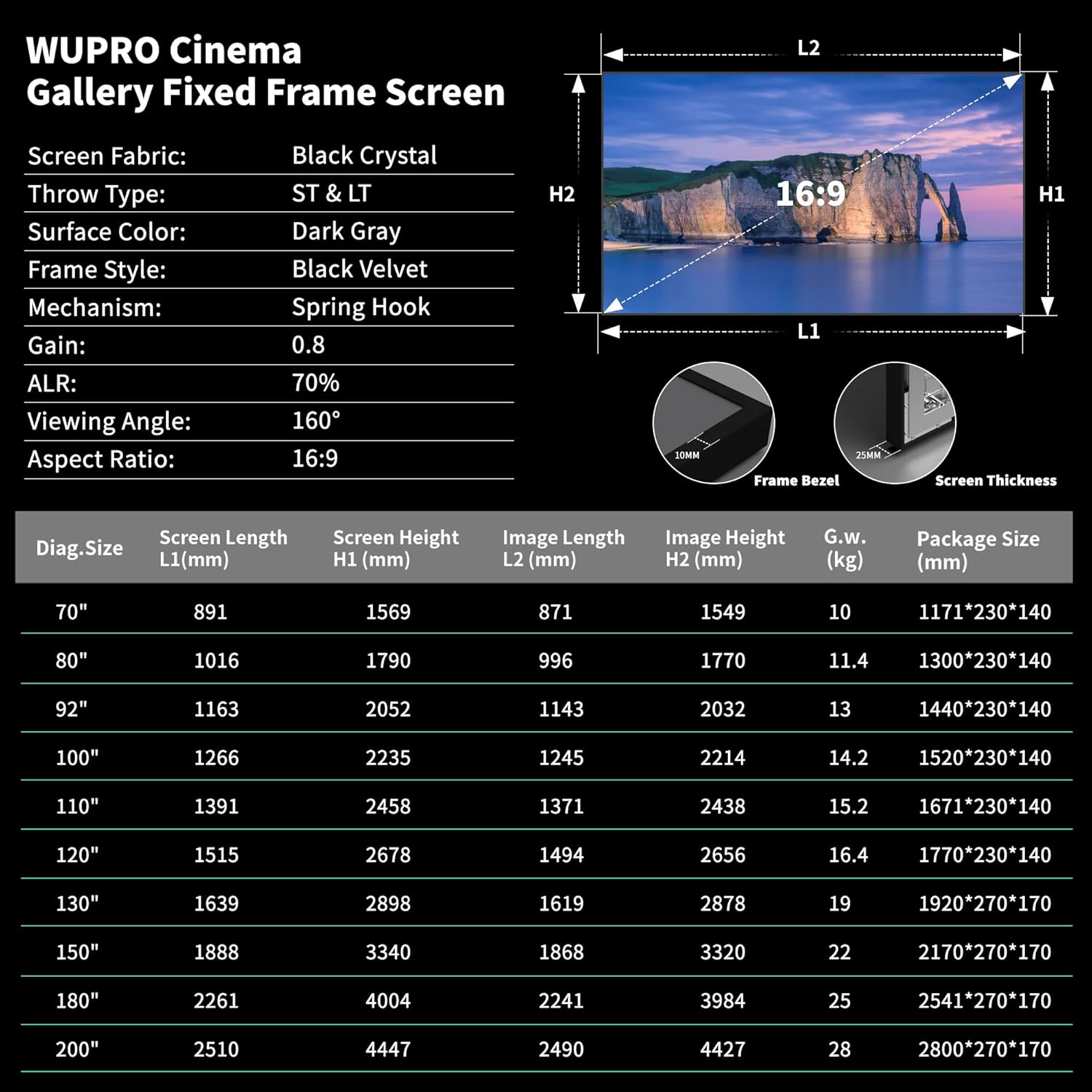
Image 8.1: Detailed specifications table for WUPRO Gallery Fixed Frame Screens across different sizes.
9. Atilẹyin ọja ati Support
WUPRO is committed to providing quality products. For any questions, technical assistance, or warranty claims, please contact WUPRO customer support through the retailer where the product was purchased or visit the official WUPRO webojula fun alaye olubasọrọ.
Jọwọ ṣe idaduro ẹri rira rẹ fun awọn idi atilẹyin ọja.