
FOREVER GSM169761
FOREVER Smartwatch SW-800 User Manual
Model: SW-800 (GSM169761)
Ọrọ Iṣaaju
This manual provides essential information for the proper use and maintenance of your FOREVER Smartwatch SW-800. Please read it thoroughly before operating the device to ensure optimal performance and longevity. The SW-800 features a 1.3-inch AMOLED display, Bluetooth connectivity, and various fitness tracking capabilities.

Image: The FOREVER Smartwatch SW-800, showcasing its versatile design with both metal and silicone strap options, and various digital watch faces.
Ṣeto
1. Gbigba agbara Smartwatch
Before first use, fully charge your smartwatch. Connect the charging cable to the charging port on the back of the watch and plug the USB end into a power adapter (not included) or a computer's USB port. The watch display will indicate charging status.

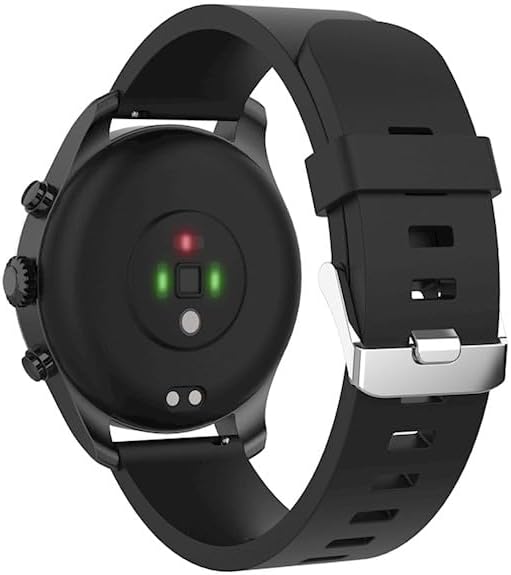
Aworan: The ru view of the smartwatch, highlighting the magnetic charging pins and the optical heart rate sensors.
2. Agbara lori / Paa
- To power on: Press and hold the side button until the FOREVER logo appears.
- To power off: Press and hold the side button, then select "Power Off" on the screen.
3. Sopọ pẹlu Foonuiyara Foonuiyara Rẹ
- Download the companion application from the App Store (for iOS) or Google Play Store (for Android). Wa fun "FOREVER Smartwatch" or refer to the QR code in the watch's settings.
- Rii daju pe Bluetooth ti ṣiṣẹ lori foonuiyara rẹ.
- Open the application and follow the on-screen instructions to create an account or log in.
- Select "Add Device" or "Pair Device" within the app.
- Yan "SW-800" lati inu akojọ awọn ẹrọ ti o wa.
- Jẹrisi ibeere sisopọ lori mejeeji foonuiyara rẹ ati smartwatch naa.

Image: A smartphone displaying the FOREVER companion app interface, with the smartwatch screen prompting the user to "Connect APP" via Bluetooth.
Ṣiṣẹ Smartwatch
1. Ipilẹ Lilọ kiri
- Afi ika te: Swipe left, right, up, or down to navigate through menus and notifications. Tap to select an item.
- Bọtini ẹgbẹ: Press to return to the home screen or wake the display. Long press for power options.
2. Key Awọn ẹya ara ẹrọ
- Abojuto Oṣuwọn Ọkàn: The smartwatch continuously monitors your heart rate. Access the heart rate widget or app on the watch to view data gidi-akoko ati awọn aṣa itan.
- Pedometer: Ṣe atẹle awọn igbesẹ ojoojumọ rẹ, ijinna, ati awọn kalori sisun.
- Awọn ọna Idaraya: The SW-800 supports 14 different sports modes, including running, cycling, and walking. Select a mode before starting an activity to track specific metrics.
- Titele orun: Monitors your sleep patterns, including deep sleep, light sleep, and wake times.
- Atẹgun ẹjẹ (SpO2) Abojuto: Ṣe iwọn awọn ipele itẹlọrun atẹgun ẹjẹ rẹ.
- Abojuto iwọn otutu: Provides body temperature readings.
- Iṣakoso Orin: Ṣakoso ṣiṣiṣẹsẹhin orin lori foonu ti a ti sopọ taara lati aago.
- Awọn iwifunni: Receive call, message, and app notifications from your smartphone.

Image: A collage of watch faces illustrating the various health and fitness tracking features, including heart rate, step count, calorie burn, sleep analysis, body temperature, and blood oxygen levels.

Image: The smartwatch displaying a graph of body temperature measurements over time, indicating current and historical readings.

Image: The smartwatch screen showing a blood oxygen saturation (SpO2) reading of 97%, along with a trend graph.

Image: The smartwatch worn by a runner, actively tracking fitness metrics during an outdoor exercise session.
Itoju
1. Ninu
Regularly clean your smartwatch and strap to prevent skin irritation and maintain device functionality. Use a soft, lint-free cloth. If necessary, slightly dampen aṣọ pẹlu omi. Yago fun lilo awọn kẹmika lile tabi awọn ohun elo abrasive.
2. Omi Resistance (IP68)
The SW-800 is rated IP68, meaning it is resistant to dust and can withstand immersion in water up to 1.5 meters for up to 30 minutes. It is suitable for daily use, such as hand washing or light rain. However, it is not recommended for swimming, diving, or high-pressure water activities.
3. Itọju batiri
- Yago fun gbigba agbara si batiri ni kikun nigbagbogbo.
- Ma ṣe fi ẹrọ naa han si awọn iwọn otutu to gaju.
- Lo okun gbigba agbara ti a pese nikan.
Laasigbotitusita
1. Agogo naa ko tan
- Rii daju pe aago naa ti gba agbara ni kikun. Sopọ mọ ṣaja fun o kere 30 iṣẹju.
- Gbiyanju lati tẹ bọtini ẹgbẹ ki o si dimu fun awọn aaya 10-15 lati fi agbara mu lati tun bẹrẹ.
2. Awọn iṣoro Asopọmọra (Bluetooth)
- Rii daju pe Bluetooth ti ṣiṣẹ lori smartwatch ati foonuiyara rẹ.
- Rí i dájú pé smartwatch náà wà láàárín ibi tí Bluetooth wà nínú foonu rẹ.
- Tun bẹrẹ mejeeji smartwatch ati foonuiyara rẹ.
- Unpair the device from your phone's Bluetooth settings and re-pair it through the companion app.
3. Àwọn Ìkà Ìlera Tí Kò Péye
- Rii daju pe aago naa ti wọ snugly lori ọwọ ọwọ rẹ, ṣugbọn kii ṣe ju.
- Nu awọn sensọ lori ẹhin aago naa.
- Yago fun gbigbe pupọ lakoko awọn wiwọn.
- Note that these devices are not medical instruments and readings are for reference only.
4. App Not Syncing Data
- Ṣayẹwo asopọ intanẹẹti rẹ lori foonuiyara rẹ.
- Ensure the companion app has all necessary permissions enabled in your phone's settings.
- Close and reopen the app, or restart your phone.
Awọn pato
| Orukọ awoṣe | SW-800 (GSM169761) |
| Ifihan | 1.3-inch AMOLED, 360 x 360 pixels |
| Asopọmọra | Bluetooth |
| Omi Resistance | IP68 |
| Awọn sensọ | Heart Rate Monitor, Pedometer, SpO2, Temperature |
| Batiri Iru | Litiumu Iwon |
| Awọn ẹrọ ibaramu | Foonuiyara |
| Human Interface Input | Awọn bọtini, Touchscreen |
| Awọn iwọn (Apapọ) | 11.2 x 9.2 x 7.1 cm |
| Ìwúwo (Apapọ) | 240 g |
Aworan: A alaye view of the smartwatch, emphasizing its 1.3-inch display with 360x360 pixel resolution, and the sleek design of the metal band.
Atilẹyin ọja ati Support
Your FOREVER Smartwatch SW-800 comes with a standard manufacturer's warranty. Please refer to the warranty card included in your product packaging for specific terms and conditions, including the warranty period and coverage details.
For technical support, troubleshooting assistance, or warranty claims, please contact FOREVER customer service. Contact information can typically be found on the official FOREVER webaaye tabi lori apoti ọja.