
1. Ifihan
Thank you for choosing the Conambo K10C Bluetooth Headset. This manual provides detailed instructions for setting up, operating, and maintaining your headset to ensure optimal performance and longevity. The K10C headset features Bluetooth 5.2 connectivity, CVC8.0 dual-mic noise cancellation, and comes with a 750mAh charging case for extended talk time.
2. Package Awọn akoonu
Jọwọ rii daju pe gbogbo awọn ohun kan wa ninu apo rẹ:
- Conambo K10C Bluetooth Headset
- 750mAh Ngba agbara Case
- Iru-C Ngba agbara USB
- 9 Pieces Ear Tips (various sizes)
- Afowoyi Olumulo (iwe-ipamọ yii)
3. Ọja Ipariview
Familiarize yourself with the components and controls of your Conambo K10C headset and charging case.

Nọmba 3.1: Conambo K10C Headset with labeled controls. This image displays the headset with callouts indicating the Power On/Off switch, Volume +/- buttons, Mute button, and the area for activating Siri/Google Assistant. It also highlights the Qualcomm QCC3040 Chip and IPX4 Water Resistance.

Nọmba 3.2: Conambo K10C Headset securely placed within its charging case. The charging case features a digital LED display for battery status.
4. Gbigba agbara
Ensure your headset and charging case are fully charged before first use.
4.1 Ngba agbara si Agbekọri
Place the headset into the charging case. The headset will begin charging automatically. The LED display on the charging case will show the battery level.
4.2 Ngba agbara Ngba agbara
Connect the provided Type-C cable to the charging port on the case and to a USB power source. The LED digital display will indicate the charging progress. A full charge takes approximately 3 hours.
The 750mAh charging case provides up to 64 additional hours of talk time, extending the headset's 16 hours to a total of 80 hours.
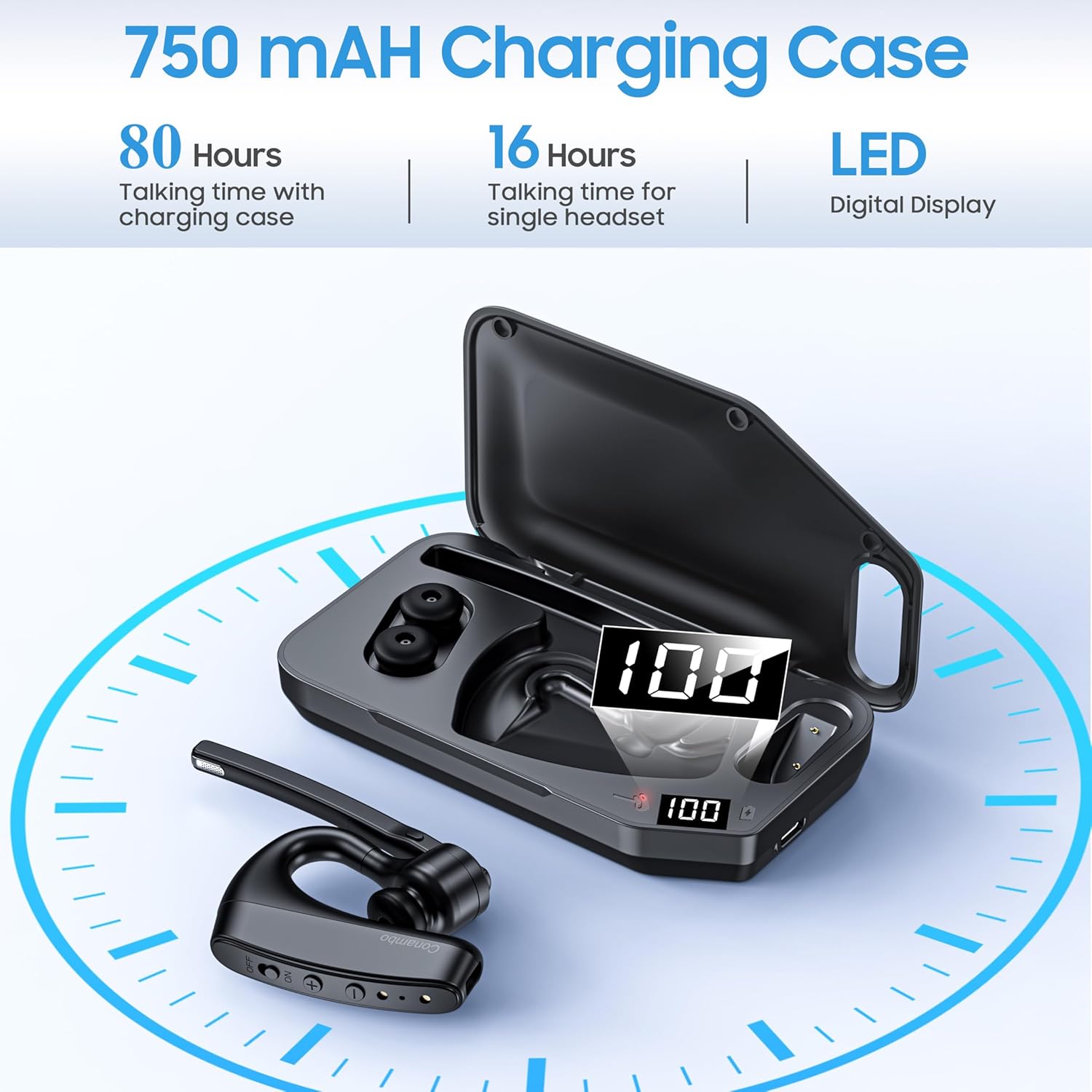
Nọmba 4.1: Pariview of the 750mAh charging case, highlighting its capacity to provide 80 hours of total talk time (16 hours from headset, 64 hours from case) and its LED digital display for battery status.
5. Sisọpọ
Follow these steps to pair your Conambo K10C headset with your device.
5.1 Ibẹrẹ Ibẹrẹ
- Rii daju pe agbekari ti gba agbara ati agbara si pipa.
- Press and hold the Power On/Off button until the indicator light flashes red and blue, indicating pairing mode.
- Lórí ẹ̀rọ rẹ (fóònù alágbékalẹ̀, kọ̀ǹpútà alágbèéká, tablet), mu Bluetooth ṣiṣẹ́ kí o sì wá àwọn ẹ̀rọ tó wà.
- Select "K10C-CBOX" from the list of found devices.
- Once connected, the indicator light on the headset will flash blue slowly.
5.2 Multipoint Technology
The K10C headset supports multipoint technology, allowing it to connect to two Bluetooth devices simultaneously. After pairing with the first device, disable Bluetooth on that device, then pair with the second device. Re-enable Bluetooth on the first device, and the headset should connect to both.
The headset utilizes Bluetooth 5.2 for a faster, more efficient, and stable connection, with an operating range of up to 59 feet (18 meters).

Nọmba 5.1: The Conambo K10C headset demonstrating multipoint technology, connecting to both a smartphone and a laptop simultaneously. This image also highlights fast pairing and a 59ft/18m range.
6. Isẹ
6.1 Agbara Tan / Pa
- Agbara Tan: Slide the Power On/Off switch to the 'ON' position. The indicator light will flash blue.
- Agbara Pa: Slide the Power On/Off switch to the 'OFF' position. The indicator light will turn off.
6.2 ipe Management
- Idahun/Ipe Ipari: Tẹ bọtini Olona-iṣẹ lẹẹkan.
- Kọ Ipe: Tẹ mọlẹ bọtini iṣẹ-ọpọlọpọ fun iṣẹju-aaya 2.
6.3 dakẹ Išė
The headset features an independent mute button on the microphone boom.
- During a call, press the mute button once to activate/deactivate mute.

Nọmba 6.1: A user demonstrating the one-button mute feature on the Conambo K10C headset, emphasizing easy call management.
6.4 Iṣakoso iwọn didun
- Tẹ bọtini '+' lati mu iwọn didun pọ si.
- Tẹ bọtini '-' lati dinku iwọn didun.
6.5 Voice Iranlọwọ ibere ise
Hold the mute button for 3 seconds to activate your device's voice assistant (Siri or Google Assistant).
6.6 Ariwo Ifagile
The Conambo K10C headset incorporates CVC8.0 Dual Mic and ENC (Environmental Noise Cancellation) technology. This system is designed to reduce up to 96% of background noise, ensuring clear voice quality during calls, even in noisy environments.
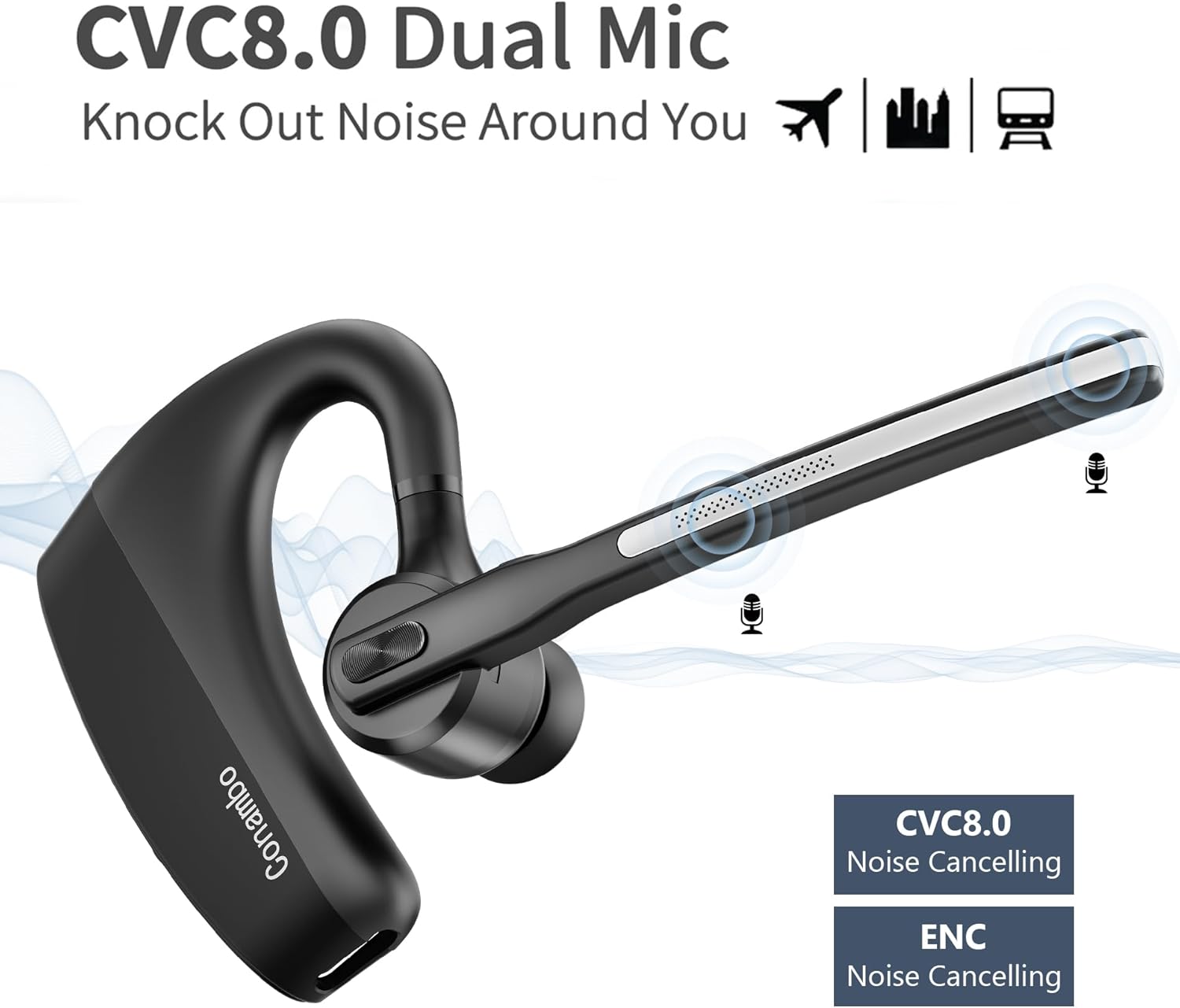
Nọmba 6.2: Visual representation of the CVC8.0 Dual Mic and ENC Noise Cancelling technology in the Conambo K10C headset, illustrating its ability to block out surrounding noise.
7. Itọju
Proper maintenance helps extend the life of your headset.
7.1 Ninu
- Gently wipe the headset and charging case with a soft, dry, lint-free cloth.
- For ear tips, remove them and clean with a mild soap solution if necessary, then rinse thoroughly and dry completely before reattaching.
- Avoid using harsh chemicals, abrasive cleaners, or getting moisture into any openings.
7.2 Ibi ipamọ
- When not in use, store the headset in its charging case to protect it from dust and damage.
- Tọju ni itura, aye gbigbẹ, kuro lati awọn iwọn otutu ti o ga julọ ati oorun taara.
8. Laasigbotitusita
Tí o bá ní ìṣòro pẹ̀lú agbekọri rẹ, wo àwọn ìṣòro àti ìdáhùn tó wọ́pọ̀ wọ̀nyí.
| Isoro | Ojutu |
|---|---|
| Agbekọri ko ni agbara. | Ensure the headset is charged. Check the charging case battery level. |
| Ko le so pọ pẹlu ẹrọ. | Ensure the headset is in pairing mode (flashing red and blue). Turn off and on your device's Bluetooth. Forget previous pairings on your device and try again. |
| Ko si ohun tabi iwọn kekere. | Adjust the volume on both the headset and your connected device. Ensure the headset is properly connected. |
| Didara ipe ti ko dara. | Ensure the headset is within range of your device. Avoid physical obstructions. Check for interference from other wireless devices. |
| Mute function not working. | Ensure you are pressing the dedicated mute button on the microphone boom. |
If problems persist, try restarting both the headset and your connected device. For further assistance, please refer to the support information.
9. Awọn pato
| Ẹya ara ẹrọ | Ẹ̀kúnrẹ́rẹ́ |
|---|---|
| Orukọ awoṣe | K10C-CBOX |
| Asopọmọra Technology | Bluetooth 5.2 |
| Imọ-ẹrọ Ibaraẹnisọrọ Alailowaya | Bluetooth |
| Ariwo Iṣakoso | Active Noise Cancellation (CVC8.0 Dual Mic) |
| Audio Driver Type | Yiyi Awakọ |
| Bluetooth Ibiti | 18 Mita (ẹsẹ 59) |
| Igbesi aye Batiri Agbekọri | Titi di wakati 16 ọrọ sisọ |
| Ngba agbara Batiri Case | 750 mAh |
| Charging Case Additional Talk Time | Titi di wakati 64 |
| Total Talk Time (with case) | Titi di wakati 80 |
| Akoko gbigba agbara | O fẹrẹ to awọn wakati 3 |
| Omi Resistance Ipele | Alatako omi (IPX4) |
| Awọn ẹrọ ibaramu | Cellphones, Laptops, Tablets, iPhone |
| Iṣakoso Iru | Iṣakoso bọtini |
| Ohun elo | Ṣiṣu |
| Iwọn Nkan | 7.2 iwon |
10. Atilẹyin ọja ati Support
The Conambo K10C Bluetooth Headset typically comes with a 2-year warranty. Please refer to your purchase documentation for specific warranty terms and conditions.
For technical support or warranty claims, please contact Conambo customer service through the retailer where the product was purchased or visit the official Conambo webojula fun alaye olubasọrọ.