
1. Ọja Ipariview
The NOHON MS15 Mag-Safe Wireless Power Bank is a compact and efficient portable charging solution designed for iPhone 12, 13, 14, and 15 series, and other compatible devices. Featuring a 5000mAh capacity, ultra-slim design, and 20W Power Delivery (PD) fast charging, it offers convenient wireless and wired charging capabilities.

Figure 1: NOHON MS15 Mag-Safe Wireless Power Bank with iPhone.
2. Package Awọn akoonu
- NOHON MS15 Mag-Safe Wireless Power Bank
- USB-C Ngba agbara Cable
- Itọsọna olumulo
3. Ṣeto ati Gbigba agbara Bank agbara
3.1 Ni ibẹrẹ idiyele
Before first use, fully charge the NOHON MS15 Power Bank. Use the included USB-C cable and connect it to a compatible power adapter (not included).
3.2 Gbigba agbara Ifi
The integrated LED indicators on the side of the power bank display the remaining battery capacity and charging status. Each light typically represents approximately 25% of the battery charge.

Figure 2: LED Power Indicator explanation.
4. Awọn ilana Iṣiṣẹ
4.1 Wireless Charging (Mag-Safe Compatible)
- Ensure your device is Mag-Safe compatible (iPhone 12 series or newer) or has a magnetic phone case.
- Align the NOHON power bank with the back of your iPhone. The magnets will automatically snap it into place, initiating wireless charging.
- To stop charging, simply detach the power bank from your device.

Nọmba 3: Asomọ oofa fun gbigba agbara alailowaya.
4.2 Gbigba agbara ti a firanṣẹ (USB-C)
- So opin kan ti okun USB-C si ibudo USB-C ti banki agbara.
- So opin keji okun USB-C pọ mọ ibudo gbigba agbara ẹrọ rẹ.
- Gbigba agbara yoo bẹrẹ laifọwọyi.
4.3 Igbakana Ngba agbara
The NOHON MS15 supports charging two devices simultaneously: one wirelessly via Mag-Safe and another via the USB-C port.
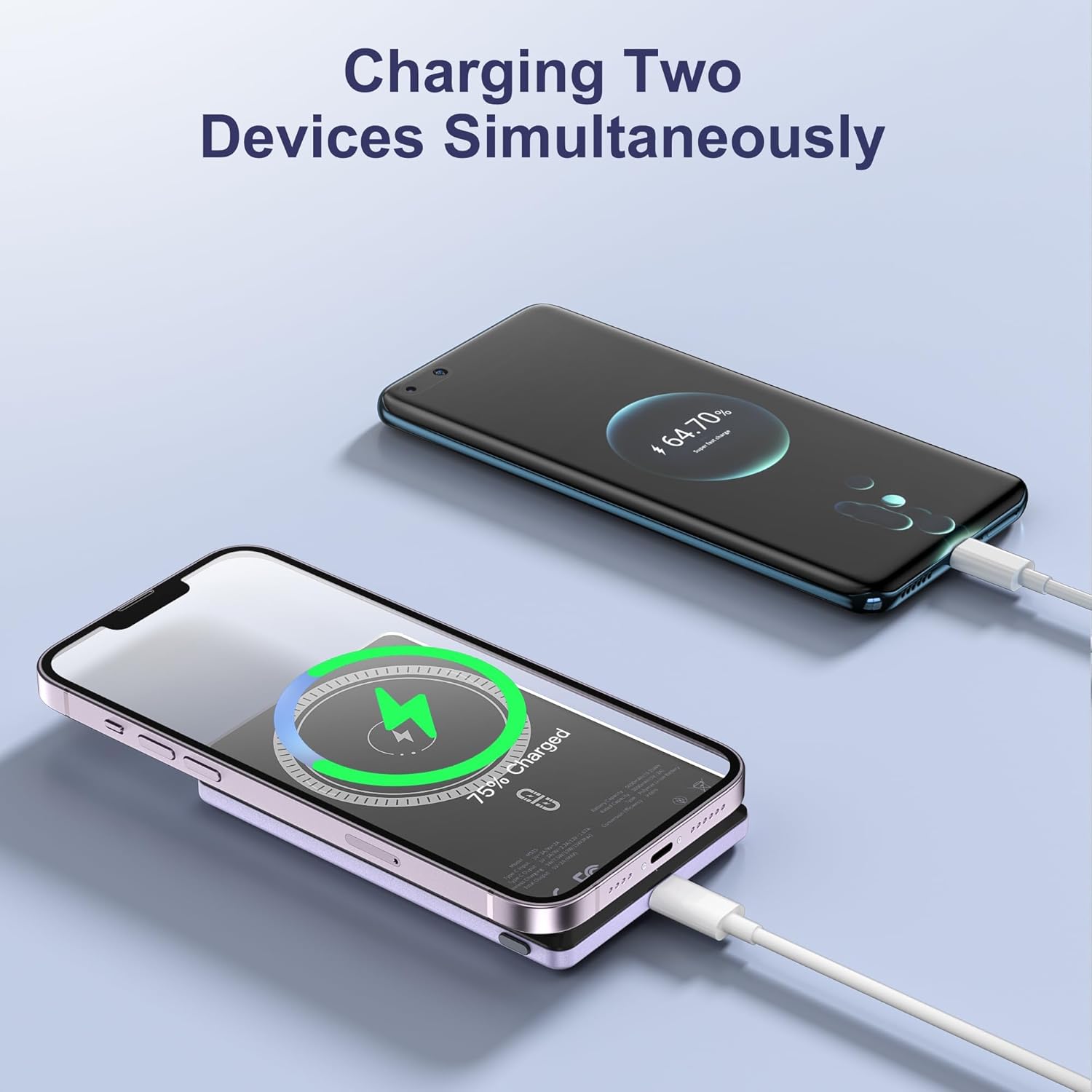
Figure 4: Charging two devices simultaneously.
4.4 Agbara Tan / Pa
The power bank automatically activates charging when a device is connected wirelessly or via cable. To turn off the power bank, press the power button twice in quick succession.
5. Key Awọn ẹya ara ẹrọ
- Apẹrẹ Ultra-Slim: Measuring just 0.32 inches (8mm) in thickness, it's designed for easy portability.
- Agbara 5000mAh: Pese ample agbara fun ojoojumọ lilo.
- Asopọ oofa: Ensures a secure and stable wireless charging link.
- 20W PD Gbigba agbara Yara: Delivers efficient wired charging speeds.
- Gbigba agbara nigbakanna: Charge two devices at once (wireless + wired).
- Idaabobo oye: Àwọn ààbò tí a kọ́ sínú rẹ̀ lòdì sí ìṣàn omi tó pọ̀jù, ìṣàn omi tó pọ̀jùtage, ati kukuru-Circuit.

Olusin 5: Pariview of NOHON MS15 features.
6. Ibamu
The NOHON MS15 Mag-Safe Wireless Power Bank is designed for universal compatibility with:
- Mag-Safe Charging: iPhone 12, 13, 14, and 15 series (including Pro Max models).
- Gbigba agbara Alailowaya: Other Qi-enabled smartphones (requires a magnetic phone case for secure attachment).
- Ti firanṣẹ Ngba agbara: Any device compatible with USB-C charging.
Akiyesi: For non-magnetic charging phones, a magnetic phone case is required to ensure a secure connection for wireless charging.
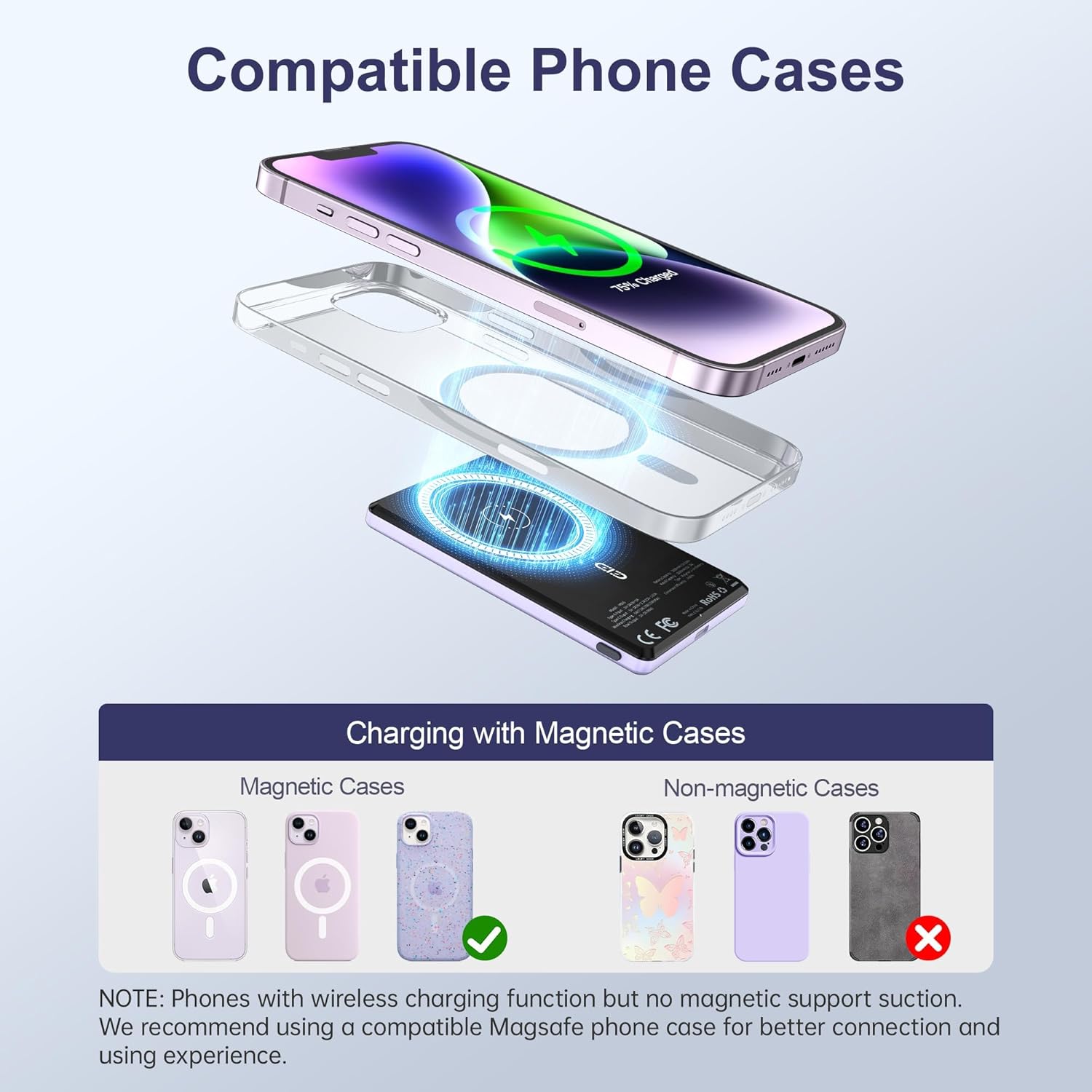
Figure 6: Compatible phone cases for magnetic charging.
7. Itọju ati Itọju
- Pa banki agbara mọ kuro ninu omi, ọrinrin, ati awọn iwọn otutu to lagbara.
- Yago fun sisọ silẹ tabi tẹriba ẹrọ si awọn ipa to lagbara.
- Nu dada mọ pẹlu asọ asọ, gbẹ. Maṣe lo awọn kẹmika lile tabi awọn ohun elo abrasive.
- Tọju ni itura, ibi gbigbẹ nigbati ko si ni lilo.
8. Laasigbotitusita
8.1 Ẹrọ Ko Ngba agbara
- Rí i dájú pé bank agbára náà ti gba agbára tó. Ṣàyẹ̀wò àwọn àmì LED.
- For wireless charging, verify proper alignment between the power bank and your device/magnetic case.
- For wired charging, check that the USB-C cable is securely connected to both the power bank and your device. Try a different cable if necessary.
- Remove any non-magnetic cases that may interfere with wireless charging.
8.2 Power Bank Overheating
- It is normal for the power bank to become slightly warm during charging.
- If it becomes excessively hot, discontinue use immediately and contact customer support.
- Ensure proper ventilation and avoid charging in direct sunlight or enclosed spaces.
9. Awọn pato
| Ẹya ara ẹrọ | Ẹ̀kúnrẹ́rẹ́ |
|---|---|
| Nọmba awoṣe | MS15 |
| Agbara Batiri | 5000mAh |
| Ọja Mefa | 4 x 2.5 x 0.32 inches |
| Iwọn Nkan | 4.1 iwon |
| Ti firanṣẹ Ngba agbara o wu | PD 20W (USB Type C) |
| O wu Ngba agbara Alailowaya | Up to 15W (for Android), 7.5W (for iOS) |
| Pataki Awọn ẹya ara ẹrọ | Fast Charging, Slim Design, Wireless Charging, Magnetic Attachment |
| Àwọ̀ | Violet Ash |
10. Official ọja Video
Fidio 1: Ọja Pariview of the NOHON Mag-Safe Power Bank. This video demonstrates the features and usage of the power bank, including its slim design and magnetic attachment.
11. Atilẹyin ọja ati Support
NOHON products typically come with a 12-month warranty. For any product inquiries, technical support, or warranty claims, please contact NOHON customer service through the retailer's platform or the official NOHON website. Please have your purchase details and model number (MS15) ready.


