
1. Ifihan
This manual provides essential information for the installation, operation, and maintenance of your SYLVOX 43-inch Outdoor Signage TV (Model SS43A0KAGD). Please read this manual thoroughly before using the product to ensure proper function and safety. This television is designed for commercial outdoor use, offering high brightness and robust weather protection.
2. Alaye Aabo
Ṣe akiyesi awọn iṣọra ailewu atẹle lati yago fun ibajẹ ọja ati rii daju aabo olumulo:
- Ibi ti ina elekitiriki ti nwa: Rii daju pe orisun agbara baamu voltage awọn ibeere pato lori aami ọja.
- Omi ati Ọrinrin: While the TV is IP55 waterproof, avoid direct high-pressure water jets. Ensure all port covers are securely closed when not in use.
- Afẹfẹ: Do not block ventilation openings. Adequate airflow is necessary to prevent overheating.
- Iṣagbesori: Use appropriate mounting hardware and follow VESA standards (400 x 200 mm) for secure installation. Professional installation is recommended for outdoor environments.
- Ninu: Ge asopọ agbara ṣaaju ṣiṣe mimọ. Lo asọ, damp asọ. Yago fun awọn kẹmika lile.
- Iwọn otutu: Operate the TV within the specified temperature range (-4°F to 113°F).
3. Package Awọn akoonu
Jẹrisi pe gbogbo awọn ohun kan wa ninu package:
- SYLVOX 43-inch Outdoor Signage TV
- Iṣakoso latọna jijin (awọn batiri AAA 2 pẹlu)
- Okun agbara
- Itọsọna olumulo
- Kaadi atilẹyin ọja
- Screws for mounting (BM8X14MM for full motion cantilever mount, BM8X28MM & Gasket for fixed wall mount)

Figure 3.1: Included accessories with the SYLVOX 43-inch Outdoor Signage TV.
4. Ọja Ipariview
4.1 Key Awọn ẹya ara ẹrọ
- Ifihan: 43-inch 4K UHD (3840x2160) LED display with 1000 nits brightness and 1.07 Billion Colors.
- Iduroṣinṣin: IP55 waterproof rating, corrosion-resistant and scratch-resistant metal casing. Designed for 7x24 hour operation with temperature protection.
- Eto isesise: Linux-based system with pre-installed applications (Netflix, Pandora, Facebook, YouTube, Twitter). Note: Signage 1.0 series does not support downloading additional apps.
- Asopọmọra: Built-in ATSC & NTSC tuners, Bluetooth, 2.4G WiFi.
- Ohun: Awọn agbohunsoke ti a ṣe sinu.

Figure 4.1: SYLVOX 43-inch Outdoor Signage TV in a commercial setting, showcasing its bright 4K display.

Figure 4.2: The TV's IP55 waterproof and wide temperature range capabilities.

Figure 4.3: Visual representation of 4K UHD picture quality and color depth.

Olusin 4.4: Pariview of the Linux system and integrated features.
4.2 Àwọn Ibudo àti Àwọn Ìsopọ̀
The TV offers a variety of input and output ports for versatile connectivity:
- RS232
- USB Input x 2 (USB 1.0, USB 2.0, USB 3.0 compatible)
- RJ45 (ayelujara)
- HDMI x3
- Optical Jade
- Audio L/R In
- YPbPr In
- Antenna In (ATSC/NTSC Tuner)
- Agbekọri Jade
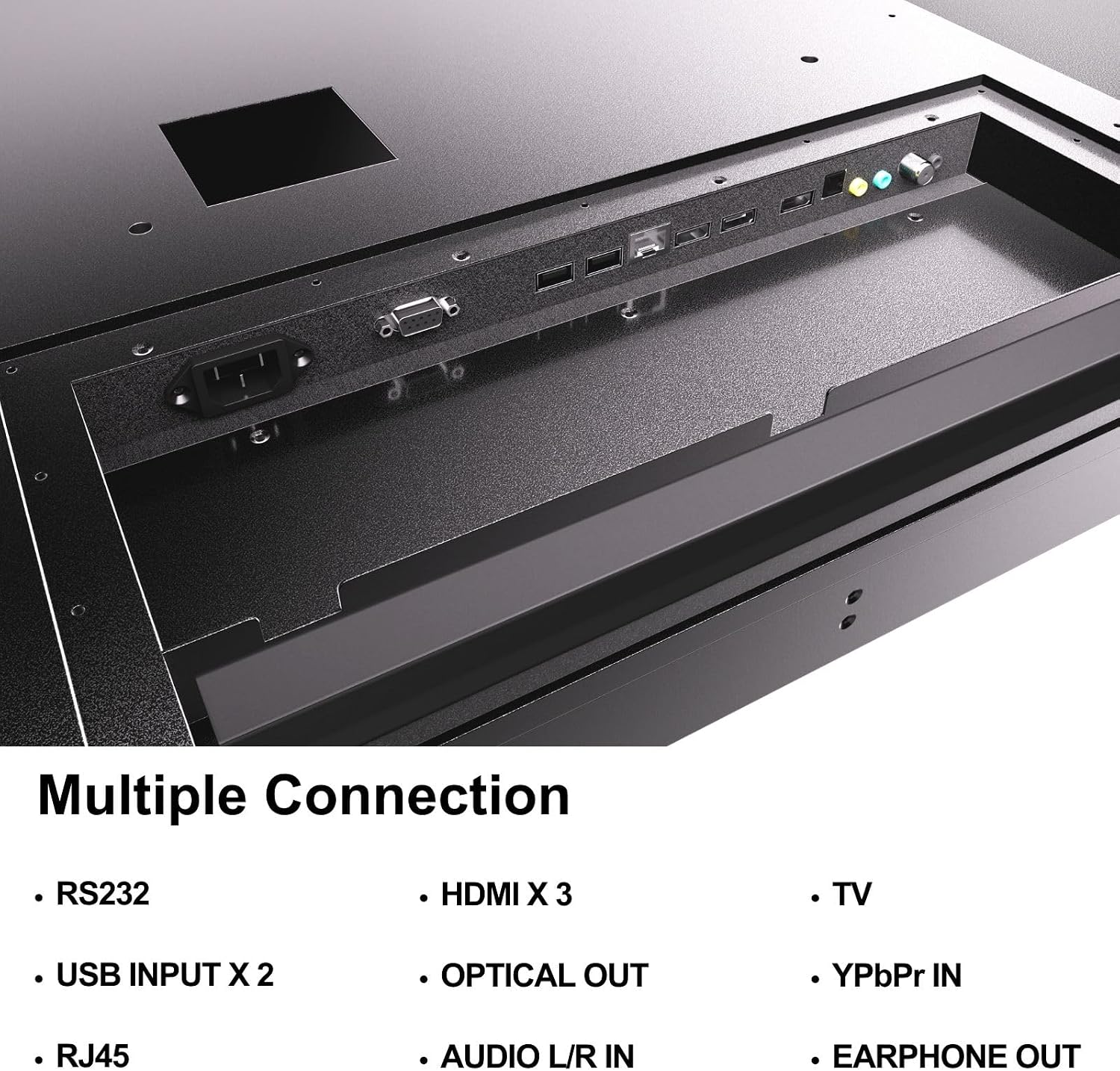
Figure 4.5: Rear panel connections of the SYLVOX Outdoor Signage TV.
5. Eto
5.1 Mounting the TV
The SYLVOX Outdoor Signage TV supports wall mounting. Ensure the mounting surface is sturdy enough to support the TV's weight and is suitable for outdoor conditions.
- Yan Ibi kan: Yan ipo ti o pese aaye ti o dara julọ viewing and protection from extreme weather, even with the TV's waterproof rating.
- Fi sori ẹrọ Odi Oke: Attach a VESA-compatible wall mount (400 x 200 mm) to the desired location according to the mount manufacturer's instructions. Use the provided screws (BM8X14MM for full motion, BM8X28MM with gasket for fixed mount).
- Attach TV to Mount: Carefully lift the TV and secure it to the installed wall mount. Ensure all connections are tight and secure.
5.2 Ibẹrẹ Agbara Lori
- So agbara: Plug the power cord into the TV's power input and then into a grounded outdoor-rated power outlet.
- Fi awọn batiri sii: Open the remote control battery compartment and insert the two AAA batteries, observing polarity.
- Agbara Tan: Tẹ bọtini agbara lori isakoṣo latọna jijin tabi TV.
- Oluṣeto Iṣeto akọkọ: Follow the on-screen instructions to select language, time zone, and perform initial channel scanning.
5.3 Asopọ Nẹtiwọọki
To access smart TV features and streaming applications, connect the TV to your network.
- Asopọ Wi-Fi: Navigate to the TV's settings menu, select 'Network', then 'Wi-Fi'. Choose your network from the list and enter the password.
- Asopọmọra Ethernet: So okùn Ethernet láti inú rọ́ọ̀tà rẹ mọ́ ibudo RJ45 lórí TV. TV náà yóò rí ìsopọ̀ onírin náà láìfọwọ́sí.
- Bluetooth: For connecting audio devices, go to the Bluetooth settings, enable Bluetooth, and pair with your desired device.
6. Awọn ilana Iṣiṣẹ
6.1 Ipilẹ TV Awọn iṣẹ
- Agbara: Tẹ awọn Agbara bọ́tìnì lórí àgbékalẹ̀ alágbèéká láti tan tàbí pa TV.
- Orisun igbewọle: Tẹ awọn Iṣawọle button to cycle through available input sources (HDMI 1/2/3, TV, YPbPr, USB).
- Iwọn didun: Lo awọn Iwọn didun +/- buttons to adjust the sound level.
- Ikanni: Lo awọn ikanni +/- buttons to change channels when using the built-in tuner.
- Lilọ kiri: Lo awọn ọfà itọsọna ati OK bọtini lati lilö kiri ni awọn akojọ aṣayan.
6.2 Smart TV Awọn ẹya ara ẹrọ
The TV runs on a Linux operating system and comes with several pre-installed applications:
- Access the home screen to view and launch applications like Netflix, Pandora, Facebook, YouTube, and Twitter.
- Use the remote control's dedicated app buttons (if available) for quick access.
- Note that the Signage 1.0 series does not support downloading additional applications.
6.3 Screencasting (Android Only)
The TV supports screencasting from Android mobile phones:
- Ensure your Android device and the TV are connected to the same Wi-Fi network.
- On your Android phone, enable the screen mirroring or screencasting feature (names may vary by device, e.g., 'Smart View', 'Cast', 'Wireless Display').
- Select your SYLVOX TV from the list of available devices.
6.4 Vertical/Horizontal Display
The TV can be installed and operated in both horizontal (landscape) and vertical (portrait) orientations. When using the screen vertically, the display direction is adjusted by the input device or content source.
7. Itọju
Proper maintenance ensures the longevity and performance of your outdoor TV:
- Ninu iboju: Rọra nu iboju naa pẹlu asọ ti ko ni lint. Fun awọn ami alagidi, die-die dampen the cloth with water. Do not spray cleaners directly onto the screen.
- Ninu ile Casing: Lo asọ, damp cloth to clean the metal casing. Yago fun abrasive ose tabi epo.
- Àwọn Ìbòrí Ibùdó: Regularly check that all unused port covers are securely sealed to maintain the IP55 waterproof rating.
- Awọn ayẹwo Ayika: Periodically inspect the TV and mounting hardware for any signs of wear, corrosion, or damage, especially after severe weather conditions.
- Awọn imudojuiwọn sọfitiwia: Check for available software updates through the TV's settings menu to ensure optimal performance and security.
8. Laasigbotitusita
If you encounter issues with your SYLVOX Outdoor Signage TV, refer to the following common problems and solutions:
| Isoro | Owun to le Fa | Ojutu |
|---|---|---|
| Ko si agbara | Power cord disconnected; no power from outlet; remote batteries dead. | Check power cord connection; test outlet; replace remote batteries. |
| Ko si aworan, ṣugbọn ohun wa | Ti yan orisun titẹ sii ti ko tọ; ita ẹrọ oro. | Press 'Input' button to select correct source; check external device connections. |
| Ko si ohun, ṣugbọn aworan wa | Ohùn tí a dákẹ́ tàbí tí ó kéré jù; ìṣòro ẹ̀rọ ohùn láti òde. | Unmute volume or increase level; check audio cables for external devices. |
| Wi-Fi connection unstable or disconnected | Router issue; TV too far from router; incorrect password. | Restart router; move TV closer or use a Wi-Fi extender; re-enter Wi-Fi password. |
| Isakoṣo latọna jijin ko ṣiṣẹ | Awọn batiri ti ku tabi ti fi sii ni aṣiṣe; idilọwọ laarin latọna jijin ati TV. | Rọpo awọn batiri; rii daju pe oju ti o han gbangba si olugba IR ti TV. |
If the problem persists after trying these solutions, please contact SYLVOX customer support.
9. Awọn pato
| Orukọ awoṣe | SS43A0KAGD |
| Iwon iboju | 43 inches |
| Ifihan ọna ẹrọ | LED |
| Ipinnu | 4K (3840x2160) |
| Oṣuwọn sọtun | 60 Hz |
| Maximum Display Brightness | 1000 Nit |
| Ipin Itansan | 3000:1 |
| Akoko Idahun | 8 Milise-aaya |
| Mabomire Rating | IP55 |
| Eto isesise | Lainos |
| Asopọmọra Technology | Wireless (Bluetooth, Wi-Fi), Wired (HDMI, USB, RJ45, RS232) |
| Input Audio | HDMI, Optical, USB, Audio L/R In |
| Ilana ifihan agbara | ATSC, NTSC |
| Total Number of HDMI Ports | 3 |
| Lapapọ Awọn ibudo USB | 2 |
| Awọn iwọn Ọja (D x W x H) | 3.4"D x 38.6"W x 22.4"H |
| Boṣewa VESA Mount | 400 x 200 mm |
| Wattage | 120 Watt-wakati |
| Olupese | Kontech Electronics Co., Ltd. |
| UPC | 810079224838 |
10. Atilẹyin ọja ati Support
10.1 atilẹyin ọja Alaye
SYLVOX provides a 2-odun olupese ká atilẹyin ọja fún ọjà yìí. Àtìlẹ́yìn yìí bo àbùkù nínú àwọn ohun èlò àti iṣẹ́ ọwọ́ lábẹ́ lílo déédéé. Jọ̀wọ́ pa ẹ̀rí ríra rẹ mọ́ fún àwọn ẹ̀tọ́ àtìlẹ́yìn.
10.2 Onibara Support
If you require assistance with installation, operation, troubleshooting, or warranty service, please contact SYLVOX customer support. We recommend checking the product upon receipt to ensure it is in good condition and functions normally.
For further support, please visit the official SYLVOX website or refer to the contact information provided on your warranty card.