
Ọrọ Iṣaaju
Welcome to the iRobot Roomba i1 (1152) Robot Vacuum user manual. This guide provides essential information for setting up, operating, maintaining, and troubleshooting your robot vacuum. The Roomba i1 is designed to efficiently clean hard floors and carpets, utilizing Wi-Fi connected mapping technology to navigate your home.
Alaye Aabo pataki
Before using your Roomba i1 robot vacuum, please read all safety instructions carefully. Failure to follow these instructions may result in electric shock, fire, or serious injury.
- Ohun elo yii le ṣee lo nipasẹ awọn ọmọde ti o jẹ ọdun 8 ati ju bẹẹ lọ ati awọn eniyan ti o dinku ti ara, ifarako tabi awọn agbara ọpọlọ tabi aini iriri ati imọ ti wọn ba ti fun wọn ni abojuto tabi itọnisọna nipa lilo ohun elo ni ọna ailewu ati loye awọn eewu ti o kan. .
- Àwọn ọmọdé kò gbọdọ̀ fi ẹ̀rọ náà ṣeré. Àwọn ọmọdé kò gbọdọ̀ ṣe ìwẹ̀nùmọ́ àti ìtọ́jú olùlò láìsí àbójútó.
- Lo nikan gẹgẹbi a ti ṣalaye ninu itọnisọna yii.
- Ma ṣe lo ita gbangba tabi lori awọn aaye tutu.
- Maṣe gba laaye lati lo bi nkan isere. Ifarabalẹ sunmọ jẹ pataki nigba lilo nipasẹ tabi sunmọ awọn ọmọde.
- Ma ṣe lo pẹlu okun ti o bajẹ tabi plug. Ti ohun elo ko ba ṣiṣẹ bi o ti yẹ, ti lọ silẹ, bajẹ, fi silẹ ni ita, tabi sọ sinu omi, da pada si ile-iṣẹ iṣẹ kan.
- Ma ṣe fa tabi gbe nipasẹ okun, lo okun bi imudani, ti ilẹkun kan lori okun, tabi fa okun ni ayika awọn egbegbe to mu tabi igun. Maṣe fi ohun elo ṣiṣẹ lori okun. Jeki okun kuro lati awọn aaye ti o gbona.
- Ma ṣe yọọ kuro nipa fifaa lori okun. Lati yọọ, di plug naa, kii ṣe okun naa.
- Ma ṣe mu plug tabi ohun elo pẹlu ọwọ tutu.
- Ma ṣe fi ohun kan sinu awọn ṣiṣi. Maṣe lo pẹlu eyikeyi ṣiṣi dina; pa eruku, lint, irun, ati ohunkohun ti o le dinku sisan afẹfẹ.
- Jeki irun, aṣọ alaimuṣinṣin, awọn ika ọwọ, ati gbogbo awọn ẹya ara kuro lati awọn ṣiṣi ati awọn ẹya gbigbe.
- Maṣe gbe ohunkohun ti o njo tabi ti nmu siga, gẹgẹbi awọn siga, awọn ere-kere, tabi eeru gbigbona.
- Ma ṣe lo lati gbe awọn olomi ina tabi ina, gẹgẹbi petirolu, tabi lo ni awọn agbegbe nibiti wọn le wa.
- Ma ṣe lo laisi apo eruku ati/tabi awọn asẹ ni aaye.
- Dena aimọkan ibẹrẹ. Rii daju pe iyipada wa ni pipa-ipo ṣaaju asopọ si idii batiri, gbigba tabi gbe ohun elo naa.
- Gba agbara nikan pẹlu ṣaja pato nipasẹ olupese. Ṣaja ti o dara fun iru idii batiri kan le ṣẹda eewu ina nigba lilo pẹlu idii batiri miiran.
- Lo awọn ohun elo nikan pẹlu awọn idii batiri ti a pinnu pataki. Lilo eyikeyi awọn akopọ batiri miiran le ṣẹda eewu ipalara ati ina.
- Nigbati idii batiri ko ba si ni lilo, tọju rẹ kuro ni awọn ohun elo irin miiran, bii awọn agekuru iwe, awọn owó, awọn bọtini, eekanna, awọn skru tabi awọn ohun elo irin kekere miiran, ti o le ṣe asopọ lati ebute kan si ekeji. Kikuru awọn ebute batiri papọ le fa ina tabi ina.
- Labẹ awọn ipo ilokulo, omi le jade kuro ninu batiri naa; yago fun olubasọrọ. Ti olubasọrọ ba waye lairotẹlẹ, fọ pẹlu omi. Ti oju omi ba kan si oju, ni afikun wa iranlọwọ iṣoogun. Omi ti o jade kuro ninu batiri le fa ibinu tabi sisun.
- Ma ṣe lo idii batiri tabi ohun elo ti o bajẹ tabi ti yipada. Awọn batiri ti o bajẹ tabi ti a tunṣe le ṣe afihan ihuwasi airotẹlẹ ti o fa ina, bugbamu tabi eewu ipalara.
- Ma ṣe fi idii batiri tabi ohun elo han si ina tabi iwọn otutu ti o pọ ju. Ifihan si ina tabi iwọn otutu ju 130°C (265°F) le fa bugbamu.
- Tẹle gbogbo awọn ilana gbigba agbara ati ma ṣe gba agbara si idii batiri tabi ohun elo ni ita iwọn otutu ti a pato ninu awọn ilana. Gbigba agbara ni aibojumu tabi ni awọn iwọn otutu ti ita ibiti o ti sọ le ba batiri jẹ ki o mu eewu ina pọ si.
- Ṣe iṣẹ ṣiṣe nipasẹ eniyan atunṣe ti o ni oye nipa lilo awọn ẹya ara ẹrọ rirọpo kanna. Eyi yoo rii daju pe aabo ọja wa ni itọju.
- Ma ṣe yipada tabi gbiyanju lati tunṣe ohun elo tabi idii batiri (bi o ṣe wulo) ayafi bi a ti tọka si ninu awọn ilana fun lilo ati itọju.
Package Awọn akoonu
Verify that all original components are included in your package:
- iRobot Roomba i1 Robot Vacuum
- Ibudo Gbigba agbara Mimọ mimọ
- Okun ila
- 1 Batiri Lithium ion (ti a ti fi sii tẹlẹ)
- Fẹlẹ ẹgbẹ
- Filter (Cloth Type)
- Dual Multi-Surface Rubber Brushes
Ṣeto
Follow these steps to set up your Roomba i1 robot vacuum for first use:
- Choose a Location for the Home Base: Place the Home Base charging station against a wall in an open, uncluttered area. Ensure there is at least 1.5 feet (0.5 meters) of clear space on each side of the Home Base and 4 feet (1.2 meters) in front of it.
- So okun agbara pọ: Plug the line cord into the Home Base and then into a wall outlet. Ensure the Home Base is powered on.
- Gba agbara si Robot: Place your Roomba i1 onto the Home Base. The robot will emit a tone to confirm it is properly docked and charging. Allow the robot to charge for at least 3 hours before its first cleaning mission. The light ring around the CLEAN button will pulse white while charging and turn solid white when fully charged.
- Ṣe igbasilẹ ohun elo ile iRobot: For full functionality, download the iRobot Home App on your smartphone or tablet. The app will guide you through connecting your robot to your Wi-Fi network and setting up cleaning schedules.
- Sopọ si Wi-Fi: Follow the in-app instructions to connect your Roomba i1 to your home Wi-Fi network. This enables smart features like mapping, scheduling, and integration with voice assistants.

Operating Your Roomba i1
Your Roomba i1 is designed for intelligent and efficient cleaning. Here's how to operate it:
Bíbẹ̀rẹ̀ Iṣẹ́ Ìmọ́tótó
- Using the CLEAN Button: Press the large CLEAN button on top of the robot once to wake it up, then press it again to start a cleaning cycle.
- Lilo ohun elo iRobot Home: Open the app and tap the "CLEAN" button to start a cleaning job from anywhere. You can also schedule cleaning times and customize cleaning preferences through the app.
- Iṣakoso ohun: The Roomba i1 is compatible with Google Home. Once connected via the iRobot Home App, you can use voice commands like "Hey Google, ask Roomba to start cleaning."
Ninu Awọn ẹya ara ẹrọ
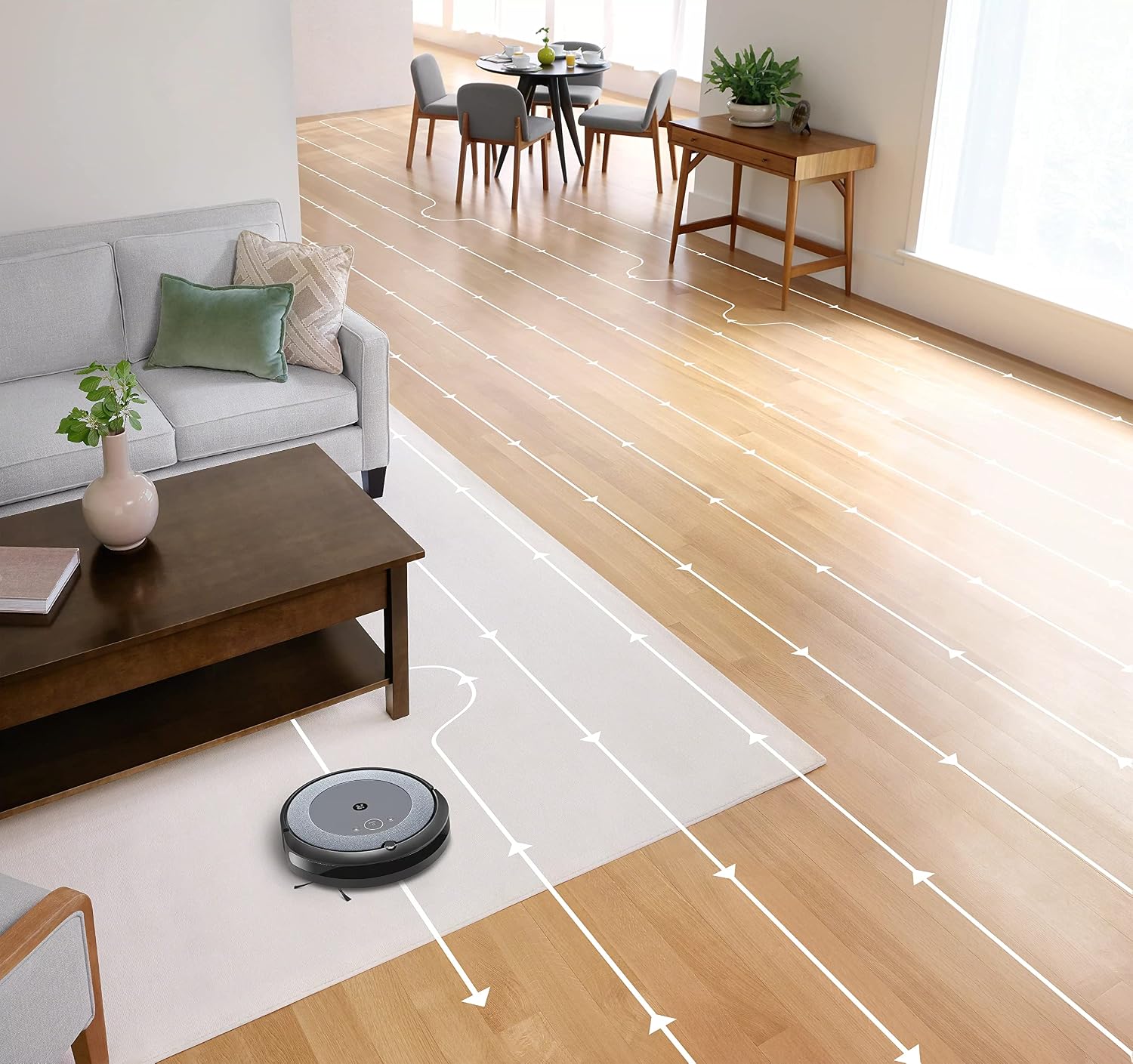
- Lilọ kiri oye: The robot cleans in neat, efficient rows, adapting to different floor types including carpets and hard floors.
- Dual Multi-Surface Rubber Brushes: These brushes are designed to prevent tangles with pet hair and effectively pick up dirt and debris from various surfaces.
- Dirt Detect™ Technology: The robot uses acoustic and optical sensors to find dirtier areas and spends more time cleaning them.
- Automatic Dirt Disposal (with compatible Clean Base): If you have a compatible Clean Base (sold separately), the robot will automatically empty its dustbin into an enclosed bag, allowing for weeks of hands-free cleaning.


Itoju
Regular maintenance ensures your Roomba i1 operates at peak performance. Always turn off the robot and disconnect it from the Home Base before performing any maintenance.
Fo Idoti
- Press the bin release button and pull out the bin.
- Open the bin door and empty debris into a trash can.
- Tap the bin against the trash can to dislodge any trapped debris.
Cleaning the Filter (Cloth Type)
- Yọ àlẹmọ kuro ninu apoti eruku.
- Tap the filter against a trash can to remove debris. Do not wash the filter.
- Replace the filter every 2 months, or more frequently if you have pets.
Ninu awọn gbọnnu
- Pinch the yellow brush release tabs to lift the brush frame.
- Remove the brushes and remove any hair or debris wrapped around them or trapped beneath the yellow caps.
- Tun awọn gbọnnu naa gbe sori ẹrọ, rii daju pe wọn tẹ sinu ipo rẹ.
Ninu Fẹlẹ ẹgbẹ
- Use a coin or small screwdriver to remove the screw holding the side brush.
- Remove the side brush and clean any hair or debris from the brush and its post.
- Tun fi awọn fẹlẹ ẹgbẹ ki o si Mu dabaru.
Ninu awọn sensọ ati gbigba agbara awọn olubasọrọ
- Wipe the charging contacts on the robot and Home Base with a clean, dry cloth.
- Wipe the cliff sensors (located on the bottom of the robot) and the front bumper sensor window with a clean, dry cloth.
Laasigbotitusita
If your Roomba i1 encounters an issue, the robot will play an audible alert and the light ring around the CLEAN button will flash. Consult the iRobot Home App for specific error messages and solutions.
Awọn oran ti o wọpọ ati Awọn ojutu:
- Robot ko gba agbara: Ensure the Home Base is plugged in and the robot is properly docked. Clean the charging contacts on both the robot and Home Base.
- Robot stuck or trapped: Clear obstacles from the robot's path. If it frequently gets stuck in the same area, consider using Virtual Wall Barriers (sold separately) or adjusting furniture.
- Iṣe mimọ ti ko dara: Empty the dust bin, clean or replace the filter, and clean the main brushes and side brush. Ensure the robot's sensors are clean.
- Robot ko sopọ si Wi-Fi: Ensure your Wi-Fi router is on and within range. Restart your router and the robot. Follow the Wi-Fi setup instructions in the iRobot Home App again.
- Robot making unusual noises: Check the brushes and wheels for any trapped debris or hair. Clean them thoroughly.
For more detailed troubleshooting, refer to the iRobot Home App or the iRobot support webojula.
Awọn pato
| Brand | iRobot |
| Orukọ awoṣe | Roomba i1 (1152) |
| Pataki Ẹya | Smart, Wi-Fi Connected Mapping |
| Àwọ̀ | Dudu/Grẹy |
| Awọn irinše to wa | Robot Vacuum, Home Base, Line Cord, Battery, Side Brush, Filter, Dual Multi-Surface Rubber Brushes |
| Àlẹmọ Iru | Aṣọ |
| Orisun agbara | Agbara Batiri |
| Awọn batiri | 1 batiri litiumu ion (pẹlu) |
| Ọna Iṣakoso | App |
| Awọn ẹrọ ibaramu | Ile Google |
| Fọọmù ifosiwewe | Robotik |
| Ọja Mefa | 13.5 x 3.6 x 13.4 inches |
| Iwọn Nkan | 13.2 iwon |
| Dada iṣeduro | Carpets, Lile ipakà |
| UPC | 657768820809 |
| ASIN | B0CPQ3RVDK |
Atilẹyin ọja ati Support
This product is sold as a renewed item. Please refer to the specific warranty terms provided by the seller or Amazon Renewed at the time of purchase. For technical support, troubleshooting assistance, or to purchase replacement parts, please visit the official iRobot support website or contact iRobot customer service. You can also find helpful resources within the iRobot Home App.
Atilẹyin Ayelujara: www.irobot.com/support