
Ọrọ Iṣaaju
Thank you for choosing the Bigben 5000mAh MagSafe Compatible Wireless Power Bank. This portable power bank is designed to provide convenient wireless charging for compatible devices, as well as wired charging via its USB-C port. Please read this manual carefully before using the product to ensure safe and optimal performance.
Alaye Aabo
Lati yago fun ipalara tabi ibajẹ si ẹrọ rẹ, jọwọ ṣe akiyesi awọn iṣọra ailewu wọnyi:
- Ma ṣe fi banki agbara han si awọn iwọn otutu to gaju, ina taara tabi ina.
- Ma ṣe fi banki agbara sinu omi tabi awọn olomi miiran.
- Avoid dropping, hitting, or disassembling the power bank.
- Jeki kuro ni arọwọto awọn ọmọde.
- Lo awọn kebulu gbigba agbara ifọwọsi nikan ati awọn oluyipada.
- Ti banki agbara ba wú, ti njade õrùn, tabi di gbona pupọ, da lilo duro lẹsẹkẹsẹ.
- Sọ banki agbara kuro ni ifojusọna ni ibamu si awọn ilana agbegbe.
Package Awọn akoonu
Jọwọ ṣayẹwo package fun awọn nkan wọnyi:
- Bigben 5000mAh MagSafe Compatible Wireless Power Bank
- USB-C si Okun Ngba agbara USB-C
- Afowoyi Olumulo (iwe-ipamọ yii)
Ọja Pariview
Mọ ararẹ pẹlu awọn paati ti banki agbara rẹ:

Aworan: Iwaju view of the Bigben 5000mAh Power Bank, highlighting the LED indicator lights and the USB-C port.
- Awọn imọlẹ Atọka LED: Four small lights indicating the remaining battery level.
- Ibudo USB-C: For charging the power bank and for wired device charging.
- Ilẹ Ngba agbara Alailowaya: The flat surface designed for MagSafe compatible wireless charging.
- Bọtini agbara: Ó ń mú kí agbára gbigba agbára alailowaya ṣiṣẹ́, ó sì ń ṣàyẹ̀wò ipele batiri.
Ṣeto
Gbigba agbara Bank agbara
Ṣaaju lilo akọkọ, gba agbara ni kikun fun banki agbara rẹ.
- So okùn USB-C tí a pèsè mọ́ ibudo USB-C ti banki agbara.
- So opin miiran okun USB-C pọ si ohun ti nmu badọgba ogiri USB ibaramu (kii ṣe pẹlu).
- The LED indicator lights will illuminate to show the charging status. When all four LEDs are solid, the power bank is fully charged.
Ipo Atọka LED:
- 1 LED: 0-25% charged
- 2 LEDs: 25-50% charged
- 3 LEDs: 50-75% charged
- 4 LEDs: 75-100% charged
Ṣiṣẹ
Ngba agbara Alailowaya (MagSafe ibaramu)
This power bank supports MagSafe compatible wireless charging up to 10W.
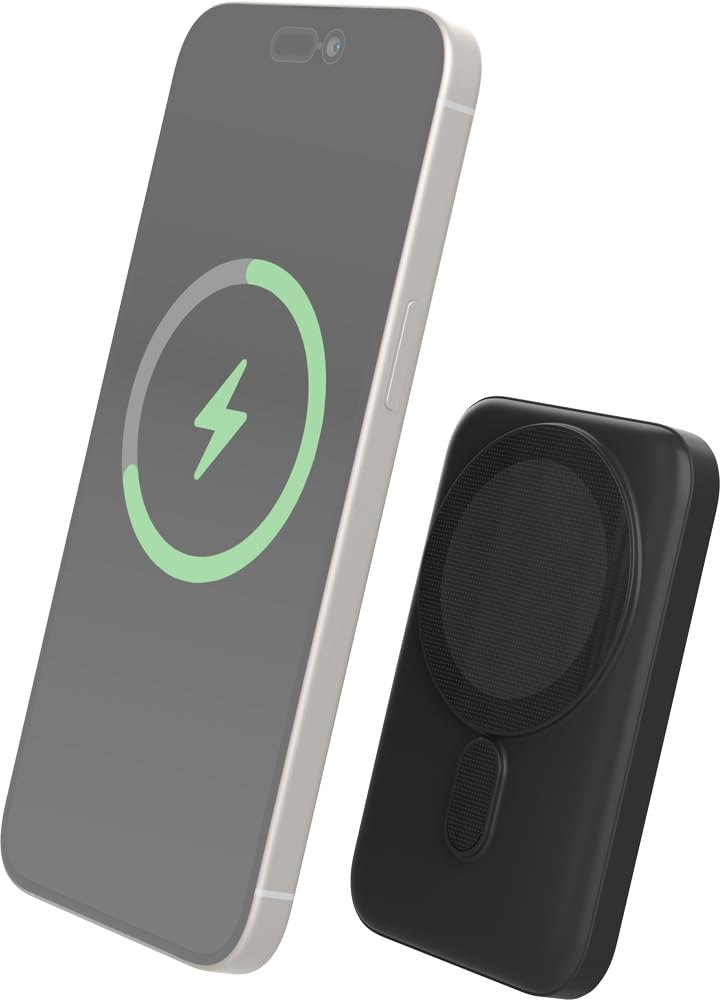
Image: The Bigben power bank magnetically connected to the back of a smartphone, illustrating the wireless charging function.
- Ensure your device is MagSafe compatible or has a MagSafe compatible case.
- Align the power bank with the back of your device. The magnets will snap it into place.
- The power bank will automatically begin charging your device. The LED indicators on the power bank will show its remaining charge.
- To stop charging, simply detach the power bank from your device.
Note: For optimal magnetic attachment and charging efficiency, ensure there are no obstructions between the power bank and your device.
Gbigba agbara gbigba agbara
You can also charge devices using a USB-C cable.
- Connect one end of a USB-C cable (not included, or use the provided one if suitable) to the power bank's USB-C port.
- So opin keji okun naa pọ mọ ibudo gbigba agbara ẹrọ rẹ.
- Ile-ifowopamọ agbara yoo bẹrẹ gbigba agbara ẹrọ rẹ laifọwọyi.
Itoju
Ninu
- Ge asopọ banki agbara kuro lati gbogbo awọn ẹrọ ati awọn orisun agbara ṣaaju ki o to nu.
- Pa dada nu pẹlu asọ, gbẹ, asọ ti ko ni lint.
- Ma ṣe lo awọn kẹmika ti o lewu, awọn nkan mimu mimọ, tabi awọn ohun ọṣẹ ti o lagbara.
Ibi ipamọ
- Tọju banki agbara ni itura, aye gbigbẹ kuro lati orun taara ati awọn iwọn otutu to gaju.
- If storing for an extended period, charge the power bank to approximately 50% every three months to maintain battery health.
Laasigbotitusita
| Isoro | Owun to le Solusan |
|---|---|
| Bank agbara ko gba agbara |
|
| Ẹrọ ko gba agbara lailowa |
|
| Device not charging via cable |
|
| Awọn afihan LED ko ṣiṣẹ |
|
Awọn pato
| Ẹya ara ẹrọ | Ẹ̀kúnrẹ́rẹ́ |
|---|---|
| Nọmba awoṣe | 6128 |
| Agbara Batiri | 5000mAh |
| Ailokun o wu | Up to 10W (MagSafe Compatible) |
| Input / o wu Port | USB-C |
| Iwọn | O fẹrẹ to 300g |
Atilẹyin ọja ati Support
Bigben products are designed and manufactured to the highest standards. For warranty information or technical support, please refer to the warranty card included with your purchase or visit the official Bigben webojula.
For further assistance, please contact Bigben customer service.