
1. Ifihan
Thank you for choosing the Zapco ST-1000XM III Monoblock Class D Amplifier. Eyi amplifier is designed to deliver high-quality audio performance for your vehicle's sound system. Please read this manual thoroughly before installation and operation to ensure proper use and to maximize the amplifier's potential.
The ST-1000XM III is a single-channel, Class D bass amplifier featuring a new aluminum chassis, variable input gain control, variable electronic crossover, variable subsonic filter, variable bass boost control, variable center frequency for bass boost, and variable phase control. It is also strappable for use with a second amplifier on a single voice coil and includes a dash-mount remote gain control.
2. Alaye Aabo
Nigbagbogbo ṣe akiyesi awọn iṣọra ailewu atẹle lakoko fifi sori ẹrọ ati iṣẹ:
- Disconnect the vehicle's battery negative terminal before starting any installation.
- Rii daju pe gbogbo awọn onirin ti wa ni ipalọlọ daradara ati ni aabo lati yago fun ibajẹ tabi awọn iyika kukuru.
- Use appropriate gauge wiring for power, ground, and speaker connections as specified.
- Fi sori ẹrọ naa ampìfọ́mọ́ra ní ibi gbígbẹ, tí afẹ́fẹ́ ń fẹ́ dáadáa, tí ó jìnnà sí oòrùn tààrà, àwọn orísun ooru, àti ọrinrin.
- Ma ṣe ṣiṣẹ awọn amplifier if it is damaged or malfunctioning. Refer servicing to qualified personnel.
- High sound pressure levels can cause permanent hearing loss. Adjust volume levels responsibly.
3. Eto ati fifi sori
Proper installation is crucial for optimal performance and safety. If you are unsure about any part of the installation process, consult a professional installer.
3.1 Iṣagbesori awọn Ampitanna
Yan ipo ti o ni aabo, gbigbẹ, ati ti afẹfẹ daradara fun fifi sori ẹrọ naa amplifier. Ensure there is sufficient airflow around the heatsink. Use the provided mounting hardware to secure the amplifier firmly to a solid surface in your vehicle.
3.2 Awọn isopọ onirin
Refer to the diagram below for proper wiring connections.
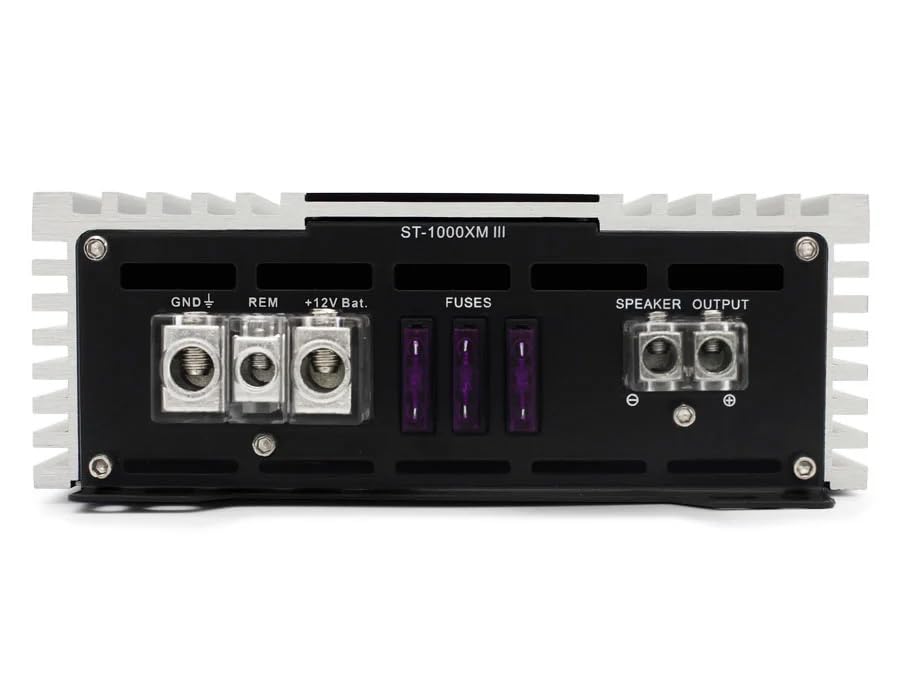
Figure 1: Rear panel connections for power, ground, remote, fuses, and speaker output.
- Agbára (BATT + 12V): Connect a heavy-gauge wire (e.g., 4 AWG or larger, depending on cable length) directly from the vehicle's positive battery terminal to the +12V terminal on the ampFi ohun èlò ìdènà fúúsì tó yẹ (kò sí èyí tó wà níbẹ̀) sínú ààrin 18 ínṣì (45 cm) sí bátírì náà.
- Ilẹ (GND): Connect a heavy-gauge wire of the same size as the power wire from the GND terminal on the ampìfọ́mọ́ra sí ojú irin mímọ́ tí kò ní àwọ̀ lórí ẹ̀rọ ọkọ̀ náà. Rí i dájú pé ó ní ìsopọ̀ iná mànàmáná tó dára.
- Latọna jijin (REM): Connect a smaller gauge wire (e.g., 18 AWG) from the REM terminal on the amplifier to the remote turn-on output of your head unit. This wire turns the amplifier tan ati pa pẹlu sitẹrio rẹ.
- Fiusi: Awọn amplifier is equipped with internal fuses. Ensure these are correctly rated (refer to specifications). Do not replace with higher-rated fuses.
- Agbejade Agbọrọsọ: Connect your subwoofer(s) to the SPEAKER OUTPUT terminals. Observe correct polarity (+ to + and - to -). This is a monoblock amplifier, designed for a single channel output.
- Ìtẹ̀síwájú (RCA): Connect RCA cables from your head unit's subwoofer or full-range pre-out to the IN (RCA) terminals on the amplifier.
- Iṣakoso Latọna jijin: Connect the included remote gain control to the 'REMOTE' port on the amplifier's front panel. This allows for convenient bass level adjustment from the driver's seat.
4. Operating Controls and Adjustments
The Zapco ST-1000XM III features several controls to fine-tune your audio system. Refer to the diagram below for control locations.
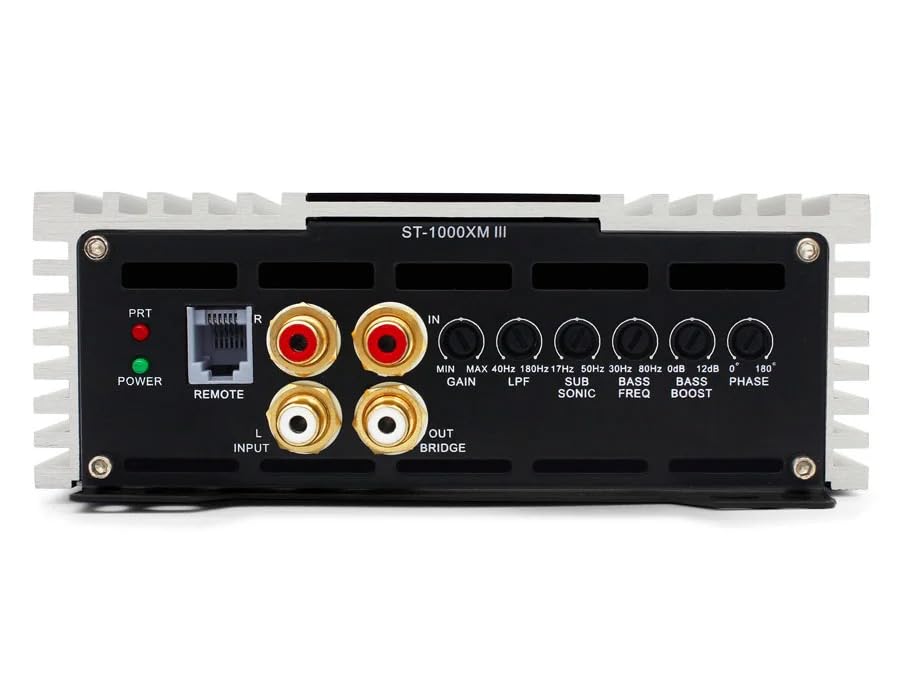
Figure 2: Front panel controls for audio adjustments.
- POWER/PRT Indicators: The POWER LED indicates the amplifier is on. The PRT (Protection) LED illuminates if the amplifier enters protection mode due to overheating, low impedance, or other faults.
- GAIN (Input Sensitivity): Ṣe atunṣe awọn amplifier's input sensitivity to match the output voltage of your head unit. Start with the gain at minimum and slowly increase until desired volume is achieved without distortion. Range: 0.25V to 5V.
- LPF (Àlẹmọ Pass Kekere): Iṣakoso yii ṣeto opin igbohunsafẹfẹ oke fun amplifier's output. Only frequencies below the set point will pass through. Typically set between 50Hz and 200Hz for subwoofers.
- SUB SONIC (Subsonic Filter): Filters out extremely low frequencies that are inaudible and can damage subwoofers. Typically set below the port tuning frequency of a ported enclosure, or around 20-30Hz for sealed enclosures. Range: 17Hz to 50Hz.
- BASS AGBARA: Increases the output level at a specific bass frequency. Use sparingly to avoid distortion. Range: 0dB to 12dB.
- BASS FREQ (Bass Boost Frequency): Selects the center frequency for the bass boost control.
- ALASE: Adjusts the phase of the subwoofer output relative to the main speakers. This helps to ensure all sound waves arrive at the listener's ears in sync, improving bass impact and clarity. Adjustable from 0° to 180°.
5. Itọju
The Zapco ST-1000XM III amplifier kò nílò ìtọ́jú tó pọ̀ tó. Tẹ̀lé àwọn ìlànà wọ̀nyí láti rí i dájú pé ó pẹ́ títí:
- Pa awọn amplifier mọ ki o si free ti eruku ati idoti. Lo asọ asọ ti o gbẹ fun mimọ.
- Rii daju deedee fentilesonu ni ayika amplifier at all times. Do not block cooling fins.
- Lokọọkan ṣayẹwo gbogbo awọn asopọ onirin fun wiwọ ati ipata.
- Yago fun sisi awọn amplifier si iwọn otutu tabi ọrinrin.
6. Laasigbotitusita
Ti o ba ni iriri awọn iṣoro pẹlu rẹ amplifier, kan si itọsọna iṣoro atẹle ṣaaju ki o to kan si atilẹyin.
- Ko si Agbara:
- Check the in-line fuse near the battery and the fuses on the amplifier.
- Verify all power, ground, and remote turn-on connections are secure and have proper voltage.
- Rí i dájú pé ẹ̀rọ orí náà wà ní titan, ó sì ń fi àmì ìjìnnà ránṣẹ́.
- Ko si Ohun:
- Check RCA input cables for proper connection and damage.
- Verify speaker wires are correctly connected and not shorted.
- Adjust the GAIN control.
- Check head unit settings (e.g., subwoofer output enabled, volume up).
- Ohun Yiyi:
- Reduce the GAIN setting.
- Check speaker impedance; ensure it is within the amplifier's rated limits.
- Adjust LPF, Subsonic, and Bass Boost settings.
- Ensure speaker wires are not shorted or damaged.
- Amplifier Goes into Protection Mode (PRT LED on):
- Check for speaker wire shorts or impedance too low.
- Rii daju pe ategun ti o peye lati ṣe idiwọ igbona.
- Check for proper power and ground connections.
7. Awọn pato
| Ẹya ara ẹrọ | Sipesifikesonu |
|---|---|
| Amplifier Iru | Single channel, Class D, Bass Ampitanna |
| Power @ 1Ω | 1 x 1050 watt RMS |
| Power @ 2Ω | 1 x 750 watt RMS |
| Power @ 4Ω | 1 x 450 watt RMS |
| THD @ Rated Power | <0.2% |
| Ifihan agbara si Noise Ratio | > 100dB |
| THD + Ariwo | <0.1% |
| Iṣẹ ṣiṣe | > 85% |
| Idahun Igbohunsafẹfẹ | 10Hz to 200Hz ±1dB |
| Input Sensitivity | 0.25V si 5V |
| Awọn iwọn (W x H x L) | 160mm x 58mm x 300mm (Ẹ̀rọ ìdáná) |
| Overall Dimensions (W x H x L) | 160mm x 58mm x 325mm |
| Iwọn Nkan | 8 iwon |
| Iṣagbesori Iru | Oke Oke |
| Pato sipesifikesonu | FCC |
8. Atilẹyin ọja ati Support
The Zapco ST-1000XM III amplifier wa pẹlu kan 1-odun atilẹyin ọja from the date of purchase, covering defects in materials and workmanship under normal use. This warranty does not cover damage caused by improper installation, accident, misuse, abuse, neglect, or unauthorized modification.
For technical support or warranty claims, please contact your authorized Zapco dealer or visit the official Zapco website for contact information. Please have your product model number and proof of purchase ready.