
1. Ifihan
The Tera Mini 1D Barcode Scanner 1100L is a compact, portable, and versatile laser barcode reader designed for efficient data collection. It features 3-in-1 connectivity options, including Bluetooth, 2.4GHz wireless, and USB wired modes, making it compatible with various operating systems such as iOS, Windows, and Android. Its robust design includes IP66 waterproof and dustproof protection, suitable for diverse working environments.
2. Package Awọn akoonu
- Ayẹwo kooduopo x1
- Okun USB x1
- 2.4G USB Dongle x1
- Ilana olumulo x1
3. Ọja Ipariview

The Tera Mini 1D Barcode Scanner is designed for comfortable, single-handed operation, featuring a prominent pink scan button and a wrist strap for security. The package includes a USB cable and a 2.4G wireless dongle for versatile connectivity.
- Iwapọ ati iwuwo fẹẹrẹ: Weighing only 1.4oz (39g) with dimensions of 1.1 x 1.5 x 3.4 inches, it is designed for portability.
- Apẹrẹ ti o tọ: Features an IP66 waterproof and dustproof rating, enhanced by a silicone port plug for protection against environmental elements.
- Ergonomic Button: A soft silicone button ensures a smooth and comfortable scanning experience.

With a weight of only 1.4oz (39g) and compact dimensions, the Tera Mini 1D Barcode Scanner is highly portable, easily fitting into a pocket for on-the-go use.
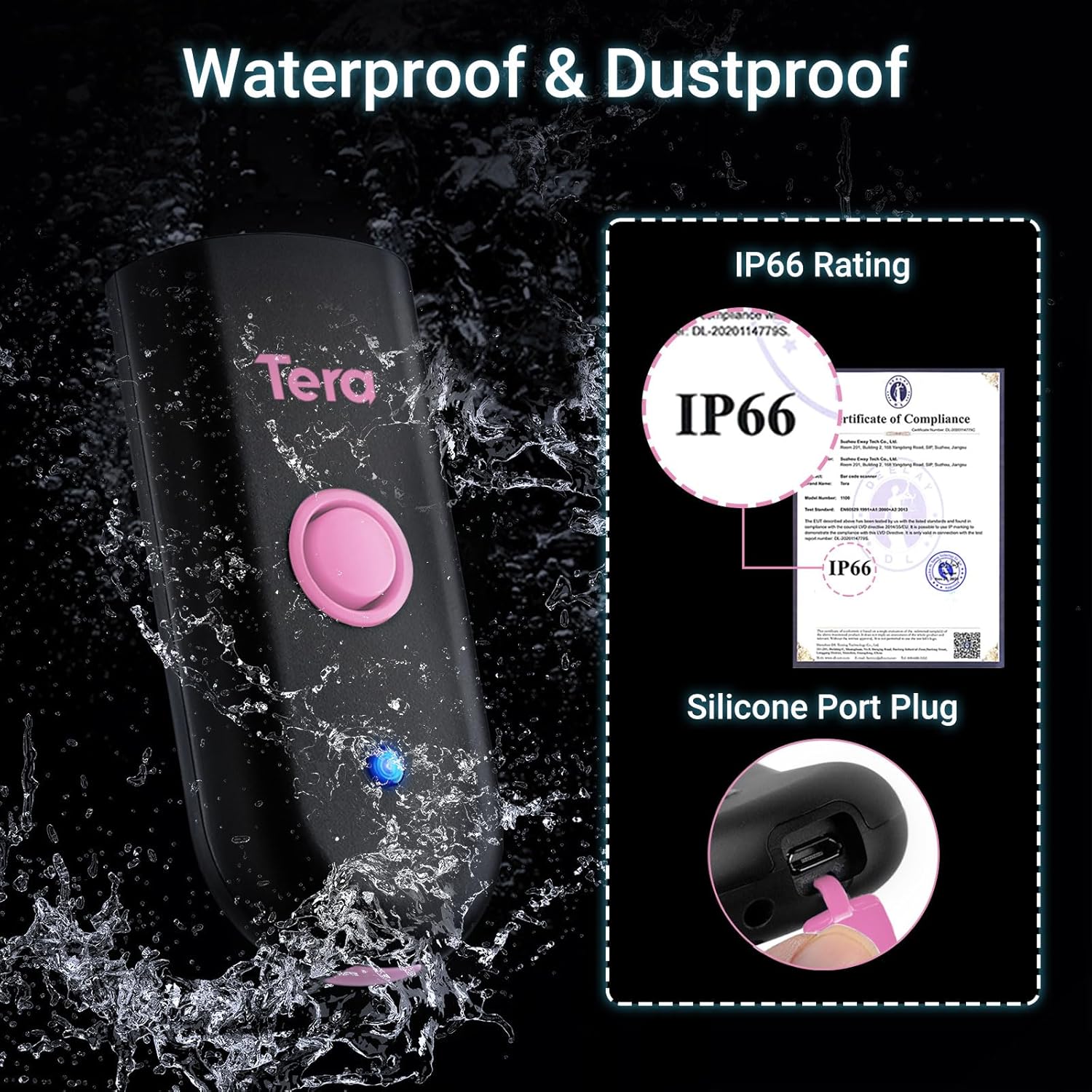
The scanner features an IP66 waterproof and dustproof rating, ensuring durability in various environments. A silicone port plug protects the charging port from moisture and dust.
4. Eto ati Asopọ
4.1 Gbigba agbara sikanu naa
Before first use, fully charge the scanner. The built-in 650mAh rechargeable battery provides up to 12 hours of continuous scanning or 4 weeks of standby time. A full charge typically takes 3.5 hours.

This image highlights the scanner's 650mAh high-capacity rechargeable battery, providing up to 12 hours of continuous scanning, 4 weeks of standby time, and a full charge in approximately 3.5 hours.
Important Charging Note:
- Use a standard 5V/1A charging adapter.
- Do NOT use USB Power Delivery (USB PD) standard power adapters or cables to charge this product.
- It is recommended to use the original USB cable included in the package for charging.

For optimal charging, use a 5V/1A adapter. Avoid using USB Power Delivery (USB PD) standard power adapters and cables, as they are not compatible with this device.
4.2 Awọn ọna asopọ
The scanner supports three connection methods:
- Bluetooth 5.0: For wireless connection to smartphones, tablets, and computers.
- Alailowaya 2.4GHz: Using the included USB dongle for wireless connection to computers. Offers a transmission distance of up to 656ft in barrier-free environments and 98ft with obstacles.
- USB 2.0 Wired: Direct connection via the USB cable to a computer.
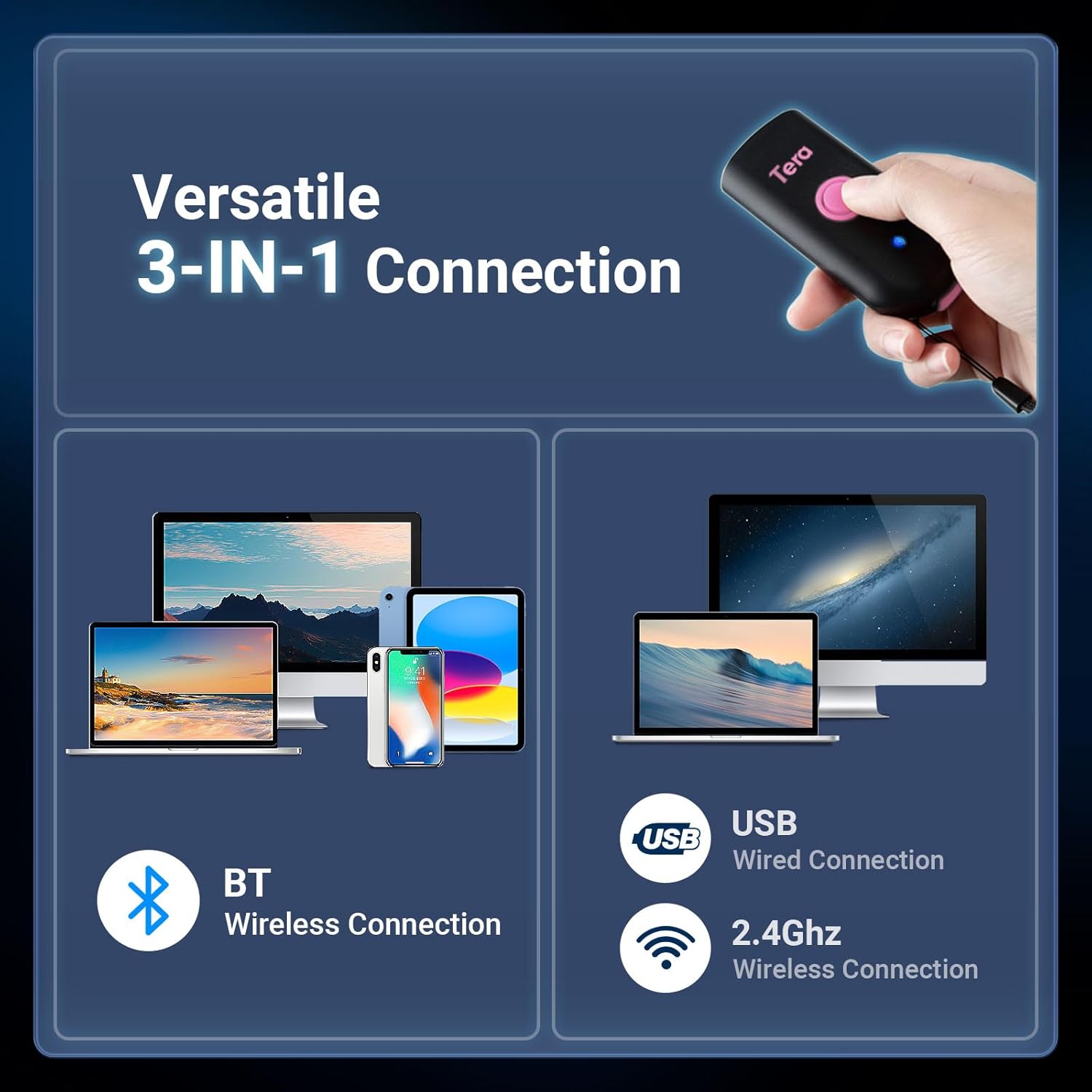
The scanner offers flexible connectivity with three modes: Bluetooth wireless for mobile devices, USB wired for direct connection, and 2.4GHz wireless via a dongle for extended range, supporting a wide range of operating systems.
4.3 Bluetooth Pairing Guide
To connect the scanner to your device via Bluetooth:
- Scan the 'Bluetooth HID' barcode.
- Scan the 'Pairing' barcode.
- On your smartphone or computer, go to Bluetooth settings and select 'Barcode Scanner HID' to connect.

To connect via Bluetooth, scan the 'Bluetooth HID' barcode, then the 'Pairing' barcode. Afterward, enable Bluetooth on your device and select 'Barcode Scanner HID' from the available devices.
5. Operating Modes and Configuration
5.1 Àwọn Ìgbésẹ̀ Ṣíṣàyẹ̀wò
The scanner supports two primary scanning modes:
- Ipo okunfa bọtini: Tẹ bọtini ayẹwo lati bẹrẹ ayẹwo kan.
- Lemọlemọfún Ipo: The scanner continuously emits a laser for automatic scanning without needing to press the button for each scan.

Users can choose between Key Trigger Mode for manual scanning by pressing the button, or Continuous Mode for automatic, uninterrupted scanning.
5.2 Àwọn Ọ̀nà Ìgbéjáde Dátà
- Ipo Ikojọpọ lẹsẹkẹsẹ: Scanned data is immediately transmitted to the connected device.
- Ipo Ipamọ: Scanned data is stored in the scanner's internal memory and can be uploaded later.
5.3 Àwọn Àṣàyàn Ṣíṣe Àtúnṣe
The scanner offers various configuration options to suit your needs:
- Ohun ati Gbigbọn: Adjust sound levels (Off, Low, Medium, High) and enable/disable vibration feedback.
- Ipilẹṣẹ/Isunmọ: Add custom characters before or after scanned barcode data.
- Atilẹyin Ọpọ Ede: The scanner supports various keyboard layouts for different languages.

Customize sound and vibration feedback.

Configure custom prefixes or suffixes.

Supports multiple language keyboard layouts.
6. Scanning Capabilities
The Tera Mini 1D Barcode Scanner 1100L is designed to read printed 1D barcodes efficiently.
6.1 Supported 1D Symbologies
- Codabar
- koodu 11
- koodu 93
- MSI
- koodu 128
- UCC/EAN-128
- koodu 39
- EAN-8
- EAN-13
- UPC-A
- ISBN
- Ile ise 25
- Alaafia 25
- Ilana 25
- 2/5 Matrix
6.2 Advanced Decoding
The scanner features super decoding ability, allowing it to read damaged, distorted, colorful, and reflective barcodes.
Important Scanning Limitations:
- This scanner cannot scan 2D barcodes.
- This scanner cannot scan 1D barcodes displayed on screens (e.g., phone or computer displays).
- It can ONLY scan printed 1D barcodes.
7. Itọju
The Tera Mini 1D Barcode Scanner 1100L is built with an IP66 rating, providing protection against dust ingress and powerful water jets. This makes it suitable for use in environments where exposure to dust or water splashes is possible.
- Ensure the silicone port plug is securely closed when not charging to maintain waterproof and dustproof integrity.
- Clean the scanner's lens and body with a soft, dry cloth. Avoid abrasive cleaners or solvents.
8. Laasigbotitusita
If you encounter issues with your scanner, please refer to the following common solutions:
- Scanner kò sopọ̀ mọ́ra:
- Rii daju pe scanner ti gba agbara ni kikun.
- For Bluetooth, re-scan the 'Bluetooth HID' and 'Pairing' barcodes, then re-attempt connection from your device's Bluetooth settings.
- Fún alailowaya 2.4GHz, rí i dájú pé o so USB dongle náà mọ́ ẹ̀rọ rẹ dáadáa.
- For USB wired, ensure the cable is properly connected to both the scanner and your device.
- Scanner kò ka àwọn barcode:
- Verify that the barcode is a printed 1D barcode. This scanner does not read 2D barcodes or 1D barcodes from screens.
- Rí i dájú pé àmì ìdámọ̀ náà mọ́ tónítóní, kò sì bàjẹ́ púpọ̀.
- Ṣàtúnṣe ijinna ati igun ti ẹrọ-ẹrọ naa si koodu barcode.
- No sound/vibration feedback: Check the configuration settings for sound and vibration.
9. Awọn pato
| Ẹya ara ẹrọ | Ẹ̀kúnrẹ́rẹ́ |
|---|---|
| Ọja Mefa | 1.1 x 1.5 x 3.4 inches |
| Iwọn Nkan | 5.5 ounces (1.4oz / 39g for scanner only) |
| Asopọmọra Technology | Bluetooth 5.0, 2.4G Wireless, USB Cable |
| Awọn ẹrọ ibaramu | Desktop, Laptop, Smartphone, Tablet (iOS, Windows, Android) |
| Orisun agbara | Agbara Batiri (650mAh) |
| Oṣuwọn ọlọjẹ | 100 scans / iṣẹju-aaya |
| Ipinnu Agbara | 1D: Codabar, Code 11, Code93, MSI, Code 128, UCC/EAN-128, Code 39, EAN-8, EAN-13, UPC-A, ISBN, Industrial 25, Interleaved 25, Standard 25, 2/5 Matrix etc. |
| Mabomire / Dustproof Rating | IP66 |
10. Atilẹyin
For further assistance or technical support, please refer to the contact information provided in your product packaging or visit the official Tera webojula.