
1. Ifihan
Welcome to the AMAZTIM T3 Ultra GPS Smart Watch user manual. This guide provides detailed instructions to help you get the most out of your new smartwatch. The T3 Ultra is designed for durability and performance, featuring advanced GPS, comprehensive health monitoring, and robust construction.
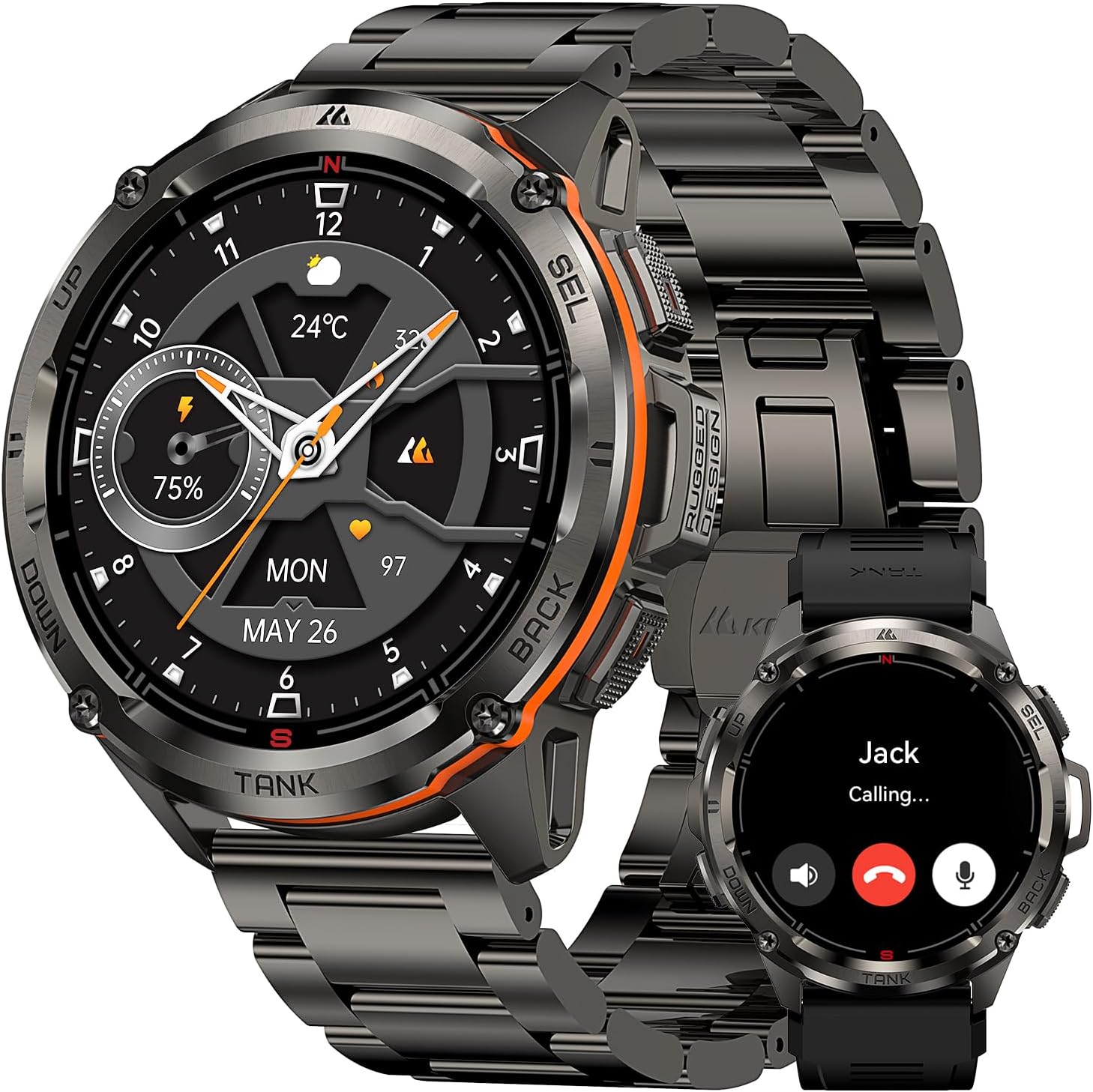
Image: The AMAZTIM T3 Ultra GPS Smart Watch, showcasing its design and a call notification feature.
2. Package Awọn akoonu
Upon opening your AMAZTIM T3 Ultra package, you should find the following items:
- 1 x AMAZTIM T3 Ultra Smart Watch
- 1 x Magnetic Charging Base
- 1 x Stainless Steel Watchband
- 1 x Silicone Watchband
- 1 x Itọsọna olumulo
- Tools for watchband adjustment (for metal band)

Image: Contents of the AMAZTIM T3 Ultra package.
3. Eto
3.1 Ngba agbara si Smart Watch
Before initial use, fully charge your AMAZTIM T3 Ultra. Connect the magnetic charging base to a USB power source and align the watch with the charging pins until it snaps into place. The watch display will indicate charging status.
3.2 Fifi sori ẹrọ Ohun elo
Láti ṣí agbára kíkún ti smartwatch rẹ, ṣe ìgbàsókè rẹ̀ KOSPET FIT app lori rẹ foonuiyara.
- Scan the QR code displayed on the watch screen or in the user manual.
- Alternatively, search for "KOSPET FIT" in the Google Play Store (for Android) or Apple App Store (for iOS).
- Fi sori ẹrọ ni app lori rẹ foonuiyara.

Image: Instructions for connecting the smartwatch to your phone via the KOSPET FIT app.
3.3 Isọpọ ẹrọ
Follow these steps to pair your smartwatch with the KOSPET FIT app:
- Rii daju pe Bluetooth ti ṣiṣẹ lori foonuiyara rẹ.
- Open the KOSPET FIT app and create an account or log in.
- Lọ sí apakan "Ẹ̀rọ" nínú àpù náà.
- Tap "Add a new device" and select "T3 Ultra" from the list of available devices.
- Jẹrisi ibeere sisopọ lori aago mejeeji ati foonuiyara rẹ.
- Gba awọn igbanilaaye pataki fun awọn iwifunni ati imuṣiṣẹpọ data.
4. Awọn ilana Iṣiṣẹ
4.1 Ipilẹ Lilọ kiri
The AMAZTIM T3 Ultra features a 1.43" AMOLED touchscreen and physical buttons for navigation:
- Afi ika te: Swipe up, down, left, or right to access different menus and features. Tap to select.
- Awọn bọtini Ti ara: The watch has multiple buttons (Power, Back, Sport, Select) for quick access to functions and navigation, especially useful when wearing gloves or in wet conditions.
4.2 Answering/Making Calls
With its built-in microphone and speaker, the T3 Ultra allows you to answer and make calls directly from your wrist when connected via Bluetooth to your smartphone.
4.3 iwifunni
Receive social media notifications, text messages, and app alerts directly on your watch. Ensure notification permissions are granted in the KOSPET FIT app and your phone settings.

Image: Steps to enable message and app notifications for iOS.

Image: Steps to enable message and app notifications for Android.
4.4 Abojuto Ilera
The T3 Ultra provides comprehensive health data:
- Oṣuwọn Ọkàn: 24-hour continuous heart rate monitoring.
- Atẹgun ẹjẹ: Real-time blood oxygen level measurement.
- Titele orun: Abojuto orun stages (deep, light, REM) and daytime naps.
- Pedometer: Tracks steps taken and calories burned throughout the day.

Image: Personal Health Monitoring Partner features.
4.5 Awọn ipo ere idaraya & GPS
The smartwatch supports over 170 sports modes and 6 intelligent sports recognition features. Its built-in dual-band, 6-satellite GPS system ensures fast and accurate positioning for tracking outdoor activities.

Image: Over 170 sports modes supported by the smartwatch.

Image: Trackable Adventures Await with built-in GPS.
4.6 AI Voice Iranlọwọ
Utilize the AI Voice Assistant for hands-free control. Give voice commands to check weather, play music, set alarms, or make calls.

Image: AI Voice Assistant functionality.
4.7 Compass, Altimeter & Barometric Pressure
For outdoor enthusiasts, the T3 Ultra includes an internal compass, altimeter, and barometric pressure sensors to provide real-time environmental data.

Image: Compass, Altitude, and Air Pressure features.
5. isọdi
5.1 Watch Awọn oju
Personalize your smartwatch with over 500 dazzling watch faces available for download via the KOSPET FIT app, including options for "Always On Display" mode.

Image: Watch face customization options.
5.2 Changing Watchbands
The AMAZTIM T3 Ultra comes with both a stainless steel and a silicone watchband. Use the provided tools to easily swap between bands to suit your activity or style.
Fídíò: Ìfihàn fídíò ọjà tí a fọwọ́ síasing the AMAZTIM T3 Ultra with its stainless steel watchband, highlighting its design and ease of adjustment.
6. Itọju
6.1 Waterproofing
The T3 Ultra is 5ATM waterproof and IP69K rated, allowing immersion in up to 50 meters of water. It is suitable for swimming and diving. Akiyesi: Do not wear the smartwatch in a sauna to protect its sealing effectiveness from water vapor.

Image: The smartwatch's 5ATM and IP69K waterproof capabilities during swimming.
6.2 Ninu
Ṣe nu smartwatch rẹ nigbagbogbo ati awọn ẹgbẹ pẹlu asọ, damp asọ. Yẹra fun awọn kẹmika lile ti o le ba awọn ohun elo jẹ.
7. Laasigbotitusita
- Wo ti ko tan: Rii daju pe aago naa ti gba agbara ni kikun.
- Ko le so pọ pẹlu foonu: Check if Bluetooth is enabled on your phone and the watch is within range. Restart both devices and try pairing again.
- Awọn iwifunni ko gba: Verify app permissions in KOSPET FIT and your phone's settings. Ensure the app is running in the background.
- Awọn alaye ilera ti ko pe: Ensure the watch is worn snugly on your wrist. Avoid excessive movement during measurements.
8. Awọn pato
- Awoṣe: T3 Ultra
- Ifihan: 1.43 Inches AMOLED, 1000NIT brightness
- Ohun elo ara: Stainless Steel (MIL-STD-810H certified)
- Ohun elo iboju: Corning Gorilla Glass, Mohs hardness up to 9H
- Agbara Batiri: 470mAh litiumu polima
- Igbesi aye batiri: Up to 2 weeks (normal use), 40+ days (power saving mode)
- Omi Resistance: 5ATM (50M), IP69K
- Ipo: Built-in GPS, Dual-band & 6 Satellite Positioning Systems
- Awọn sensọ: Compass, Altimeter, Barometric Pressure, Heart Rate, Blood Oxygen
- Asopọmọra: Bluetooth
- Ibamu: Android 5.1+ / iOS 10.0+
- Awọn ọna Idaraya: 170+
9. Atilẹyin ọja ati Support
For warranty information and customer support, please refer to the official AMAZTIM website or contact their customer service directly. The user manual included in your package may also contain specific warranty details.