
Candy 31019948
Candy Smart CSTG 47TMV5/1-S Top Load Washing Machine User Manual
Model: CSTG 47TMV5/1-S (31019948)
Brand: Candy
1. Ifihan
This user manual provides essential information for the safe and efficient operation of your Candy Smart CSTG 47TMV5/1-S Top Load Washing Machine. Please read this manual carefully before using the appliance and keep it for future reference. It contains instructions for installation, operation, maintenance, and troubleshooting.

olusin 1.1: Iwaju view of the Candy Smart CSTG 47TMV5/1-S Top Load Washing Machine. This image shows the compact design and the top-loading access.
2. Alaye Aabo
Always follow basic safety precautions when using electrical appliances to reduce the risk of fire, electric shock, and injury to persons. Keep this manual handy for quick reference.
- Rii daju pe ohun elo ti wa ni ilẹ daradara.
- Má ṣe jẹ́ kí àwọn ọmọdé máa fi ẹ̀rọ ìfọṣọ ṣeré tàbí kí wọ́n máa ṣiṣẹ́.
- Yọọ ohun elo ṣaaju ṣiṣe mimọ tabi ṣiṣe itọju eyikeyi.
- Ma ṣe ṣisẹ ẹrọ naa ti o ba bajẹ tabi ti ko ṣiṣẹ.
- Jeki awọn ohun elo flammable kuro ninu ohun elo naa.
3. Eto ati fifi sori
3.1 Ṣiṣii silẹ
Carefully remove all packaging materials. It is crucial to remove the four transit bolts located at the rear of the washing machine before first use. These bolts secure the drum during transport and must be removed to prevent damage during operation. Store them for future transport if needed.
3.2 Ibi
Place the washing machine on a firm, level surface. Ensure there is adequate space around the appliance for ventilation and access. The compact design (60 cm width, 41 cm depth, 86 cm height) allows for placement in narrow spaces.
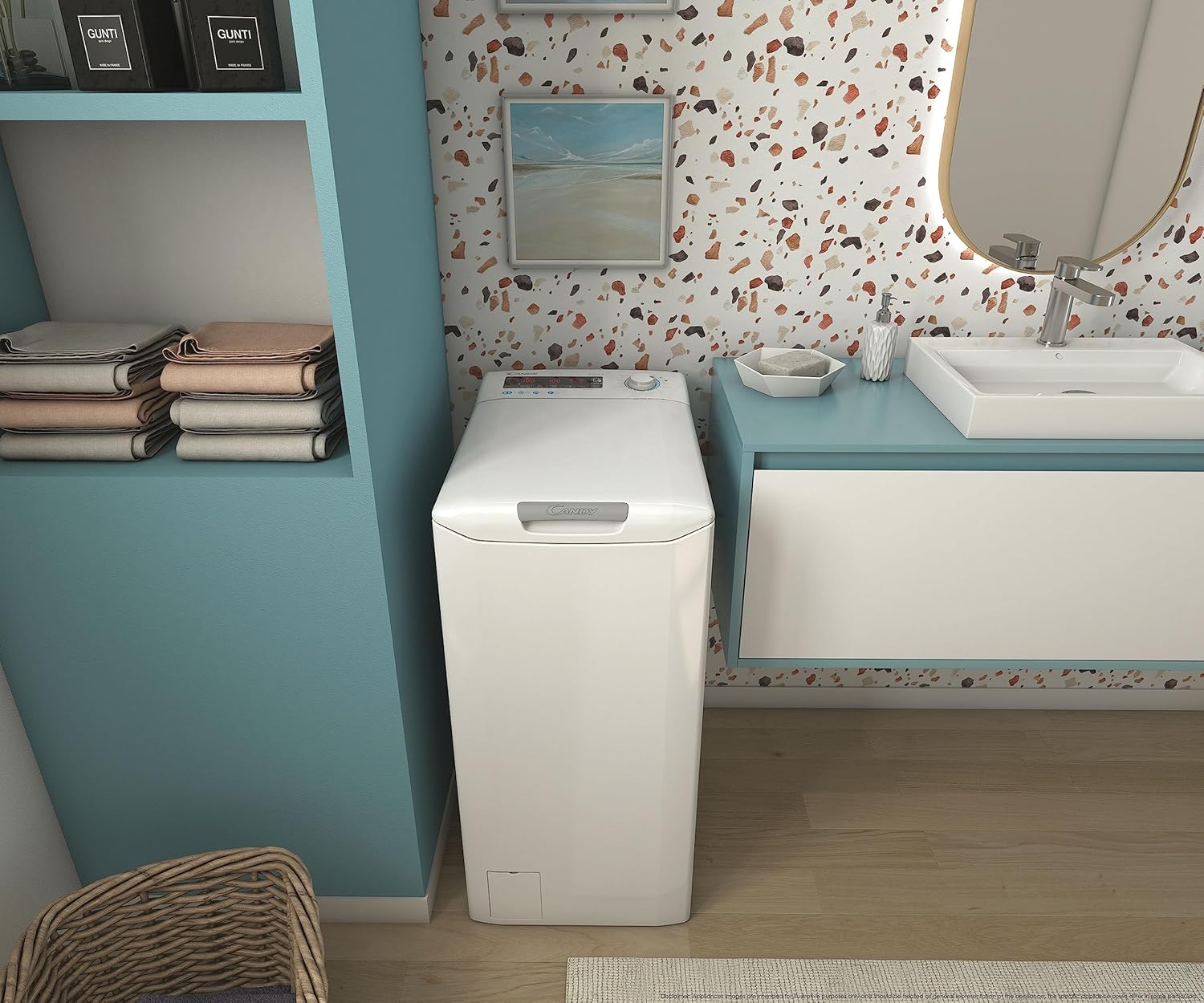
Figure 3.1: The washing machine positioned in a bathroom, demonstrating its suitability for compact areas.
3.3 Omi ati Sisan awọn isopọ
Connect the water inlet hose to a cold water tap. Ensure the connection is secure to prevent leaks. Position the drain hose into a suitable drain pipe or sink, ensuring it is not kinked or blocked. It is recommended to use an aquastop hose for added safety, as the included hose may not have this function.
3.4 Itanna Asopọ
Plug the power cord into a grounded electrical outlet. Do not use extension cords or adapters. Ensure the voltage ati igbohunsafẹfẹ baramu awọn pato ti ohun elo rẹ.
4. Awọn ilana Iṣiṣẹ
4.1 Iṣakoso igbimo Loriview
The washing machine features a digital display with tactile buttons and a rotary knob for program selection. This intuitive interface allows for easy configuration of washing functions and program choices.
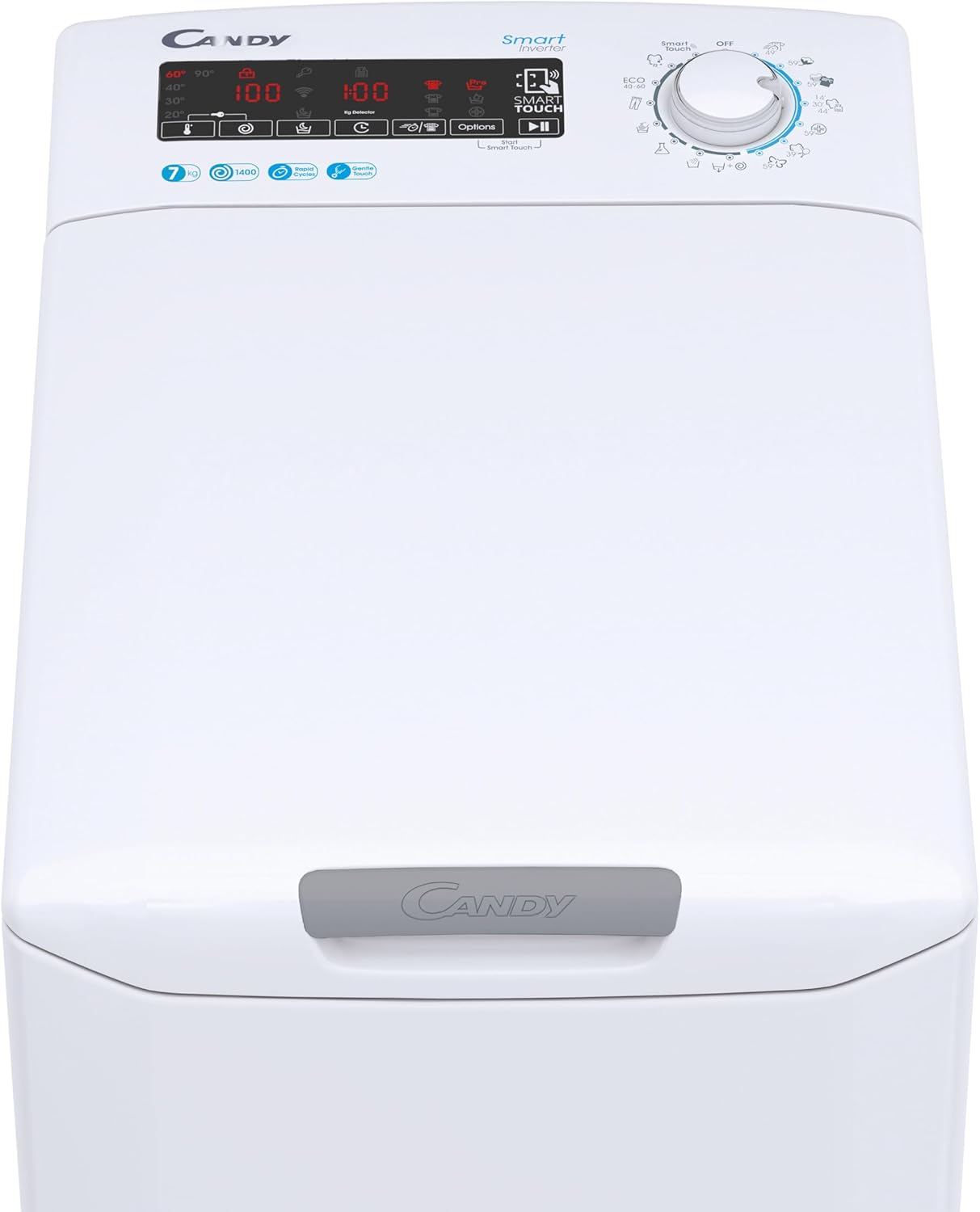
Nọmba 4.1: Alaye view of the control panel, showing the digital display, tactile buttons, and program selector knob.
4.2 ikojọpọ ifọṣọ
Open the top lid using the Gentle Touch Opening mechanism. Load laundry into the drum, ensuring not to overload the machine. The machine has a 7 kg capacity. Close the lid securely before starting a cycle.

Figure 4.2: Gentle Touch Opening icon, indicating the smooth and easy opening of the top lid.
4.3 Fifi Detergent
Add the appropriate amount of detergent and fabric softener to the dispenser compartments. Refer to your detergent packaging for recommended dosages.
4.4 Eto Aṣayan
Turn the rotary knob to select one of the 17 available washing programs. These include:
- Awọn Yiyi Yara: 14', 30', 44' for fast washes.
- Hygienic Cycle: For thorough cleaning and sanitization.
- Awọn elege: 59' cycle for sensitive fabrics.
- Color and Mixed: 59' cycle for mixed loads.
- Perfect Cotton: 59' cycle for cotton items.
- Sport Plus: 39' cycle for sportswear.
Additional programs can be accessed via the Candy simply-Fi App.
4.5 Pataki Awọn ẹya ara ẹrọ
- NFC ọna ẹrọ: Connect your smartphone to the washing machine via NFC for remote control, voice commands, and access to additional programs and features through the Candy simply-Fi App.
- Mix Power System+: This technology pre-mixes water and detergent into a highly concentrated solution, which is then sprayed into the drum, ensuring better penetration into fabrics and enhanced cleaning performance even at lower temperatures.
- Mọto oniyipada: Provides quiet operation, increased durability, and energy efficiency.
- Delayed Start (up to 24H): Set the machine to start a cycle at a later time, allowing you to take advantage of off-peak electricity tariffs or have laundry ready when you arrive home.
- KG Detector: Automatically adjusts the water and energy consumption based on the load size, optimizing resources and reducing waste.

Figure 4.3: NFC icon, symbolizing the machine's smart connectivity features.

Figure 4.4: Timer icon, representing the delayed start feature.
4.6 Bibẹrẹ Ayika
Lẹ́yìn tí o bá ti yan ètò náà àti àwọn àṣàyàn tí o fẹ́, tẹ bọ́tìnì Bẹ̀rẹ̀/Dúró láti bẹ̀rẹ̀ ìyípo ìfọṣọ.
5. Itọju ati Itọju
Itọju deede ṣe idaniloju gigun ati iṣẹ ti o dara julọ ti ẹrọ fifọ rẹ.
5.1 Ninu Dispenser Detergent
Máa yọ àpótí ìfọṣọ kúrò lẹ́ẹ̀kọ̀ọ̀kan kí o sì nu ún láti má ṣe kó àwọn ohun tó kù jọ. Fi omi tó ń ṣàn fọ̀ ọ́, kí o sì gbẹ ẹ́ dáadáa kí o tó tún fi sínú rẹ̀.
5.2 Cleaning the Drum and Gasket
After each wash, wipe down the inside of the drum and the rubber gasket around the opening to remove any accumulated water or lint. This helps prevent mold and unpleasant odors.
5.3 Ninu Ajọ
Locate the filter access panel at the bottom front of the machine. Regularly clean the filter to remove lint, coins, or other small objects that may have accumulated. Refer to the diagram in the full manual for detailed instructions on accessing and cleaning the filter.
5.4 Ode Ninu
Mu ese ita ti ẹrọ fifọ pẹlu asọ, damp asọ. Ma ṣe lo abrasive ose tabi epo.
6. Laasigbotitusita
Ṣaaju ki o to kan si iṣẹ alabara, gbiyanju awọn ojutu wọnyi fun awọn ọran ti o wọpọ:
| Isoro | Owun to le Fa | Ojutu |
|---|---|---|
| Ẹrọ ko bẹrẹ | Power cord unplugged; door not closed properly; program not selected. | Check power connection; ensure lid is fully closed; select a program and press Start. |
| Gbigbọn pupọ tabi ariwo | Awọn boluti irekọja ko yọ kuro; ẹrọ kii ṣe ipele; kojọpọ fifuye. | Ensure all transit bolts are removed; adjust leveling feet to stabilize the machine; redistribute laundry inside the drum. |
| Omi ti ko ṣan | Drain hose kinked or blocked; filter clogged. | Check drain hose for kinks or obstructions; clean the drain filter. |
| Clothes are too wet after spin cycle | Spin speed too low; overloaded machine; unbalanced load. | Select a higher spin speed; reduce load size; redistribute laundry. |
| Awọn oorun aladun | Residue buildup in drum or gasket; insufficient detergent. | Run a maintenance wash cycle (e.g., hot wash with no laundry); clean drum and gasket thoroughly; use appropriate detergent dosage. |
If the problem persists after trying these solutions, please contact Candy customer support.
7. Awọn pato
| Ẹya ara ẹrọ | Ẹ̀kúnrẹ́rẹ́ |
|---|---|
| Nọmba awoṣe | CSTG 47TMV5/1-S (31019948) |
| Agbara | 7 kg |
| O pọju omo ere | 1400 RPM |
| Awọn iwọn (H x W x D) | 86 cm x 60 cm x 41 cm |
| Iwọn | 58 kg |
| Agbara ṣiṣe Rating | A |
| Ohun elo | Irin Alagbara (ìlù) |
| Àwọ̀ | Funfun |
| Awọn iṣẹ pataki | Mix Power System+, NFC Technology, Inverter Motor, Delayed Start (24H), KG Detector, Gentle Touch Opening |
| Nọmba ti Awọn eto | 17 (plus App programs) |
8. Atilẹyin ọja ati Support
For detailed warranty information, please refer to the warranty card included with your purchase or visit the official Candy website. For technical support, spare parts, or service requests, please contact Candy customer service through their official channels. Always provide your model number (CSTG 47TMV5/1-S or 31019948) and serial number when seeking assistance.
O le wa alaye siwaju sii ati support lori awọn Candy Brand Store.
Ask a question about this manual
Ask about setup, troubleshooting, compatibility, parts, safety, or missing instructions. Manuals+ will review the question and use this page’s manual context to help answer it.