
1. Ọja Ipariview
The Xiaomi Redmi Note 13 Pro+ 5G is a high-performance smartphone featuring a 200MP OIS camera, a 6.67-inch 1.5K curved AMOLED display, and MediaTek Dimensity 7200-Ultra processor. It supports fast charging and offers dual SIM capabilities. This manual provides essential information for setting up, operating, maintaining, and troubleshooting your device.

Image 1.1: Xiaomi Redmi Note 13 Pro+ 5G in Aurora Purple, showcasing its design and camera system.
2. Eto
2.1. Fifi sori kaadi SIM
The device supports dual SIM cards (nano SIM + nano SIM or nano SIM + eSIM). Ensure your SIM cards are activated by your carrier before installation.
- Wa atẹ kaadi SIM ni ẹgbẹ foonu rẹ.
- Fi ohun èlò ìdènà atẹ SIM tí a pèsè sínú ihò kékeré tí ó wà lẹ́gbẹ̀ẹ́ atẹ náà kí o sì tì í pẹ̀lẹ́pẹ̀lẹ́ títí atẹ náà yóò fi jáde.
- Place your nano SIM card(s) into the designated slots on the tray. If using eSIM, follow your carrier's instructions for activation.
- Fi iṣọra tun fi kaadi SIM sii sinu foonu titi ti o fi tẹ sinu aaye.

Aworan 2.1: Ẹgbẹ profile of the Redmi Note 13 Pro+ 5G, illustrating button placement.
2.2. Agbara akọkọ Lori ati iṣeto ni
- Tẹ bọtini agbara (ti o wa ni apa ọtun ti ẹrọ naa) ki o si di mu titi ti aami Xiaomi yoo fi han.
- Tẹle awọn itọnisọna loju iboju lati yan ede rẹ, agbegbe, ati sopọ si nẹtiwọki Wi-Fi kan.
- Wọle pẹlu akọọlẹ Google rẹ tabi ṣẹda tuntun lati wọle si awọn iṣẹ Google ati Play itaja.
- Complete the setup process, including setting up screen lock, fingerprint, and face unlock.
2.3. Ngba agbara ẹrọ
Use the included 120W Wall Adapter and USB Cable for optimal charging performance.
- Connect the USB cable to the Wall Adapter.
- Plug the Wall Adapter into a power outlet.
- So opin USB-C ti okun pọ mọ ibudo gbigba agbara ni isalẹ foonu rẹ.
- Atọka gbigba agbara yoo han loju iboju.
3. Awọn ilana Iṣiṣẹ
3.1. Ifihan Awọn ẹya ara ẹrọ
The Redmi Note 13 Pro+ 5G features a 6.67-inch CrystalRes AMOLED display with a 120Hz adaptive refresh rate for smooth visuals. It offers 1800 nits peak brightness and 12-bit color depth. The display is protected by Corning Gorilla Glass Victus and includes eye protection features like 1920Hz PWM dimming and TÜV Rheinland certifications for low blue light and circadian friendliness.
3.2. Lilo kamẹra
Your device is equipped with a versatile triple camera system:
- Kamẹra akọkọ 200MP: Features OIS (Optical Image Stabilization) and an f/1.65 aperture for detailed photos, especially in low light. Supports 16-in-1 binning for larger 2.24µm pixels.
- 8MP Ultra-Wide Kamẹra: For capturing broader scenes.
- Kamẹra Makiro 2MP: For close-up shots.
The camera supports 4K video recording at 24/30fps and 1080p at 30/60fps. OIS+EIS dual-stabilization helps in capturing clear photos and stable videos.
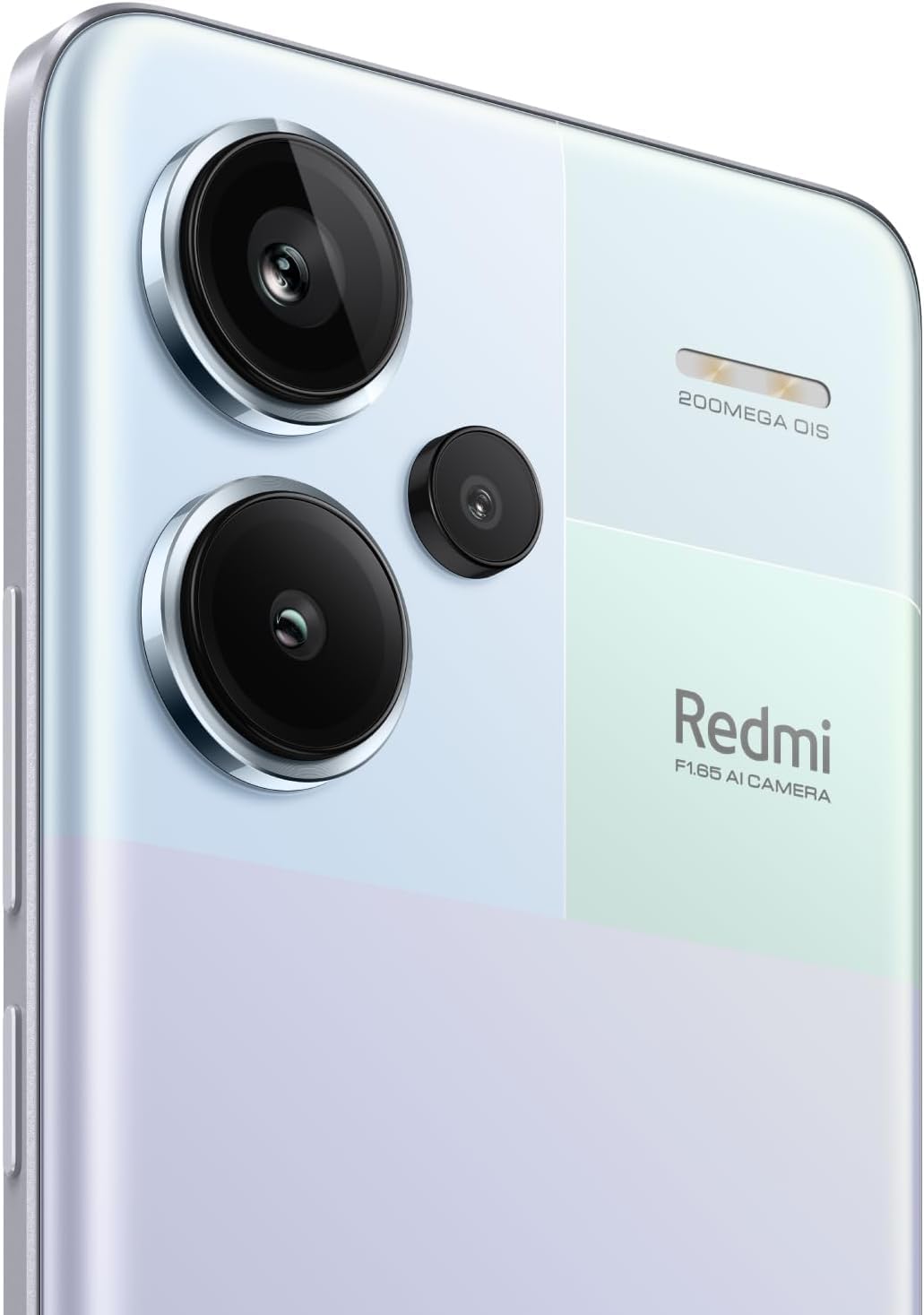
Aworan 3.1: alaye view of the 200MP OIS triple camera system.
3.3. Ààbò Ìrísí-ẹ̀rọ
- Sensọ Ìtẹ̀wé Ìka Nínú Ìbòjú: Register your fingerprints for quick and secure unlocking. Access this feature in Settings > Security & privacy > Fingerprint unlock.
- Ṣíṣí ojú AI: Set up face recognition for convenient unlocking. Access this feature in Settings > Security & privacy > Face unlock.
3.4. Asopọmọra
- Nẹtiwọọki 5G: Supports various 5G bands for high-speed mobile data.
- Wi-Fi: Compatible with Wi-Fi 6/5/4 and 802.11a/b/g standards, supporting 2.4GHz and 5GHz bands with 2x2 MIMO.
- Bluetooth 5.3: Fun asopọ awọn ẹya ẹrọ alailowaya.
- GPS: Supports Beidou, GPS, Galileo, GLONASS, and QZSS for accurate positioning.
4. Itọju
4.1. Itọju batiri
The device is powered by a 5020 mAh Lithium-Polymer battery. To maximize battery life:
- Yago fun awọn iwọn otutu to gaju.
- Lo ṣaja atilẹba ati okun.
- Yago fun mimu batiri kuro patapata nigbagbogbo.
- Optimize power settings in the device's settings menu.
4.2. Software imudojuiwọn
Regularly check for and install software updates to ensure optimal performance, security, and access to new features. Go to Settings > About phone > MIUI version to check for updates.
4.3. Ninu Rẹ Device
To clean your phone, use a soft, lint-free cloth. Avoid using harsh chemicals or abrasive materials. For the screen, a screen cleaner specifically designed for electronics can be used. Ensure all ports are dry before charging.
5. Laasigbotitusita
If you encounter issues with your Redmi Note 13 Pro+ 5G, consider the following common solutions:
- Ẹrọ ti ko tan: Rii daju pe batiri ti gba agbara. So ṣaja pọ ki o duro fun iṣẹju diẹ ṣaaju igbiyanju lati tan-an lẹẹkansi.
- Awọn ohun elo kọlu tabi didi: Ti app iṣoro naa pa ki o si tun un ṣii. Ti iṣoro naa ba tẹsiwaju, paarẹ cache app naa tabi tun fi sii.
- Asopọmọra nẹtiwọki ti ko dara: Check if your SIM card is properly inserted. Restart the device. Verify network settings and ensure mobile data or Wi-Fi is enabled.
- Sensọ titẹ ika ọwọ ko ṣiṣẹ: Rí i dájú pé ìka rẹ mọ́ tónítóní àti pé ó gbẹ. Tún ṣe ìforúkọsílẹ̀ ìka rẹ tí ó bá pọndandan.
- Igbóná púpọ̀: Avoid using the phone in direct sunlight or while charging for extended periods during heavy usage. Close background applications.
- Iṣẹ ṣiṣe ti o lọra: Pa ko wulo files and cache. Uninstall unused apps. Restart your device regularly.
Fun awọn iṣoro ti o tẹsiwaju, tọka si atilẹyin Xiaomi osise webojula tabi olubasọrọ onibara iṣẹ.
6. Awọn pato
| Ẹya ara ẹrọ | Ẹ̀kúnrẹ́rẹ́ |
|---|---|
| Brand | XIAOMI |
| Orukọ awoṣe | Àkíyèsí 13 Pro+ 5G |
| Eto isesise | Android 13.0 |
| Ramu Memory | 8 GB |
| Agbara Ibi ipamọ Iranti | 256 GB |
| Iwon iboju | 6.67 inches |
| Ifihan Iru | AMOLED |
| Ipinnu | 2712x1220 (446 PPI) |
| Oṣuwọn sọtun | Titi di 120Hz |
| Sipiyu Awoṣe | MediaTek Dimensity 7200-Ultra (Octa-core, titi di 2.8GHz) |
| Ipinnu Kamẹra ti o kẹhin | 200 MP (Akọkọ) + 8 MP (Ultra-jakejado) + 2 MP (Macro) |
| Ipinnu Kamẹra iwaju | 16 MP |
| Agbara Batiri | 5020 Milionuamp Hours (Lithium-Polymer) |
| Gbigba agbara | 120W Yara Ngba agbara |
| Iho kaadi SIM kika | SIM meji (nano SIM + nano SIM tabi nano SIM + eSIM) |
| Cellular Technology | 5G |
| Ìmọ̀-ẹ̀rọ Nẹ́tíwọ́ọ̀kì Aláìlókùn | Wi-Fi 6, Bluetooth 5.3, GSM |
| Biometric Aabo | In-screen Fingerprint Recognition, AI Face Unlock |
| Omi Resistance Ipele | Mabomire |
| Iwọn Nkan | 199 giramu |
| Àwọ̀ | Aurora Purple |
7. atilẹyin ọja Information
This product comes with a 30-day warranty. For specific terms and conditions, please refer to the Xiaomi Warranty Europe policy or contact your point of purchase.
8. Atilẹyin
For further assistance, technical support, or detailed product information, please visit the official Xiaomi webojú òpó wẹ́ẹ̀bù tàbí kí o kàn sí ẹ̀ka iṣẹ́ ìtọ́jú oníbàárà wọn. Jẹ́ kí ìwé ẹ̀rí ìrajà rẹ àti nọ́mbà ìtẹ̀lé ọjà rẹ wà ní ọwọ́ rẹ nígbà tí o bá ń wá ìrànlọ́wọ́.