
Transformers F8770
Transformers Studio Series 09 Gamer Edition Ratchet Action Figure Instruction Manual
Awoṣe: F8770
Alaye Aabo
ÌKÌLỌ̀: EWÉWÉ ÌFÍFÍN-Ẹ̀ – Àwọn ẹ̀yà kékeré lè wà. Kì í ṣe fún àwọn ọmọdé tí kò tíì pé ọmọ ọdún mẹ́ta.
A ṣe iṣeduro ọja yii fun awọn ọmọde ọdun 8 ati si oke.
Ọja Pariview
The Transformers Studio Series 09 Gamer Edition Ratchet action figure is inspired by the Transformers: War for Cybertron video game. This collectible figure features detailed design and articulation, allowing for dynamic posing and conversion between two iconic modes.
Awọn ẹya pataki:
- Highly articulated for various poses.
- Converts between robot and Cybertronian sports car modes.
- Includes a blaster and an axe accessory.
- Comes with a removable backdrop for display.

Image: Ratchet in robot mode, showcasing its articulation and included accessories (blaster and axe).
Ṣeto
- Unboxing: Carefully remove the figure and its accessories from the packaging. Retain the packaging for future reference or storage.
- Ohun elo Asomọ: The figure comes with a blaster and an axe. These accessories can be held by the figure in robot mode or stored in designated slots in vehicle mode. Refer to the packaging for visual guidance on accessory placement.
- Display Backdrop: The removable backdrop can be used to create a display scene for your figure. Position the figure in front of the backdrop as desired.
Operating: Transformation
The Ratchet figure converts between robot mode and Cybertronian sports car mode in 28 steps. This process requires careful manipulation of the figure's joints and panels. Patience and attention to detail are key to a successful transformation.
Transformation Steps (General Guidance):
- Initial Positioning: Ensure the figure is in its default robot mode.
- Limb Articulation: Begin by articulating the arms and legs to prepare them for folding and collapsing into the vehicle chassis.
- Panel Alignment: Carefully fold and align the various body panels to form the exterior of the Cybertronian sports car. Pay close attention to how panels interlock.
- Ẹya ara ẹrọ: The blaster and axe can be attached to the vehicle mode. Consult the original packaging or manufacturer's visual guides for specific attachment points.
- Iṣatunṣe ipari: Ensure all parts are securely tabbed and aligned to form a compact and stable vehicle mode.
To convert back to robot mode, reverse these steps, carefully unfolding and extending the limbs and body panels until the robot form is achieved.

Image: Ratchet in Cybertronian sports car mode, ready for display or play.
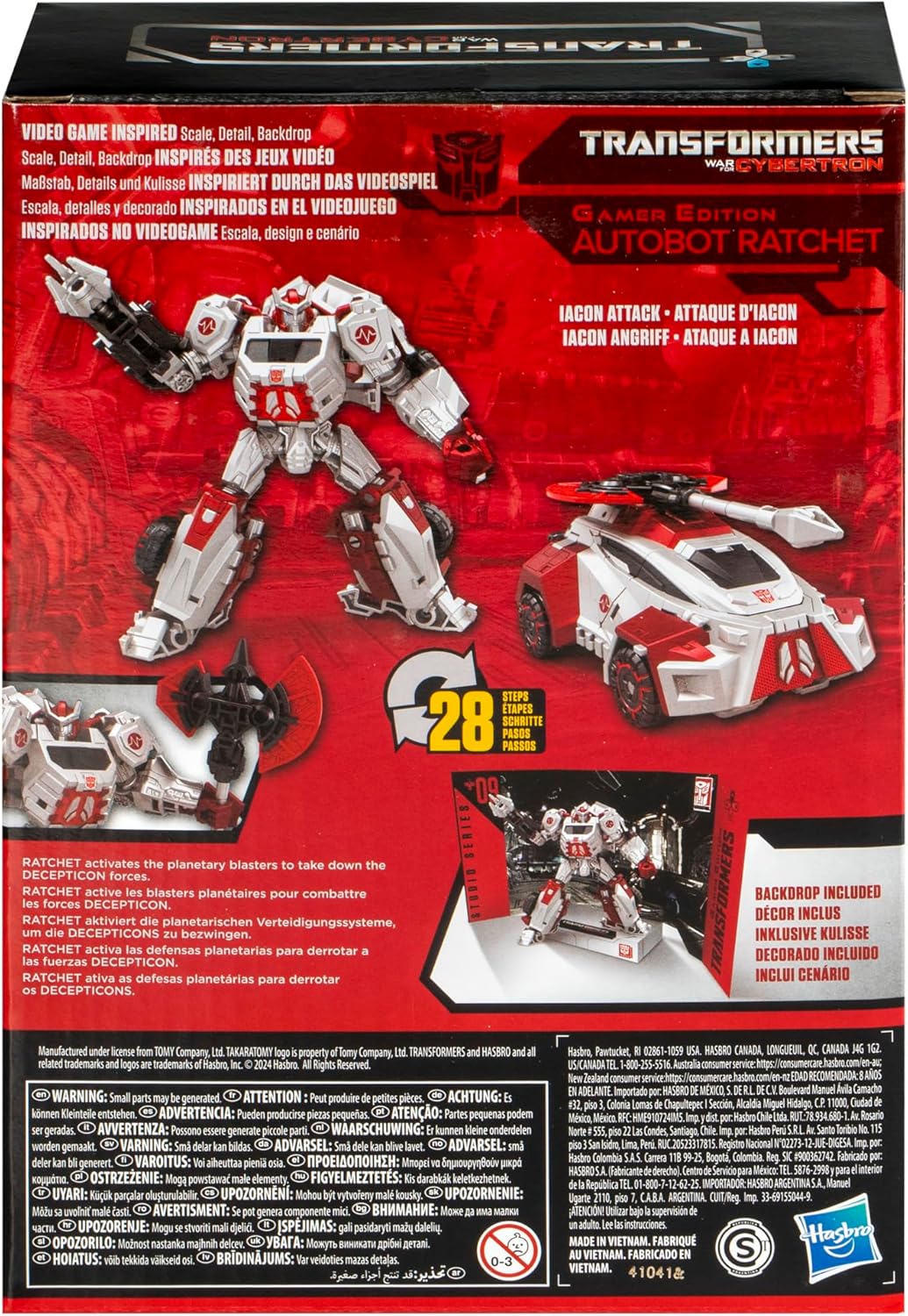
Image: Product packaging illustrating the figure in both modes and highlighting the 28-step transformation process.
Itoju
- Ninu: Use a soft, dry cloth to gently wipe dust from the figure. Avoid using harsh chemicals or abrasive materials, as these can damage the paint or plastic.
- Ibi ipamọ: Store the figure in a cool, dry place away from direct sunlight and extreme temperatures to prevent discoloration or material degradation.
- Itọju Apapọ: If joints become stiff, gently work them back and forth. Avoid forcing movement, which can cause breakage.
Laasigbotitusita
Difficulty with Transformation:
- Review Awọn igbesẹ: The transformation involves 28 steps. If you encounter difficulty, carefully re-examine the instructions or visual guides provided on the packaging.
- Agbara Onírẹ̀lẹ̀: Avoid applying excessive force. If a part does not move easily, check for obstructions or incorrect alignment.
- Awọn orisun Ayelujara: For visual assistance, search for official or fan-made transformation guides online for "Transformers Studio Series 09 Gamer Edition Ratchet".
Awọn isẹpo alaimuṣinṣin:
- Over time, some joints may become slightly loose. This is common with articulated figures.
- For minor looseness, a small amount of clear nail polish or a specialized joint-tightening fluid can be applied to the joint and allowed to dry. Apply sparingly.
Awọn pato
| Nọmba awoṣe: | F8770 |
| Awọn iwọn ọja: | 6.26 x 3.19 x 9.02 inches |
| Ìwọ̀n Nkan: | 10.9 iwon |
| Ọjọ ori ti a ṣeduro: | 8 ọdun ati si oke |
| Olupese: | Hasbro |
| Awọn Igbesẹ Iyipada: | 28 steps (Robot to Cybertronian Sports Car) |
Atilẹyin ọja ati Support
For information regarding product warranty, please refer to the official Hasbro website or contact their customer support directly. Specific warranty terms and conditions may vary by region.
For further assistance or inquiries, please contact Hasbro customer service:
- Olupese: Hasbro, Inc.
- Webojula: Hasbro Customer Service
Ask a question about this manual
Ask about setup, troubleshooting, compatibility, parts, safety, or missing instructions. Manuals+ will review the question and use this page’s manual context to help answer it.