
1. Ifihan
This manual provides detailed instructions for the installation, operation, and maintenance of your NOPAARD 52-YJ682 Smart Ceiling Fan with Light. Please read this manual thoroughly before installation and use to ensure safe and efficient operation. Keep this manual for future reference.
2. Alaye Aabo
WARNING: To reduce the risk of fire, electric shock, or personal injury, always follow these safety precautions:
- Ensure power is turned off at the circuit breaker before installation or servicing.
- Gbogbo onirin gbọdọ wa ni ibamu pẹlu awọn koodu itanna ti orilẹ-ede ati agbegbe.
- Fifi sori gbọdọ wa ni ošišẹ ti a oṣiṣẹ ina.
- Mount the fan directly to a structural ceiling joist or an outlet box marked "Acceptable for Fan Support of 35 lbs (15.9 kg) or less".
- Do not bend blade holders during installation, balancing, or cleaning.
- Keep foreign objects clear of rotating fan blades.
- Olufẹ yii jẹ damp-rated for covered outdoor patios, but should not be exposed to direct water.
3. Package Awọn akoonu
Rii daju pe gbogbo awọn paati wa ṣaaju ki o to bẹrẹ fifi sori ẹrọ.
- Aja Fan Motor Apejọ
- Awọn abẹfẹfẹ Fan (3)
- Downrods (6-inch ati 10-inch)
- Oke Atẹgun
- Ibori
- Isakoṣo latọna jijin
- Ohun elo Ina LED
- Apo ohun elo (skru, eso waya, ati bẹbẹ lọ)
- Itọsọna olumulo
4. Eto ati fifi sori
4.1 Yiyan ipo iṣagbesori kan
Select a location where the fan blades will have at least 7 feet (2.1 meters) of clearance from the floor and 30 inches (76 cm) from any walls or obstructions.
4.2 iṣagbesori Aw
This fan supports two mounting options: standard downrod mount and sloped ceiling mount (up to 20 degrees).
Apejuwe aworan: A diagram illustrating the NOPAARD 52-inch ceiling fan's dimensions, including its 52-inch width and adjustable height with 6-inch and 10-inch downrods. It also shows icons for flat ceiling mounting and sloped ceiling mounting (up to 20 degrees), along with recommended room sizes (130-300 sq. ft.) and damp rating for covered locations.
4.3 Apejọ Igbesẹ
- Pa Agbara: Before starting, ensure the power supply is disconnected at the main circuit breaker.
- Fi Biraketi Iṣagbesori sori ẹrọ: Secure the mounting bracket to the ceiling outlet box. Ensure the box is rated for fan support.
- Ṣe apejọ Downrod: Choose the appropriate downrod (6-inch or 10-inch) for your ceiling height. Feed the motor wires through the downrod.
- Attach Fan Body: Carefully lift the fan motor assembly and hang it from the mounting bracket.
- Awọn isopọ Waya: Connect the fan wires to the household electrical wires according to the wiring diagram provided in the separate wiring guide (not included in this manual, refer to product packaging for full wiring instructions). Ensure all connections are secure with wire nuts.
- Ibori to ni aabo: Slide the canopy up to the ceiling and secure it to the mounting bracket with screws.
- So Blades: So awọn abẹ́ afẹ́fẹ́ mẹ́ta mọ́ ibi tí a fi ń gbá mọ́tò náà dáadáa.
- Fi sori ẹrọ Apo Imọlẹ: Connect the LED light kit wires and attach the light kit to the bottom of the fan motor housing.
5. Awọn ilana Iṣiṣẹ
5.1 Awọn ọna Iṣakoso
Your NOPAARD Smart Ceiling Fan can be controlled via the included remote, the Tuya Smart App, or voice commands through Alexa and Google Assistant.

Apejuwe aworan: An illustration detailing the four control methods for the NOPAARD ceiling fan: a remote control, a smartphone displaying the Tuya app, a microphone icon for voice control (Alexa and Google Assistant), and a wall switch. A note indicates that wall control can only turn the fan and lights on/off together and cannot adjust settings separately.
5.2 Iṣẹ iṣakoso latọna jijin
The remote control allows for basic fan and light functions.
- Olufẹ TAN/PA: Tẹ bọtini afẹfẹ lati tan-an tabi pa afẹfẹ naa.
- Iyara Olufẹ: Use the speed buttons (1-6) to adjust fan speed.
- Imọlẹ TAN/PA: Tẹ bọtini ina lati tan ina tabi pa.
- Dimming Light: Mu bọtini ina naa lati dinku tabi tan imọlẹ naa.
- Iwọn awọ: Press the color temperature button to cycle through 3000K (warm yellow), 4000K (bright daylight), and 5000K (cool white).
- Aago: Set a 2-hour timer for the fan to automatically turn off.
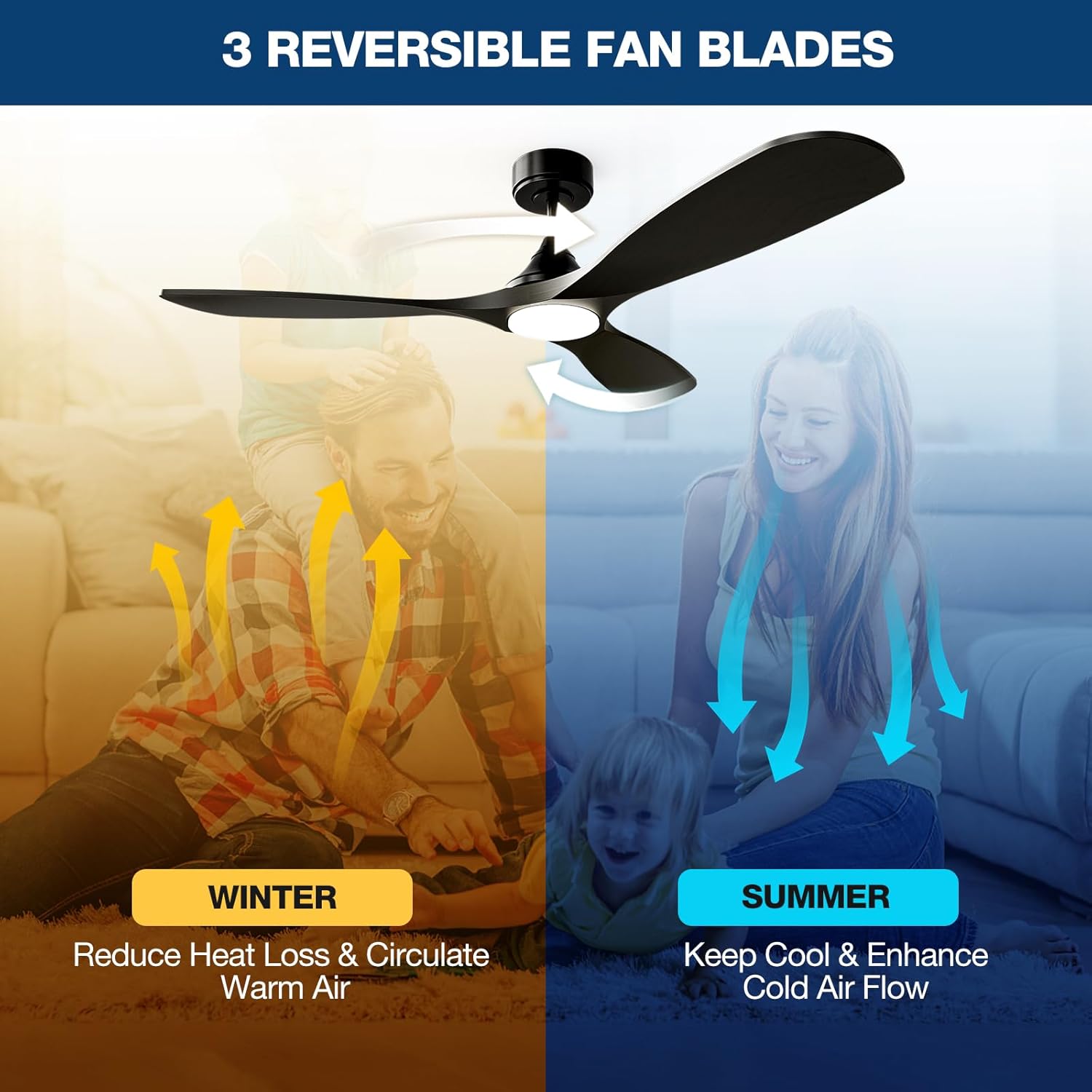
- Iṣe Yipada: Press the reverse button to change blade direction for summer (downward airflow) or winter (upward airflow).
5.3 Iṣakoso Ohun elo Smart (Tuya Smart)
- Ṣe igbasilẹ Ohun elo: Download the "Tuya Smart" app from your device's app store.
- Forukọsilẹ/Wọle: Ṣẹda iroyin tabi wọle.
- Fi ẹrọ kun: Follow the in-app instructions to add your NOPAARD ceiling fan. Ensure your phone is connected to a 2.4GHz Wi-Fi network.
- Awọn iṣẹ iṣakoso: Use the app to control fan speed, light brightness, color temperature, timer, and reverse function.
5.4 Iṣakoso ohun (Alexa & Google Iranlọwọ)
- Akọọlẹ Ọna asopọ: In your Alexa or Google Home app, link your Tuya Smart account.
- Ṣawari Awọn ẹrọ: Allow the smart assistant to discover your NOPAARD ceiling fan.
- Awọn pipaṣẹ ohun: Lo awọn aṣẹ bii:
- "Alexa, turn on the fan."
- "Hey Google, set fan speed to 3."
- "Alexa, turn off the light."
- "Hey Google, dim the fan light to 50%."
5.5 Reversible Blades Function

Apejuwe aworan: An illustration demonstrating the reversible blade function. In "SUMMER" mode, blue arrows show downward airflow for cooling. In "WINTER" mode, yellow arrows show upward airflow to circulate warm air.
The fan features a reversible DC motor to optimize air circulation for different seasons:
- Ipo Ooru: Àwọn abẹ́ máa ń yípo ní ọ̀nà tí kò báradé, wọ́n á sì máa tì afẹ́fẹ́ sí ìsàlẹ̀ láti mú kí afẹ́fẹ́ tutù.
- Ipo igba otutu: Àwọn abẹ́ máa ń yípo ní ọ̀nà aago, wọ́n á sì fa afẹ́fẹ́ sókè láti máa rìn kiri afẹ́fẹ́ gbígbóná tí ó wà nítòsí àjà ilé.
6. Itọju
Itọju deedee n ṣe idaniloju iṣẹ ṣiṣe to dara julọ ati pe o fa igbesi aye afẹfẹ aja rẹ gun.
- Ninu: Lo asọ, damp asọ lati nu àìpẹ abe ati motor ile. Ma ṣe lo abrasive ose tabi epo.
- Wiwọn Abẹ: Periodically check and tighten all blade screws to prevent wobbling and noise.
- Apo Imọlẹ: The integrated LED light is designed for long life and is not user-replaceable.
- Eruku: Dust the fan regularly to prevent buildup that can affect performance.
7. Laasigbotitusita
| Isoro | Owun to le Fa | Ojutu |
|---|---|---|
| Fan ko bẹrẹ |
|
|
| Fan wobbles |
|
|
| Imọlẹ ko ṣiṣẹ |
|
|
| Cannot connect to App/Voice Control |
|
|
8. Awọn pato
| Ẹya ara ẹrọ | Ẹ̀kúnrẹ́rẹ́ |
|---|---|
| Nọmba awoṣe | 52-YJ682 |
| Brand | NOPAARD |
| Iwọn | 52 inches |
| Àwọ̀ | Dudu |
| Ohun elo | Irin, Igi |
| Motor Iru | DC Motor |
| Awọn ọna Iṣakoso | Remote, Tuya App, Alexa, Google Assistant |
| Awọn iyara Fan | 6 variable speeds |
| Air Sisan Agbara | Titi di 6872 CFM |
| Ariwo Ipele | Less than 35dB (speeds 1-2) |
| Imọlẹ Iru | Ese Dimmable LED |
| Imọlẹ Imọlẹ | 0-2000 Lumens |
| Iwọn otutu awọ | 3000K (Warm Yellow), 4000K (Bright Daylight), 5000K (Cool White) |
| Voltage | 110 Volts |
| Wattage | 50 watt |
| Downrod Sizes | 6-inch, 10-inch |
| Damp Idiwon | Covered Damp Location (Indoor/Covered Outdoor) |
| Awọn iwe-ẹri | Akojọ ETL |
9. Atilẹyin ọja ati Support
NOPAARD offers a 24-osu didara idaniloju for this product and a 10-odun atilẹyin ọja for the DC motor.
If you encounter any issues with installation, operation, or product quality, please contact NOPAARD customer support for assistance. Refer to your purchase documentation for contact details.