
1. Ifihan
The INNOCN 40C1R is a 40-inch Ultrawide WQHD (3440 x 1440p) monitor designed to enhance your computing and gaming experience. Featuring a 144Hz refresh rate and AMD FreeSync Premium, it delivers smooth visuals. The monitor boasts HDR400 support, 95% DCI-P3 color gamut, and 500 Nits IPS display for vibrant and accurate colors. Its versatile connectivity options and ergonomic design make it suitable for various applications, from professional tasks to immersive gaming.

Image 1: The INNOCN 40C1R Ultrawide Monitor set up on a desk, showcasing its immersive display during a gaming session.
2. Package Awọn akoonu
Rii daju pe gbogbo awọn nkan wa ninu package:
- INNOCN 40C1R Monitor
- Ipilẹ
- Power Cable (US Power Adapter)
- Okun USB B
- DP Cable (DisplayPort)
- Okun HDMI
- Okun USB C
- Itọsọna olumulo
- Awọ odiwọn Iroyin

Image 2: A visual representation of the INNOCN 40C1R monitor and its accompanying accessories, including various cables and the stand components.
3. Eto ati Apejọ
Follow these steps to assemble and set up your monitor:
- So ipilẹ iduro si ọrun imurasilẹ.
- Connect the assembled stand to the back of the monitor. The stand is designed for easy attachment and secure locking.
- For alternative mounting, the monitor supports VESA 100x100mm mounting standards.

Image 3: This diagram highlights the monitor's adjustable stand, showing its capabilities for height adjustment (120mm/4.72"), swivel (±30°), tilt (5°–15°), and VESA 100x100mm compatibility.
4. Asopọmọra
The INNOCN 40C1R offers a variety of ports for broad compatibility:
- 1 x DisplayPort (DP 1.4): Supports up to 144Hz refresh rate.
- 1 x USB Type-C: Delivers powerful connectivity (up to 90W power delivery) and supports video input (Max 60Hz).
- 2 x HDMI (HDMI 2.0): Supports up to 100Hz refresh rate.
- 1 x 3.5MM Audio Jack: Fun awọn ẹrọ ohun ita gbangba.
These ports allow direct connection to various devices such as laptops, Macs, phones, tablets, and gaming consoles (e.g., Switch, PS5/4/3, Xbox Series).
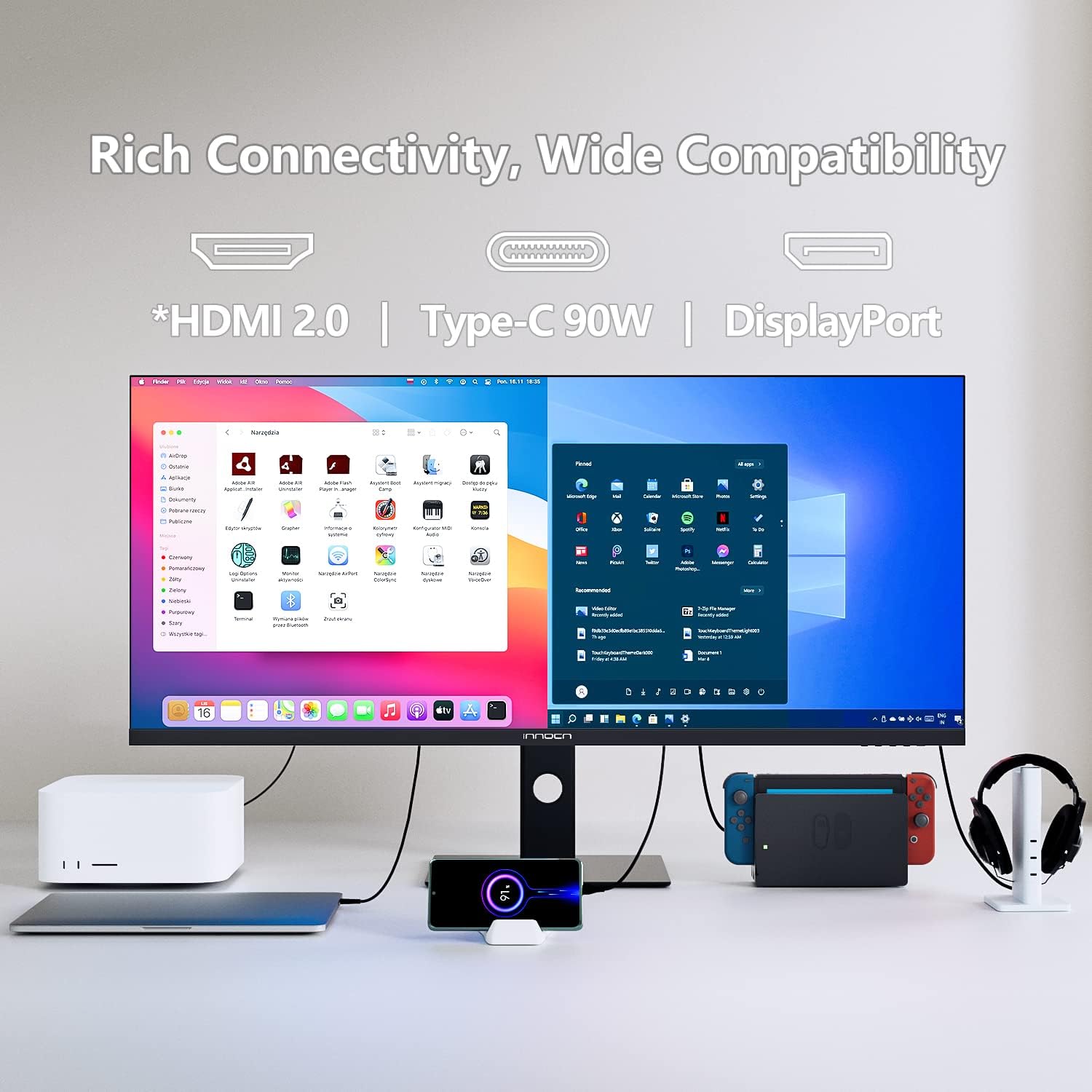
Image 4: The back of the monitor displaying the array of input ports, including USB-C, HDMI, DisplayPort, and an audio jack, highlighting its extensive compatibility.
5. Ṣiṣẹ Atẹle
Awọn iṣakoso Oju-iboju (OSD).
The monitor's controls are located on the bottom right bezel. Pressing the home button once will bring up a legend for the buttons. Pressing it a second time will bring up the main OSD menu, allowing you to tailor various settings.
Àwòrán-nínú-Àwòrán (PIP) àti Àwòrán-nínú-Àwòrán (PBP)
The 40C1R supports PBP/PIP technology, enabling enhanced productivity for multi-tasking. You can display content from multiple input devices simultaneously on the screen. Available modes include:
- Ipo PIP: Displays one input source in a smaller window over another.
- PBP 2Win 11: Splits the screen into two sections, ideal for Windows 11 multitasking.
- PBP (Phone1/Phone2): Allows connecting and displaying content from two mobile devices.

Image 5: The monitor showcasing its split-screen capability, displaying content from a laptop and a smartphone simultaneously, demonstrating its multi-input functionality.
ere Awọn ẹya ara ẹrọ
Optimize your gaming experience with dedicated settings:
- Awọn ọna Ere: Àsọyé Profiles for RTS/RPG, FPS Arena, and MOBA Arena.
- Amuṣiṣẹpọ-Amuṣiṣẹpọ: On/Off toggle for smoother gameplay.
- Akoko Idahun: Adjust to Fast for reduced motion blur.
- Oṣuwọn isọdọtun: Set to 144Hz (via DP) or 100Hz (via HDMI) for fluid visuals.
- Ere Crosshair: On/Off toggle for an on-screen crosshair.

Image 6: A visual comparison demonstrating the effect of AMD FreeSync Premium, showing a clear and smooth frame when enabled versus screen tearing when disabled.
Ọjọgbọn Eto
For creative professionals, the monitor offers various color profiles and adjustments:
- Awọn ọna awọ: Standard, sRGB, Adobe, Uniformity.
- Gamma: Adjustable settings.
- CT Settings: Natural and other options.
- Sharpness, Shadow Balance, Hue, Saturation, Dynamic Brightness: Fine-tune these settings for optimal visual output.

Image 7: The monitor showcasing its ability to display true-to-life colors with a 95% DCI-P3 color gamut, ideal for creative tasks like photo and video editing.
6. Awọn atunṣe Ergonomic
The monitor's stand provides comprehensive ergonomic adjustments for comfortable viewing:
- Atunse Giga: Up to 120mm (4.72 inches).
- Swivel: ±30 degrees.
- Tẹ: 5 si 15 iwọn.
These adjustments help you find the optimal viewing angle and reduce strain during prolonged use.
7. Eye Care Technology
The INNOCN 40C1R incorporates eye-care technologies to ensure comfort during long viewing or gaming sessions:
- Imọlẹ Buluu Kekere: Din ipalara ina bulu ina itujade.
- Imọ-ẹrọ Ọfẹ Flicker: Minimizes screen flickering to prevent eye fatigue.
These features are TÜV Rheinland certified, ensuring a comfortable and safe visual experience.

Image 8: A visual breakdown of the monitor's eye-care features, comparing a screen with flicker, a screen with general eye-care, and a screen with blue light reduction.
8. Awọn pato
| Ẹya ara ẹrọ | Apejuwe |
|---|---|
| Iwon iboju | 40 inches |
| Ipinnu | WQHD (3440 x 1440 Pixels) |
| Apakan Ipin | 21:9 |
| Oṣuwọn sọtun | 144Hz (DP), 100Hz (HDMI) |
| Akoko Idahun | 1ms (MPRT) |
| Panel Iru | IPS |
| Imọlẹ | 500 Awọn owo |
| Awọ Gamut | 95% DCI-P3 |
| HDR atilẹyin | VESA IfihanHDR 400 |
| Amuṣiṣẹpọ Adaptive | AMD FreeSync Ere |
| Asopọmọra | 1x DP 1.4, 1x USB-C (90W PD), 2x HDMI 2.0, 1x 3.5mm Audio Jack |
| Awọn Agbọrọsọ ti a ṣe sinu | Bẹẹni |
| Ergonomics | Height, Swivel, Tilt Adjustable |
| Oke VESA | 100x100mm |
| Ọja Mefa | 11.42 x 38.98 x 23.23 inches |
| Iwọn Nkan | 34.6 iwon |
9. Laasigbotitusita
If you encounter any issues with your INNOCN 40C1R monitor, please refer to the following common troubleshooting tips:
- Ko si Ifihan: Ensure all cables (power, DisplayPort/HDMI/USB-C) are securely connected. Verify the correct input source is selected in the OSD menu.
- Iboju didan: Check cable connections. Ensure your graphics card drivers are up to date. Try adjusting the refresh rate in your computer's display settings.
- Ko si Ohun: Confirm the audio cable (if used) is connected. Check monitor and computer volume settings. Ensure the correct audio output device is selected on your computer.
- Awọn ọran Didara Aworan: Adjust brightness, contrast, and color settings via the OSD menu. Ensure your display resolution is set to the native 3440x1440p.
- Awọn atunṣe imurasilẹ: If the stand is stiff, ensure no locking mechanisms are engaged. Apply gentle, even pressure when adjusting.
For further assistance, please contact INNOCN customer support.
10. Atilẹyin ọja ati Support
INNOCN is committed to providing excellent customer service:
- Ìpadàbọ̀ ọ̀fẹ́ ọjọ́ 30: Enjoy peace of mind with a 30-day return policy.
- 12 Months Coverage: Ọja naa ni aabo nipasẹ atilẹyin ọja oṣu mejila kan.
- 24 Hours Specialist Support: Access to specialist support within 24 hours for any technical queries.

Image 9: An illustration summarizing INNOCN's customer support offerings, including 24-hour specialist support, 30-day free returns, and 12-month product coverage.
11. Awọn fidio ọja osise
INNOCN 40 Inch Ultrawide Monitor - 40C1R Overview
Fidio 1: Oṣiṣẹ kan ti pariview video from INNOCN showcasing the features and design of the 40C1R Ultrawide Monitor.