
Ọrọ Iṣaaju
This manual provides essential information for the installation, operation, and maintenance of your NVIDIA GeForce RTX 4070 Super 12GB GDDR6X Graphics Card. Designed for high-performance gaming and creative applications, this graphics card leverages the NVIDIA Ada Lovelace architecture to deliver advanced features such as fast ray tracing and AI-accelerated performance with DLSS 3. Please read this guide thoroughly before proceeding with installation or use.
Ṣeto
1. Unboxing ati Package Awọn akoonu
Carefully open the packaging and ensure all components are present. The package typically includes:
- NVIDIA GeForce RTX 4070 Super Graphics Card
- 16-pin (12VHPWR) to 2x 8-pin PCIe power adapter cable
- Quick Bẹrẹ Itọsọna
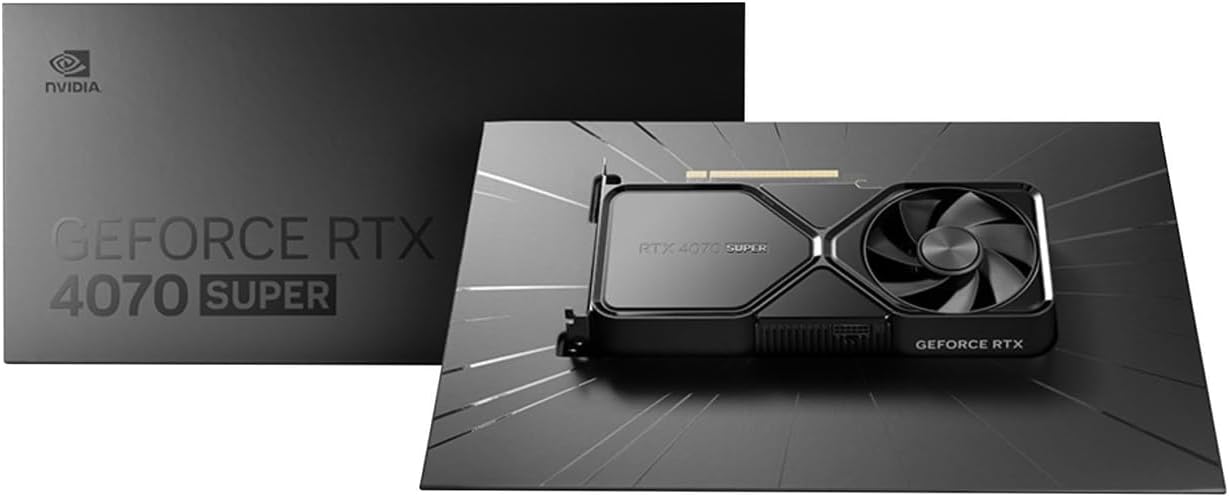
Image: Contents of the NVIDIA GeForce RTX 4070 Super package, including the graphics card and adapter cable.
2. Fifi sori ti ara
Before installation, ensure your computer is powered off and unplugged from the wall outlet. Ground yourself to prevent electrostatic discharge.
- Ṣii apoti kọnputa rẹ.
- Wa iho PCI Express x16 kan ti o wa lori modaboudu rẹ.
- Remove the metal slot cover(s) corresponding to the chosen PCIe slot.
- Fi ìṣọ́ra so káàdì àwòrán pọ̀ mọ́ ihò PCIe kí o sì tẹ̀ ẹ́ mọ́lẹ̀ dáadáa títí tí yóò fi dúró dáadáa. A lè gbọ́ ìtẹ̀ kan.
- Secure the graphics card to the case with the retaining screw(s).

Àwòrán: Apá iwájú view of the NVIDIA GeForce RTX 4070 Super Graphics Card, showing its cooling fans and shroud.
3. Asopọ agbara
The GeForce RTX 4070 Super requires external power. Use the provided 16-pin (12VHPWR) to 2x 8-pin PCIe power adapter cable.
- Connect the 16-pin end of the adapter cable to the power connector on the graphics card. Ensure it is fully seated.
- Connect two separate 8-pin PCIe power cables from your power supply unit (PSU) to the two 8-pin connectors on the adapter cable. Do not use a single PCIe cable with a pigtail connector for both 8-pin inputs, as this may lead to insufficient power delivery and potential system instability or damage.
4. Fifi sori awakọ
After physical installation and power connection, close your computer case and reconnect all peripherals. Power on your computer.
- Once your operating system loads, navigate to the official NVIDIA webAaye (www.nvidia.com/drivers).
- Select your product type (GeForce), product series (GeForce RTX 40 Series), product (GeForce RTX 4070 Super), and your operating system.
- Download the latest recommended drivers.
- Run the installer and follow the on-screen instructions to complete the driver installation. A system restart may be required.
Ṣiṣẹ
The NVIDIA GeForce RTX 4070 Super is designed to enhance your computing experience, particularly for gaming, content creation, and professional applications. Once drivers are installed, the card will be fully operational.
- Ere: Experience high frame rates and advanced visual fidelity in modern games with features like Ray Tracing and DLSS 3. Ensure your games are updated to support these technologies for optimal performance.
- Ṣiṣẹda Akoonu: Accelerate video editing, 3D rendering, and graphic design tasks with NVIDIA's powerful GPU architecture and dedicated AI cores.
- Ìsopọ̀mọ́ra Ìfihàn: Connect your monitor(s) to the DisplayPort or HDMI outputs on the graphics card. The card supports multiple displays and high resolutions up to 7680x4320.
Itoju
1. Ninu
Ṣiṣe mimọ nigbagbogbo ṣe iranlọwọ lati ṣetọju iṣẹ ṣiṣe to dara julọ ati fa igbesi aye ti kaadi awọn aworan rẹ pọ si.
- Periodically use compressed air to remove dust from the fans and heatsink fins. Ensure the computer is powered off and unplugged before cleaning.
- Di awọn abẹfẹfẹ afẹfẹ rọra lati ṣe idiwọ fun wọn lati yiyi ni iyara lakoko mimọ, eyiti o le ba awọn bearings jẹ.
- Yẹra fún lílo àwọn ohun ìfọṣọ omi taara lórí káàdì náà.
2. Awọn imudojuiwọn Awakọ
NVIDIA regularly releases new drivers that include performance optimizations, bug fixes, and support for new games and applications. It is recommended to keep your drivers updated.
- Use the NVIDIA GeForce Experience software (if installed) to automatically check for and install driver updates.
- Alternatively, manually check for updates on the NVIDIA webAaye (www.nvidia.com/drivers).
Laasigbotitusita
Ti o ba pade awọn ọran pẹlu kaadi eya aworan rẹ, ronu awọn igbesẹ laasigbotitusita ti o wọpọ wọnyi:
| Oro | Owun to le Solusan |
|---|---|
| Ko si igbejade ifihan |
|
| System instability or crashes |
|
| Poor gaming performance |
|
If issues persist, consult the NVIDIA support webojula tabi kan si wọn onibara iṣẹ.
Awọn pato
Key technical specifications for the NVIDIA GeForce RTX 4070 Super Graphics Card:
- Alakoso Awọn aworan: NVIDIA GeForce RTX 4070 SUPER
- Brand: NVIDIA
- Graphics RAM Size: 12 GB
- GPU Clock Speed: 2.48 GHz
- Fídíò Àwòrán Ìgbéjáde: DisplayPort, HDMI
- Graphics RAM Type: GDDR6X
- Awọn ẹrọ ibaramu: Ojú-iṣẹ, Kọǹpútà alágbèéká
- Ipinnu Ifihan O pọju: 7680x4320
- Àwòrán Kaadi Eya: PCI Express
- Iyara aago iranti: 21 GHz
- Orukọ awoṣe: GeForce RTX 4070 SUPER
- UPC: 812674025575

Aworan: Oke view of the NVIDIA GeForce RTX 4070 Super Graphics Card, highlighting its cooling design.
Atilẹyin ọja ati Support
Alaye atilẹyin ọja
NVIDIA graphics cards typically come with a limited manufacturer's warranty. The duration and terms of the warranty may vary by region and retailer. Please retain your proof of purchase for warranty claims. For detailed warranty information, refer to the official NVIDIA webaaye tabi iwe ti o wa pẹlu ọja rẹ.
Onibara Support
For technical assistance, driver downloads, or further information, please visit the official NVIDIA support resources:
- NVIDIA atilẹyin Webojula: www.nvidia.com/support
- Awọn igbasilẹ Awakọ: www.nvidia.com/drivers