
1. Awọn ilana iṣeto
The MCombo 7785 Power Swivel Glider Rocker Recliner is designed for quick and easy assembly, typically within 15 minutes. It arrives in three boxes. Follow these steps for proper setup:
1.1 Unpacking ati Idanimọ paati
Carefully unpack all components from the three boxes. Ensure all parts are present before beginning assembly. The main components include the base, backrest, left armrest, right armrest, manual, parts box, and power adapter.

Image: All components of the MCombo 7785 recliner laid out after unpacking.
1.2 Armrest and Backrest Assembly
- Remove any protective packaging from the armrest and backrest connection points.
- Align the metal brackets on the armrests with the corresponding slots on the base. Slide the armrests down until they securely lock into place.
- Similarly, align the backrest with the slots on the base and slide it down firmly until it clicks into position.
1.3 Awọn isopọ Waya
Connect the internal wires for the massage, heat, and reclining functions. These connections are tool-free and typically involve matching color-coded or uniquely shaped connectors.
- Connect the massage wires (often red and white RCA-style connectors).
- Connect the massage remote control wire.
- Connect the USB wire.
- Connect the recline remote control wire.
- Plug the power adapter into the designated port on the chair and then into a wall outlet. Ensure the power switch on the chair's base is in the 'ON' position.
Video: Detailed assembly guide for the MCombo 7785 recliner, demonstrating armrest, backrest, and wire connections.
2. Awọn ilana Iṣiṣẹ
The MCombo 7785 recliner offers multiple features for enhanced comfort and convenience.
2.1 Power Reclining Function
Use the recline remote control to adjust the chair's recline angle. The chair can recline up to 142 degrees, allowing for various comfortable positions, including napping.

Image: The recliner demonstrating its maximum recline angle of 142 degrees.
2.2 Swivel and Gliding Movement
The chair features a 270-degree swivel movement and a smooth gliding motion. These functions operate manually by shifting your weight or gently pushing off the floor.
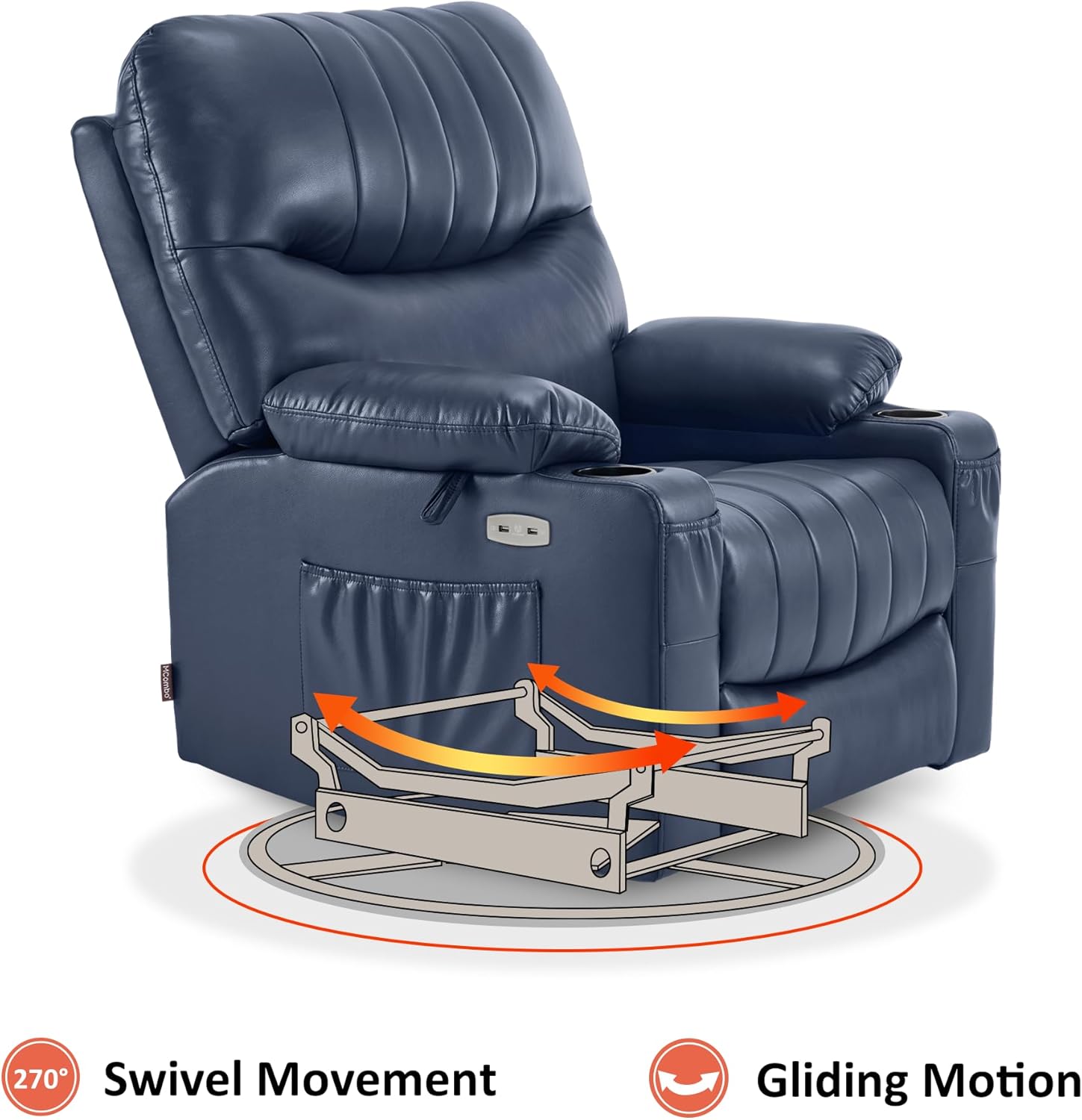
Image: Visual representation of the chair's swivel and gliding capabilities.
2.3 Heat and Vibration Massage
The chair includes a full-body vibration massage system with 7 points (shoulder, waist, thigh) and 1 lumbar heating zone. Use the massage remote control to customize massage modes, intensity, and set timers.
- Iṣẹ Ooru: Press the 'HEAT' button on the remote to activate lumbar heating.
- Ifọwọra gbigbọn: Select from various massage modes and adjust intensity using the remote.
- Awọn aago: Set the massage duration using the timer buttons.

Image: The massage remote control, highlighting buttons for heat, massage modes, and timers.
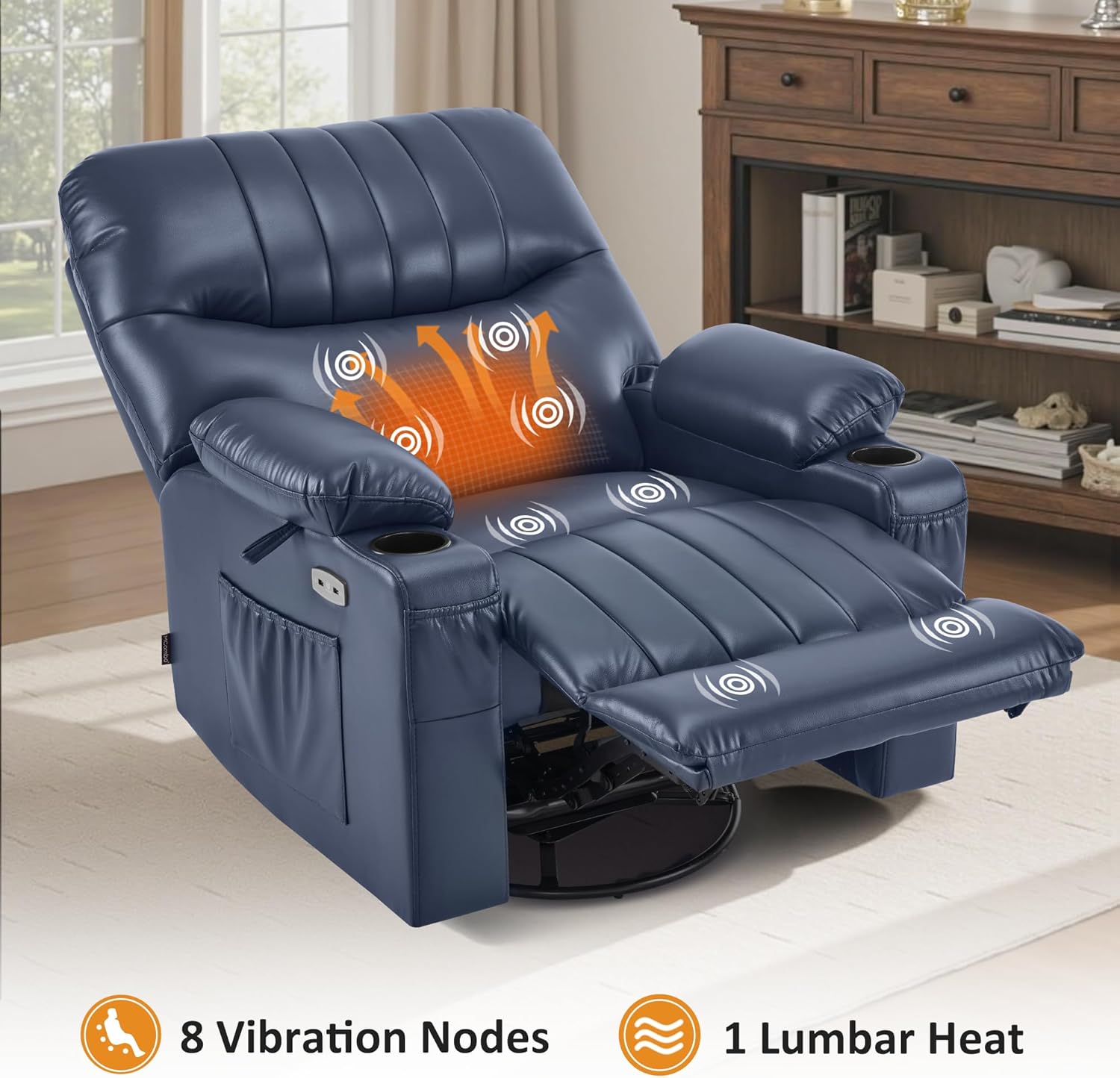
Image: The recliner showing the areas of vibration massage and lumbar heat.
2.4 USB Ports and Storage
The chair is equipped with USB ports for charging low-power devices, cup holders for beverages, and side/front pockets for storing items like magazines or remote controls.
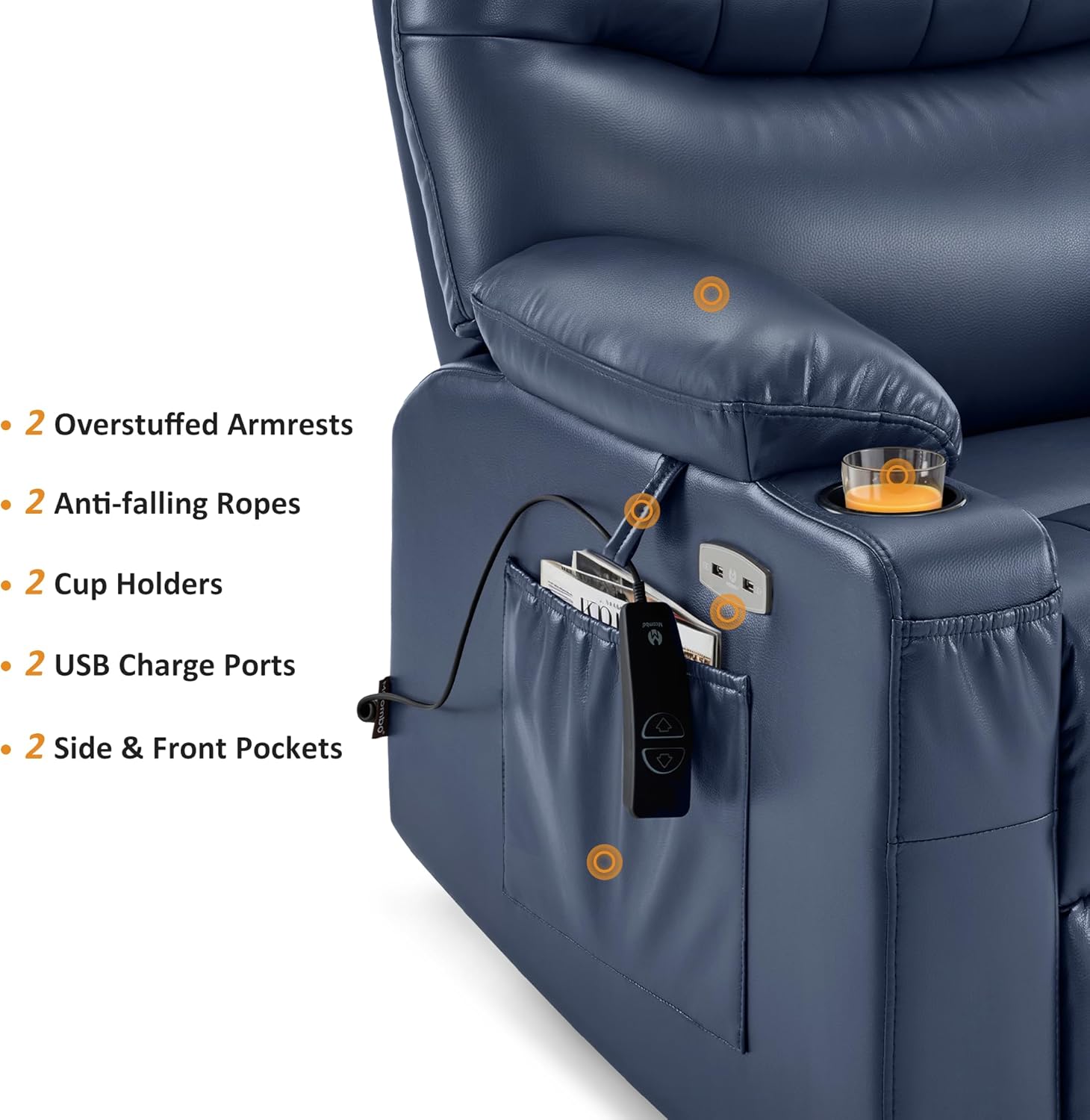
Image: Armrest features including USB ports, cup holders, and storage pockets.
3. Itọju
Proper care ensures the longevity and appearance of your MCombo recliner.
3.1 Cleaning Awọn ilana
- Faux Leather: Pa nu pẹlu ipolowoamp Aṣọ. Yẹra fún àwọn kẹ́míkà líle tàbí àwọn ohun ìfọmọ́ tí ó lè fa ìpalára, nítorí pé àwọn wọ̀nyí lè ba ohun èlò náà jẹ́.
- Fun awọn itusilẹ, paarẹ lẹsẹkẹsẹ pẹlu asọ ti o mọ, ti o gbẹ.
3.2 Itọju Gbogbogbo
- Avoid placing the chair in direct sunlight or near heat sources to prevent material fading or cracking.
- Regularly check all connections and fasteners to ensure they are secure.
- Maṣe kọja agbara iwuwo ti o pọju ti 320 poun.
4. Laasigbotitusita
If you encounter issues with your recliner, refer to the following common solutions:
- Chair Not Reclining/No Power:
- Ensure the power adapter is securely plugged into both the chair and a working wall outlet.
- Check that the power switch on the chair's base is in the 'ON' position.
- Verify all internal wire connections are firm and correctly matched.
- Ifọwọra / Ooru Ko Ṣiṣẹ:
- Confirm the massage remote control is properly connected.
- Ensure the chair has power (see 'Chair Not Reclining' above).
- Check the specific buttons on the remote for activation.
- Awọn Ariwo Alailẹgbẹ Lakoko Iṣiṣẹ:
- Inspect the chair's mechanism for any obstructions.
- Ensure all assembly bolts and connections are tightened.
If these steps do not resolve the issue, please contact MCombo customer support.
5. Awọn pato
| Ẹya ara ẹrọ | Ẹ̀kúnrẹ́rẹ́ |
|---|---|
| Brand | MCombo |
| Orukọ awoṣe | Power Swivel Glider Recliner (Model 7785) |
| Nọmba awoṣe | 6160-7785 |
| Àwọ̀ | Awọ buulu dudu |
| Ohun elo | Faux Leather (Seat Material), Wood (Frame Material), Sponge (Fill Material) |
| Awọn iwọn Ọja (D x W x H) | 37.8"D x 39.8"W x 42.9"H |
| Iwọn Nkan | 146 iwon |
| Iṣeduro iwuwo ti o pọju | 320 Pounds (Tested to endure 25,000 repetitions with a 350-lb load) |
| Igun rọgbọkú | Titi di 142 ° |
| Isunmọ Ipo Iṣiro | Ipò Àìlópin |
| Swivel Movement | 270° |
| Awọn ẹya ara ẹrọ ifọwọra | Full-body Vibration (7 points: shoulder, waist, thigh), Lumbar Heating (1 zone) |
| Asopọmọra | Awọn ibudo USB |
| Ibi ipamọ | Cup Holders (2), Side & Front Pockets |
| Minimum Wall Clearance | 12.2 inches |
| Apejọ ti a beere | Bẹẹni (Laisi Irinṣẹ) |
| Itọju Ọja | Nu Nu |
6. Atilẹyin ọja
The MCombo 7785 Power Swivel Glider Rocker Recliner comes with a 2-Odun Atilẹyin ọja Limited. Atilẹyin ọja yi ni wiwa awọn abawọn iṣelọpọ ati awọn abawọn ohun elo labẹ lilo deede. Jọwọ ṣe idaduro ẹri rira rẹ fun awọn iṣeduro atilẹyin ọja.
For specific details regarding coverage, exclusions, and how to make a claim, refer to the warranty information provided with your product packaging or contact MCombo customer support.
7. Onibara Support
For any questions, assistance with assembly, troubleshooting, or warranty inquiries, please contact MCombo customer support.
- Atilẹyin Ayelujara: Visit the official MCombo webaaye fun FAQs ati awọn orisun atilẹyin.
- Ibi iwifunni: Refer to your product packaging or the MCombo webojú òpó wẹ́ẹ̀bù fún àwọn àlàyé ìbánisọ̀rọ̀ tuntun (fóònù, ìmeeli).
When contacting support, please have your product model number (6160-7785) and proof of purchase readily available to expedite assistance.