
1. Ifihan
This manual provides detailed instructions for the installation, operation, and maintenance of your ABSOSO Single Din Car Radio Receiver. Please read this manual thoroughly before using the product to ensure proper function and to prevent damage. Keep this manual for future reference.
2. Ohun ti o wa ninu Apoti
- Single Din Car Audio Unit
- Wireless IR Remote Control
- Mounting Kits & Harness
- Afowoyi Olumulo (iwe-ipamọ yii)
3. Awọn ẹya Ọja
The ABSOSO Single Din Car Radio Receiver offers a range of features designed to enhance your in-car audio experience:
- Bluetooth Audio & Calling: Connect your smartphone for hands-free calls and music streaming from apps like Spotify and Pandora.
- Redio AM/FM: Tune into 30 preset AM/FM radio stations with automatic and manual search options for news, weather, and music.
- Ijade Agbara giga: Delivers 4 channels x 75 watts (300W total) built-in power audio amplifier for robust sound.
- LCD Display & Physical Buttons: Features an HD digital LCD screen and illuminated buttons/knob for comfortable viewing and easy control.
- Multiple Music Modes Input: Supports 3.5mm AUX-input, SD card, and dual USB ports (one for up to 64GB flash drive, the other for 2.1A quick charge).
- Gbigbasilẹ Ilana kika: Compatible with MP3, WAV, and WMA music formats.
- ID3 Tag Ifihan: Shows additional data like title and artist for audio files.
- Preset EQ Configuration: Access various music styles such as Rock, POP, and Jazz for high-quality sound.
4. Eto ati fifi sori
Proper installation is crucial for optimal performance. It is recommended to have this unit installed by a qualified professional.
4.1. Aworan aworan
Refer to the diagram below for correct power and speaker connections. Ensure all connections are secure to prevent short circuits or damage to the unit and vehicle's electrical system.

Figure 4.1: Wire Connection Diagram. This diagram illustrates the power cable connections (A) including +12V Constant Power Supply, Ground Wire, +12V Ignition Switch, and Antenna. It also shows the speaker cable connections (B) for 4-channel speaker output, including Rear Right, Front Right, Front Left, and Rear Left speakers. The rear panel of the unit is shown with Radio Antenna, SUB, Audio RCA, External Mic, Fuse (15A), and Power port.
4.2. Iṣagbesori
The unit is designed for a standard single DIN opening. Secure the unit using the provided mounting kits. Ensure adequate ventilation around the unit to prevent overheating.

Figure 4.2: Rear Panel with RCA Outputs. This image displays the rear of the car radio, showing the various ports including RCA outputs for subwoofer (SUB-1, SUB-2), rear left (R-L), rear right (R-R), front left (F-L), and front right (F-R) channels, indicating its 300W high power and pre-amp awọn agbara.
5. Awọn ilana Iṣiṣẹ
5.1. Gbogbogbo Iṣakoso
The front panel features an LCD display, a rotary knob, and various buttons for control. The rotary knob typically controls volume and can be pressed for menu selections. Buttons are illuminated for visibility.

Figure 5.1: LCD Display and Rotary Knob. This image highlights the digital LCD screen and the central rotary knob, which features dynamic color-changing illumination, providing a comfortable viewing experience and matching various car interior styles.
5.2. Sisopọ Bluetooth
Lati so ẹrọ alagbeka rẹ pọ nipasẹ Bluetooth:
- Rii daju pe Bluetooth ti ṣiṣẹ lori ẹrọ alagbeka rẹ.
- Select the Bluetooth source on the car radio. The display will show 'BT'.
- Wa fun available devices on your mobile phone and select 'ABSOSO Car Audio' (or similar name).
- Nígbà tí o bá ti so pọ̀ mọ́ ara rẹ, o lè ṣe àwọn ìpè láìfọwọ́kàn àti sísọ̀rọ̀ ohùn.

Figure 5.2: Hands-Free Calling & Wireless Streaming. This image shows the car radio installed in a dashboard, with a smartphone displaying music playback, illustrating the seamless Bluetooth connectivity for hands-free calls and wireless music streaming.
5.3. Iṣẹ́ Rédíò Àárọ̀/FM
Press the 'BAND' button to switch between AM and FM bands. Use the seek buttons to automatically search for stations or manually tune using the rotary knob.
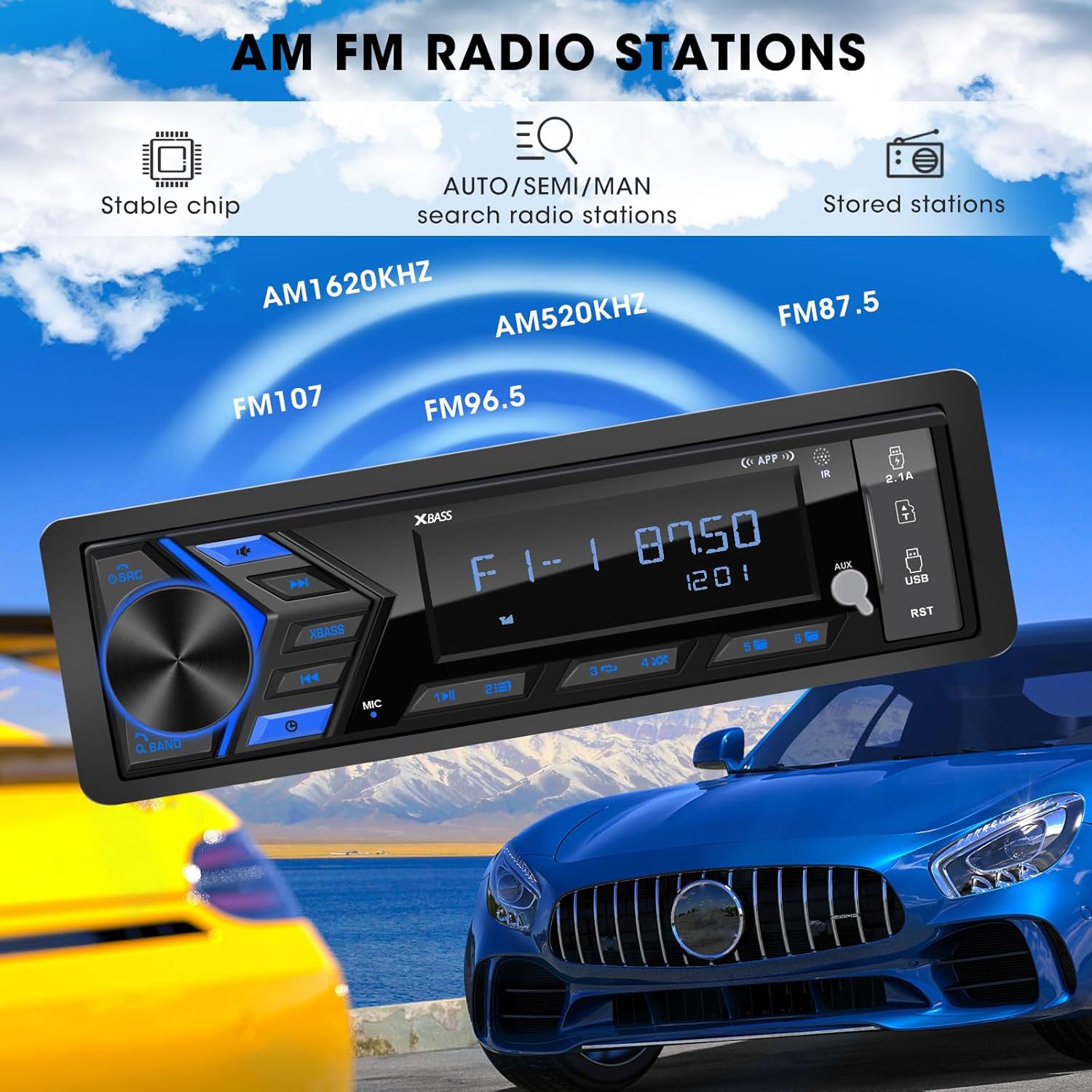
Figure 5.3: AM/FM Radio Stations. This image shows the car radio displaying a radio frequency (FM 87.50), with visual cues indicating its capability to receive AM (520KHz, 1620KHz) and FM (96.5, 107) radio stations, supported by a stable chip for auto/semi/manual search and stored stations.
5.4. Media Playback (USB, SD, AUX)
Insert a USB flash drive or SD card into the respective ports. The unit will automatically switch to the corresponding mode and begin playback. Connect external audio devices via the 3.5mm AUX-input.

Figure 5.4: SD USB AUX-IN for Media Play. This image focuses on the front panel of the car radio, clearly labeling the 3.5mm Aux-in, 32GB SD Port, 64GB USB Flash Drive port, and a 2.1A Fast Charge USB port, indicating support for MP3/WAV/WMA music formats.
5.5. Sound Settings (EQ)
Access the equalizer settings through the menu to adjust audio output. Choose from preset EQ modes (Rock, POP, Jazz) or customize bass and treble levels to your preference.

Figure 5.5: Customizable EQ. This image shows the car radio's display with 'X-BASS ON' and 'BASS' settings, accompanied by a vibrant graphic of equalizer bars, illustrating the customizable sound settings available.
6. Itọju
Láti rí i dájú pé rédíò ọkọ̀ ayọ́kẹ́lẹ́ rẹ pẹ́ títí àti pé ó ń ṣiṣẹ́ dáadáa, tẹ̀lé àwọn ìlànà ìtọ́jú wọ̀nyí:
- Ninu: Lo asọ ti o rọ, ti o gbẹ lati nu oju ilẹ kuro. Fun idoti alagidi, die-die dampFi omi bo aṣọ náà. Yẹra fún lílo àwọn kẹ́míkà líle, àwọn ohun olómi, tàbí àwọn ohun ìfọmọ́ tí ó lè pa aṣọ náà.
- Idena eruku: Keep the unit free from dust and debris, especially around the ports and ventilation areas.
- Iwọn otutu: Yago fun ṣiṣafihan ẹyọkan si awọn iwọn otutu to gaju, oorun taara fun awọn akoko gigun, tabi ọriniinitutu giga.
- Awọn isopọ: Lokọọkan ṣayẹwo gbogbo awọn asopọ onirin lati rii daju pe wọn wa ni aabo ati ominira lati ipata.
7. Laasigbotitusita
If you encounter issues with your ABSOSO Car Radio Receiver, refer to the table below for common problems and their solutions:
| Isoro | Owun to le Fa | Ojutu |
|---|---|---|
| Ko si agbara | Fiusi ti a fẹ; Asopọmọra ti ko tọ; Loose agbara asopọ. | Check and replace fuse (15A); Verify wiring according to diagram; Secure power connections. |
| Ko si ohun | Volume too low; Mute function active; Incorrect speaker wiring; Faulty speakers. | Increase volume; Deactivate mute; Check speaker connections; Test with different speakers. |
| Bluetooth ko sopọ | Bluetooth not enabled on device; Unit not in pairing mode; Interference. | Ensure Bluetooth is on; Put unit in pairing mode; Move closer to unit; Restart both devices. |
| Gbigba redio ko dara | Eriali ko ti sopọ; Agbegbe ifihan agbara ti ko lagbara; kikọlu. | Check antenna connection; Try in a different location; Avoid strong electromagnetic fields. |
| USB/SD ko dun | Ti ko ni atilẹyin file format; Corrupted media; Incorrectly inserted. | Rii daju files are MP3/WAV/WMA; Try different media; Reinsert or reformat media. |
8. Awọn pato
| Ẹya ara ẹrọ | Sipesifikesonu |
|---|---|
| Ọja Mefa | 1.9"D x 7.4"W x 4.5"H (4.8 x 18.8 x 11.4 cm) |
| Iwọn Nkan | 1.28 poun (0.58 kg) |
| Agbara Ijade | 300 Wattis (O pọju) |
| Kakiri Ohun ikanni iṣeto ni | 4 Awọn ikanni |
| Ipo Ijade Ohun | Sitẹrio |
| Asopọmọra Technology | Iranlọwọ, Bluetooth, USB |
| Awọn ẹrọ ibaramu | Amplifier, MP3, Smartphone, Speaker |
| Nọmba Awoṣe Nkan | Single Din Car Radio Receiver |
| Olupese | ABSOSO |
9. Atilẹyin ọja ati Support
For warranty information and technical support, please refer to the documentation included with your purchase or contact ABSOSO customer service through the retailer where the product was purchased. Keep your proof of purchase for warranty claims.