
1. Ifihan
The HIKMICRO ECO-V Handheld Thermography Camera is a versatile thermal imaging device designed for various professional applications. It offers thermal, bi-spectrum image fusion, and visible light modes to meet diverse business needs. This manual provides essential information for the safe and effective operation of your ECO-V camera.
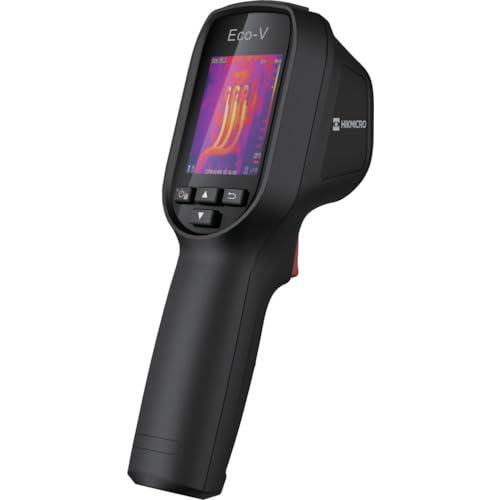
Figure 1: HIKMICRO ECO-V Handheld Thermography Camera
2. Alaye Aabo
Jọwọ ka ati loye gbogbo awọn ikilọ aabo ati awọn ilana ṣaaju lilo ọja yii. Ikuna lati tẹle awọn ilana wọnyi le ja si mọnamọna, ina, tabi ipalara nla.
Gbogbogbo Aabo Awọn iṣọra
- Ma ṣe ṣiṣẹ ẹrọ naa ni awọn bugbamu bugbamu, gẹgẹbi niwaju awọn olomi ina, gaasi, tabi eruku.
- Jeki ẹrọ naa kuro ninu omi ati awọn olomi miiran.
- Má ṣe gbìyànjú láti ṣí tàbí ṣe àtúnṣe sí ẹ̀rọ náà. Tọ́ka gbogbo iṣẹ́ ìtọ́jú náà sí àwọn òṣìṣẹ́ tó mọ̀ nípa rẹ̀.
- Use only HIKMICRO-approved accessories.
- Avoid direct exposure of the thermal lens to strong light sources (e.g., sun, laser) as this may damage the detector.
Aabo batiri
- The device contains a built-in Lithium-ion battery. Do not expose the battery to excessive heat, direct sunlight, or fire.
- Do not puncture, open, or disassemble the battery.
- Charge the battery only with the provided USB cable and a compatible power adapter.
- Sọ awọn batiri sọnu ni ibamu si awọn ilana agbegbe.
3. Package Awọn akoonu
The HIKMICRO ECO-V package includes the following items:
- HIKMICRO Handheld Thermography Camera ECO-V
- USB Iru-C USB
- Quick Start Guide (not explicitly mentioned but standard)
- Calibration Certificate (not explicitly mentioned but standard)
Video 3.1: Unboxing the HIKMICRO M-Series (similar to ECO-V, showing typical package contents and device appearance).
4. Ẹrọ Loriview
Familiarize yourself with the physical components and interface of your HIKMICRO ECO-V camera.
Irisi ati Interface
The ECO-V features a compact, ergonomic design for comfortable handheld use. Key components include the thermal lens, optical lens, laser indicator, white light, trigger button, navigation buttons, and a 2.4-inch display.
Video 4.1: This video demonstrates the physical appearance and interface of a HIKMICRO M-Series camera, which shares similar design elements and interface components with the ECO-V.
5. Eto
5.1 Ngba agbara si Ẹrọ
Before initial use, fully charge the device's built-in Lithium-ion battery.
- Connect the provided USB Type-C cable to the device's USB port.
- Connect the other end of the USB cable to a compatible power adapter (5V2A recommended) and plug it into a power outlet.
- The charging indicator will show red during charging and turn green when fully charged.
Video 5.1: This HIKMICRO ECO operation video demonstrates the charging process for the device.
5.2 Agbara Tan / Pa
To power on the device, press and hold the power button for more than 6 seconds. To power off, press and hold the power button again until the device shuts down.
Video 5.2: This HIKMICRO ECO operation video demonstrates how to power on the device.
6. Awọn ilana Iṣiṣẹ
This section covers the basic and advanced operational features of your ECO-V camera.
6.1 Image Capture and Display
To capture a thermal image, aim the camera at the target and press the trigger button. The captured image will be saved to the internal EMMC storage. To view saved images, navigate to the 'Albums' section in the menu.
Video 6.1: This HIKMICRO ECO operation video demonstrates image capture and viewing saved snapshots.
6.2 Awọn irinṣẹ wiwọn
The ECO-V provides various measurement tools to analyze thermal images:
- Hot Spot: Automatically identifies and displays the highest temperature point.
- Cold Spot: Automatically identifies and displays the lowest temperature point.
- Aaye aarin: Ṣe afihan iwọn otutu ni aarin iboju naa.
Video 6.2: This HIKMICRO ECO operation video demonstrates the use of measurement tools like hot, cold, and center spots.
6.3 SuperIR Image Enhancement
SuperIR technology enhances the thermal image resolution, providing more detail for analysis. You can enable or disable this feature in the settings menu.
Video 6.3: This HIKMICRO ECO operation video demonstrates how to enable and use the SuperIR image enhancement feature.
6.4 Awọn ipo Aworan
The ECO-V supports multiple image modes for different inspection needs:
- Gbona: Displays only the thermal image.
- Apapo: Blends the thermal and visible light images for enhanced detail.
- PIP (Aworan-ni-Aworan): Overlays a smaller thermal image on a visible light image.
- Ojú: Àwòrán ìmọ́lẹ̀ tí a lè rí nìkan ló ń fi hàn.
Video 6.4: This HIKMICRO B10S product video demonstrates switching between different image modes, including Thermal, Fusion, PIP, and Optical.
6.5 Parallax Correction
When using fusion modes, adjust the parallax correction based on the distance to the target to ensure accurate alignment between thermal and visible images.
Video 6.5: This HIKMICRO B10S product video demonstrates how to adjust parallax correction for accurate image fusion.
6.6 Palette Adjustment
Select from various color palettes (e.g., White Hot, Black Hot, Rainbow, Ironbow) to visualize temperature differences more effectively. This can be adjusted in the settings menu.
Video 6.6: This HIKMICRO B10S product video demonstrates how to adjust color palettes.
6.7 Emissivity and Distance Settings
For accurate temperature measurements, it is crucial to set the correct emissivity value for the target material and the distance to the target. Refer to the general emissivity reference table in the specifications section.
Video 6.7: This HIKMICRO ECO operation video demonstrates setting emissivity and distance for accurate temperature readings.
6.8 Lesa ijuboluwole
The built-in laser pointer helps to precisely identify the measurement target. It can be enabled or disabled in the settings menu.
Video 6.8: This HIKMICRO ECO operation video demonstrates how to enable and use the laser pointer.
6.9 Itaniji otutu giga
Set a high temperature alarm threshold to be notified when temperatures exceed a predefined limit. This feature is useful for identifying potential overheating issues.
Video 6.9: This HIKMICRO B10S product video demonstrates how to set a high temperature alarm.
6.10 Hotspot Connection
The ECO-V can connect to a mobile device via Wi-Fi hotspot for live viewing and data transfer. Enable the Wi-Fi hotspot function in the device settings and connect your mobile device.
Video 6.10: This HIKMICRO M-Series video demonstrates how to establish a hotspot connection with a mobile device.
6.11 HIKMICRO Viewer App Connection
Download the HIKMICRO Viewer app on your mobile device to access live view, manage images and videos, and generate reports. Connect the device to your phone via Wi-Fi.
Video 6.11: This HIKMICRO Pocket series video demonstrates connecting the device to the HIKMICRO Viewer app for various functions.
7. Itọju
7.1 Ninu
- Mu ara ẹrọ nu pẹlu asọ, damp asọ. Ma ṣe lo abrasive ose tabi epo.
- Gently clean the lenses with a lens cleaning cloth. Avoid touching the lens surface with bare hands.
7.2 Ibi ipamọ
- Tọju ẹrọ naa ni itura, aye gbigbẹ, kuro lati orun taara ati awọn iwọn otutu to gaju.
- Ti o ba wa ni ipamọ fun akoko ti o gbooro sii, rii daju pe batiri naa ti gba agbara kan (ni ayika 50%) ki o si gba agbara ni gbogbo oṣu diẹ lati ṣetọju ilera batiri.
8. Laasigbotitusita
If you encounter issues with your HIKMICRO ECO-V, refer to the following common problems and solutions:
| Isoro | Owun to le Fa | Ojutu |
|---|---|---|
| Ẹrọ naa ko ṣiṣẹ | Batiri kekere; Aṣiṣe ẹrọ | Charge the battery; Contact support |
| Awọn kika iwọn otutu ti ko pe | Incorrect emissivity/distance settings; Dirty lens | Adjust emissivity/distance; Clean the lens |
| Cannot connect to Wi-Fi hotspot | Incorrect password; Hotspot not enabled | Verify password; Enable hotspot in settings |
9. Awọn pato
Detailed technical specifications for the HIKMICRO ECO-V camera:
| Ẹya ara ẹrọ | Sipesifikesonu |
|---|---|
| Awoṣe | ECO-V |
| Measurement Temperature Range | -20°C si 550°C |
| Minimum Temperature Display | 0.1°C |
| Aaye ti View (FOV) | 50° × 50° |
| Ipinnu Aye (IFOV) | 8.89 md |
| Awọn iwọn otutu ti nṣiṣẹ | -10°C si 50°C |
| Ibi ipamọ otutu Ibiti | -40°C si 70°C |
| Iwọn Ifihan | 2.4 inches |
| Orisun agbara | Batiri litiumu-ion ti a ṣe sinu |
| Aago Ṣiṣẹ Batiri | wakati meji 8 |
| Wi-Fi | Ko si |
| Ipele Idaabobo | IP54 |
| Ni wiwo | USB Iru-C |
| Pixel ipolowo | 12μm |
| Measuring Wavelength | 7.5-14μm |
| NETD | <40 mK (@ 25°C, F#=1.0) |
| Ifojusi Gigun | 1.35 mm |
| Iho | F1.0 |
| Ijinna Idojukọ Kere | 0.1m (0.33ft) |
| Iwọn fireemu | 25Hz |
| Eto Ifojusi | Ọfẹ aifọwọyi |
| Media Gbigbasilẹ | EMMC (4GB) |
| Agbara Ibi ipamọ Aworan | 30,000 awọn aworan |
| Aworan File Ọna kika | BMP (includes measurement data) |
| Gbona Aworan Ipinnu | 96×96 (9,216 pixels) |
| Visible Image Resolution | 640×480 |
| Yiye | ±2°C or ±2% (whichever is greater), when ambient temperature is 15°C to 35°C and target temperature is 0°C or above. |
| Awọn ohun elo | Polycarbonate, resini ABS |
| Iwọn | 360g |
General Emissivity Reference
| Ohun elo | Emissivity |
|---|---|
| Awọ Eniyan | 0.98 |
| PCB | 0.91 |
| Ohun-elo Cement | 0.95 |
| Awọn ohun elo amọ | 0.92 |
| Roba | 0.95 |
| Kun | 0.93 |
| Igi | 0.85 |
| Biriki | 0.96 |
| Iyanrin | 0.90 |
| Ile | 0.92 |
| Owu | 0.98 |
| Paali | 0.90 |
| Iwe funfun | 0.96 |
| Omi | 0.96 |
10. Atilẹyin ọja ati Support
HIKMICRO products are covered by a limited warranty. For detailed warranty terms and conditions, please refer to the official HIKMICRO webaaye tabi kan si olupin agbegbe rẹ.
Onibara Support
If you require technical assistance, troubleshooting, or have questions about your ECO-V camera, please contact HIKMICRO customer support through their official webaaye tabi alaye olubasọrọ ti a pese ninu apoti ọja rẹ.