
TAFFIO CH7102-FCX9
TAFFIO 10.25" Android Head Unit for Mazda CX-9 (2016-2023) Instruction Manual
Ọrọ Iṣaaju
This manual provides detailed instructions for the installation, operation, and maintenance of your TAFFIO 10.25" Touchscreen Android Head Unit, compatible with Mazda CX-9 models from 2016 to 2023. This device integrates advanced Android 12 features, GPS navigation, CarPlay, and Android Auto into your vehicle's multimedia system, enhancing your driving experience with modern connectivity and entertainment options.
Ohun ti o wa ninu Apoti
Jọwọ rii daju pe gbogbo awọn eroja ti a ṣe akojọ si isalẹ wa ninu package rẹ:
- 1x Android Multimedia System
- 1x Power cable with Canbus decoder
- 1x Most Box for Bose Soundsystem (if applicable)
- 1x Okun Agbara
- 1x GPS - antenna
- 1x 4G - Antenna
- 1x PDF installation manual
- 1x invoice with VAT + 2 years warranty

Eto ati fifi sori
The TAFFIO Android Head Unit is designed for plug-and-play installation, requiring no modification, restriction, or coding of your vehicle's original system. The original system remains fully intact, allowing for easy switching between the original and Android interfaces. Installation typically involves connecting a single screen and connection cable, without the need for external boxes or complex procedures.
Fifi sori Igbesẹ Loriview
- Carefully remove the original head unit or display from your Mazda CX-9.
- Connect the provided wiring harness to the vehicle's existing connectors.
- Connect the LVDS cable to the original main unit.
- Connect the rear camera input (if installing an aftermarket camera).
- Connect the audio input (RCA) and video input (RCA) as needed.
- Connect the GPS antenna and 4G antenna, positioning them for optimal signal reception.
- Connect the USB cables for external devices.
- Connect the microphone input.
- Mount the new TAFFIO Android display securely in the dashboard.
- Ensure all connections are firm before reassembling the dashboard components.
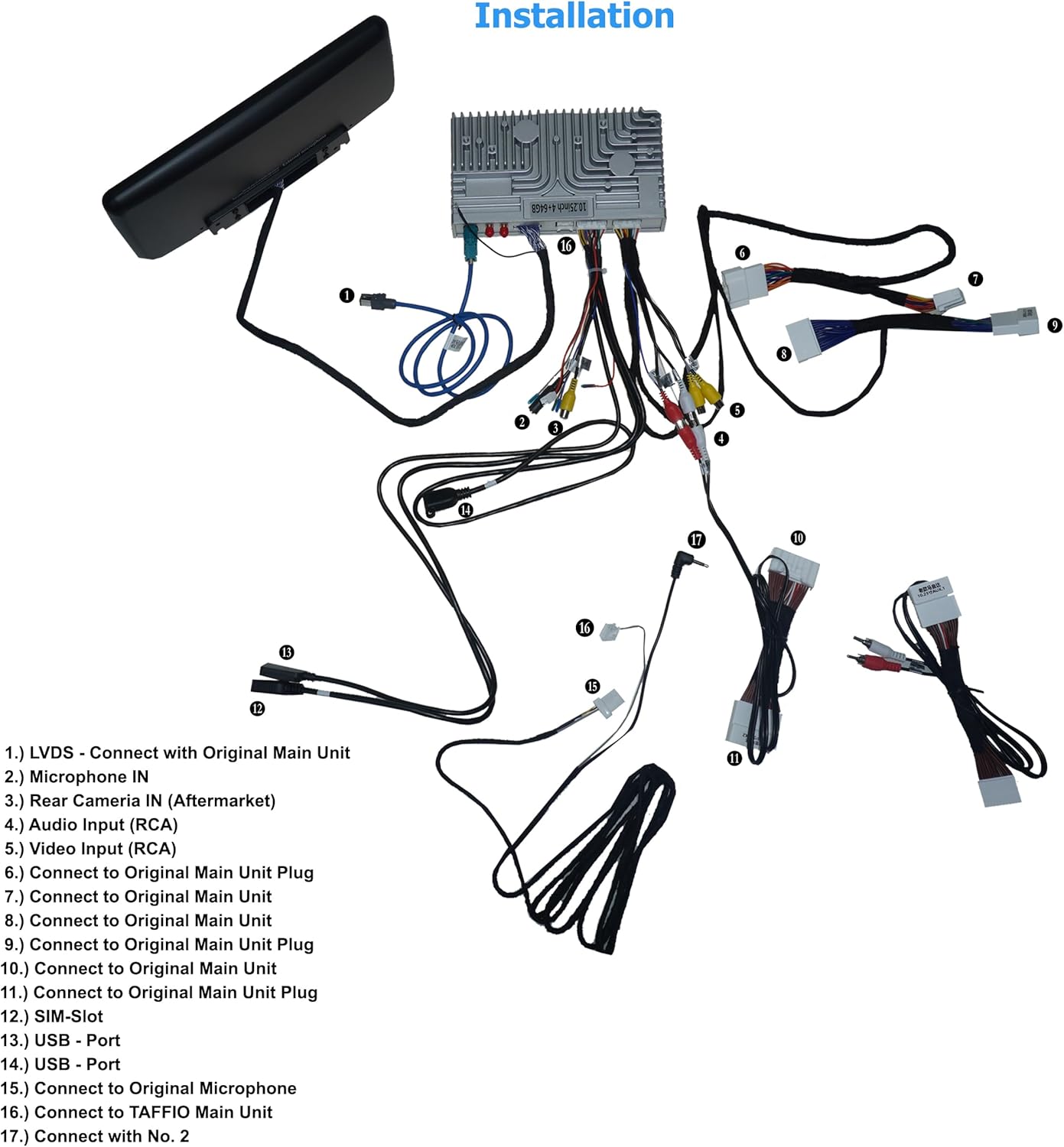

Awọn ilana Iṣiṣẹ
Isẹ ipilẹ
The head unit features a capacitive multitouch screen for intuitive control. Navigate through menus and applications by tapping, swiping, and pinching. The user interface is available in multiple languages. The original radio functions, controller, and steering wheel controls remain supported and functional within both the Android menu and the original system.
Android System Features
- Eto isesise: Android 12.
- Olupilẹṣẹ: 8-core CPU (Cortex-A75 and Cortex-A55) with 6x 1.80 GHz and 2x 1.80 GHz.
- Iranti: 4 GB RAM and 64 GB integrated memory.
- Awọn aworan: Mali-G52 GPU.
- Ipinnu Ifihan: 1920x1080.
- Asopọmọra: Integrated Wi-Fi, 3G/4G LTE SIM card slot (max 390 MBit/s download, 150 MBit/s upload), Bluetooth 5.0.
- Lilọ kiri: Integrated GPS with support for 3D navigation and map material.
- Iboju iboju: Integrated Airplay & Miracast Mirror Link for transmitting image and sound from Apple iPhone and Android phones.
- Atilẹyin Media: Supports 1080P H264 MP4 AVI RMVB FLV MKV video formats and MP3 WMA FLAC APE AAC audio formats.
- Atilẹyin kamẹra: Supports DVR function via USB 2.0 & AV/CVBS, and rear camera connection with automatic switching when reversing.
CarPlay ati Android Auto
The unit features integrated CarPlay and Android Auto functionality, eliminating the need for an extra adapter. Connect your compatible smartphone to access navigation, communication, and entertainment apps directly on the head unit's display.
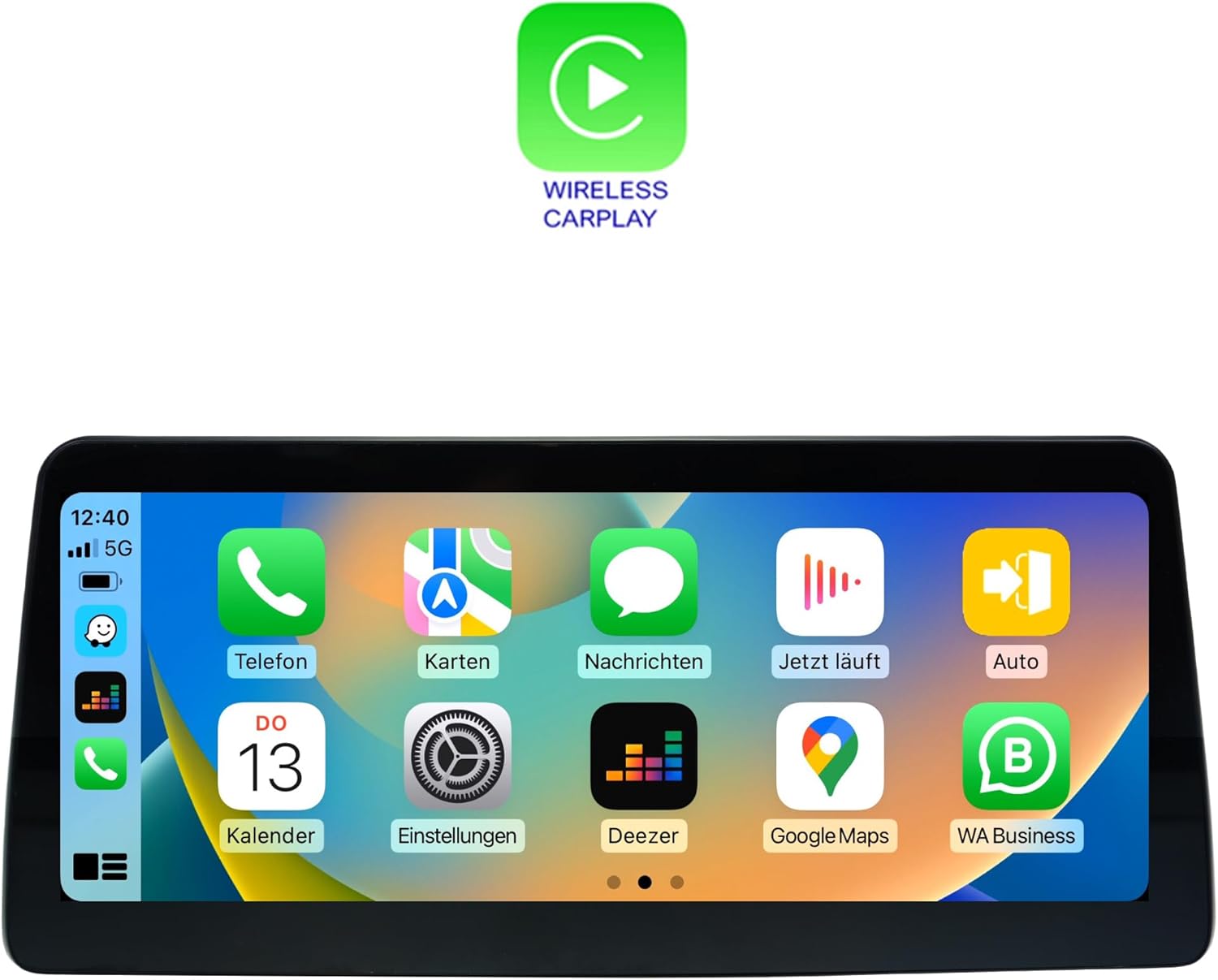

User Interface Loriview
The Android system provides a customizable and intuitive user interface. Swipe left or right to access different pages of applications and settings.


Itoju
Ninu iboju
Lo asọ rirọ, ti ko ni lint, die-die dampened with water or a screen-cleaning solution, to gently wipe the touchscreen. Avoid abrasive materials or harsh chemicals that could damage the display.
Awọn imudojuiwọn Software
Periodically check for software updates to ensure optimal performance and access to the latest features. Updates can typically be performed via Wi-Fi connection. Refer to the 'Settings' menu on your device for update options.
Laasigbotitusita
Ko si Agbara
- Ṣe àyẹ̀wò gbogbo àwọn ìsopọ̀ okùn agbára láti rí i dájú pé wọ́n ti so mọ́ ara wọn dáadáa.
- Verify the vehicle's fuse related to the head unit is not blown.
Ko si Ohun
- Rí i dájú pé a kò pa ohùn náà rẹ́ tàbí kí a ṣètò rẹ̀ sí ìpele tí ó kéré gan-an.
- Ṣayẹwo awọn asopọ okun agbọrọsọ.
- If using the Most Box for Bose Soundsystem, ensure it is correctly connected and functioning.
- Verify that the correct audio output source is selected in the system settings.
Àwọn Ìṣòro Ìfilọ́lẹ̀ GPS
- Ensure the GPS antenna is properly connected and positioned in an area with a clear view ti ọrun.
- Avoid placing the antenna near metallic objects that could interfere with the signal.
CarPlay/Android Auto kò sopọ̀ mọ́ ara wọn
- Ensure your smartphone is compatible with CarPlay or Android Auto.
- Check your phone's settings to ensure CarPlay/Android Auto is enabled.
- For wireless connections, ensure Bluetooth and Wi-Fi are enabled on your phone and the head unit.
- Try restarting both your phone and the head unit.
Awọn pato
| Ẹya ara ẹrọ | Sipesifikesonu |
|---|---|
| Nọmba awoṣe | CH7102-FCX9 |
| Iwọn Ifihan | 10.25 inches |
| Eto isesise | Android 12 |
| isise | 8-core CPU (Cortex-A75 & Cortex-A55, 6x 1.80 GHz, 2x 1.80 GHz) |
| Àgbo | 4 GB |
| Iranti Apapo | 64 GB |
| GPU | Mali-G52 |
| Ipinnu Ifihan | 1920x1080 |
| Modẹmu LTE | Max 390 MBit/s (download), 150 MBit/s (upload) |
| Ẹya Bluetooth | 5.0 |
| Pataki Ẹya | Afi ika te |
| Iwọn Nkan | kilo 3 (6.6 poun) |
| Olupese | Real Media GmbH & Co. KG - Germany |
Alaye atilẹyin ọja
This TAFFIO Android Head Unit comes with a 2-odun olupese ká atilẹyin ọja. Please retain your invoice as proof of purchase for any warranty claims. The warranty covers defects in materials and workmanship under normal use.
Atilẹyin
For technical assistance, troubleshooting beyond this manual, or warranty claims, please contact the seller or manufacturer directly. Ensure you have your product model number (CH7102-FCX9) and proof of purchase available when seeking support.
Ask a question about this manual
Ask about setup, troubleshooting, compatibility, parts, safety, or missing instructions. Manuals+ will review the question and use this page’s manual context to help answer it.