
1. Ifihan
This manual provides detailed instructions for the installation, operation, and maintenance of the QOLTEC 50900 Three Phase Electronic Energy Consumption Meter. This device is designed for measuring active energy consumption in three-phase, four-wire AC circuits. Please read this manual thoroughly before installation and use to ensure proper function and safety.
2. Alaye Aabo
IKILO: Installation and maintenance of this device must be performed by qualified personnel only. Failure to follow these instructions can result in electric shock, fire, or serious injury.
- Máa yọ agbára kúrò nígbà gbogbo kí o tó fi mita náà sí tàbí kí o ṣe iṣẹ́ fún un.
- Rí i dájú pé gbogbo àwọn ìsopọ̀ wáyà náà wà ní ààbò àti pé ó tọ́ gẹ́gẹ́ bí àwòrán wáyà náà ṣe sọ.
- Má ṣe lo mita náà ní àyíká tí ó ju àwọn ipò iṣẹ́ tí a ti sọ fún ọ lọ.
- Do not open or modify the meter casing. Ko si awọn ẹya ti o le lo ninu.
- Protect the meter from moisture, dust, and direct sunlight.
3. Ọja Ipariview
The QOLTEC 50900 is a compact, DIN rail mountable electronic energy meter designed for accurate measurement of three-phase energy consumption. It features an LCD display for clear readings and a pulse output for remote monitoring.

Figure 3.1: QOLTEC 50900 Energy Meter showing dimensions (75mm x 92mm x 76mm) and key features like Three Phase Type, 230V Rated Voltage, 1.0 Precision Class, and LCD Display.
Awọn ẹya pataki:
- Three-phase, four-wire measurement
- LCD digital display for energy consumption (kWh)
- DIN rail mounting (4P width)
- High accuracy (Class 1.0)
- Pulse output (400imp/kWh)
- Iwọn iṣẹtage: 3x230/400V
4. Awọn pato
| Paramita | Iye |
|---|---|
| Awoṣe | 50900 |
| Oṣuwọn Voltage | 3x230/400V AC |
| Ti won won Lọwọlọwọ | 3x10(100)A |
| Igbohunsafẹfẹ | 50Hz |
| Yiye Kilasi | 1.0 |
| Ifihan | LCD |
| O wu Polusi | 400imp / kWh |
| Fifi sori ẹrọ | DIN Rail (4P) |
| Awọn iwọn (W x H x D) | 75 x 92 x 76 mm |
| Iwọn | 100 g |
| Ohun elo | Akiriliki |
5. Eto ati fifi sori
The QOLTEC 50900 meter is designed for standard 35mm DIN rail mounting. Ensure the installation location is dry, well-ventilated, and free from excessive vibration or electromagnetic interference.
5.1 Iṣagbesori
- Locate a suitable 35mm DIN rail within your electrical panel.
- Align the meter's DIN rail clip with the rail.
- Tẹ mita naa ṣinṣin lori iṣinipopada titi ti o fi tẹ sinu aaye.

Figure 5.1: The QOLTEC 50900 meter securely mounted on a DIN rail, showing its compact form factor.
5.2 Awọn isopọ onirin
PATAKI: All wiring must comply with local electrical codes and regulations. Ensure power is OFF before making any connections.
- Identify the input (IN) and output (OUT) terminals on the meter.
- Connect the incoming three-phase lines (L1, L2, L3) and Neutral (N) to the corresponding IN terminals (typically 5, 6, 7, 8).
- Connect the outgoing three-phase lines (L1, L2, L3) and Neutral (N) to the corresponding OUT terminals (typically 1, 2, 3, 4).
- Rí i dájú pé gbogbo àwọn ìsopọ̀ náà wà ní ìdúróṣinṣin àti ní ààbò láti dènà kí àwọn ìsopọ̀ náà má baà bàjẹ́ tàbí kí ó gbóná jù.

olusin 5.2: Apa view of the meter showing the wiring diagram for input (IN) and output (OUT) connections for L1, L2, L3, and Neutral.

olusin 5.3: Iwaju view of the meter with its LCD display and a separate view of the terminal block for wiring connections.
6. Awọn ilana Iṣiṣẹ
Once properly installed and powered, the QOLTEC 50900 meter will automatically begin measuring energy consumption.
Ifihan LCD 6.1
The LCD displays the total active energy consumption in kilowatt-hours (kWh). The display is continuous and does not require any button presses for basic reading.
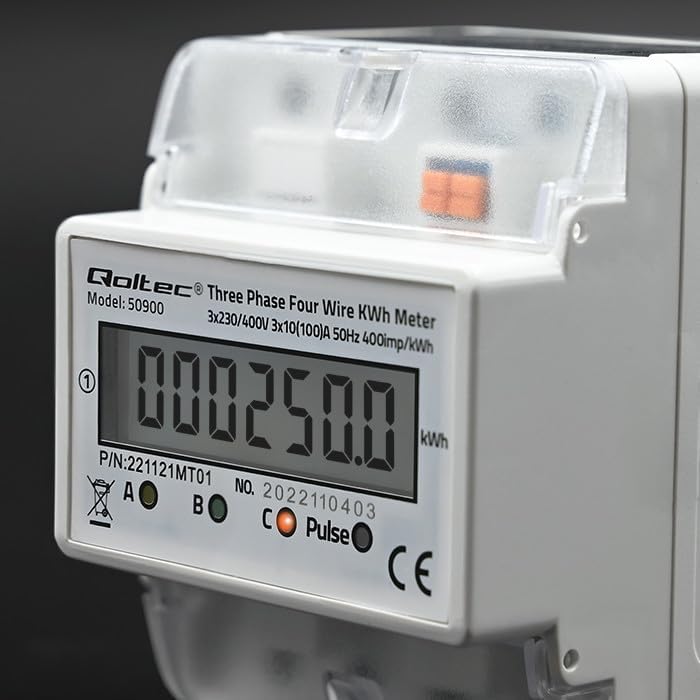
olusin 6.1: Isunmọ view of the LCD display showing an example energy reading in kWh.
6.2 Pulse wu
The meter features a pulse output (400imp/kWh) which can be used to connect to external monitoring systems for remote data collection. Refer to the external system's documentation for connection details.
7. Itọju
The QOLTEC 50900 energy meter is designed for maintenance-free operation under normal conditions.
- Ninu: Use a soft, dry cloth to clean the meter's exterior. Do not use abrasive cleaners, solvents, or liquids that could enter the casing.
- Ayewo: Periodically inspect the wiring connections for any signs of loosening or damage. Ensure the meter is free from dust accumulation.
- Awọn ipo Ayika: Ensure the operating environment remains within the specified temperature and humidity ranges to prolong the meter's lifespan.
8. Laasigbotitusita
If you encounter issues with your QOLTEC 50900 meter, refer to the following common problems and solutions:
| Isoro | Owun to le Fa | Ojutu |
|---|---|---|
| Kò sí ìfihàn/Mita tí kò ń ṣiṣẹ́ | No power supply; Incorrect wiring; Blown fuse in circuit | Check power supply to the meter. Verify wiring connections. Check circuit breaker/fuse. |
| Incorrect energy reading | Incorrect wiring; Faulty meter | Verify wiring connections against the diagram. If wiring is correct, contact support. |
| Pulse output not working | Incorrect connection to external system; Faulty meter | Check pulse output wiring to the external system. Consult external system's manual. If issue persists, contact support. |
If the problem persists after attempting these solutions, please contact Qoltec customer support.
9. Atilẹyin ọja ati Support
Qoltec products are manufactured to high-quality standards. For warranty information and technical support, please refer to the warranty card included with your product or visit the official Qoltec webojula. Tọju iwe-ẹri rira rẹ bi ẹri rira.