
1. Ifihan
Thank you for choosing the SBS MagSafe Compatible Wireless Power Bank. This compact and versatile 5000 mAh power bank is designed to provide convenient and efficient charging for a wide range of devices, including iPhones with MagSafe technology, Android smartphones, e-readers, smartwatches, and TWS earphones. Its dual charging capabilities (wireless and USB-C) ensure your devices stay powered on the go. This manual provides essential information on how to set up, operate, and maintain your power bank.

Image 1: The SBS MagSafe Compatible Wireless Power Bank magnetically attached to the back of an iPhone, illustrating its primary use.
2. Ọja Ipariview
2.1 Key Awọn ẹya ara ẹrọ
- Agbara 5000 mAh: Provides sufficient power to charge most smartphones up to two times.
- Ibamu MagSafe: Magnetic attachment and wireless charging for compatible iPhones.
- Universal Wireless Charging: Supports wireless charging for other Qi-enabled Android devices.
- USB-C 10W Output/Input: Fast and safe wired charging for various devices, and for recharging the power bank itself.
- Intelligent Charge (IC) Technology: Optimizes charging speed for connected devices.
- Awọn itọkasi Ipo LED: Four LEDs to precisely monitor the power bank's internal charge level.
- Iwapọ ati Apẹrẹ to gbe: Rọrùn láti gbé fún gbígbà agbára lórí ìrìnàjò.
- Oko ofurufu ti a fọwọsi: Safe for transport in aircraft cabins.
- Awọn ẹya Aabo: Includes short-circuit protection and overload protection.
2.2 Package Awọn akoonu
- SBS MagSafe Compatible Wireless Power Bank (Model: TEBB5000MAG1CK)
- USB-A si okun gbigba agbara USB-C

Image 2: The power bank's interface, highlighting its compatibility with various electronic devices.

Aworan 3: alaye view of the power bank's features, including wireless charging area and port labels.
3. Eto
3.1 Gbigba agbara akọkọ ti Bank Power
Before first use, it is recommended to fully charge your SBS Power Bank. This ensures optimal performance and battery longevity.
- Connect the included USB-A to USB-C charging cable to the USB-C port on the power bank.
- Plug the USB-A end of the cable into a compatible USB wall adapter (not included) or a computer's USB port.
- Àwọn àmì LED tó wà lórí páńkì agbára yóò tàn láti fi bí agbára náà ṣe ń lọ hàn. Gbogbo LED mẹ́rẹ̀ẹ̀rin náà yóò dúró dáadáa nígbà tí agbára bá ti gba agbára tán.
Gbigba agbara kikun maa n gba ọpọlọpọ awọn wakati da lori orisun agbara naa.
4. Awọn ilana Iṣiṣẹ
4.1 Ṣiṣayẹwo Ipele Batiri
Press the power button once to check the current battery level of the power bank. The four LED indicators will light up to show the remaining charge:
- 1 LED: 0-25% idiyele
- Awọn LED 2: 25-50% idiyele
- Awọn LED 3: 50-75% idiyele
- Awọn LED 4: 75-100% idiyele
4.2 Charging Devices Wirelessly (MagSafe & Qi Compatible)
The power bank supports both MagSafe magnetic wireless charging for compatible iPhones and standard Qi wireless charging for other devices.
- For MagSafe Compatible iPhones: Align the power bank with the back of your iPhone. The magnets will automatically snap it into place, and wireless charging will begin.
- For Other Qi-Enabled Devices (e.g., Android phones): Place your device centrally on the wireless charging surface of the power bank. Ensure proper alignment for charging to initiate.
The power bank's LEDs may indicate active wireless charging. Remove your device once fully charged or when you no longer need to charge.
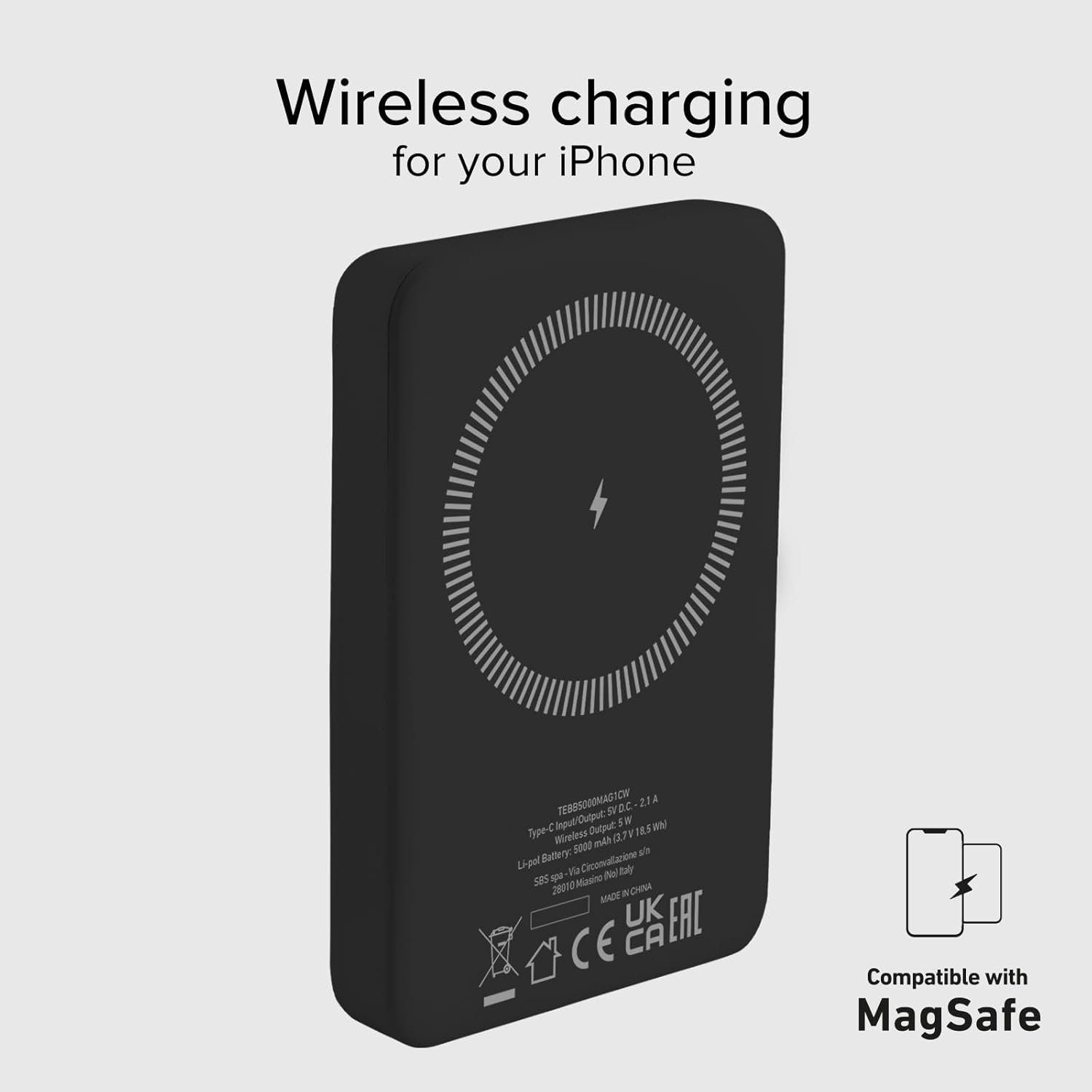
Image 4: The power bank's wireless charging surface, designed for MagSafe compatibility.

Image 5: Demonstrating the magnetic attachment of the power bank to a compatible iPhone.

Image 6: Wireless charging an Android device by placing it on the power bank.
4.3 Charging Devices via USB-C Cable
The USB-C port on the power bank can be used to charge devices that support wired charging.
- Connect one end of a compatible USB-C cable (or the included USB-A to USB-C cable with an appropriate adapter for your device) to the USB-C port on the power bank.
- So opin keji okun naa pọ mọ ibudo gbigba agbara ẹrọ rẹ.
- Charging will begin automatically. The power bank's Intelligent Charge (IC) technology will optimize the charging speed for your device.
The 10W output ensures rapid charging for most compatible devices.

Image 7: Charging a smartphone using the USB-C cable.
4.4 Igbakana Ngba agbara
The power bank can charge one device wirelessly and another via the USB-C port simultaneously, though total output may be shared.

Image 8: The power bank allows for device usage while charging.
5. Itọju
Proper care and maintenance will extend the life of your power bank.
- Ninu: Lo asọ ti o rọ, ti o gbẹ lati nu dada ti banki agbara. Maṣe lo awọn kẹmika lile tabi awọn ohun elo abrasive.
- Ibi ipamọ: Tọju banki agbara ni itura, aye gbigbẹ kuro lati orun taara, awọn iwọn otutu to gaju, ati ọriniinitutu.
- Itọju Batiri: Láti lè mú kí bátírì ní ìlera, gba agbára kíkún kí o sì yọ agbára bank náà kúrò ní o kere ju lẹ́ẹ̀kan ní gbogbo oṣù mẹ́ta tí o kò bá ń lò ó déédéé.
- Yago fun awọn isọ silẹ: Dáàbò bo ẹ̀rọ náà kúrò lọ́wọ́ àwọn ìkọlù àti ìkọlù ara.
- Ifihan omi: This power bank is not waterproof. Avoid exposure to water or other liquids.
6. Laasigbotitusita
If you encounter issues with your power bank, refer to the following common solutions:
- Banki Agbara Ko Ngba agbara:
- Rii daju pe okun gbigba agbara ti sopọ ni aabo si banki agbara ati orisun agbara.
- Try a different USB wall adapter or USB port.
- Daju pe orisun agbara n ṣiṣẹ.
- Ohun elo Ko Ngba agbara Lailowaya:
- Ensure your device is Qi-enabled or MagSafe compatible.
- Check that your device is correctly centered on the power bank's wireless charging surface.
- Yọ eyikeyi awọn ọran foonu ti o nipọn ti o le dabaru pẹlu gbigba agbara alailowaya.
- Device Not Charging via USB-C:
- Rí i dájú pé okùn USB-C so mọ́ banki agbára àti ẹ̀rọ rẹ dáadáa.
- Gbiyanju okun USB-C ti o yatọ.
- Verify your device's charging port is clean and free of debris.
- Gbigba agbara lọra:
- Ensure you are using a compatible charging cable and adapter.
- Charging speed can be affected by the device's battery level (slower when nearly full).
- Avoid using your device heavily while charging.
- Àwọn LED tí kò tan ìmọ́lẹ̀:
- The power bank might be completely discharged. Connect it to a power source for a few minutes.
- Press the power button to activate the LED indicators.
If problems persist, please contact SBS customer support.
7. Awọn pato
| Iwa | Ẹ̀kúnrẹ́rẹ́ |
|---|---|
| Brand | SBS |
| Orukọ awoṣe | Mag Power Bank Color |
| Nọmba awoṣe | TEBB5000MAG1CK |
| Agbara Batiri | 5000 Milionuampwakati-aaya (mAh) |
| Batiri Tiwqn | Litiumu polima |
| Input / o wu Port | 1 x USB-C (10W) |
| O wu Ngba agbara Alailowaya | 5W (Alailowaya) |
| Voltage | 5 Volts |
| Awọn ẹrọ ibaramu | Smartphones (iPhone, Android), E-readers, Speakers, Headphones, Smartwatches, MP3 Players, Cameras |
| Pataki Awọn ẹya ara ẹrọ | Lightweight, Short-circuit Protection, Overload Protection, Wireless Charging, LED Indicator Lights |
| Iwọn | 187 g |
| Àwọ̀ | Dudu |
| Awọn irinše to wa | Okun gbigba agbara (USB-A si USB-C) |
| Airline Transportable | Yes (Cabin Allowed) |

Image 9: The power bank is approved for air travel.
8. Atilẹyin ọja ati Support
For warranty information and customer support, please refer to the documentation provided with your purchase or visit the official SBS website. You can also visit the SBS Brand Store on Amazon for more product information and support resources.
SBS Brand Store: https://www.amazon.it/stores/SBS/page/57FDEEEA-56BF-47BC-BBDB-9389D6E570BD