
1. Awọn Ilana Aabo pataki
Ka gbogbo awọn itọnisọna ṣaaju lilo ohun elo yii. Ikuna lati tẹle awọn ilana wọnyi le ja si mọnamọna, ina, tabi ipalara nla.
- Ma ṣe lo ita gbangba tabi lori awọn aaye tutu.
- Maṣe gba laaye lati lo bi nkan isere. Ifarabalẹ sunmọ jẹ pataki nigba lilo nipasẹ tabi sunmọ awọn ọmọde.
- Lo nikan gẹgẹbi a ti ṣalaye ninu itọnisọna yii. Lo awọn asomọ iṣeduro olupese nikan.
- Ma ṣe lo pẹlu okun tabi plug ti o bajẹ. Ti ohun elo ko ba ṣiṣẹ bi o ti yẹ, ti lọ silẹ, bajẹ, fi silẹ ni ita, tabi sọ sinu omi, da pada si ile-iṣẹ iṣẹ kan.
- Ma ṣe fa tabi gbe nipasẹ okun, lo okun bi imudani, ti ilẹkun kan lori okun, tabi fa okun ni ayika awọn egbegbe to mu tabi igun. Maṣe fi ohun elo ṣiṣẹ lori okun. Jeki okun kuro lati awọn aaye ti o gbona.
- Ma ṣe yọọ kuro nipa fifaa lori okun. Lati yọọ, di plug naa, kii ṣe okun naa.
- Ma ṣe mu plug tabi ohun elo pẹlu ọwọ tutu.
- Ma ṣe fi ohun kan sinu awọn ṣiṣi. Maṣe lo pẹlu eyikeyi ṣiṣi dina; pa eruku, lint, irun, ati ohunkohun ti o le dinku sisan afẹfẹ.
- Jeki irun, aṣọ alaimuṣinṣin, awọn ika ọwọ, ati gbogbo awọn ẹya ara kuro lati awọn ṣiṣi ati awọn ẹya gbigbe.
- Maṣe gbe ohunkohun ti o njo tabi ti nmu siga, gẹgẹbi awọn siga, awọn ere-kere, tabi eeru gbigbona.
- Lo itọju afikun nigbati o ba sọ di mimọ lori awọn pẹtẹẹsì.
- Ma ṣe lo lati gbe awọn olomi ina tabi ina, gẹgẹbi petirolu, tabi lo ni awọn agbegbe nibiti wọn le wa.
- Maṣe gbe awọn ohun elo oloro, gẹgẹbi bleach chlorine, amonia, tabi ẹrọ mimu.
- Ma ṣe lo laisi apo eruku ati/tabi awọn asẹ ni aaye.
- Dena aimọkan ibẹrẹ. Rii daju pe iyipada wa ni ipo PA ṣaaju asopọ si idii batiri, gbigba tabi gbe ohun elo naa.
- Gba agbara nikan pẹlu ṣaja pato nipasẹ olupese. Ṣaja ti o dara fun iru idii batiri kan le ṣẹda eewu ina nigba lilo pẹlu idii batiri miiran.
- Lo awọn ohun elo nikan pẹlu awọn idii batiri ti a pinnu pataki. Lilo eyikeyi awọn akopọ batiri miiran le ṣẹda eewu ipalara ati ina.
- Nigbati idii batiri ko ba si ni lilo, tọju rẹ kuro ni awọn ohun elo irin miiran, bii awọn agekuru iwe, awọn owó, awọn bọtini, eekanna, awọn skru tabi awọn ohun elo irin kekere miiran, ti o le ṣe asopọ lati ebute kan si ekeji. Kikuru awọn ebute batiri papọ le fa ina tabi ina.
- Labẹ awọn ipo ilokulo, omi le jade kuro ninu batiri naa; yago fun olubasọrọ. Ti olubasọrọ ba waye lairotẹlẹ, fọ pẹlu omi. Ti oju omi ba kan si oju, ni afikun wa iranlọwọ iṣoogun. Omi ti o jade kuro ninu batiri le fa ibinu tabi sisun.
- Ma ṣe lo idii batiri tabi ohun elo ti o bajẹ tabi ti yipada. Awọn batiri ti o bajẹ tabi ti a tunṣe le ṣe afihan ihuwasi airotẹlẹ ti o fa ina, bugbamu tabi eewu ipalara.
- Ma ṣe fi idii batiri tabi ohun elo han si ina tabi iwọn otutu ti o pọ ju. Ifihan si ina tabi iwọn otutu ju 130°C (265°F) le fa bugbamu.
- Tẹle gbogbo awọn ilana gbigba agbara ati ma ṣe gba agbara si idii batiri tabi ohun elo ni ita iwọn otutu ti a pato ninu awọn ilana. Gbigba agbara ni aibojumu tabi ni awọn iwọn otutu ti ita ibiti o ti sọ le ba batiri jẹ ki o mu eewu ina pọ si.
- Ṣe iṣẹ ṣiṣe nipasẹ eniyan atunṣe ti o ni oye nipa lilo awọn ẹya ara ẹrọ rirọpo kanna. Eyi yoo rii daju pe aabo ọja wa ni itọju.
- Ma ṣe yipada tabi gbiyanju lati tunṣe ohun elo tabi idii batiri (bi o ṣe wulo) ayafi bi a ti tọka si ninu awọn ilana fun lilo ati itọju.
2. Package Awọn akoonu
Carefully unpack all components and check against the list below. Ensure all parts are present and undamaged. If any items are missing or damaged, contact customer support.
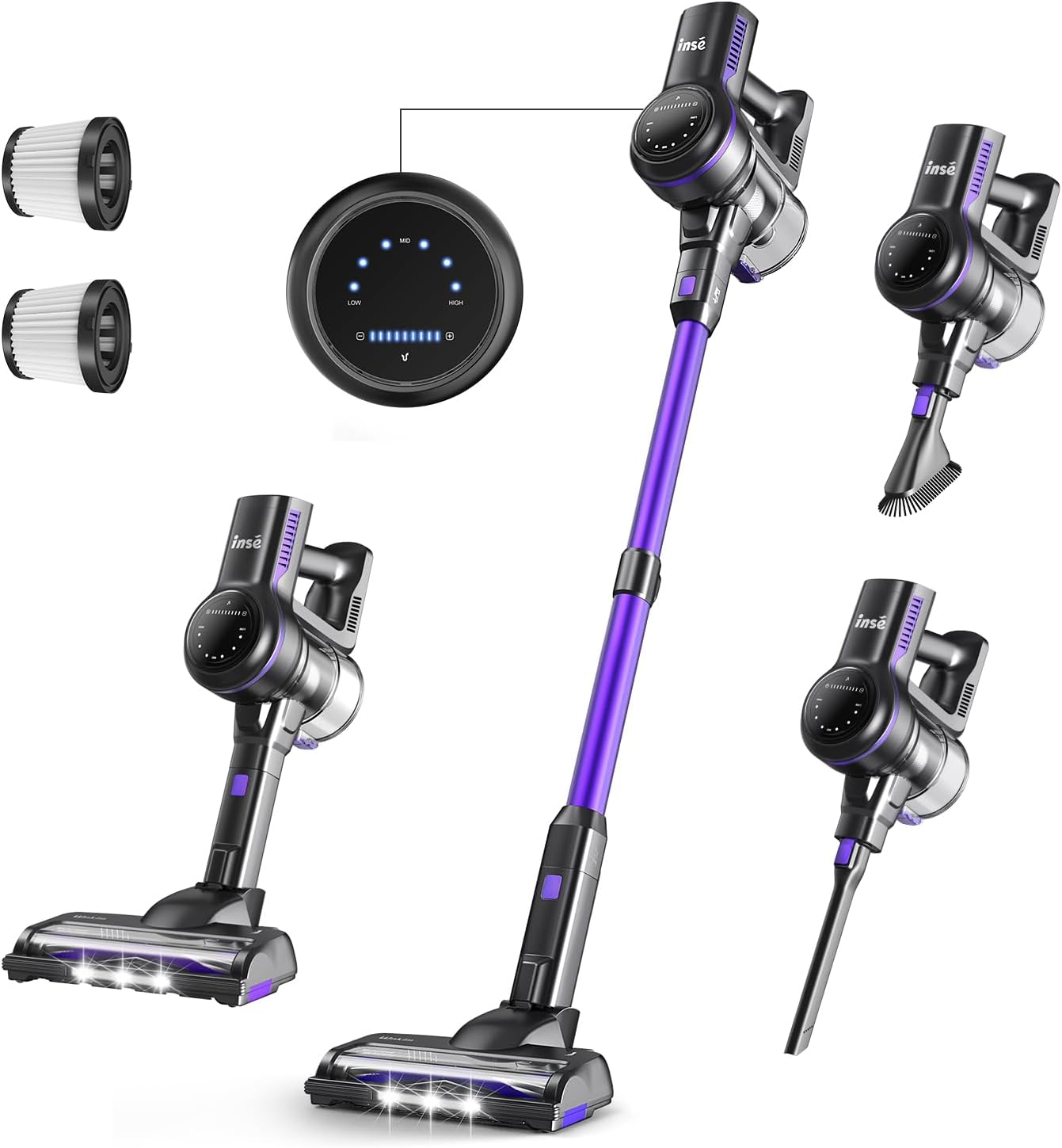
Apejuwe aworan: An oke view of the INSE S7P 05 cordless stick vacuum cleaner disassembled into its main components and accessories. Visible parts include the main motor unit, extension wand (purple), floor brush head, two HEPA filters, a long crevice tool, a 2-in-1 brush, and the wall mount. The vacuum's control panel is also shown separately, displaying power modes (LOW, MID, HIGH) and battery indicator lights.
- Akọkọ Motor Unit
- Ifaagun Ifaagun
- Motorized fẹlẹ Head
- Yiyọ Batiri Pack
- Power Adapter / Ṣaja
- Ìsopọ̀ Ògiri pẹ̀lú àwọn skru
- Ọpa Crevice
- 2-in-1 fẹlẹ
- Extra HEPA Filter (2 total)
- Ọpa mimọ
- Afowoyi Olumulo (iwe-ipamọ yii)
3. Ọja Ipariview
3.1 Àwòrán Àwọn Ohun Èlò
Familiarize yourself with the different parts of your INSE S7P 05 vacuum cleaner.
Apejuwe aworan: This image displays the INSE S7P 05 cordless vacuum cleaner and its various attachments. The main vacuum body with the dustbin and motor is shown, along with the purple extension wand, the floor brush head, and specialized tools like the crevice tool and combination brush. Two spare HEPA filters are also visible. The digital display on the main unit shows power modes (LOW, MID, HIGH) and battery status.
- Main Motor Unit (with Dustbin and Filter System)
- Digital Ifihan Panel
- Bọtini agbara
- Bọtini Aṣayan Ipo
- Bọtini Tu Batiri
- Yiyọ Batiri Pack
- Ifaagun Ifaagun
- Motorized Floor fẹlẹ Head
- Awọn imọlẹ ina LED
- Ọpa Crevice
- 2-ni-1 Fẹlẹ Ọpa
- Àlẹmọ HEPA
4. Apejọ
Follow these steps to assemble your INSE S7P 05 cordless stick vacuum cleaner.
- So Batiri naa pọ: Slide the removable battery pack into the main motor unit until it clicks securely into place.
- Connect the Extension Wand: Insert the top end of the extension wand into the main motor unit until it locks.
- So fẹlẹ ilẹ mọ: Connect the motorized floor brush head to the bottom end of the extension wand until it clicks.
- Alternative Attachments: For handheld use, you can directly attach the crevice tool or 2-in-1 brush tool to the main motor unit.
5. Ngba agbara si Batiri naa
Ensure the battery is fully charged before first use to maximize performance and lifespan.

Apejuwe aworan: A sunmọ-soke view of the INSE S7P 05 vacuum's removable battery pack, showing its internal cells and a charging indicator. Text overlays indicate battery runtimes for different power modes: 45 minutes in Eco mode (12 kPa), 30 minutes in Medium mode (19 kPa), and 15 minutes in Maximum mode (26 kPa). The image emphasizes the battery's capacity and power levels.
- Ọna gbigba agbara: The battery can be charged while attached to the vacuum or separately.
- Sopọ Ṣaja: Plug the power adapter into a wall outlet and connect the charging cable to the charging port on the battery pack (or the main unit if the battery is attached).
- Atọka gbigba agbara: The digital display or battery indicator lights on the battery pack will illuminate to show charging status. They will typically turn solid or change color when fully charged.
- Akoko gbigba agbara: Gbigba agbara ni kikun maa n gba to awọn wakati 4-5.
- Igbesi aye batiri:
- Eco Mode (12 kPa): Up to 45 minutes
- Medium Mode (19 kPa): Up to 30 minutes
- Maximum Mode (26 kPa): Up to 15 minutes
6. Isẹ
Learn how to effectively use your INSE S7P 05 vacuum cleaner for various cleaning tasks.

Apejuwe aworan: A woman is shown operating the INSE S7P 05 cordless stick vacuum cleaner on a carpeted floor in a living room setting. The vacuum is in full stick mode, and the image highlights its powerful suction capabilities, with icons indicating 12Kpa, 19Kpa, and 26Kpa suction levels, suggesting different power modes for various cleaning needs.
6.1 Titan / Pa a
- Press the Power Button once to turn the vacuum ON.
- Press the Power Button again to turn the vacuum OFF.
6.2 Selecting Suction Mode
The INSE S7P 05 offers multiple suction modes for different cleaning needs:
- While the vacuum is ON, press the Mode Selection Button on the digital display to cycle through the available power modes: LOW (Eco), MID (Medium), and HIGH (Maximum).
- The digital display will indicate the currently selected mode.
6.3 Lilo Awọn asomọ
- Fẹlẹ Ilẹ Ilẹ Mọto: Ideal for carpets and hard floors. The LED headlights illuminate dark areas.
- Irinṣẹ Crevice: Ó dára fún àwọn àlàfo tóóró, igun àti etí.
- Ohun èlò ìfọ́ 2-nínú-1: Use the brush for dusting delicate surfaces like keyboards or curtains, and the wide nozzle for upholstery or car interiors.
7. Itọju
Itọju deede ṣe idaniloju iṣẹ ṣiṣe ti o dara julọ ati fa gigun igbesi aye ẹrọ igbale rẹ.
7.1 Ofo Dustbin
- Ensure the vacuum is OFF and disconnected from the charger.
- Wa bọtini itusilẹ apoti idoti, ti o maa n sunmọ ẹrọ alupupu akọkọ.
- Press the button to open the dustbin flap and empty contents into a trash can.
- Ti ideri apoti naa pa daradara titi ti yoo fi tẹ.
7.2 Cleaning Ajọ
The INSE S7P 05 uses a multi-stage filtration system, including HEPA filters. Clean filters regularly for best suction.
- Yọ Awọn Ajọ kuro: Twist and pull to remove the dustbin from the main unit. Then, carefully remove the internal filters (HEPA filter, metal filter, sponge filter).
- Awọn Ajọ Fọ: Rinse the HEPA filter, metal filter, and sponge filter under cold running water until the water runs clear. Do not use detergent.
- Awọn Ajọ Gbẹ Allow all filters to air dry completely for at least 24 hours before reassembling. Do not use a dryer or direct heat.
- Ṣe atunto: Once completely dry, place the filters back into the dustbin and reattach the dustbin to the main unit.
- Rọpo: Replace HEPA filters every 3-6 months, depending on usage.
7.3 Ninu Roll fẹlẹ
- Rii daju pe igbale ti PA.
- Detach the motorized floor brush head from the extension wand.
- Locate the brush roll release tab or screw on the side of the brush head. Open it to remove the brush roll.
- Use scissors or the provided cleaning tool to cut and remove any tangled hair or debris from the brush roll.
- Clean the brush roll housing.
- Fi ìdìpọ̀ búrọ́ọ̀ṣì mímọ́ náà sí i kí o sì ṣọ́ ọ.
8. Laasigbotitusita
Tọkasi apakan yii fun awọn ọran ti o wọpọ ati awọn ojutu wọn.
| Isoro | Owun to le Fa | Ojutu |
|---|---|---|
| Igbale ko ni tan. | Batiri naa ko gba agbara tabi ko fi sori ẹrọ daradara. | Rii daju pe batiri ti gba agbara ni kikun ati ti tẹ ni aabo si aaye. |
| Agbara afamora kekere. | Dustbin is full; Filters are clogged; Brush roll is tangled; Obstruction in nozzle/wand. | Empty dustbin; Clean/wash filters and allow to dry completely; Clean brush roll; Check for and remove any blockages. |
| Fẹlẹ eerun ko nyi. | Brush roll is tangled with hair/debris; Brush roll is not properly installed; Obstruction in brush head. | Clean brush roll; Ensure brush roll is correctly reinserted; Check for and remove any blockages in the brush head. |
| Batiri ko ngba agbara. | A kò so ẹ̀rọ kọ̀ǹpútà pọ̀ dáadáa; Agbára kọ̀ǹpútà tàbí bátìrì tí ó ní àbùkù. | Ensure charger is securely plugged into outlet and vacuum/battery; Contact customer support if issue persists. |
| Ẹ̀rọ ìfọṣọ dúró lójijì nígbà tí a bá ń lò ó. | Batiri ti tán; Idaabobo igbona pupọju ti mu ṣiṣẹ. | Recharge battery; Turn off vacuum and allow it to cool down for at least 30 minutes before resuming use. Check for blockages. |
9. Awọn pato
Key technical specifications for the INSE S7P 05 Cordless Stick Vacuum Cleaner.
- Awoṣe: S7P 05
- Brand: INSE
- Orisun Agbara: Agbara Batiri
- Ẹya Pataki: Ailokun
- Àlẹmọ Iru: Káàtìrìjì (HEPA)
- Awọn iwọn Ọja (L x W x H): 25 x 21 x 117 cm (9.8 x 8.3 x 46.1 inches)
- Ìwọ̀n Nkan: 3.7 kg (8.16 lbs)
- Akoko ṣiṣe Batiri: Titi di iṣẹju 45 (Ipo Eco)
- Agbara mimu: Up to 26 kPa (Maximum Mode)
10. Atilẹyin ọja ati Support
For warranty information, technical support, or to order replacement parts, please contact INSE customer service. Refer to your purchase documentation for specific warranty terms and contact details.
- Iṣẹ onibara: Please visit the official INSE webaaye tabi tọka si alaye olubasọrọ ti a pese pẹlu rira rẹ.
- Awọn Ẹya Iyipada: Genuine INSE replacement parts, such as filters and brush rolls, are available through authorized retailers or the official webojula.